Search...Search plugins and themes...
⌘K
Sign in
  • Get started
  • Download
  • Pricing
  • Enterprise
  • Account
  • Obsidian
  • Overview
  • Sync
  • Publish
  • Canvas
  • Mobile
  • Web Clipper
  • CLI
  • Learn
  • Help
  • Developers
  • Changelog
  • About
  • Roadmap
  • Blog
  • Resources
  • System status
  • License overview
  • Terms of service
  • Privacy policy
  • Security
  • Community
  • Plugins
  • Themes
  • Discord
  • Forum / 中文论坛
  • Merch store
  • Brand guidelines
Follow us
DiscordTwitterBlueskyThreadsMastodonYouTubeGitHub
© 2026 Obsidian

Dangling links

graydongraydon18k downloads

Add a sidebar showing any dangling links in a vault. Dangling links are orphaned links that don't point to anything in the vault.

Add to Obsidian
  • Overview
  • Scorecard
  • Updates3

This plugin is only lightly maintained, you might find this alternative suits your needs better.
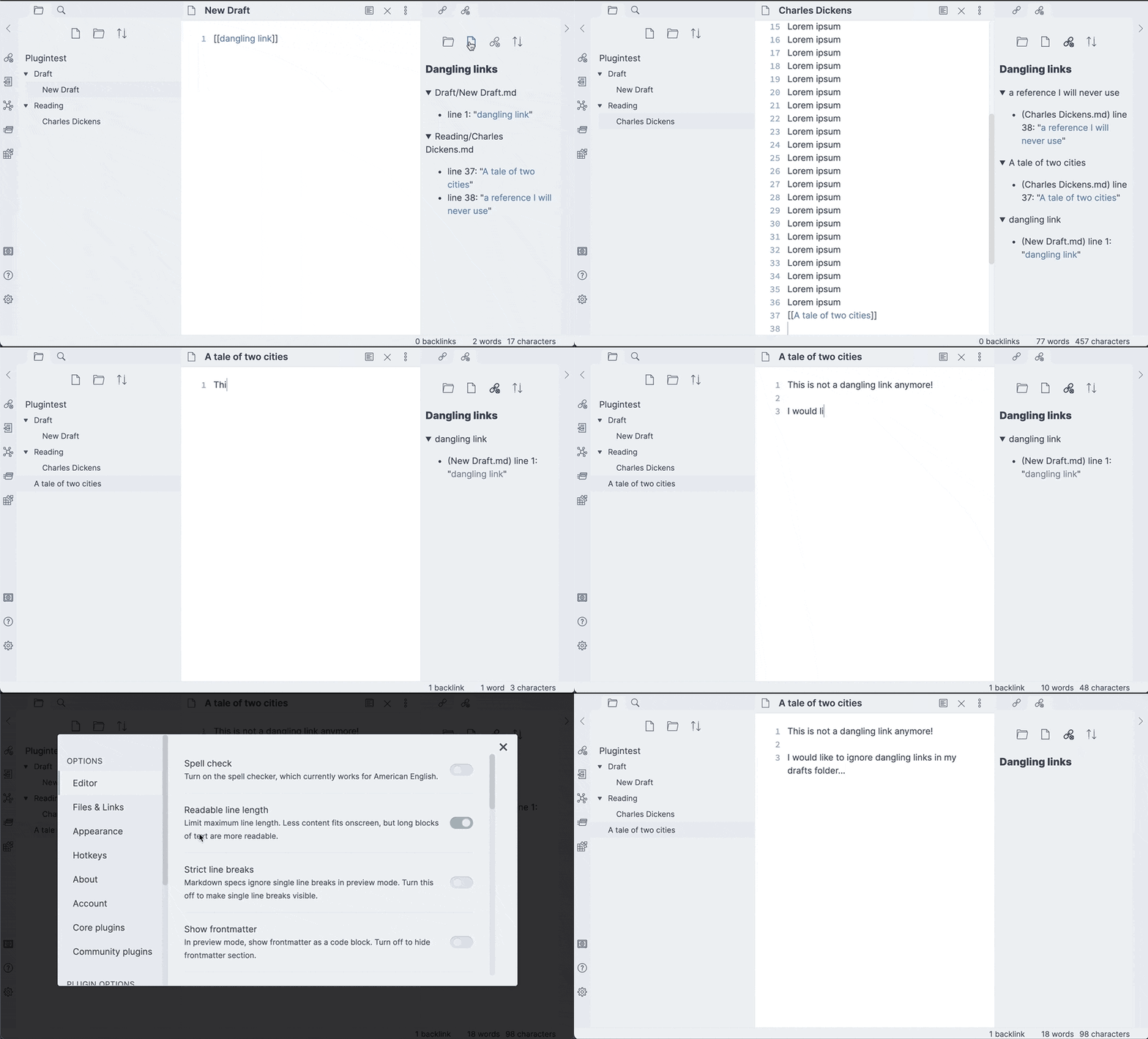
Obsidian Dangling Links demo

This is a small plugin for Obsidian that displays the set of dangling links in your current vault in a side-panel -- links you've put in a note somewhere that don't currently point to anything in the vault.

Dangling links may be typos or they may be links you intended to make a note for but forgot to get to. Either way, it can be nice to have a list of them to work with.

Usage

The panel is accessed with the "Dangling links: Open view" command, or by clicking the broken-link ribbon icon. Dangling links can be grouped by the file or folder they occur in, or can be shown as a list of dangling links and their reference and you can click each occurrence to navigate to it.

You are also able to collapse each item or ignore complete folders from the settings page.

Compatibility

I've marked this as requiring obsidian v0.9.15 because that's what I have. If you get it working on an earlier one, I'm happy to reduce that number. I don't have a lot of time to spend testing versions though and I don't see a big reason to stick with old versions.

57%
HealthFair
ReviewCaution
About
Display all dangling links in your vault in a side panel, showing where each missing target is referenced. Group by file or folder, view occurrences and jump to each reference, collapse items, and ignore folders to narrow the list.
LinksSidebarNavigation
Details
Current version
0.3.0
Last updated
5 years ago
Created
5 years ago
Updates
3 releases
Downloads
18k
Compatible with
Obsidian 0.9.15+
Platforms
Desktop, Mobile
License
MIT
Report bugRequest featureReport plugin
Author
graydongraydon
github.com/graydon
GitHubgraydon
  1. Community
  2. Plugins
  3. Links
  4. Dangling links

Related plugins

Notebook Navigator

A better file browser and calendar inspired by Apple Notes, Bear, Evernote and Day One.

Recent Files

Display a list of recently opened files.

TagFolder

Show tags as folder.

Strange New Worlds

Reveal networked thought and the strange new worlds created by your vault.

Reveal Active File Button

Add a button to the top of the File Explorer, to reveal the active file.

Portals

Pin folders and tags as customizable tabs with icons, colors, and folder notes for easier navigation.

Table of Contents

Create a table of contents for a note.

Homepage

Open a note, base, or workspace on startup, or set it for quick access later.

Smart Connections

AI link discovery copilot. See related notes as you write. Lookup using semantic (vector) search across your vault. Zero-setup local model for embeddings, no API keys, private.

Vertical Tabs

Offer an alternative view that displays open tabs vertically, allowing users to group and organize tabs for a better navigation experience.