Cursor Location
 spslater11k downloads
Display the location of the cursor (character and line number).
- Overview
- Scorecard
- Updates11
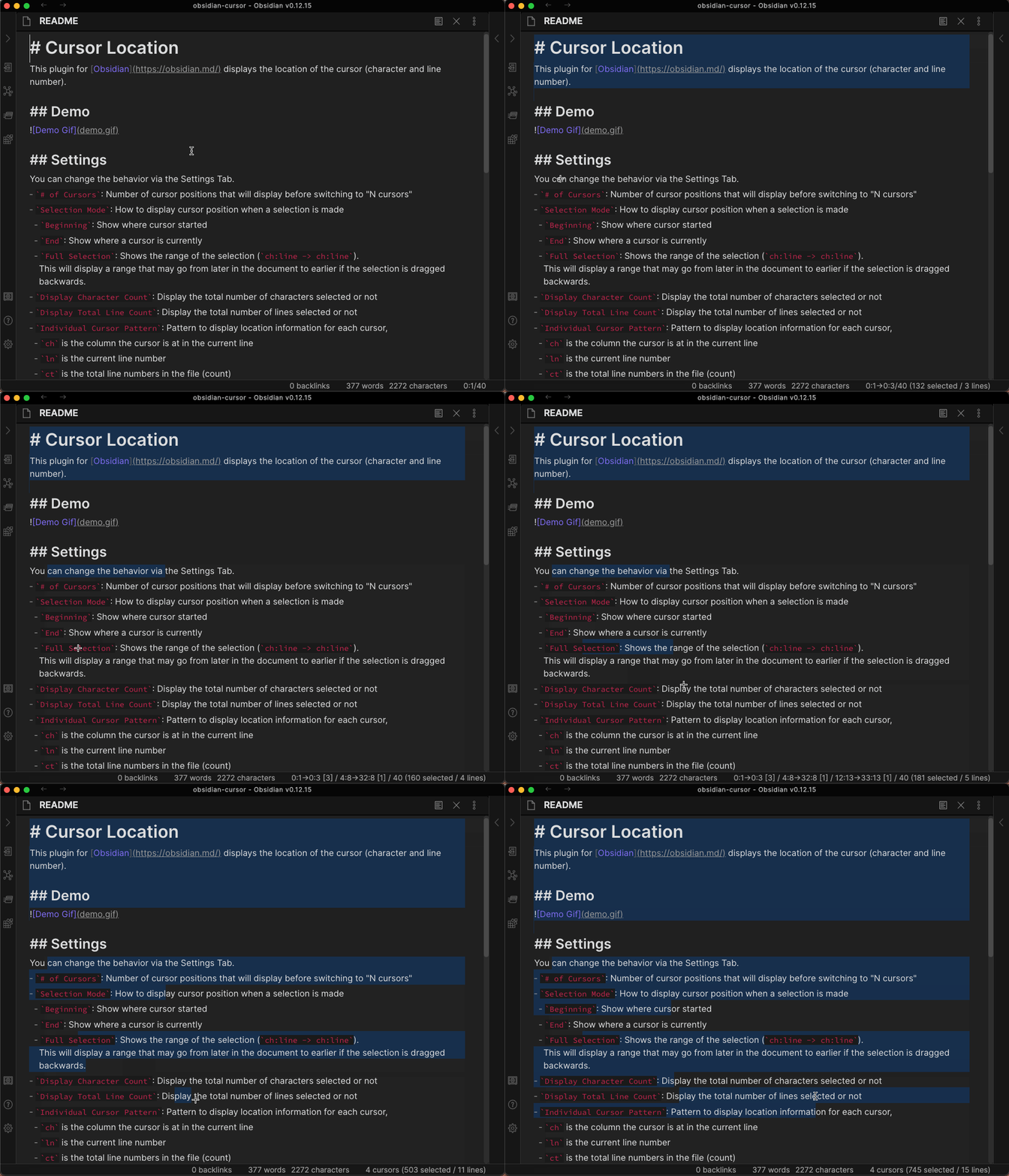
This plugin for Obsidian displays the location of the cursor (character and line number).
Currently, the plugin is Desktop Only because the mobile apps do not support custom status bar items.
Demo
This demo uses an older version of Obsidian, but the output functions the same.
Settings
custom options in dropdowns allow you to set your own pattern if none of the predefined ones suit your needs. For settings that used to be text boxes and are now dropdowns, if you've modified that setting from the previous default and would like to switch back, selecting custom will revert to your setting.
You can change the behavior via the Settings Tab.
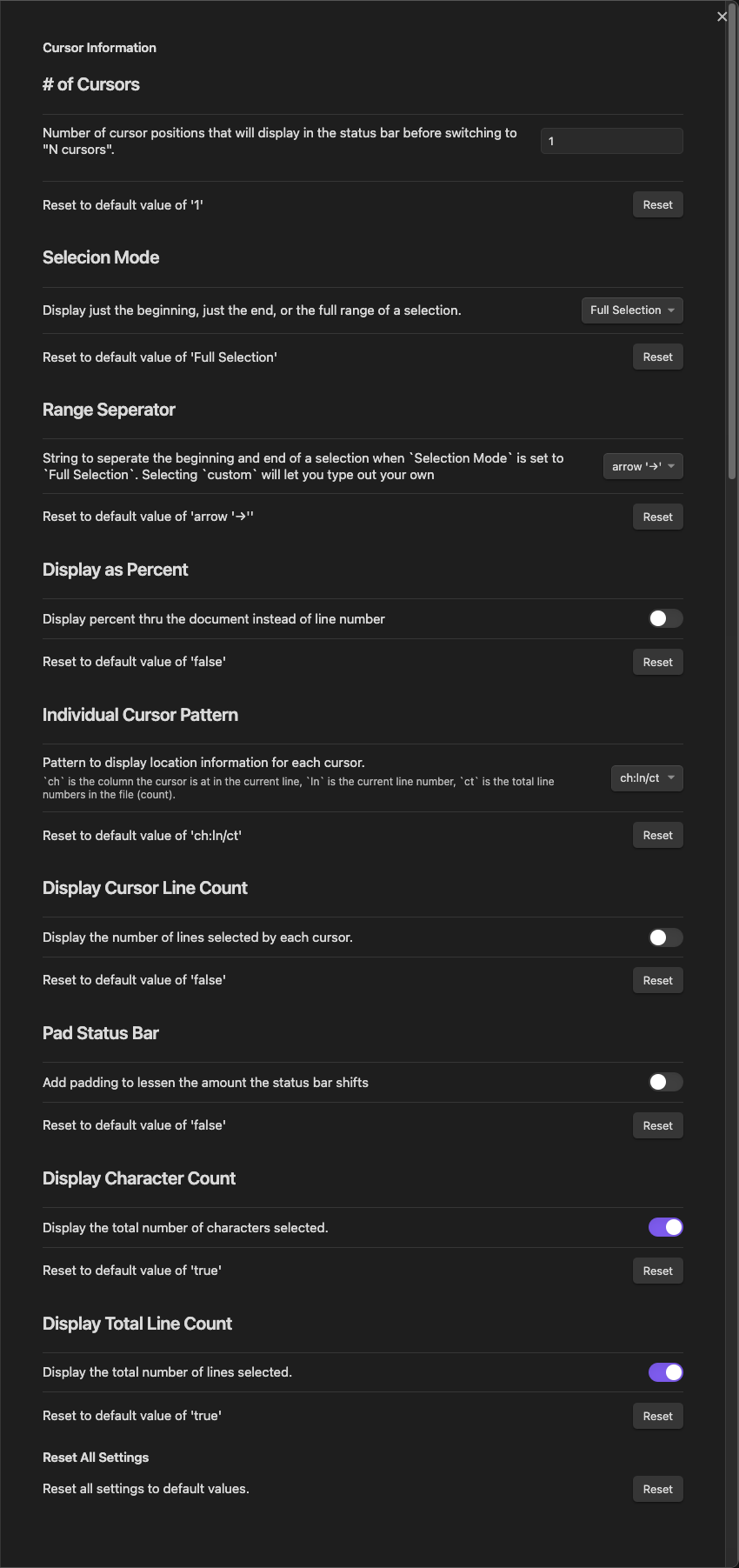
# of Cursors: Number of cursor positions that will display before switching to "N cursors"Cursor Separator: String to separate multiple cursor locations when# of Cursorsis greater than 1. Consecutive whitespace is squashed to 1 space (per HTML rules).- This will only display if you have
# of Cursorsgreater than 1
- This will only display if you have
Selection Mode: How to display cursor position when a selection is madeBeginning: Show where cursor startedEnd: Show where a cursor is currentlyFull Selection: Shows the range of the selection (ch:line -> ch:line). This will display a range that may go from later in the document to earlier if the selection is dragged backwards.
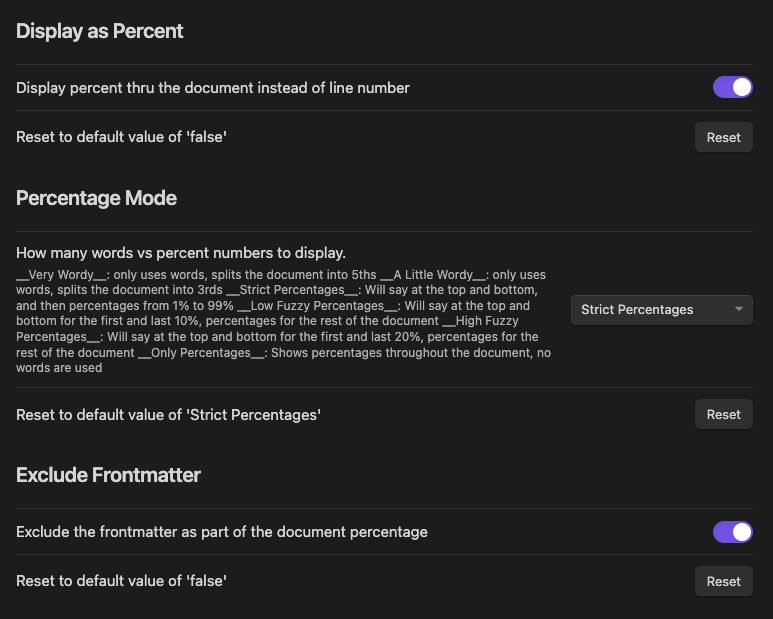
Range Separator: String to separate the beginning and end of a selection whenSelection Modeis set toFull Selection. Consecutive whitespace is squashed to 1 space (per HTML rules).Display as Percent: Displays percent thru the document instead of what line number you are currently on.Percentage Mode: How many words vs percent numbers to displayVery Wordy: only uses words, splits the document into 5thsA Little Wordy: only uses words, splits the document into 3rdsStrict Percentages: Will say at the top and bottom, and then percentages from 1% to 99%Low Fuzzy Percentages: Will say at the top and bottom for the first and last 10%, percentages for the rest of the documentHigh Fuzzy Percentages: Will say at the top and bottom for the first and last 20%, percentages for the rest of the documentOnly Percentages: Shows percentages throughout the document, no words are used
Individual Cursor Pattern: Pattern to display location information for each cursorchis the column the cursor is at in the current linelnis the current line numberctis the total line numbers in the file (count)- If
ctis the first or last of the three values, it will be removed when displaying a range.
Include Frontmatter: Count the frontmatter as part of the document percentageFrontmatter Phrase: If not including frontmatter, what should it be called.frontmattermetadatapreamble
Display Cursor Line Count: Display the number of lines selected by each cursor.Cursor Line Pattern: Pattern to display whenDisplay Cursor Line Countis enabledcustomallows you to set your own pattern if none of the predefined ones suit your needs- If you've changed this from the default previously and would like to switch back,
selecting
customwill pick that one.
Pad Status Bar: Add padding to lessen the amount the status bar shiftsPadding Width: Amount status bar will pad, only shows whenPad Status Baris enabledDisplay Character Count: Display the total number of characters selected or notDisplay Total Line Count: Display the total number of lines selected or notReset: Reset all values to the default settings
Default Settings
Percentage Settings
Installation
You can install the plugin via the Community Plugins tab within Obsidian. Just search for "Cursor Location"
Contributing
Help is greatly appreciated. First check if there are any issues open that relate to what you want to help with. Also feel free to make a pull request with changes / fixes you make.