Search...Search plugins and themes...
⌘K
Sign in
  • Get started
  • Download
  • Pricing
  • Enterprise
  • Account
  • Obsidian
  • Overview
  • Sync
  • Publish
  • Canvas
  • Mobile
  • Web Clipper
  • CLI
  • Learn
  • Help
  • Developers
  • Changelog
  • About
  • Roadmap
  • Blog
  • Resources
  • System status
  • License overview
  • Terms of service
  • Privacy policy
  • Security
  • Community
  • Plugins
  • Themes
  • Discord
  • Forum / 中文论坛
  • Merch store
  • Brand guidelines
Follow us
DiscordTwitterBlueskyThreadsMastodonYouTubeGitHub
© 2026 Obsidian

Code Block Labels

stbowersstbowers5k downloads

Add labels to fenced code blocks.

Add to Obsidian
  • Overview
  • Scorecard
  • Updates1

This plugin renders labels for fenced code blocks.

Add a label to a code block by putting it inside curly braces ({}) at the end of the first line of the fenced code block (after the language if applicable).

Demo of named codeblock

The plugin can also be optionally configured to show the language as a label, if no explicit label was set (this is enabled by default - see settings panel to turn off).
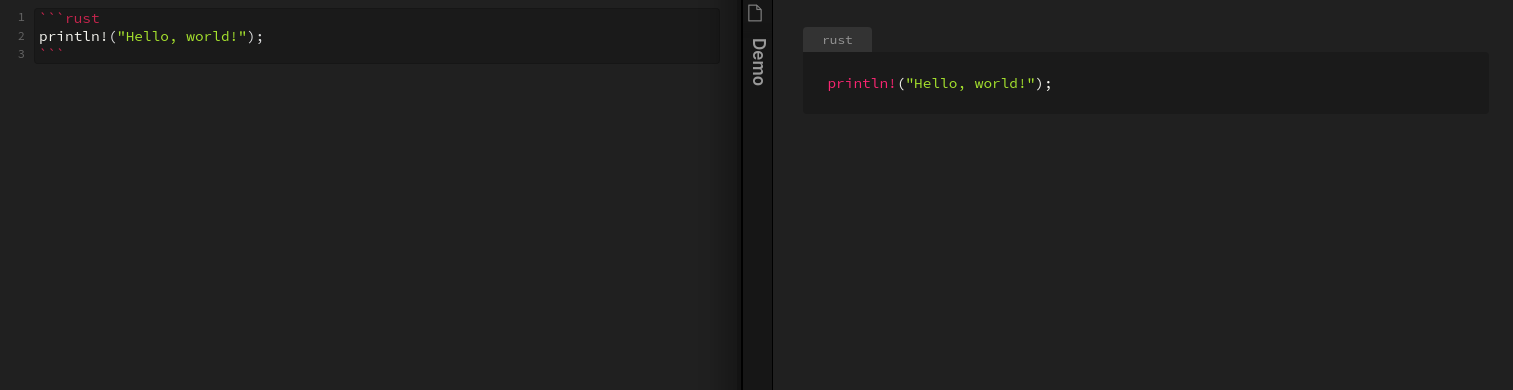
Screenshot of language used as label

Labels are assigned the "codeblock-label" class and so can be styled with CSS:

/* style the label */
.markdown-preview-view .codeblock-label {
  color: magenta;
  background: green;
}

/* to style the code block itself, but leave unlabled codeblocks untouched, select the pre tag that comes directly after the label */
.markdown-preview-view .codeblock-label + pre {
  background: blue;
}
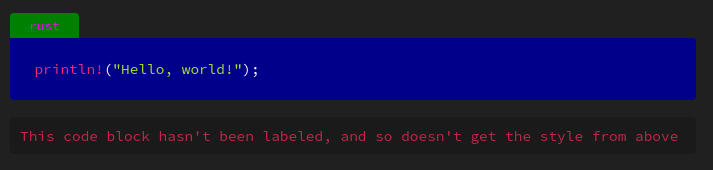
Screenshot of labeled codeblock with custom css

Refresh bug

There is a known issue where making a change to the label doesn't always cause the preview to update. I am looking in to a potential fix, but I want to make sure I do it in the correct way :)

Because Obsidian tries to be efficient in it's Markdown rendering, it only updates the preview when it detects a change to the Markdown. The syntax used here however doesn't always trigger this update, because Obsidian doesn't consider it valid Markdown syntax.

Specifically Obsidian only checks the first line of the code block up to the first space or newline for the language to use for syntax highlighting. This means that if you have a space between the language and label (or if your label has a space in it), when you modify anything past that first space it won't update the preview automatically. To manually fix this, just make a change to any other part of the code block and it should trigger an update.
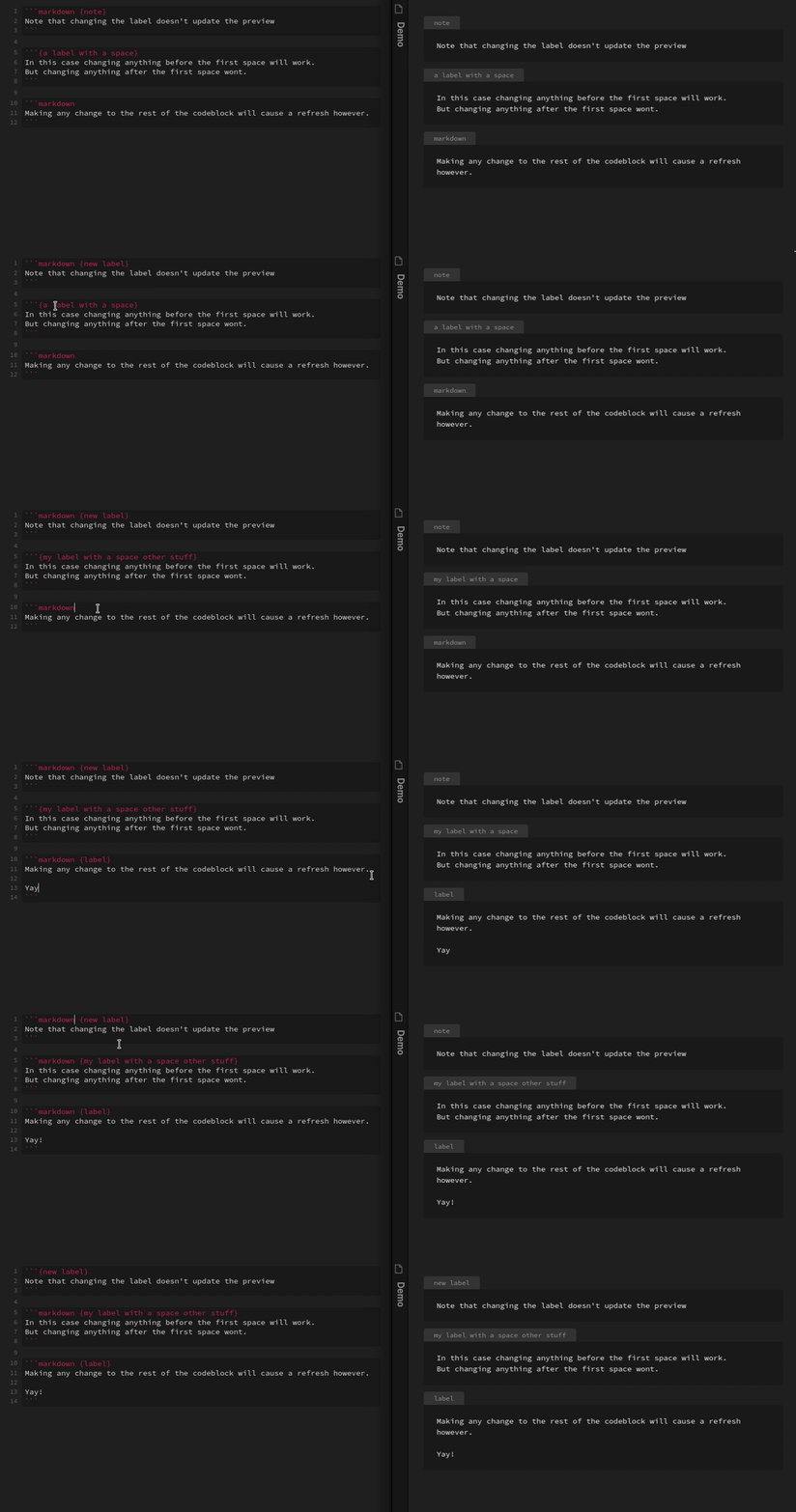
Animation showing the bug in action

Live preview

Currently this plugin does not support live preview. The live preview works in a significantly different way than the "normal" preview, and I don't personally use live preview so have little incentive to make it work. I'd be more than happy to accept a pull request though if anyone wants to take a look at it!

Credit

This plugin is based off of the template plugin here https://github.com/obsidianmd/obsidian-sample-plugin

69%
HealthFair
ReviewCaution
About
Render labels for fenced code blocks by placing a label in curly braces after the language specifier on the first line. Style labels and adjacent code blocks with the generated codeblock-label CSS class, fall back to using the language as a label if none is provided, and note that live preview isn't supported.
CodeCSSMarkdown
Details
Current version
1.0.0
Last updated
4 years ago
Created
4 years ago
Updates
1 release
Downloads
5k
Compatible with
Obsidian 0.12.0+
Platforms
Desktop, Mobile
License
MIT
Report bugRequest featureReport plugin
Author
stbowersstbowers
github.com/stbowers
GitHubstbowers
  1. Community
  2. Plugins
  3. Code
  4. Code Block Labels

Related plugins

Custom Frames

Turn web apps into panes using iframes with custom styling. Also comes with presets for Google Keep, Todoist and more.

Blur

Create obfuscated blocks of text.

JS Engine

Run JavaScript from within your notes.

Columns

Create columns in Markdown.

Templater

Create and use dynamic templates.

Importer

Import data from Notion, Evernote, Apple Notes, Microsoft OneNote, Google Keep, Bear, Roam, and HTML files.

Outliner

Work with your lists like in Workflowy or Roam Research.

Mermaid Tools

Improved Mermaid.js experience: visual toolbar with common elements and more.

Various Complements

Complete words similar to auto-completion in an IDE.

Style Settings

Adjust theme, plugin, and snippet CSS variables.