
- Overview
- Scorecard
- Updates4
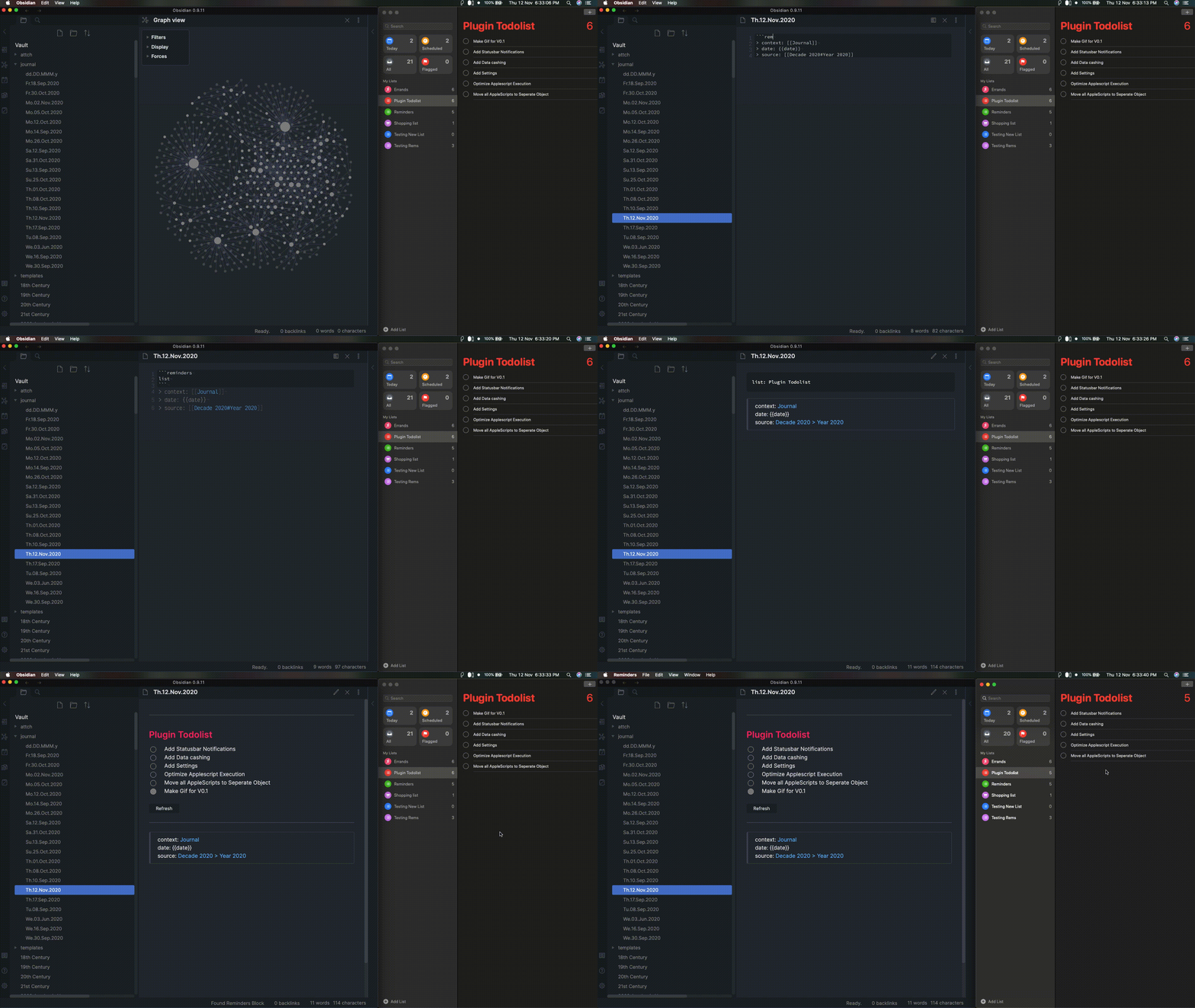
A plugin to attempt to bring Apple Reminders into Obsidian.
Note: This plugin can get a bit heavy but I've tried to make it as effecient as possible. Any recommendations are welcome.
(I'm not responsible for any loss of data....though this plugin never deletes any reminder, only ever alters their properties)
Change Log
v2.0:
- !! Massive overhaul of entire codebase
- Added better refreshing
- Added Settings
- Fixed bugs that blocked reminder access in later MacOS versions
v0.2:
- Implemented basic Filtering
- Displayed more Data
- UI Improvements
Requirements
This plugin uses apple script to sync so it will only work on an Apple Device.
Installation Instructions
Manual
- Download and unzip the release folder
obsidian-apple-reminders-plugin.zip - Copy the
obsidian-apple-reminders-pluginfolder into the.obsidian/pluginsfolder - Start Obsidian
- Enable
Apple RemindersinThird-Party Plugins
Obsidian Built-In Plugin Manager
Add this plugin from the Community Plugins Tab
How To Use
Create a code block like so:
```apple-reminders
list: List Name
```
This will fetch all uncompleted reminders in the list List Name.
Note:
- If the list does not exist, it will create it.
- This uses the yaml format specification.
- Nested (aka 'Indented') Reminders don't work. This is cause Apple doesn't expose this feature yet through apple script for some reason. (Bummer, I know.)
Additional Features
Pull Specific Reminders
list: List Name
reminders:
  - Reminder 1
  - Reminder 2
This will do 2 things:
- Will Create 'Reminder 1' or 'Reminder 2' if it doesn't exist
- If 'Reminder 1' or 'Reminder 2' does exist, it will fetch it and show it's status.
- (I.e. it fetches the reminders regardless of whether they are completed, effectively bypassing the default settings of a list only fetching reminders that aren't completed yet.)
Filters
list: List Name
reminders:
  - Some Random (Possibly) Completed Reminder That Doesn't Matter
filters:
  - date: today - next month
  - priority: high
So far only the date and priority fields are filterable since those are mostly what I pay attention to. (If you'd like other fields to be implemented please create an issue)
Things to Note:
- The
datefield is parsed using the Chrono.js library and thus has all the features (and or issues) that it has. Please refer to it's documentation to see what is available.
- However please note that the dates are compared using Moment.js (specifically the isSame and isBetween (inclusive) functions) and the dates are limited to the 'day' value. This means that times are ignored.
- So for example, if you try to pull reminders
between 6am and 5pmthis will just pull all the reminders on that day rather than limit it to that time period
- So for example, if you try to pull reminders
- The filters are 'anded' together. I.e. the filters in the example above become
date is between today and next monthandpriority is high. - The
datefield has a special keyword. If you put:
- date: daily note
The filter will be replaced by the Title of the Note. This has a caveat that if your Daily Note has an unusual Date Format (that can not be parsed by Chrono.js) this filter will not work and this might result in no reminders being displayed. (If you use this feature and this caveat occurs, please create an issue or comment on an existing one).
Additional Notes
The blocks sync every few minute. The sync time can be set in the plugin settings.
Objectives
To add to this list create a Feature Request in Issues and I'll be happy to add it to this list.
(In no particular order)
Fetch data from Reminders.app for use in Obsidian
- Figure out how to get data consistantly
- using AppleScript, specifically using this library to execute it for now, until and unless a more efficient way is found
- Figure out how to get data consistantly
Display Data in Obsidian in a way that is most usable and uses Obsidian Constructs
- Figure out how to best display Reminder data
- Using Svelte (like how the obsidian-todoist-plugin is doing it. Many Thanks!)
- Find a way to bring nested or 'indented' reminders into Obsidian (currently not supported in applescript)
- Make the Refresh Button work better (currently only refreshes the UI but not the Model, i.e. it doesn't pull from Apple)
- Filtering
- Customize what a List Fetches
- Filter by Date
-
Filter by Time- This doesn't seem nessesary at the moment. However the status may change if enough people want the more fine grained control :)
- Filter by Priority
- Filter by Location
- Create Status Bar icon and messages to show when the plugin is doing whatever it's doing.
- Create an Interface that shows all the Lists in Obsidian at once
-
Create a 'Today' List (?? Is this redundant now that Filters are implemented?)
- Figure out how to best display Reminder data
Create a mechanism that allows for efficient editing of Reminders via Obsidian
- Create Reminders through Obsidian
- Mark Reminders as completed through Obsidian
- Due Date and Remind Me Date editing of reminders
- List Color editing
- Look into bringing the List 'emblems' into Obsidian
Make this plugin as configurable as possible to allow for multiple use cases
- Create a settings tab in the Obsidian Menu
- Make sync time configurable
- Make UI more configurable (standardize class names and create a document for it)
- Make sensible defaults
Development Things
- Create Documentation
-
Create Files for AppleScripts to allow for customization
Feedback
Any bugs or features/recommendations can be made by creating an Issue on this repo