Note Illustrator
 ThreeM135 downloads
Generates and replaces images in your notes based on a description heading, using AI.
- Overview
- Scorecard
- Updates3
This is a plugin for Obsidian.md designed to help you automatically generate art for your notes. It was originally built for TTRPG Game Masters (GMs) to create images for characters and locations, but it is universally applicable for any note.
The plugin reads the text under a user-defined heading (e.g., # Description) in your active note, sends it to an OpenAI-compatible API, and then automatically replaces a specified placeholder image.
By default, it is configured to use OpenAI (DALL-E 3).
🚀 Features
- Flexible AI Art Generation:
- Generates images using DALL-E 3 (default) or any other OpenAI-compatible API.
- Custom API Endpoint: Define your own API URL to use compatible services.
- Custom Model Name: Specify the exact model name to be used (e.g.,
dall-e-3).
- Regenerate Function: If no placeholder is found, the plugin automatically finds the last generated image and targets it for regeneration.
- Confirmation Modal: Asks for a "Yes/No" confirmation before regenerating an existing image to prevent accidents.
- Optional Auto-Delete: Can be configured to automatically move the old, replaced image to the system trash upon regeneration.
- Optional "Smart Sizing": Reads the dimensions of your placeholder image (e.g.,
599x598) and automatically embeds the new, high-resolution image with the exact same dimensions (![[...|599x598]]). - TTRPG Vault Compatibility: Optionally updates the
Image:(orimage:) key in the note's frontmatter, replacing it with the new filename (e.g.,image.png). - Configurable Prompt Source:
- Custom Heading: Define exactly which Markdown heading the plugin should read from (e.g.,
#,##). - Custom Heading Text: Define the heading text to search for (e.g.,
Description,Appearance).
- Custom Heading: Define exactly which Markdown heading the plugin should read from (e.g.,
- Advanced Prompt Control:
- Prompt Prefix: Add a global, customizable style prefix (e.g., "A detailed fantasy portrait of:") to all your prompts from the settings.
- Robust Text Parsing: Correctly stops reading text before code blocks (
```) or the next heading, ensuring clean prompts.
- Configurable Storage: Saves all generated images to a user-defined folder.
💡 Planned Features
- AI Horde integration
- Local Stable Diffusion (AUTOMATIC1111) API integration
🔧 Manual Installation
- Navigate to your Obsidian vault's plugin folder:
YourVault/.obsidian/plugins/. - Create a new folder named
note-illustrator. - Inside this new folder, create two files:
main.js(copy V 1.2.1)manifest.json
- Restart Obsidian.
- Go to Settings > Community Plugins.
- Turn off "Safe Mode" if it's on.
- Find "Note Illustrator" in your list of installed plugins and enable it.
⚙️ Configuration
After installing, you must configure the plugin:
- Go to Settings in Obsidian.
- Scroll down to the "Plugin Options" section and click on "Note Illustrator".
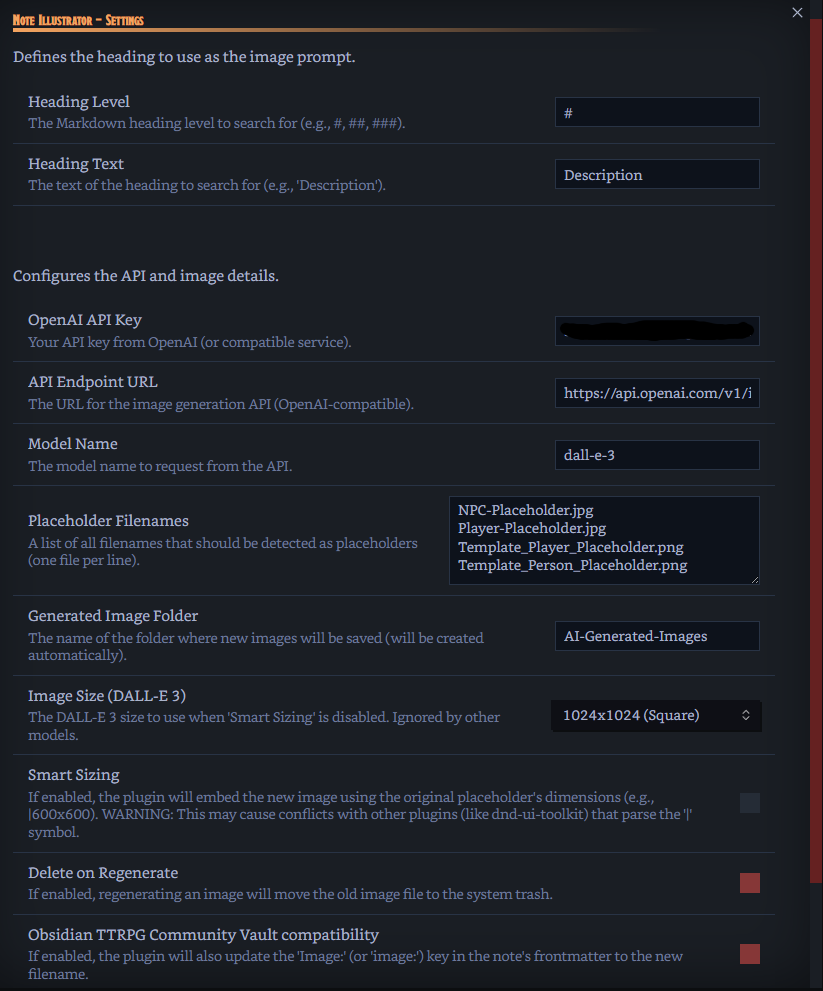
Prompt Heading
These settings define where the plugin looks for the prompt text.
- Heading Level: The Markdown heading level (e.g.,
#,##,###).- Default:
#
- Default:
- Heading Text: The text of the heading (e.g.,
Description,Appearance).- Default:
Description
- Default:
API & Image Settings
- OpenAI API Key: Your API key from OpenAI (or compatible service).
- API Endpoint URL: The URL for the image generation API.
- Default:
https://api.openai.com/v1/images/generations
- Default:
- Model Name: The model name to request from the API.
- Default:
dall-e-3
- Default:
- Placeholder Filenames: A list of all filenames to be detected as placeholders. Put each filename on a new line. (Defaults to 5 rows high).
- Generated Image Folder: The folder where new images will be saved (it will be created automatically).
- Image Size (DALL-E 3): The DALL-E 3 size to use when "Smart Sizing" is disabled. (Ignored by other models).
- Smart Sizing: (Default: OFF) If enabled, the plugin will read the placeholder's dimensions (e.g.,
|600x600) and apply them to the new image.- WARNING: This feature may cause conflicts with other plugins (like
dnd-ui-toolkit) that also parse the|symbol in image links.
- WARNING: This feature may cause conflicts with other plugins (like
- Delete on Regenerate: (Default: OFF) If enabled, regenerating an image will move the old, replaced image file to the system trash.
- Obsidian TTRPG Community Vault compatibility: (Default: OFF) If enabled, the plugin will also update the 'Image:' (or 'image:') key in the note's frontmatter to the new filename.
- Prompt Prefix (Optional): Text that is automatically added before your description to define the style. (Defaults to 5 rows high).
💡 How to Use
- Create or open a note for your NPC, location, or character.
- Ensure the note has a heading that matches your settings.
- (Using default settings, this would be:
# Description)
- (Using default settings, this would be:
- Write your description text (e.g.,
Fritz is a mountain of muscle...) directly under this heading. - Ensure the note also contains one of your defined placeholder images (e.g.,
![[NPC-Placeholder.jpg]]). - Open the Command Palette (
Ctrl+PorCmdP). - Search for and select the command: "Generate Image from Description & Replace Placeholder".
- Wait a moment. The plugin will generate the image and automatically replace the placeholder link.
Regenerating an Image
Simply run the same command again ("Generate Image...").
- The plugin will see that
NPC-Placeholder.jpgis gone and will instead find the image it just created. - A modal will pop up asking: "Regenerate Image?"
- Click "Yes, Regenerate" to get a new image, or "Cancel" to stop.
HealthExcellent
ReviewPassed
About
Generate AI art from a chosen heading and automatically replace a placeholder image using an OpenAI-compatible API (default DALL‑E 3). Regenerate past images with confirmation, match placeholder dimensions when embedding, and optionally update frontmatter image keys or move replaced files to trash.Details
Current version
1.2.1
Last updated
10 months ago
Created
10 months ago
Updates
3 releases
Downloads
135
Compatible with
Obsidian 1.10.3+
Platforms
Desktop, Mobile
License
GPL-3.0