Note From Form
 arhichief935 downloads
Define dynamic input form and use it to create notes
- Overview
- Scorecard
- Updates7
⚠️ Breaking Changes in v2.0 Version 2.0 introduces breaking changes that are not backward compatible with previous versions. Templates created for v1.x may need to be updated. Please review the updated documentation below before upgrading.
Obsidian plugin that allows to define form with different type of input fields and JavaScript support that will later be used together with template to generate notes.
It behaves same as Templates Core plugin or From Template but extends its functionality with strongly typed fields, allows initial values and supports user defined JavaScript functions for value generations.
[!TIP] Template can be described in both YAML (just like note properties in Obsidian) or JSON.
Consider having template like one of those
| YAML | JSON |
|---|---|
|
|
After adding template to the index and call for template, following form will be displayed:
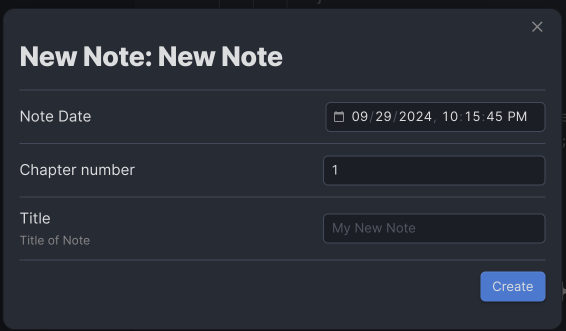
And will generate following Markdown and add it to the note named My Note 1727640827748 where 1727640827748 is Unix timestamp of Note Date field. Note will be created in directory named My Folder.
---
tags: tag1, tag2
aliases: alias1
date: 2024-09-29T22:13:47

---

# Chapter 1: This is title

Done: false
Category: Work
Sample templates can be found here.
Using
- Install plugin
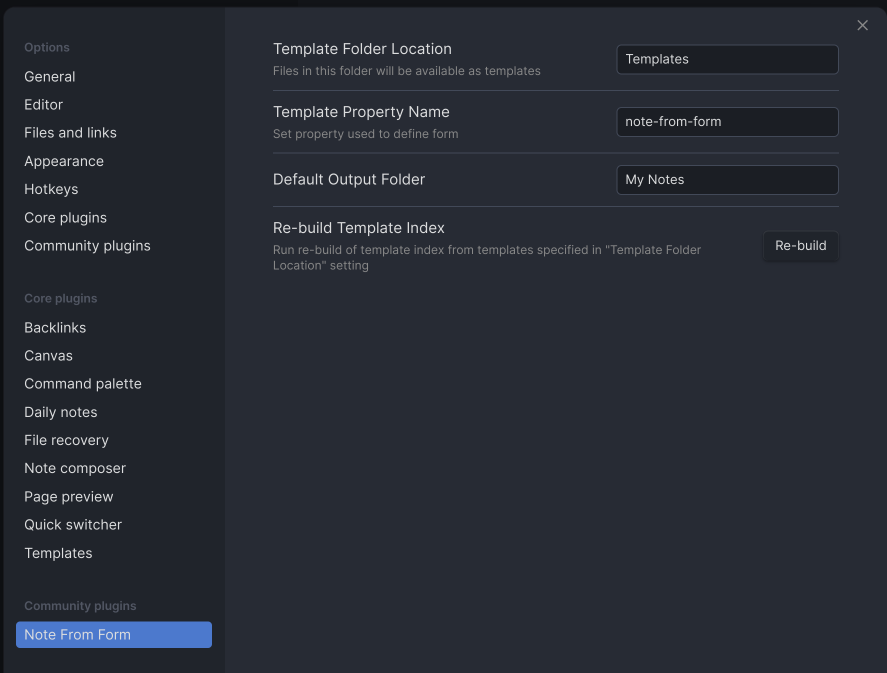
- Open plugin settings and set location of template files. Also you can specify obsidian property that will point to template definition:
- Create set of templates that will be used by plugin to generate input form and new notes. See Template Description;
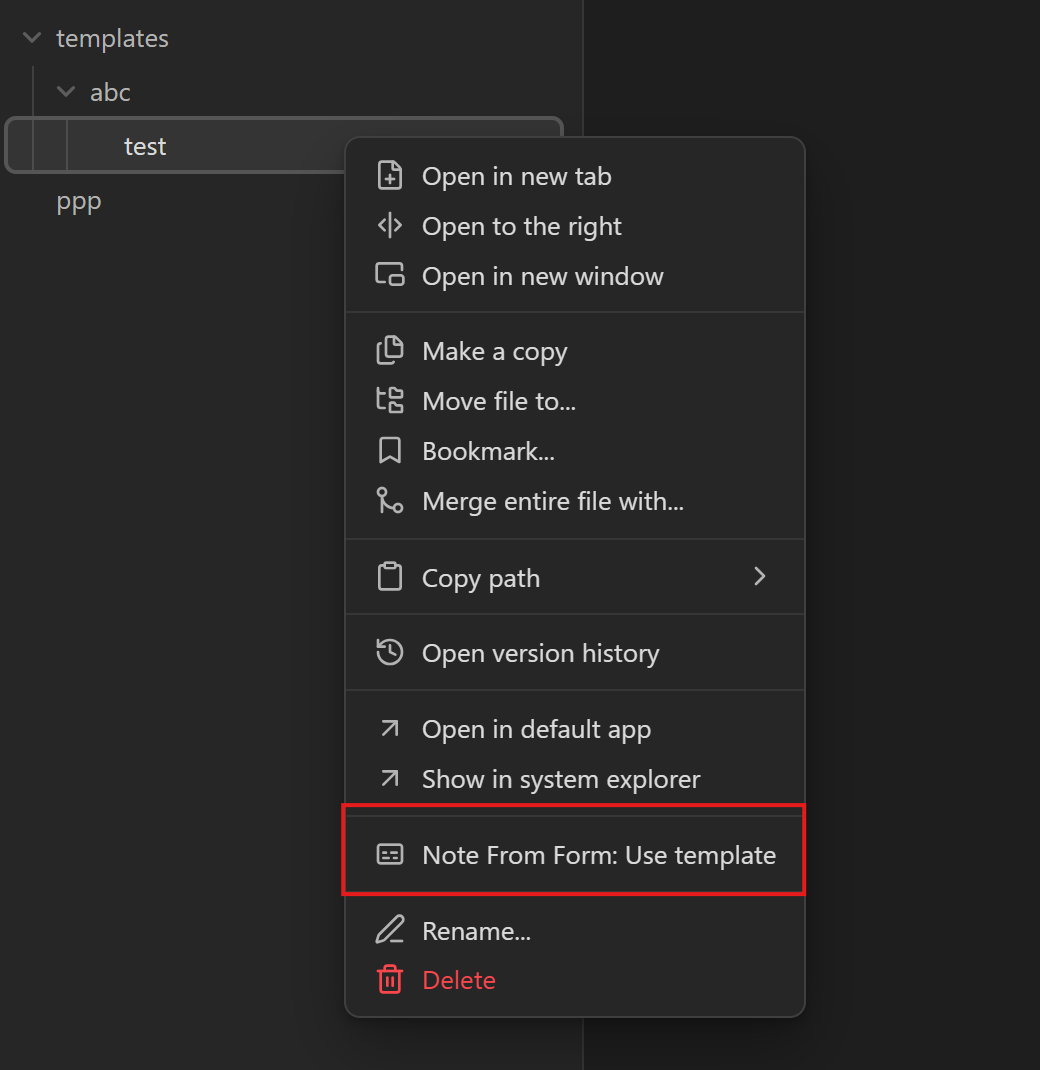
If template files have no issues Obsidian command palette will be enriched with new commands in format Note From Form: path/to/template, and context menu option will appear for template file. Use commands from command palette to create new note from template:
| Use template from commands | Use template from context menu |
|---|---|
 |
 |
Template Description
Form and note template are defined as markdown files that supports mustache syntax for values that need to be placed from form. Instructions for form itself are defined as JSON or YAML object inside properties. Property name might be defined in plugin settings or be a default value note-from-form.
Form template contains following fields:
file-nameused to define name of the result file;file-locationused to define folder where new note will be stored;form-itemsused to define content of the input form or compute values for template based on the input or user-defined logic;beforeCreateoptional hook executed right before note is created.
file-name
Used to specify name of the file for new note.
This property should be initialized with following format <type>:<value>. type specifies outcome of the value and might be one of the following:
v. In this case content after:will be used as result. For examplev:My File;t. In this case post-processed input form will be used as source for mustache template passed after:. For example,t:My Note {{noteNum}};f. In this case user defined async JavaScript function can be specified. Function accepts two parameters:view— object constructed from all fields defined inform-itemsafter callinggetfunction (see below) for each of them — andapi— instance of User API. This might be used in case if result should be computed based on some complex logic not supported by mustache templates. For example,f:async (view, api) => 'My Value ' + moment(Date.now()).format();ref. In this case content after:is a reference to a named function. For example,ref:myFuncorref:/lib/helpers.md:myFunc.
file-name is optional and if not defined, textbox with input for new file name will be displayed on input form.
file-location
Used to specify location of file with new note in Obsidian vault.
This property should be initialized with following format <type>:<value>. type specifies outcome of the value and might be one of the following:
v. In this case content after:will be used as result. For examplev:/My Folder;t. In this case post-processed input form will be used as source for mustache template passed after:. For example,t:My Note {{noteNum}};f. In this case user defined async JavaScript function can be specified. Function acceptsviewandapiparameters (seegetfor details). For example,f:async (view, api) => '/My Folder/' + view.category;ref. In this case content after:is a reference to a named function. For example,ref:resolveFolder.
file-location is optional and if not defined value specified in plugin settings would be used. In case if plugin settings are missing it, textbox for input will be displayed on input form.
form-items
Is array of items that are defining structure and content of input form and used as source for generating object that will be later used by plugin as source for mustache blocks inside template.
Each item of array may have following structure:
| YAML | JSON |
|---|---|
|
|
| Field Name | Is Mandatory | Description | Possible values |
|---|---|---|---|
id |
yes | Declare identifier of the field in form. By this identifier field can be later referenced inside user defined function or mustache template | string with field name, i.e. date |
type |
yes | Specify type of input field. Type of the field allow you to control what user can input, what operations can be done and how field would be displayed | text, textArea, date, time, dateTime, number, checkbox, dropdown |
init |
no | init function. Used to get initial value of field. In case if not specified, default value would be used |
Pure values or user defined functions (see below) |
get |
no | This is get function that is called after all input provided and used to create result object that will be used as source of values for template, file-name and file-location |
Pure value, mustache template or user defined function |
validate |
no | validate function. Called after every get to verify the field value. Must return { isValid, errMsg }; when isValid is false, errMsg is shown inline and note creation is aborted |
User defined function or reference |
form |
no | Instructs plugin how to render field on form. This property might be skipped if some computed values are needed but shouldn't be changed by user | Complex object that have title, placeholder and description fields |
title |
no | Used to provide user-friendly name of the field. | Any string |
placeholder |
no | For fields of text and textArea types might be used as field placeholder. For other types is not used |
Any string |
description |
no | Used to provide user-friendly description of the field on input form | Any string |
get
get function used to get final result of input and generate model used as source for template mustache blocks. It might be defined in one of four variants:
v:<value>. This instructsgetfunction to return string value defined after:. For example,v:Hello World!will returnHello World!string and assign it to appropriate field in model used in mustache blocks of template;t:<mustache string>. This instructsgetfunction to collect all values defined inform-itemsand use it as source for mustache template defined in<mustache string>. For example,t:Hello {{who}}!will take field fromform-itemswithidwhoand use its value for template. Consider,whois set toworldthen result oft:Hello {{who}}!would beHello world!string;f:<async JS function text>. This instructsgetfunction to execute async function defined in<async JS function text>. Function must receiveviewandapiparameters. For example,f:async (view, api) => view.myfield + ' + 1'orf:async function(view, api) { return view.myfield + ' + 1'; };ref:<funcName>orref:<path>:<funcName>. References a named function declared elsewhere. See Function references.
Function can be useful to produce values based on user input or values that do not need to be provided by user.
Function accepts two arguments: view is JS object with fields defined in form-items with latest values entered by user, and api is an instance of User API. Function is expected to return string. Function has following TS declaration:
async function(view: Record<string, any>, api: IUserApi): Promise<string>;
[!WARNING]
f:<async JS function text>use JavaScripteval()call to translate text into executable. Use it carefully!
If not specified, default variant is used that returns string representation of field.
init
init function used to set initial values of fields declared in form-items. init function might be defined in one of three variants:
v:<value>. Instructsinitfunction to initialize form field from string specified in<value>. Based on field type appropriate casting will be done;f:<async JS function text>. Use async JavaScript function defined in<async JS function text>to initialize form field. Function must receive singleapiparameter. For example,f:async (api) => 'default value'orf:async function(api) { return 42; };ref:<funcName>orref:<path>:<funcName>. References a named function declared elsewhere. See Function references.
Function accepts single api argument that is an instance of User API and is expected to return value with type equivalent to defined in type. Function has following TS declaration:
async function<TFieldType>(api: IUserApi): Promise<TFieldType>;
[!WARNING]
f:<async JS function text>use JavaScripteval()call to translate text into executable. Use it carefully!
If not specified, default value will be used.
validate
validate function is an optional per-field hook executed after every get has populated the view model and before the note is created. It allows the form item to enforce custom constraints on the collected values.
[!NOTE]
validateonly runs for fields that are rendered on the form (i.e. items with aformblock). Items without a form element are skipped.
It can be defined in one of two variants:
f:<async JS function text>. Use async JavaScript function defined in<async JS function text>. Function must receiveviewandapiparameters. For example,f:async (view, api) => ({ isValid: !!view.title, errMsg: 'Title is required' });ref:<funcName>orref:<path>:<funcName>. References a named function declared elsewhere. See Function references.
The function must return an object with the following shape:
interface ValidateResult {
    isValid: boolean;
    errMsg?: string;
}
- When
isValidistrue, the field is considered valid and any previously shown error is cleared. - When
isValidisfalse,errMsgis displayed inline next to the field on the form, and note creation is aborted.
view is the object containing the latest values produced by get for every item in form-items. api is an instance of User API.
Function has following TS declaration:
async function(view: Record<string, any>, api: IUserApi): Promise<ValidateResult>;
Form item with validate may look like this:
| YAML | JSON |
|---|---|
|
|
[!WARNING]
f:<async JS function text>use JavaScripteval()call to translate text into executable. Use it carefully!
beforeCreate
Top-level optional hook executed once, after every form item has been processed and validated, but before the destination note is created. Use it to perform cross-field validation, prepare files / folders, or render auxiliary notes via User API.
It can be defined in one of two variants:
f:<async JS function text>. Async JavaScript function receivingviewandapiparameters. For example,f:async (view, api) => { if (!view.title) api.throwError('Title is required'); };ref:<funcName>orref:<path>:<funcName>. References a named function declared elsewhere. See Function references.
Calling api.throwError(message) aborts note creation and shows the message to the user. The hook may also use api.io to inspect or create files / folders, or api.renderTemplate(...) to render additional notes from other templates.
Function has following TS declaration:
async function(view: Record<string, any>, api: IUserApi): Promise<void>;
[!WARNING]
f:<async JS function text>use JavaScripteval()call to translate text into executable. Use it carefully!
Function references
Instead of inlining function bodies inside f: strings you can reference named functions with the ref: prefix. Two forms are supported:
ref:<funcName>— reference a function defined in the same template file (e.g. inside a code block declaring it). For example,ref:resolveTitle.ref:<path>:<funcName>— reference a function defined in an external markdown file stored in the vault. The path must be absolute (starting with/). For example,ref:/lib/helpers.md:resolveTitle.
Function names must be valid JavaScript identifiers ([a-zA-Z_$][a-zA-Z0-9_$]*). The referenced function must follow the same signature as the function slot it is used in (i.e. an init ref takes (api), a get / validate / beforeCreate ref takes (view, api)).
Using ref: is the recommended way to share logic across templates and to keep template front matter short and readable.
User API
Every f: or ref: function receives a api argument that exposes the plugin's user-facing API. It has the following TS interface:
interface IUserApi {
    readonly io: InputOutput;
    throwError(message: string): void;
    renderTemplate(template: TFile, viewModel: Record<string, string>): Promise<void>;
}

interface InputOutput {
    readonly templatesDirectory: TFolder;
    readonly defaultOutputDirectory: TFolder;

    createDirectory(path: string): Promise<TFolder>;
    createFile(path: string, content: string): Promise<TFile>;

    getDirectory(path: string): TFolder | null;
    getFile(path: string): TFile | null;

    isDirectory(folder: TAbstractFile): boolean;
    isFile(file: TAbstractFile): boolean;
}
api.throwError(message)— aborts the current operation and surfacesmessageto the user. Used bybeforeCreateto report errors. (Note:validatereports errors by returning{ isValid: false, errMsg }instead.)api.renderTemplate(template, viewModel)— renders another template file with the supplied view model. Useful for generating companion notes from withinbeforeCreate.api.io— vault input/output helpers:templatesDirectory/defaultOutputDirectory— configured folders from plugin settings;createDirectory(path)/createFile(path, content)— create new folders / files inside the vault;getDirectory(path)/getFile(path)— look up existing folders / files (returnsnullif missing);isDirectory(item)/isFile(item)— type guards overTAbstractFile.
Obsidian file types
The vault helpers in api.io operate on file system entities defined by Obsidian itself. The plugin re-exports them through IUserApi without wrapping, so functions inside templates can use the full Obsidian API on the returned objects.
TAbstractFile— abstract base class for anything stored in the vault. Common members:name: string— file or folder name (including extension);path: string— full vault-relative path;parent: TFolder | null— containing folder;vault: Vault— reference to the owning vault.
TFolder— a folder in the vault (extendsTAbstractFile). Additionally exposes:children: TAbstractFile[]— direct contents of the folder;isRoot(): boolean— whether this folder is the vault root.
TFile— a file in the vault (extendsTAbstractFile). Additionally exposes:basename: string— file name without extension;extension: string— file extension (without the leading dot);stat: FileStats— timestamps and size (ctime,mtime,size).
Use api.io.isDirectory(item) / api.io.isFile(item) as type guards when you have a generic TAbstractFile and need to narrow it to TFolder or TFile. For full type definitions and additional members, follow the links to the official Obsidian developer documentation.
Input type fields
Following field types are supported:
texttextAreanumberdatetimedateTimecheckboxdropdown
text and textArea
Simple single line text input field.
Form item definition may look like this:
| YAML | JSON |
|---|---|
|
|
If init is not set, than empty string used as default value;
If get is not set, latest user input will be returned.
For this type of field user can specify placeholder inside form field of form-items item.
In model passed as argument to get field type would be string.
textArea is same to text but provides multiline.
number
Generates field for numeric input.
Form item definition may look like this:
| YAML | JSON |
|---|---|
|
|
If init is not set, than 0 used as default value;
If get is not set, latest user input will be returned.
In model passed as argument to get field type would be number.
date, time and dateTime
Generates widget for user input of date, time or date & time.
Form item definition may look like this:
| YAML | JSON |
|---|---|
|
|
If init is not set, current date & time will be used as initial value.
If get is not set, latest user input will be returned and formatted to string using moment.js. Based on the type different formatting will be used (see moment.js|Format)
date-Lformat will be used;time-LTSformat will be used;dateTime- will format time based on system locale.
moment.js can be used inside get or init functions to manipulate date and time values.
This type extends t: definition of get. Instead of mustache template moment.js|Format string can be specified, i.e. t:YYYY-MM-DDTHH:mm:ss.
In model passed as argument to get field type would be Date.
checkbox
Generate widget with switcher to select between true and false;
Form item definition may look like this:
| YAML | JSON |
|---|---|
|
|
If init is not set, false will be used as initial value.
If get is not set, latest user input will be returned.
In model passed as argument to get field type would be boolean.
dropdown
Generates widget with options where one may be selected.
Form item definition may look like this:
| YAML | JSON |
|---|---|
|
|
init must be set for this type. As value it expects array of objects. Object should be following:
{
    "k": "key",
    "v": "value",
    "s": true // optional
}
The s flag marks an option as initially selected. If multiple options are marked with s: true, the last one wins. If no option is marked, the first option in the array is used.
After initialization the dropdown's stored value is reduced to a single-element array containing only the currently selected option (with the s flag stripped). For example, an init value of v:[{"k":"a","v":"Alpha"},{"k":"b","v":"Beta","s":true}] produces an internal value of [{ "k": "b", "v": "Beta" }]. Changing the selection in the UI updates this single-element value accordingly.
If get is not set, latest v of selected object will be returned.
In model passed as argument to get field type would be array of 1 element with object that have k and v fields.