Noctilucent
 Sarah Ling36 downloads
Local PDF, Office Viewer and Markdown Reading View highlights/annotations, with non-destructive Markdown export and Traditional Chinese/English UI.
- Overview
- Scorecard
- Updates1
PDF, Office Viewer, and Markdown Reading View highlighting and annotations for Obsidian.
Current version: 0.1.9 (desktop-only preview) · Author: AOI · Minimum Obsidian version declared: 1.12.0
Release status: Noctilucent v0.1.9 is a desktop-only preview, not yet listed in Obsidian Community Plugins. The author has tested and used the available features in a real Obsidian environment, with no known blocking issues in that environment. This is not a guarantee of compatibility with every operating system, viewer version, or document. Back up your vault and annotation data before upgrades.
Traditional Chinese guide · Changelog (English) · 更新紀錄(繁體中文)
Why Noctilucent?
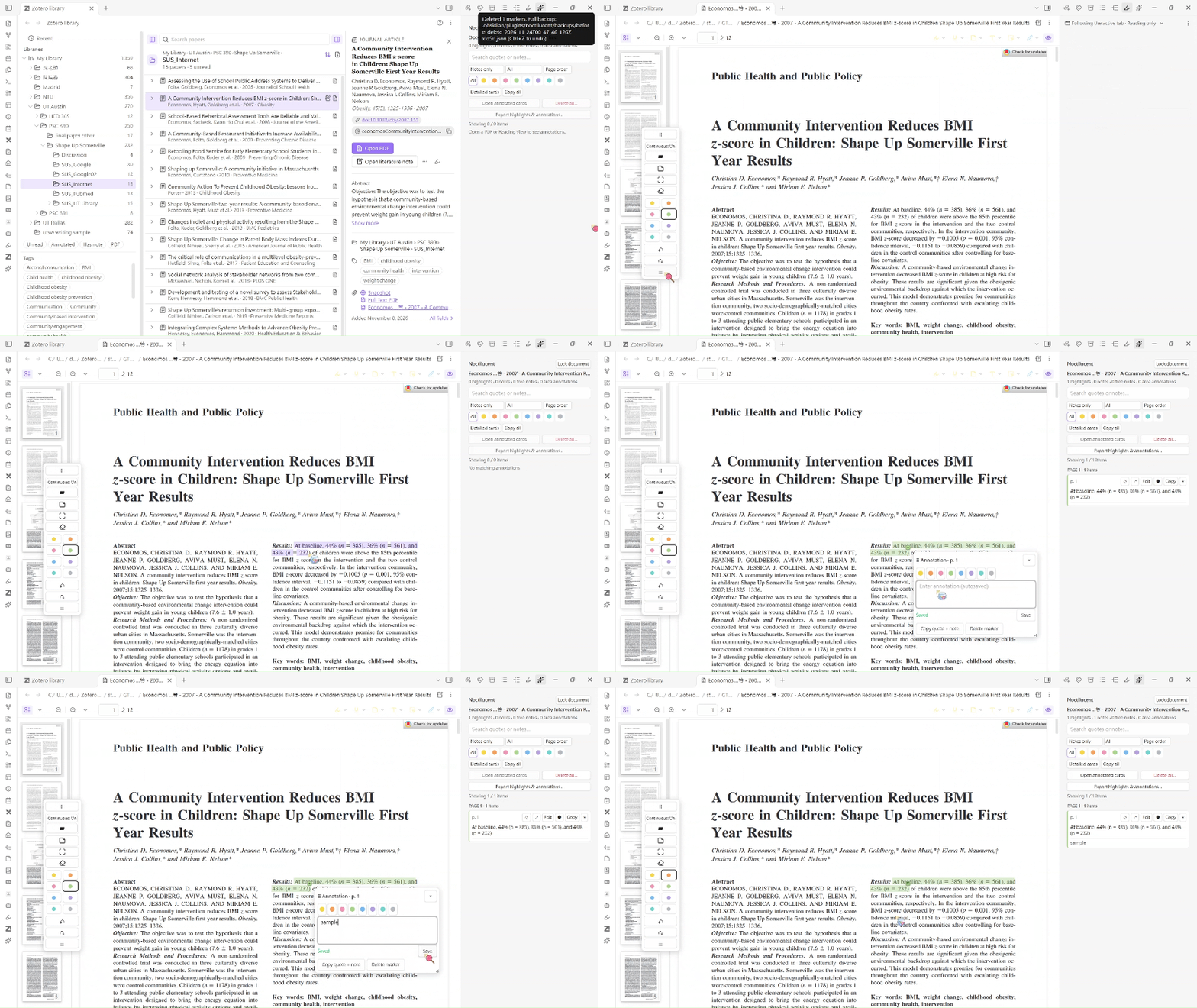
Highlight freely. Annotate naturally.
Noctilucent was created around a reading-first approach: noticing an important passage should not require writing a note, choosing a semantic category, or opening a permanent sidebar.
- Highlight first, annotate when needed. A highlight stands on its own. Add a comment to that highlight now or later.
- Write in context. Open a movable, sticky-note-style annotation card within the current document view, close to the passage you are reading, without reserving a permanent sidebar or page margin.
- Choose color independently. Use the highlight color you prefer without having to assign a category or give your thought a predefined meaning.
- Keep the page in focus. Cards appear on demand; highlights remain visible without demanding a note.
- Stay consistent across formats. The same reading-first interaction principles extend to supported PDF, DOCX, PPTX, and Markdown Reading View documents, within each viewer's technical limits.
Design principle: The annotation tool should adapt to the reader, not the reader to the annotation tool.
Read the Product Vision for the origin, interaction principles, and design goals.
Features in the current preview
- PDF annotations: Text highlighting with an eight-color palette, note cards, continuous highlighting, free-position sticky notes, and area highlighting.
- Reading tools: A draggable floating toolbar, annotation sidebar with document-specific search and filters, note editing, and annotation navigation.
- Annotation management: Session-based undo/redo, eraser tools, pinning (up to three annotations per document), and a bulk-delete workflow with a backup safeguard.
- Markdown Reading View: Text highlighting and notes in reading mode. Markdown editing mode is intentionally left unchanged; free-position notes and area highlighting are not supported in Markdown.
- Office Viewer compatibility preview: DOCX and PPTX selectable text highlighting and notes, subject to the rendering and text-anchoring limitations of the Office Viewer. This is experimental rather than guaranteed support for every document.
- Markdown export (introduced in v0.1.8): Export annotations from the current document into a separate Markdown snapshot without altering the source file or the original annotations. Exports are not synchronized with subsequent edits.
- English and Traditional Chinese interface (v0.1.9): Auto, English, and 繁體中文 language choices. Auto uses Traditional Chinese for Chinese Obsidian locales and English for other locales. This affects interface strings, not selected text or existing annotation data.
The author has tested the available features in a real Obsidian desktop environment. Compatibility across different systems, Obsidian versions, viewer implementations, and document structures is not universally guaranteed.
Installation (manual preview)
- Back up your Obsidian vault and, if updating, the existing
.obsidian/plugins/noctilucent/data.jsonfile. - Copy
manifest.json,main.js, andstyles.cssinto<your vault>/.obsidian/plugins/noctilucent/. - Restart Obsidian or reload its plugins, then enable Noctilucent under Settings → Community plugins.
- Open a supported document to use the annotation controls. For first-time setup or significant updates, a test vault is recommended.
The src/i18n/ files are maintainable language resources. The currently supplied main.js already contains the language dictionaries; these source resources are not separately required for manual installation.
Interface language
Under Settings → Community plugins → Noctilucent → Interface language, choose Auto, English, or 繁體中文. See 繁體中文說明 for details.
Data and important limitations
- Annotation data is stored locally in the plugin's
data.json. Do not delete or overwrite this file when upgrading. Keep an independent backup before testing updates or bulk operations. - Highlighting and annotation data are maintained separately from the source PDF, Office, or Markdown files; source files are not intentionally rewritten by these annotation features.
- Text positioning depends on the host viewer and whether the original text remains selectable and uniquely identifiable. Some selections may not be safely re-anchored after changes, resizing, or viewer updates; the plugin may suppress a marker rather than display it in the wrong place.
- Markdown annotations are limited to Reading View.
Homepage.mdand configured homepage-style documents are excluded from the Markdown annotation overlay. - Office Viewer limitations: rasterized text, some PowerPoint slide content, and varying viewer structures may not support selectable text or reliable positioning.
- Exported Markdown is a one-time snapshot, not a live bidirectional synchronization. PDF page links are available; precise jumps to text in Office/Markdown are not guaranteed.
- Text-selection and translation-tool coexistence depends on the active viewer and local setup; verify overlapping shortcuts and selection behavior when combining tools. Earlier notes do not claim full compatibility testing.
Local PDF access and privacy
Noctilucent stores highlights and annotations locally in the plugin's data.json. For experimental PDF symbol recovery, it may read the bytes of a PDF in your vault to calculate a SHA-256 hash and compare it with a built-in index of previously verified PDF samples.
For a PDF referenced by a supported local file: path, this recovery function can also access a PDF outside the Obsidian vault using the desktop filesystem API, provided the path passes its local-file and PDF checks. This access is for reading the file and calculating its fingerprint; the function does not write changes to the PDF. It does not recursively scan your filesystem. Unmatched files may fall back to ordinary text normalization or other available recovery methods.
The symbol recovery code does not upload PDF contents or computed hashes to an external server. The built-in verification indexes are included with the plugin. The recovery function retains a small in-memory cache of document hashes during the plugin session.
Note: This describes the v0.1.9 PDF symbol recovery code path, not a claim that every Obsidian PDF viewer or externally opened document is supported. As with other third-party plugins, review the code and back up your annotation data before use.
Building from source
Noctilucent v0.1.9 has a zero-dependency, reproducible Node.js build. Run npm run check to verify that the committed main.js matches the output generated from src/main.template.js and the two src/data/ PDF recovery indexes; use npm run build to regenerate it. See Build instructions for details and caveats.
The original main.js is deliberately unchanged: the large PDF recovery indexes have been separated in the source tree but remain embedded in the release file to avoid introducing runtime or installation changes. The source dictionaries in src/i18n/ are maintenance references and are not imported automatically by the v0.1.9 builder.
Project status and development notes
Noctilucent is under active development. The repository now includes the distributed JavaScript, a reconstructible source template, PDF recovery indexes, and a working build/check script. Broader cross-environment compatibility verification remains a publication-preparation task. The features listed above have been exercised by the author in an actual Obsidian desktop environment.
For individual changes, hotfixes, historical limitations, and test caveats through v0.1.9, see the English changelog or Traditional Chinese changelog. The original mixed-language development log is also preserved.
License
Noctilucent is licensed under the MIT License. Copyright (c) 2026 AOI. The license permits use, modification, redistribution, and commercial use, provided the copyright and license notices are retained. Third-party components, if any, remain subject to their own licenses.