Nightly Journal
 David Mogollon533 downloads
A local AI interviews you at the end of your day and writes your journal for you: daily notes, people and projects, a confirmable writing plan, and a long-term memory you can ask questions. 100% local
- Overview
- Scorecard
- Updates18
Nightly Journal
A local AI interviews you at the end of your day and writes your journal for you — 100% local via Ollama.
Una IA local te entrevista al final del día y escribe tu diario por ti — 100% local con Ollama.
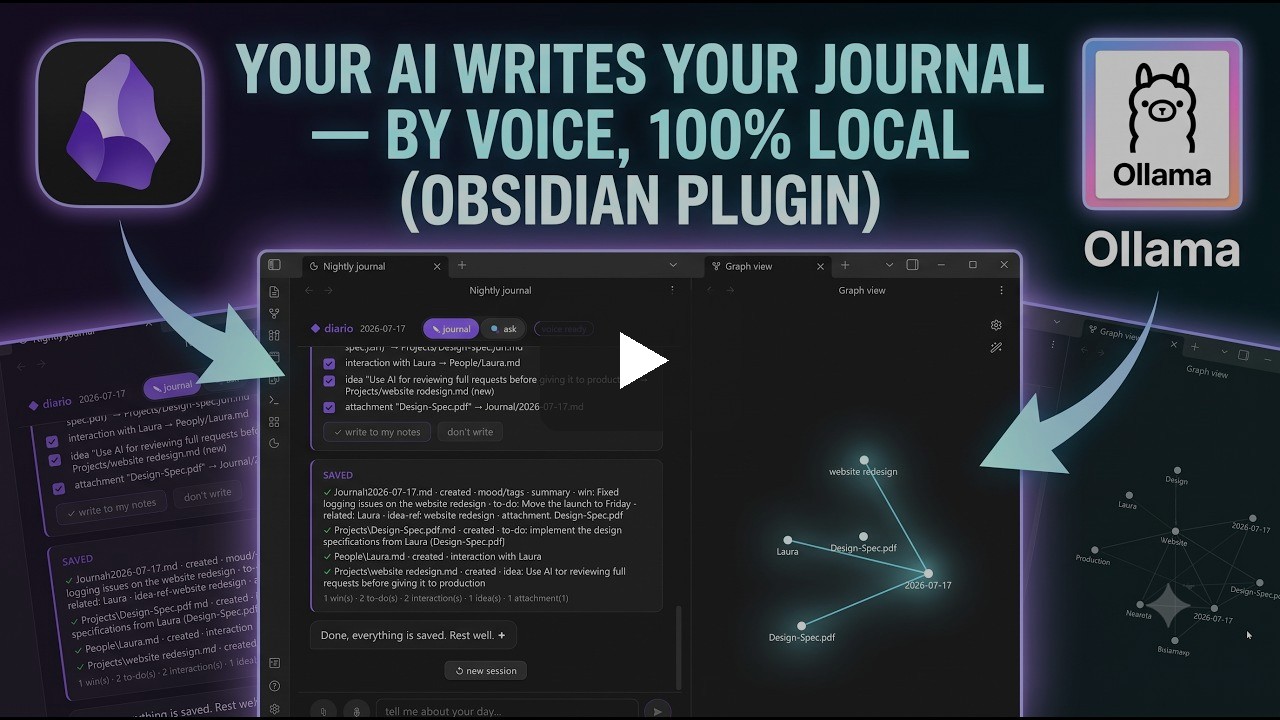
▶ Watch the 4-minute demo on YouTube · Mira la demo de 4 minutos
English
What it does
Chat for two minutes at the end of your day. The plugin interviews you with short, warm follow-up questions; when you close the day it shows a writing plan — item by item, with checkboxes — and only after you confirm does it write to your vault: a daily note with mood and energy, plus person and project notes connected with wikilinks.
No cloud, no accounts, no telemetry: the model runs on your machine.
See it in action
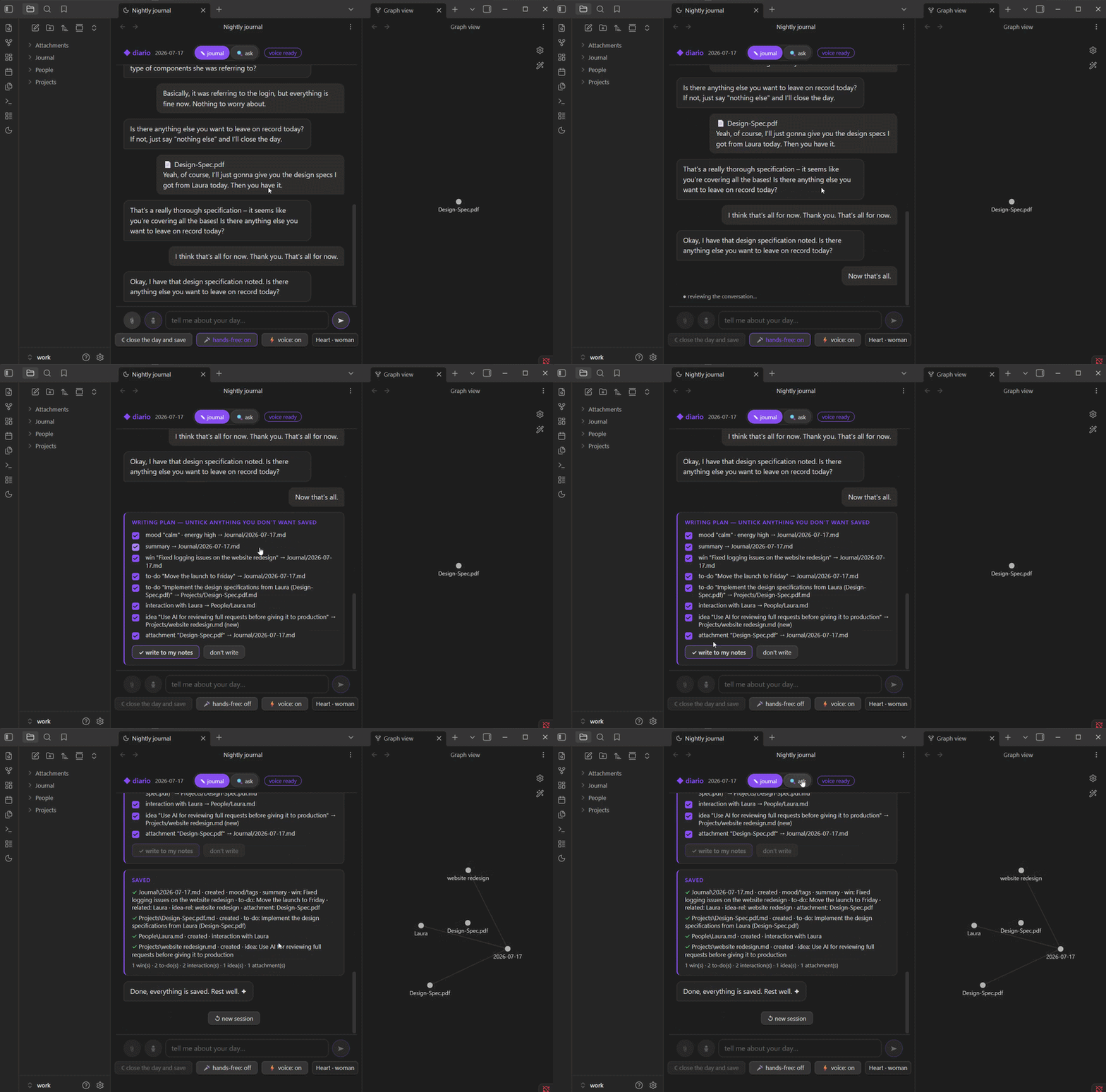
Hands-free — just talk: it detects your pause, sends by itself and answers out loud.
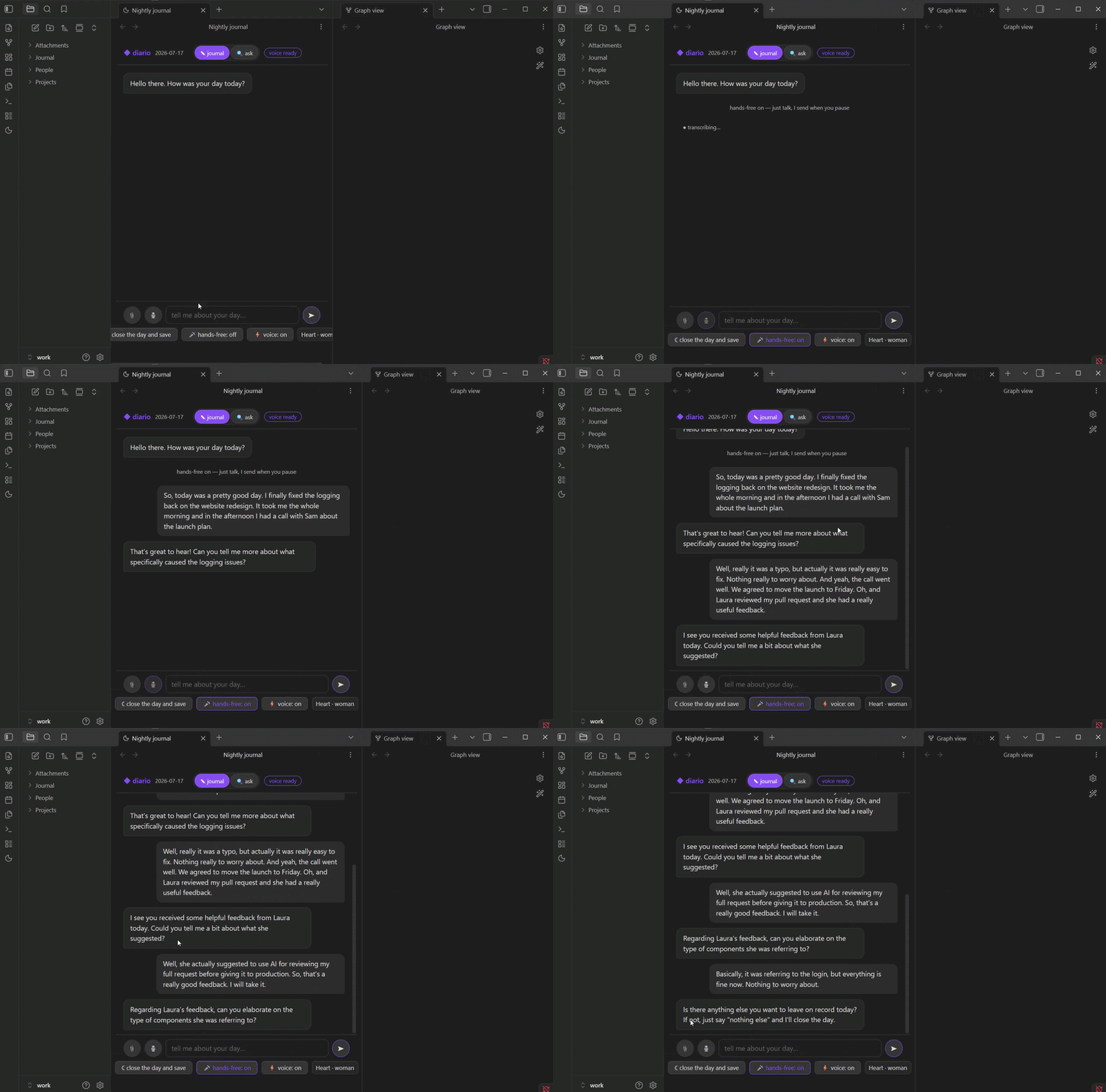
Attach documents — a PDF becomes part of the conversation (and of your memory).
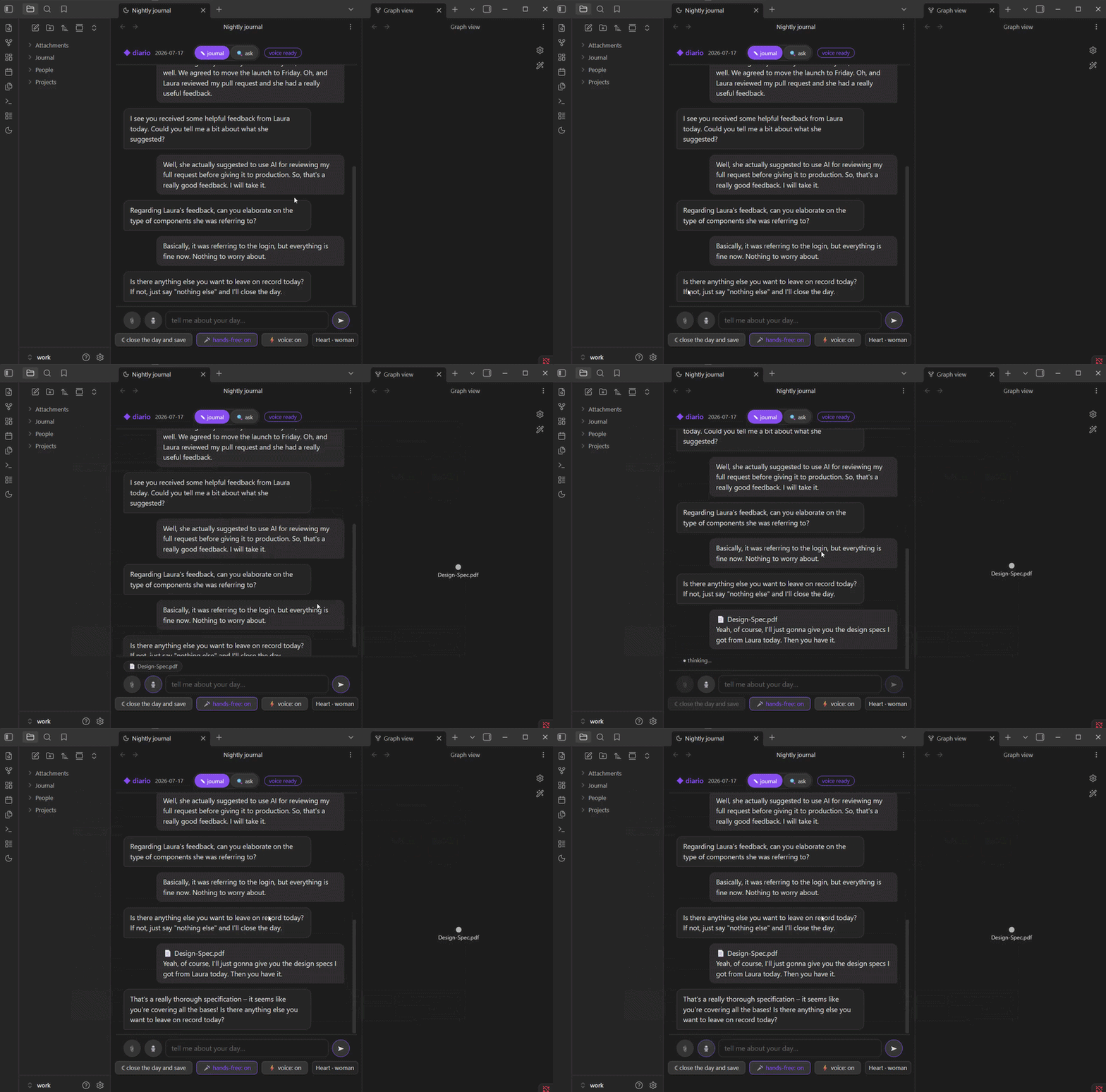
Close the day — review the plan, confirm, and watch the notes appear in your graph.
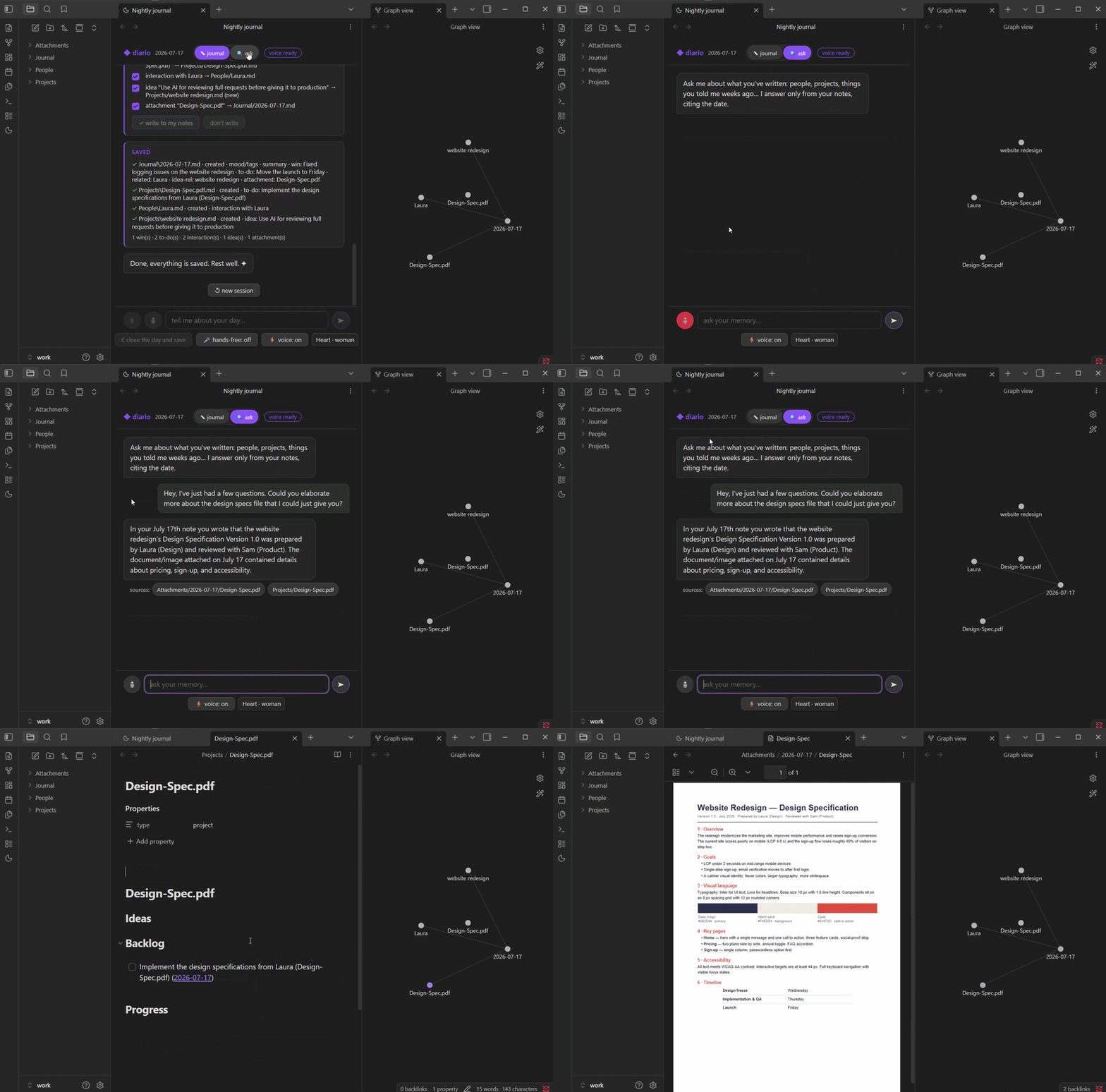
Ask your journal — it answers only from your notes, citing dates, with clickable sources.
Features
- Nightly interview — type, dictate with the mic 🎙️, or go hands-free 🎤: it detects when you pause, sends automatically, and replies out loud.
- A plan you confirm — untick anything you don't want saved; nothing is written without your OK.
- Structured notes — daily note (mood/energy frontmatter, summary, wins, to-dos),
People/Mari.md,Projects/…— the wikilinks build your graph night after night. - Long-term memory — with a local embeddings model it remembers your old notes and connects them: "is this the tooth you said they were going to pull?".
- Ask your journal — in the 🔍 tab, ask about your own past. It answers only from your notes, citing the date, with clickable sources that open the note. When it doesn't know, it says so honestly.
- Attachments become memory — attach photos, PDFs or text files 📎: PDF text is extracted and images are described by the local model, so you can ask about them later.
- Voice, fully local (optional) — text-to-speech (Kokoro) and speech-to-text (Whisper) through a small local sidecar. Without it, the plugin works in text-only mode.
- Streak & energy — 🔥 consecutive nights and a 7-day energy sparkline in the header.
- Undo (optional) — with git auto-commit enabled, each session is one commit and the undo button reverts it.
- English or Spanish — follows your Obsidian language by default; switchable in settings.
Requirements
- Obsidian desktop (the plugin talks to a local model; mobile is not supported).
- Ollama running locally, with the interview model:
ollama pull gemma3:4b
Optional, recommended:
| Model | Enables |
|---|---|
embeddinggemma — the plugin downloads it automatically |
long-term memory + the ask your journal tab |
ollama pull gemma3:12b |
higher-quality extraction (set as extraction model in settings) |
If Ollama or a model is missing, the plugin shows a friendly first-run card — not an error. From that card you can choose between the recommended models — gemma3:4b (default), gemma3:12b (higher quality) or the experimental bonsai-27b (27B compressed to 4.4 GB, great at conversation; needs Ollama 0.32.5+) — and download your pick with one click (no terminal), or use any model you already have installed in Ollama.
How to use
- Click the 🌙 moon icon in the ribbon (or run the command "Open nightly journal").
- Tell it about your day. Attach photos or documents with 📎 if you like.
- Press "☾ close the day and save" (or just say "nothing else").
- Review the writing plan, untick what you don't want, confirm.
- Any time, switch to the 🔍 ask tab and ask your memory: "when did I last see Mari?"
Settings
- Ollama URL and the three models (interview / extraction / memory).
- Guided questions per session — how many questions before it starts wrapping up.
- Language — Automatic (Obsidian language), English or Spanish. The folder schema of a vault that already has entries never changes, so your vault won't fragment.
- Git auto-commit — off by default. Turning it on creates a git repository inside your vault and commits once per session, which enables the undo button. Keep it off if your vault is already in git or you use another git plugin.
- Voice — sidecar URL, and (advanced) paths so the plugin can auto-start the sidecar.
Voice sidecar (optional)
Voice uses a local sidecar with Kokoro (TTS) and Whisper (STT). The easy way: install Python 3.12 (not the "latest" 3.13/3.14 — the voice engine doesn't support them yet), then in the plugin go to Settings → Voice → set up voice — the assistant creates an isolated environment, installs everything (~3 GB, once), writes the sidecar and starts it for you, no terminal needed. It also opens when you click the voice button in the journal view. Manual alternative, with the sidecar included at apps/voz/servidor_voz.py:
python -m venv .venv
.venv/Scripts/pip install torch kokoro "misaki[en,es]" transformers fastapi uvicorn soundfile pymupdf imageio-ffmpeg
.venv/Scripts/python apps/voz/servidor_voz.py 8765
Then set the sidecar URL in settings (http://127.0.0.1:8765). If you also fill in the advanced paths (python, script, working directory), the plugin starts the sidecar by itself when it's not running.
Privacy
Everything stays on your machine: the interview (Ollama on localhost), the memory index (.indice/rag.json, inside your vault and invisible to Obsidian), voice, and PDF extraction (127.0.0.1). The plugin makes no network requests beyond localhost.
Build from source
npm install --prefix apps/diario
npm install --prefix apps/obsidian
npm run build --prefix apps/obsidian    # typecheck + bundle → apps/obsidian/main.js
Español
Qué hace
Charla dos minutos al final de tu día. El plugin te entrevista con preguntas cortas y cálidas; al cerrar el día te muestra un plan de escritura — ítem por ítem, con casillas — y solo cuando confirmas escribe en tu vault: la nota diaria con ánimo y energía, más notas de personas y proyectos conectadas con wikilinks.
Sin nube, sin cuentas, sin telemetría: el modelo corre en tu máquina.
Míralo en acción
Manos libres — solo habla: detecta tu pausa, envía solo y te responde en voz alta.
Adjunta documentos — un PDF pasa a ser parte de la conversación (y de tu memoria).
Cierra el día — revisa el plan, confirma y mira las notas aparecer en tu grafo.
Pregúntale a tu diario — responde solo con tus notas, citando fechas, con fuentes clicables.
Funciones
- Entrevista nocturna — escribe, dicta con el mic 🎙️, o manos libres 🎤: detecta tus pausas, envía solo y te responde hablando.
- Un plan que tú confirmas — desmarca lo que no quieras guardar; nada se escribe sin tu OK.
- Notas estructuradas — nota diaria (frontmatter de ánimo/energía, resumen, logros, pendientes),
Personas/Mari.md,Proyectos/…— los wikilinks arman tu grafo noche a noche. - Memoria de largo plazo — con un modelo de embeddings local recuerda tus notas viejas y las conecta: "¿es la muela que dijiste que te iban a sacar?".
- Pregúntale a tu diario — en la pestaña 🔍 pregunta por tu propio pasado. Responde solo con tus notas, citando la fecha, con fuentes clicables que abren la nota. Cuando no sabe, lo dice honestamente.
- Los adjuntos se vuelven memoria — adjunta fotos, PDF o archivos de texto 📎: el texto de los PDF se extrae y las imágenes las describe el modelo local, para que luego puedas preguntar por ellos.
- Voz 100% local (opcional) — texto a voz (Kokoro) y voz a texto (Whisper) con un pequeño sidecar local. Sin él, el plugin funciona en solo texto.
- Racha y energía — 🔥 noches seguidas y mini-gráfica de energía de la semana en el encabezado.
- Deshacer (opcional) — con git auto-commit activado, cada sesión es un commit y el botón deshacer lo revierte.
- Español o inglés — hereda el idioma de Obsidian por defecto; se puede fijar en los ajustes.
Requisitos
- Obsidian de escritorio (el plugin habla con un modelo local; no funciona en móvil).
- Ollama corriendo localmente, con el modelo de entrevista:
ollama pull gemma3:4b
Opcional, recomendado:
| Modelo | Habilita |
|---|---|
embeddinggemma — el plugin lo descarga automáticamente |
memoria de largo plazo + la pestaña consultar |
ollama pull gemma3:12b |
extracción de más calidad (ponlo como modelo de extracción en los ajustes) |
Si falta Ollama o un modelo, el plugin muestra una tarjeta de primer arranque — no un error. Desde esa tarjeta puedes elegir entre los modelos recomendados — gemma3:4b (por defecto), gemma3:12b (más calidad) o el experimental bonsai-27b (27B comprimido a 4.4 GB, gran conversador; pide Ollama 0.32.5+) — y descargar el elegido con un click (sin terminal), o usar cualquier modelo que ya tengas instalado en Ollama.
Cómo se usa
- Haz clic en el icono 🌙 de la barra lateral (o el comando "Abrir diario nocturno").
- Cuéntale tu día. Adjunta fotos o documentos con 📎 si quieres.
- Pulsa "☾ cerrar el día y registrar" (o simplemente di "nada más").
- Revisa el plan de escritura, desmarca lo que no quieras, confirma.
- Cuando quieras, cambia a la pestaña 🔍 consultar y pregúntale a tu memoria: "¿cuándo fue la última vez que vi a Mari?"
Ajustes
- URL de Ollama y los tres modelos (entrevista / extracción / memoria).
- Preguntas guiadas por sesión — cuántas preguntas antes de empezar el cierre.
- Idioma — Automático (idioma de Obsidian), español o inglés. El esquema de carpetas de un vault con entradas no cambia nunca, así tu vault no se fragmenta.
- Auto-commit con git — apagado por defecto. Al activarlo crea un repositorio git dentro de tu vault y hace un commit por sesión, lo que habilita el botón deshacer. Déjalo apagado si tu vault ya está en git o usas otro plugin de git.
- Voz — URL del sidecar y (avanzado) rutas para que el plugin lo arranque solo.
Sidecar de voz (opcional)
La voz usa un sidecar local con Kokoro (TTS) y Whisper (STT). La vía fácil: instala Python 3.12 (no la "última" 3.13/3.14 — el motor de voz aún no las soporta) y en el plugin ve a Ajustes → Voz → configurar la voz — el asistente crea un entorno aislado, instala todo (~3 GB, una sola vez), escribe el sidecar y lo arranca por ti, sin terminal. También se abre al pulsar el botón de voz en la vista del diario. Alternativa manual, con el sidecar incluido en apps/voz/servidor_voz.py:
python -m venv .venv
.venv/Scripts/pip install torch kokoro "misaki[en,es]" transformers fastapi uvicorn soundfile pymupdf imageio-ffmpeg
.venv/Scripts/python apps/voz/servidor_voz.py 8765
Luego pon la URL del sidecar en los ajustes (http://127.0.0.1:8765). Si además llenas las rutas avanzadas (python, script, carpeta de trabajo), el plugin arranca el sidecar solo cuando no está corriendo.
Privacidad
Todo queda en tu máquina: la entrevista (Ollama en localhost), el índice de memoria (.indice/rag.json, dentro de tu vault e invisible para Obsidian), la voz y la extracción de PDF (127.0.0.1). El plugin no hace ninguna petición de red fuera de localhost.
Compilar desde el código
npm install --prefix apps/diario
npm install --prefix apps/obsidian
npm run build --prefix apps/obsidian    # typecheck + bundle → apps/obsidian/main.js