Neat File Tree
 Neil1k downloads
VSCode-style sticky folder headers, accent-colored top-level folders, and tinted indentation guides for the file explorer.
- Overview
- Scorecard
- Updates13
Small quality-of-life tweaks for Obsidian's file explorer that make a deep, busy vault easier to navigate.
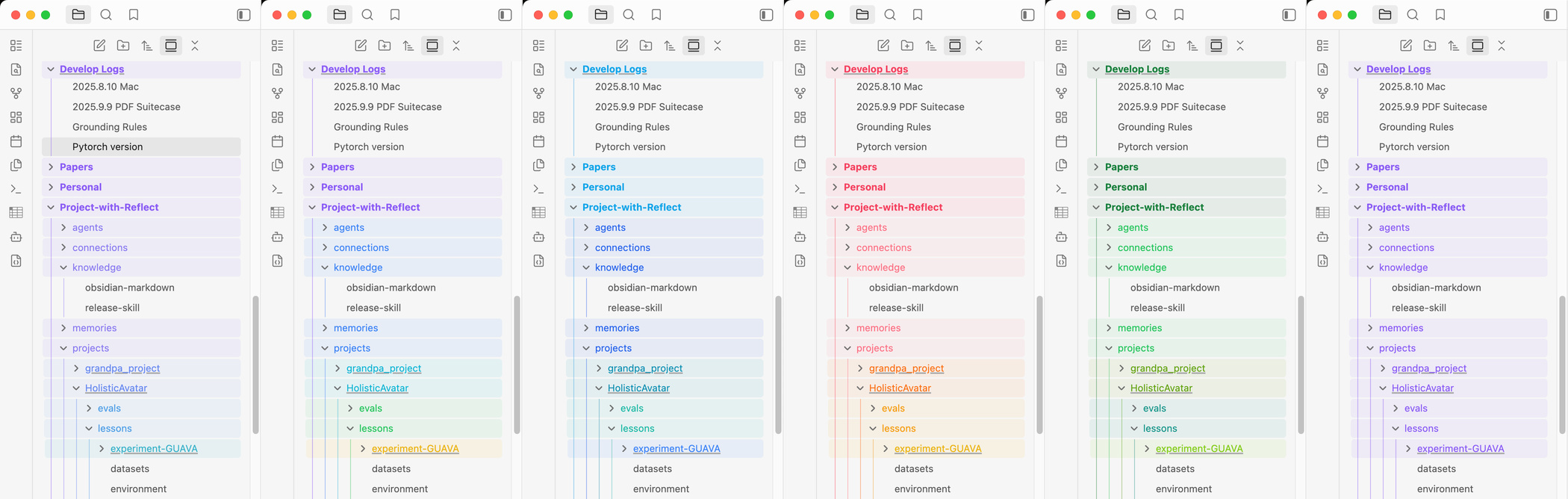
Sticky folder headers + the six built-in color schemes (Aurora, Rainbow, Ocean, Sunset, Forest, Mono)
Features
Sticky folder headers — parent folders pin to the top as you scroll, stacked by depth, just like VSCode's "sticky scroll". You never lose track of where you are when many folders are expanded.
Per-depth color schemes — folder names, their bar, and the indentation guide lines are colored by depth from a scheme you pick: Rainbow (the default), Aurora (anchored to your theme's accent), Ocean, Sunset, Forest, or Mono — chosen from a live preview in settings. Top-level folders stay bold so the roots of your vault stand out.
Reveal on open — opening or switching to a file scrolls the tree to it and seats it just below its sticky ancestor stack, with a brief accent pulse. Clicking a pinned sticky header jumps to that folder's real row.
nft:links — link to a path from inside a note to reveal it in the file tree without navigating:[My projects](nft:Work/Projects) [A note](nft:Work/Projects/Roadmap.md)Single-click scrolls and pulses that file or folder in the tree; the note you're reading stays put. Double-click reveals it and opens it — so one link does both jobs. (Double-clicking a folder opens its folder note, if it has one.) The link is drawn in your colour scheme's colour for the depth it points at, so it matches the row it reveals, with a dotted underline and a ▸ marker to set it apart from a normal link. Percent-encode spaces (
Work%20Notes) or wrap the target in angle brackets ([x](<nft:Work Notes>)). Works in Reading view and Live Preview.
Each feature has its own toggle in the plugin settings, plus a Row height
field to keep the sticky headers aligned if you use a larger interface font.
(nft: links need no toggle — they only do anything if you write one.)
Reveal links from a Base
A Base's file column opens the note. To make it reveal in the tree instead, add
a formula column — html() lets a Base emit a real link, which the plugin picks
up like any other:
formulas:
  reveal: "html(\"<a href='nft:\" + file.path + \"'>\" + file.name + \"</a>\")"
Then use formula.reveal in place of file.name in each view's order: (leave
sort: alone — it can keep sorting on file.name), and give formula.reveal
the column's displayName. Note a .base file is shared by every note that
embeds it.
Install
In Obsidian: Settings → Community plugins → Browse → search "Neat File Tree" → Install → Enable.
How it works
The look is CSS toggled by body classes — no DOM manipulation, no performance
cost. The scroll behaviors are a thin layer of plain JS on top. It respects your
theme's accent color (--text-accent) and
background variables, so it adapts to light/dark and custom themes
automatically.
License
MIT