Native Search
 gyroid263 downloads
Zero-index search powered by the OS-native index (macOS Spotlight): PDF full-text, OCR'd text inside images, Office documents and notes — no indexing cost inside Obsidian.
- Overview
- Scorecard
- Updates2
English | 日本語
Zero-index search for Obsidian, powered by the index your OS already maintains.
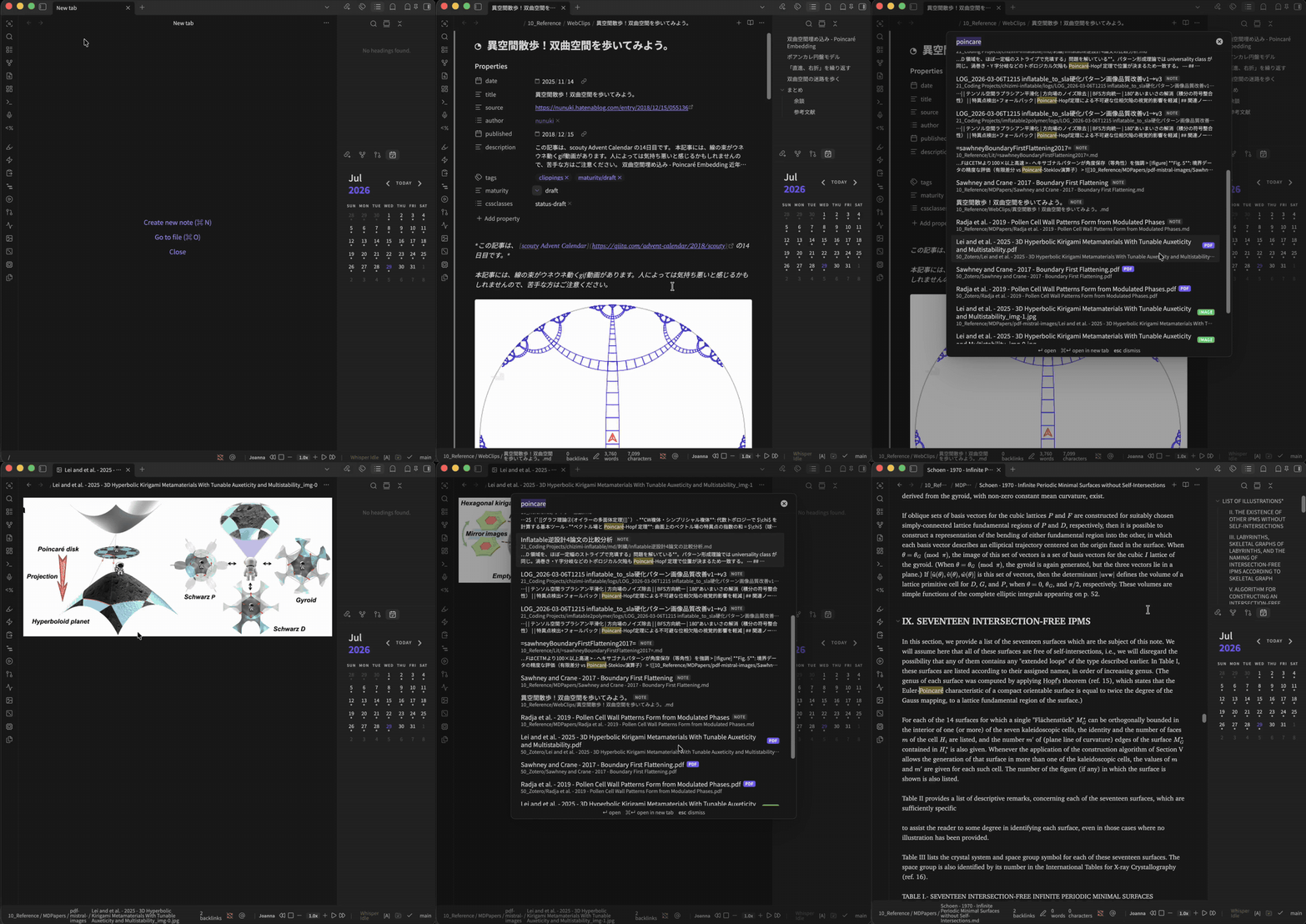
Search the full text of PDFs, the OCR'd text inside images (via Apple Live Text), Office documents (Word, PowerPoint, Keynote, Excel, …) and your notes — with zero indexing cost inside Obsidian. There is no plugin-side background index, cache file, index-related startup delay, or resident search index. The plugin-side footprint stays nearly flat even for vaults with 100,000+ files.
Why
An in-app search engine must build, load, update, and retain its own index in Obsidian's renderer process. Those costs are often negligible for an ordinary vault, but they grow with the number and size of indexed files.
macOS Spotlight already maintains a full-text and OCR index of your vault folder. Native Search queries that existing index with mdfind, leaving indexing and extraction outside Obsidian. This architecture is especially useful for very large or document-heavy vaults.
Native Search trades relevance ranking and typo tolerance for a minimal in-app footprint. See the comparison below for the practical differences.
Usage
- Click the ribbon icon, or run the command "Open Native Search" (assign a hotkey for the full Omnisearch-style experience).
- Type any words — multiple words are AND-combined. Matching is case- and diacritic-insensitive, so
poincarecan findPoincaré. Japanese, English and other languages are supported wherever Spotlight indexes them. - Use
"exact phrase"for a phrase,-wordor-"excluded phrase"to exclude content and filename matches,path:Projects/for a vault-relative path prefix, andext:pdffor a file extension. - Results show badges:
NOTE/PDF/IMAGE(OCR hit) /OFFICE/FILE, plusNAMEfor filename matches (shown first). - Results are grouped
NAME→NOTE→PDF→IMAGE→OFFICE→FILE; files within each group are newest first. Configurable excerpts show the first matching context for text-based files. - Reopening the modal restores the previous query and results within the current Obsidian session. The query is selected so typing replaces it immediately.
↵opens in the current tab,⌘↵in a new tab. Files Obsidian can't display (e.g..docx,.key) open in their default app.- Opening a note jumps to the first match and highlights every occurrence — the same mechanism Obsidian's core Search uses. Opening a PDF drives the built-in viewer's search bar: all matches are highlighted and the view jumps to the first one. (Images can't be highlighted in place — Spotlight doesn't expose OCR match positions.)
Settings
- Max results / Debounce
- Include notes — turn off to search only non-note files (use alongside your favorite note search)
- Search filenames — filename matches ranked first
- Show excerpts / Excerpt count — show matching context for up to the configured number of top text-file results
- Remember last query — restore the previous query and results when reopening the modal
- Excluded folders — vault-relative prefixes, one per line
Comparison with Omnisearch
Omnisearch is a mature, excellent in-app search engine. It and Native Search optimize for different constraints:
| Capability | Native Search | Omnisearch |
|---|---|---|
| Relevance ranking (BM25) | No; deterministic match/type groups, then modification time | Yes; weighted BM25 document scoring |
| Fuzzy matching | No | Yes; typo-resistant search |
| Excerpts | Yes, for a configurable number of text-file results | Yes |
| Phrase & operators | Quotes, exclusions, path: prefixes, ext: filters |
Quotes, exclusions, extension filters |
| PDF full-text | Spotlight metadata index | Via the companion Text Extractor plugin |
| Image OCR | Spotlight / Apple Live Text | Via the companion Text Extractor plugin |
| Office documents | Spotlight metadata importers | Via the companion Text Extractor plugin |
| Indexing cost | No index inside Obsidian; the OS maintains it | Builds and updates a MiniSearch index inside Obsidian |
| Startup impact | No plugin index to load or rebuild | May load or update its cache/index; cost depends on the vault |
| Memory footprint | No resident plugin search index | Resident index grows with the indexed corpus |
| Vault-size scaling | Near-flat plugin-side cost; particularly suited to 50k–100k+ files | Indexing, cache, and memory work grow with the corpus |
| Index freshness | Spotlight updates asynchronously; timing is controlled by macOS | Vault changes can be reflected immediately |
| Platforms | macOS desktop only | Desktop and mobile (dependency features may vary) |
For small to medium vaults, Omnisearch is an excellent choice: its relevance ranking, fuzzy matching, broad platform support, and immediate index updates make it a more capable general-purpose search experience.
Native Search's advantage becomes clearest in huge vaults. In one 100k-file stress test, an in-app indexer added about 9 seconds to startup, used roughly 668 MB of additional heap, and could freeze the renderer while writing its cache. Native Search added no plugin-side index build, cache write, or resident index. Those figures are a workload-specific observation rather than a universal benchmark, but they illustrate the architectural difference.
Requirements & limitations
- macOS only. Spotlight (
mdfind) is a macOS facility. (Windows Search / Linux equivalents are conceptually possible — PRs welcome.) - Your vault must live in a Spotlight-indexed location (most home-folder locations are). Check with:
If this returns nothing for a word you know exists, check System Settings → Siri & Spotlight → Spotlight Privacy, and note that some external/network drives are not indexed.mdfind -onlyin /path/to/vault "kMDItemTextContent == '*someword*'cd" - Spotlight updates are asynchronous. A just-created or just-edited file may take time to appear, and Native Search cannot force or rebuild the OS index.
- Image OCR coverage is whatever Apple Live Text has processed — it covers common image formats and improves over time, but is controlled by the OS, not the plugin. Spotlight reports that an image matched, not where, so the match can't be highlighted inside the image.
- PDF match highlighting drives the built-in viewer's find bar, which is not a public API; if a future Obsidian version changes the viewer internals, the PDF still opens and only the automatic highlight is skipped.
- Excerpts are read only for the configured number of top text-file results. PDFs, images, and binary Office formats do not receive excerpts.
- Spotlight does not expose relevance scores via
mdfind, so results are grouped (filename → notes → PDF → images → Office → other files) rather than relevance-ranked. - Obsidian's "Excluded files" setting is not consulted; use the plugin's own excluded-folders setting.
Privacy
Everything runs locally. The plugin spawns mdfind (a standard macOS command-line tool) against your vault folder only. No network requests, no telemetry, no index files written.
Install
Until the plugin is accepted into the community directory:
- Download
main.js,manifest.json,styles.cssfrom the latest release. - Put them in
<vault>/.obsidian/plugins/native-search/. - Enable Native Search in Settings → Community plugins.
Or use BRAT with gyroid-eth/obsidian-native-search.
License
MIT