MultiDim Virtual Folders
 Arislan Song836 downloads
Create multi-dimensional virtual folders from frontmatter without moving real files.
- Overview
- Scorecard
- Updates3

MultiDim Virtual Folders
MultiDim Virtual Folders is an Obsidian plugin for building multiple virtual folder trees from note frontmatter.
Your notes do not have to live in only one folder hierarchy. A single note can appear under a date, a project, a source, a topic, and any other structure you care about, while the real Markdown file stays exactly where it is.
Why Use It
Use MultiDim Virtual Folders when one real folder tree is not enough.
For example, the same note can be part of a monthly review, a project, and a source collection at the same time. Instead of duplicating files or constantly moving notes around, you write simple frontmatter fields and let the plugin build the sidebars for you.
What You Can Do
- Create any number of virtual folder dimensions.
- Show each dimension in the left sidebar, right sidebar, or both.
- Switch dimensions from compact sidebar icons.
- Date dimensions can start from year, month, or day.
- Path dimensions support nested virtual folders from frontmatter paths.
- Create temporary virtual paths without creating real folders.
- Drag Markdown notes into virtual folders to update frontmatter.
- Rename folders/categories from the context menu.
- Change folder/category icons from the context menu.
- Delete virtual folders/categories without deleting real files.
- Sort each dimension by name, created time, or modified time.
- Choose ascending or descending order per dimension.
- Use Emoji or Lucide icons.
- Use Chinese or English interface text.
A Small Example
Add frontmatter like this to a note:
---
catalog_date: 2026-06-29
project_path: Example Project/Phase One
source_path: Reference/Manual
---
Then the note can appear in several virtual folder trees at once:
- Date:
2026 / 2026-06 / 2026-06-29 - Project:
Example Project / Phase One - Source:
Reference / Manual
Installation
Obsidian Community Plugin Store
After the plugin is approved by the Obsidian community plugin review process:
- Open Obsidian Settings.
- Go to Community plugins.
- Search for
MultiDim Virtual Folders. - Install and enable the plugin.
Offline Installation
Use this method when the plugin is not available from the community store yet, or when the target computer cannot access GitHub or the Obsidian community plugin store.
- Download
multidim-virtual-folders.zipfrom the latest GitHub release. If the target computer is offline, download it on another computer and copy it over. - Open the target vault folder and go to:
.obsidian/plugins/
- Extract
multidim-virtual-folders.zipinto that folder. - Confirm the files are in:
.obsidian/plugins/multidim-virtual-folders/
- Restart Obsidian or reload the app.
- Open Settings -> Community plugins and enable
MultiDim Virtual Folders.
Visual Setup Guide
The screenshots below use the Chinese Obsidian interface, but the flow is the same in other languages.
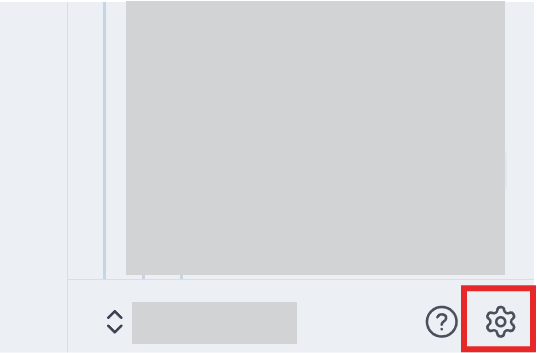
- Open Obsidian settings.
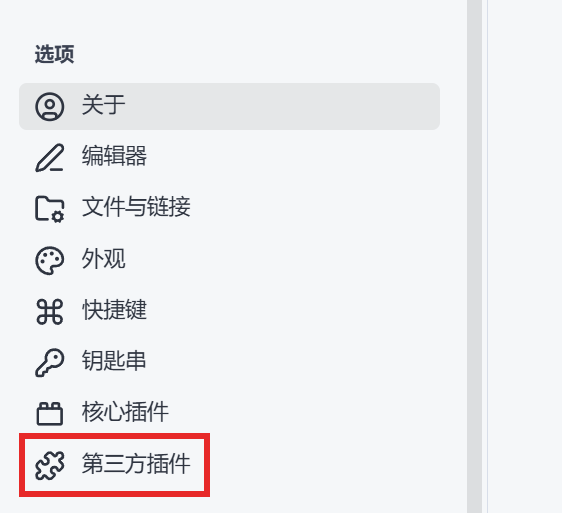
- Go to Community plugins.
- Find
multidim-virtual-folders.

- Open the plugin options.

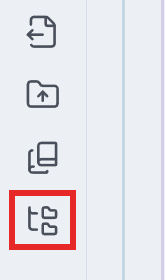
- Return to the main interface and open the virtual folder sidebar from the bottom icon.
BRAT Installation
Before community plugin approval, you can install the GitHub repository with BRAT:
Arislan-x/multidim-virtual-folders
How It Feels To Use
Open the plugin from the ribbon icon or from the command palette.
In settings, create one or more virtual folder dimensions:
- Date dimension: groups notes by a date frontmatter property.
- Path dimension: groups notes by a path-like frontmatter property.
For each dimension, you can configure:
- Title
- Icon
- Color
- Frontmatter property
- Display side
- Sorting
- Write mode
- Temporary virtual paths
Most dimension settings are locked by default, so you do not accidentally change a working setup. Click Edit, adjust the dimension, then click Save.
Drag And Drop
Drag a Markdown note into a virtual folder to write that folder path into the configured frontmatter property.
Only Markdown files are accepted. Real files are not moved.
Mobile Support
The plugin is marked as mobile-compatible.
Sidebar browsing, dimension switching, settings, and frontmatter-based virtual folders can be used on mobile. Drag-and-drop behavior depends on the Obsidian mobile app and the operating system, so desktop remains the most complete experience for drag-and-drop workflows.
Context Menu
Right-click a virtual folder/category to:
- Change icon
- Rename the folder/category
- Create a subcategory
- Delete the virtual folder/category
These actions update frontmatter and plugin settings only. They do not delete or move real files in your vault.
Privacy
This plugin does not send data to external services.
It does not use telemetry, analytics, remote code loading, or external network requests.
All data stays in your local Obsidian vault and plugin settings.
License
MIT License. See LICENSE.