Search...Search plugins and themes...
⌘K
Sign in
  • Get started
  • Download
  • Pricing
  • Enterprise
  • Account
  • Obsidian
  • Overview
  • Sync
  • Publish
  • Canvas
  • Mobile
  • Web Clipper
  • CLI
  • Learn
  • Help
  • Developers
  • Changelog
  • About
  • Roadmap
  • Blog
  • Resources
  • System status
  • License overview
  • Terms of service
  • Privacy policy
  • Security
  • Community
  • Plugins
  • Themes
  • Discord
  • Forum / 中文论坛
  • Merch store
  • Brand guidelines
Follow us
DiscordTwitterBlueskyThreadsMastodonYouTubeGitHub
© 2026 Obsidian

Move Tab to Group

Changhun HanChanghun Han354 downloads

Move the active tab into the tab group on its left or right. If there is no group on that side, a new one is split off for it.

Add to Obsidian
  • Overview
  • Scorecard
  • Updates1

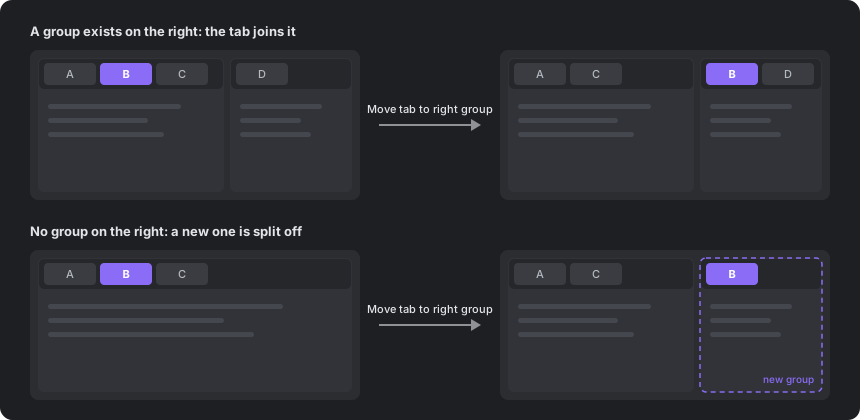
Move the active tab into the tab group on its left or right with one command. If there is no group on that side, a new one is split off for the tab.
How it works

Obsidian's built-in split commands open a copy of the note in a new pane, and dragging tabs between groups needs the mouse. This plugin moves the tab itself, so the original tab leaves its group and keeps its history.

Commands

Command What it does
Move tab to left group Moves the active tab to the end of the group on the left. If there is none, splits a new group off on the left.
Move tab to right group Moves the active tab to the front of the group on the right. If there is none, splits a new group off on the right.

Details:

  • The tab stays focused after it moves.
  • In nested layouts, the tab goes to the nearest group on that side.
  • A tab that is alone in its group is not moved into a new group, because that would leave the layout unchanged.
  • Only left and right moves are supported. If the groups on the target side are stacked vertically, the tab goes to the top one.
  • Works in popout windows. Sidebars are not affected.

Hotkeys

The plugin sets no default hotkeys. Assign your own in Settings → Hotkeys by searching for "Move tab to".

Ctrl+Alt+← and Ctrl+Alt+→ work well. On Windows and Linux these keys are bound to Navigate back and Navigate forward by default, so remove or change those bindings first.

Installation

From Obsidian: open Settings → Community plugins → Browse, search for "Move Tab to Group", then install and enable it.

Manually: download main.js and manifest.json from the latest release and put them in <vault>/.obsidian/plugins/move-tab-to-group/.

Compatibility

Desktop only. Obsidian has no public API for moving an open tab between groups, so the plugin uses internal workspace methods. It was tested on Obsidian 1.13.7. A future Obsidian update may break it; please open an issue if it stops working.

License

MIT

HealthExcellent
ReviewPassed
About
Move the active tab to the group on its left or right with a single command, creating a new group on that side if none exists. Send the actual tab (not a copy) so it keeps its history and focus, and work in nested layouts and popout windows with left/right moves only.
WorkspacesCommandsNavigation
Details
Current version
1.0.0
Last updated
2 weeks ago
Created
2 weeks ago
Updates
1 release
Downloads
354
Compatible with
Obsidian 1.5.0+
Platforms
Desktop only
License
MIT
Report bugRequest featureReport plugin
Sponsor
Ko-fi
Author
Changhun HanChanghun Hanchun
github.com/HanChangHun
GitHubhanchanghun
  1. Community
  2. Plugins
  3. Workspaces
  4. Move Tab to Group

Related plugins

Homepage

Open a note, base, or workspace on startup, or set it for quick access later.

Quick Switcher++

Enhanced Quick Switcher, search open panels, and symbols.

Vertical Tabs

Offer an alternative view that displays open tabs vertically, allowing users to group and organize tabs for a better navigation experience.

Open Tab Settings

Adds options to customize how tabs are opened, including open in new tab by default, preventing duplicate tabs, and more.

Tab Switcher

Switch your tabs with Ctrl + Tab in recently used order like in a browser.

Leader Hotkeys

Add leader hotkey support to any command (like tmux or vim).

Notebook Navigator

A better file browser and calendar inspired by Apple Notes, Bear, Evernote and Day One.

Copilot

Run AI agents such as Claude Code, Codex, and OpenCode inside your vault. Turn your second brain into a smart assistant that gets knowledge work done.

Breadcrumbs

Visualise the hierarchy of your vault using a breadcrumb trail or matrix view.

Quick Explorer

Perform file explorer operations (and see your current file path) from the title bar, using the mouse or keyboard.