Search...Search plugins and themes...
⌘K
Sign in
  • Get started
  • Download
  • Pricing
  • Enterprise
  • Account
  • Obsidian
  • Overview
  • Sync
  • Publish
  • Canvas
  • Mobile
  • Web Clipper
  • CLI
  • Learn
  • Help
  • Developers
  • Changelog
  • About
  • Roadmap
  • Blog
  • Resources
  • System status
  • License overview
  • Terms of service
  • Privacy policy
  • Security
  • Community
  • Plugins
  • Themes
  • Discord
  • Forum / 中文论坛
  • Merch store
  • Brand guidelines
Follow us
DiscordTwitterBlueskyThreadsMastodonYouTubeGitHub
© 2026 Obsidian

Move Selected Files Here

Yoonchae LeeYoonchae Lee97 downloads

'Move selected files here' context menu is added.

Add to Obsidian
Move Selected Files Here screenshot
  • Overview
  • Scorecard
  • Updates1

Move Selected Files Here adds a context menu action to move selected files and folders into a folder in Obsidian.

  1. Select one or more files or folders in the File Explorer.
  2. Right-click the destination folder and click Move selected files here.
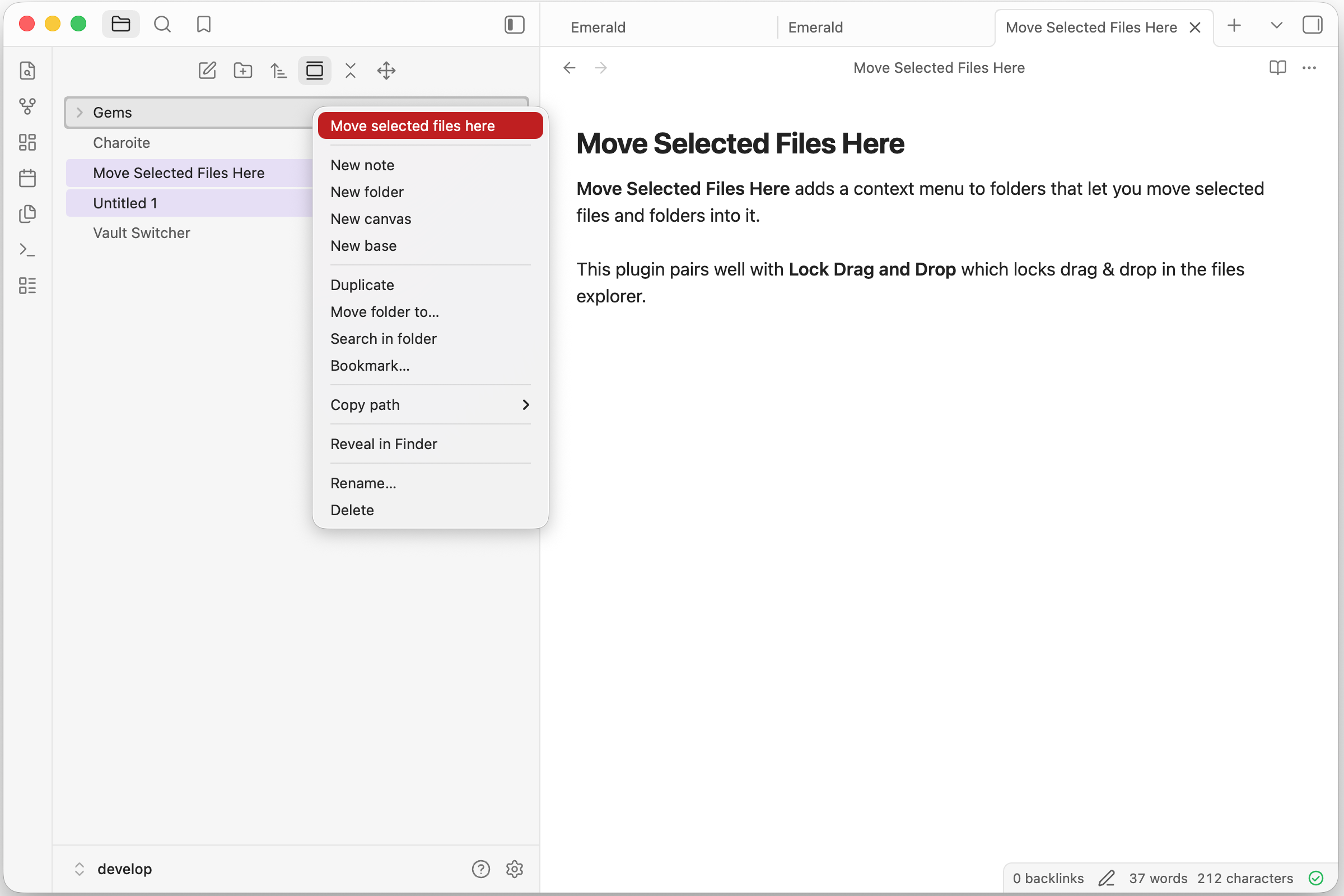
screenshot

Development

Install dependencies and build the plugin:

pnpm install
pnpm run build

The build writes main.js and manifest.json to ./dist/.

Then symlink the ./dist/ folder from the Obsidian plugin folder.

ln -s <path to ./dist/> move-selected-files-here

If you want to sync your plugins, you will need to copy the folder instead of symlinking.

Creating a release

Run below command to create and upload new version tag. This makes use of npm version lifecycle hook and the script.

pnpm version 0.1.0
git push origin main 0.1.0

Disclaimer

This plugin was developed with AI assistance, but all code was manually reviewed by a human.

This plugin is not affiliated with official Obsidian product.

HealthExcellent
ReviewPassed
About
Move selected files and folders into a folder directly from the File Explorer. Select items, right-click the destination folder and choose "Move selected files here" to relocate them in one action.
FilesFolders
Details
Current version
1.0.1
Last updated
3 weeks ago
Created
4 weeks ago
Updates
1 release
Downloads
97
Compatible with
Obsidian 1.13.0+
Platforms
Desktop, Mobile
License
MIT
Report bugRequest featureReport plugin
Author
Yoonchae LeeYoonchae Leebluegreenmagick
GitHubbluegreenmagick
  1. Community
  2. Plugins
  3. Files
  4. Move Selected Files Here

Related plugins

Quick Explorer

Perform file explorer operations (and see your current file path) from the title bar, using the mouse or keyboard.

Flexplorer

Enhance the file explorer with custom sorting, pinning, and hiding.

Custom File Explorer sorting

Manual or automatic config-driven reordering and sorting of files and folders in File Explorer.

Multi Properties

Add properties to multiple notes at once. Either right-click a folder or select multiple notes and right-click the selection.

GridExplorer

Browse and organize note files visually in a flexible grid layout.

Advanced Note Mover

Quickly and easily move notes to a predefined folder. Perfect for organizing your notes.

File Tree Alternative

An alternative file tree view with separate folder and file panes.

File Explorer Note Count

See the number of notes in each folder within the file explorer.

Create Note in Folder

Add commands to create a note in a specific folder.

Neighbouring Files

Navigate to the next and previous file in the current directory.