Search...Search plugins and themes...
⌘K
Sign in
  • Get started
  • Download
  • Pricing
  • Enterprise
  • Account
  • Obsidian
  • Overview
  • Sync
  • Publish
  • Canvas
  • Mobile
  • Web Clipper
  • CLI
  • Learn
  • Help
  • Developers
  • Changelog
  • About
  • Roadmap
  • Blog
  • Resources
  • System status
  • License overview
  • Terms of service
  • Privacy policy
  • Security
  • Community
  • Plugins
  • Themes
  • Discord
  • Forum / 中文论坛
  • Merch store
  • Brand guidelines
Follow us
DiscordTwitterBlueskyThreadsMastodonYouTubeGitHub
© 2026 Obsidian

Move Cursor On Startup

treaddertreadder316 downloads

Move cursor right then left briefly on startup --> first opened note. Makes DataView expressions 'activate' automatically instead of waiting for user interaction.

Add to Obsidian
  • Overview
  • Scorecard
  • Updates1

Obsidian plugin to move the cursor to the right and back to the left when starting up.

Why? To keep DataView expressions from not running on the first load of, say, your Home file.

Problem Example:

This is what happens with DataView embedded in a Home note, or first note you open: Problem Example
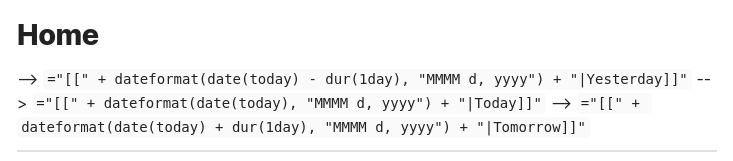
Solution Example

This is what happens once the cursor automaticall moves briefly on startup: Solution Example

To contribute / modify this make use of the Obsidian docs: https://docs.obsidian.md/Plugins/Getting+started/Build+a+plugin

HealthGood
ReviewSatisfactory
About
Move the cursor briefly on startup to trigger DataView expressions to evaluate on the first opened note. Prevent embedded DataView blocks from failing to render by shifting the cursor right then back left during startup.
AutomationEditing
Details
Current version
1.0.0
Last updated
Last year
Created
Last year
Updates
1 release
Downloads
316
Compatible with
Obsidian 0.15.0+
Platforms
Desktop, Mobile
License
0BSD
Report bugRequest featureReport plugin
Sponsor
Support
Author
treaddertreadder
www.linkedin.com/in/jared-kelnhofer/
GitHubtreadder
  1. Community
  2. Plugins
  3. Automation
  4. Move Cursor On Startup

Related plugins

MetaEdit

Manage your metadata.

Homepage

Open a note, base, or workspace on startup, or set it for quick access later.

Linter

Format and style your notes. Linter can be used to format YAML tags, aliases, arrays, and metadata; footnotes; headings; spacing; math blocks; regular Markdown contents like list, italics, and bold styles; and more with the use of custom rule options.

BRAT

Easily install a beta version of a plugin for testing.

LanguageTool Integration

Advanced grammar and spell checking, powered by LanguageTool.

Advanced URI

Control everything with URI.

Meta Bind

Make your notes interactive with inline input fields, metadata displays, and buttons.

Advanced Tables

Improved table navigation, formatting, and manipulation.

Thino

Quickly capture memos and display them in the sidebar with a heatmap. (Closed source)

QuickAdd

Quickly add new notes or content to your vault.