Search...Search plugins and themes...
⌘K
Sign in
  • Get started
  • Download
  • Pricing
  • Enterprise
  • Account
  • Obsidian
  • Overview
  • Sync
  • Publish
  • Canvas
  • Mobile
  • Web Clipper
  • CLI
  • Learn
  • Help
  • Developers
  • Changelog
  • About
  • Roadmap
  • Blog
  • Resources
  • System status
  • License overview
  • Terms of service
  • Privacy policy
  • Security
  • Community
  • Plugins
  • Themes
  • Discord
  • Forum / 中文论坛
  • Merch store
  • Brand guidelines
Follow us
DiscordTwitterBlueskyThreadsMastodonYouTubeGitHub
© 2026 Obsidian

Model Viewer

janispritzkaujanispritzkau1k downloads

View and embed interactive 3D models directly in your vault, powered by Google's <model-viewer> component. Supports the glTF and GLB file formats.

Add to Obsidian
  • Overview
  • Scorecard
  • Updates6

This plugin allows you to view and embed interactive 3D models directly in your Obsidian vault, powered by Google’s <model-viewer> component.
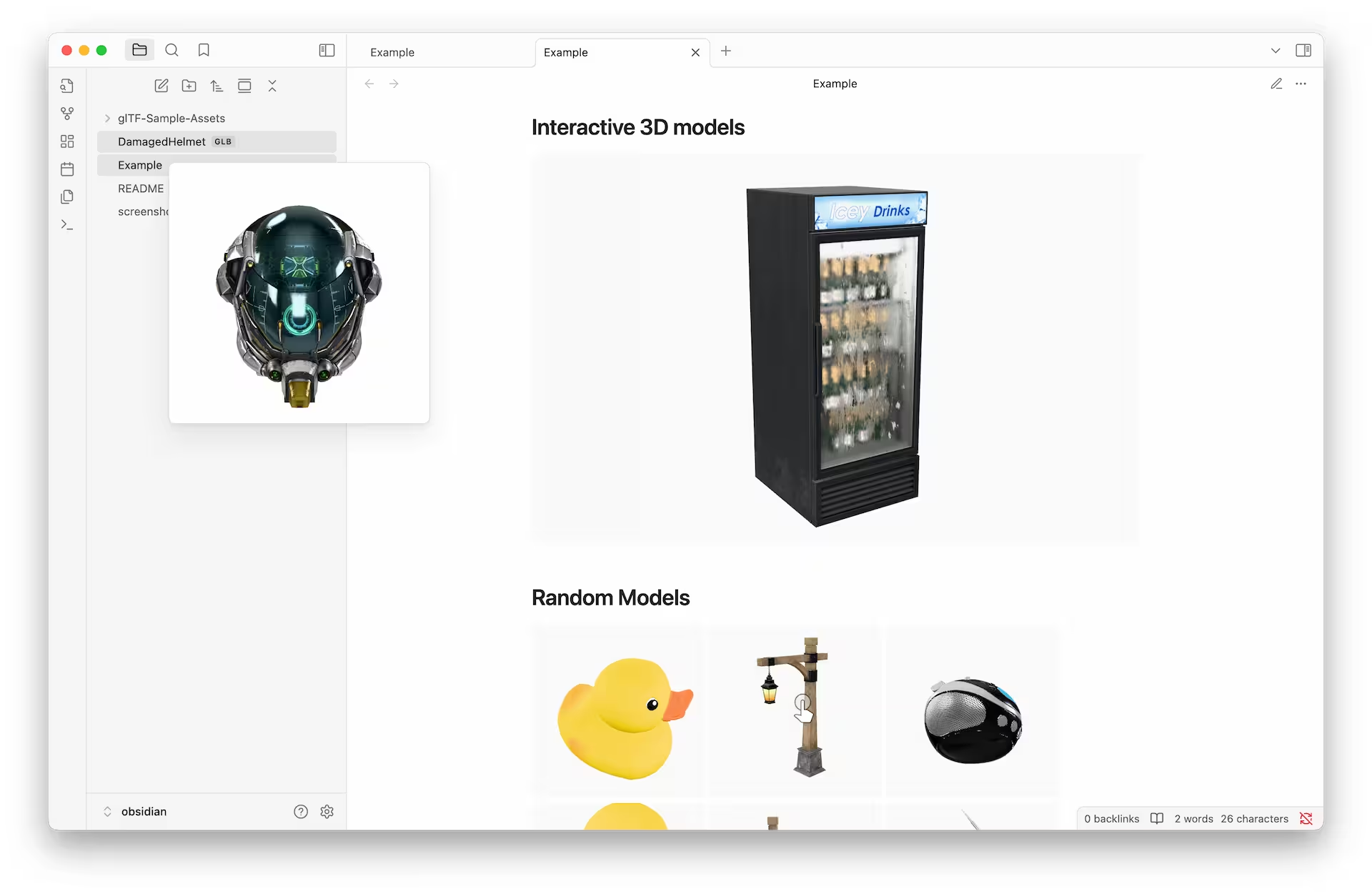
Screenshot

<model-viewer> supports and plans to support only glTF/GLB 3D models. It is the Khronos standard known as the JPEG of 3D and the first format to standardize Physically-Based Rendering (PBR), making your models look realistic under any lighting, on any renderer. It is also compact, compressible, and loads rapidly into the GPU.

<model-viewer> FAQ

Features

  • .glb and .gltf file support with most popular glTF extensions (including Draco compression, KTX2 textures and PBR materials)
  • Supports most of the features of the <model-viewer> component
  • Obsidian-style embed syntax with custom attributes

File View

Using this plugin, Obsidian automatically recognizes the .glb and .gltf files in your vault, allowing you to browse them and open them in a tab.

Hover Preview

When combined with Obsidian's page preview plugin (enabled by default), you can view 3D models using the hover preview.

Embed models in Markdown

You can embed 3D models in your notes using Obsidian's native embed syntax. This allows you to view and interact with the models directly within your notes.

The simplest embed looks like this:

![[DamagedHelmet.glb]]

If you want to specify the height of the model, you can do so like this:

![[Duck.glb#height=400]]

Or alternatively, you can specify the aspect ratio:

![[Sponza.gltf#aspect=16:9]]

The embed will automatically fill the entire width of the container. As with other embed types, you can also specify the width after the pipe character:

![[StainedGlassLamp.gltf#aspect=1|320]]

You can even place models side by side on a single line:

![[A.glb|160]] ![[B.glb|160]] ![[C.glb|160]]

Using <model-viewer> attributes

You can also use any of the attributes supported by the <model-viewer> component. To do this, you can use the following syntax:

![[Fox.glb#autoplay&camera-controls=false&camera-orbit=30deg+80deg+80%]]

The documentation for all available attributes can be found here: https://modelviewer.dev/docs/index.html

75%
HealthGood
ReviewCaution
About
View and embed interactive glTF/GLB 3D models directly in your vault using Google's model-viewer. Browse and preview .glb/.gltf files, place interactive models in notes with native embed syntax, and support common glTF extensions like Draco and KTX2 for compressed assets and PBR materials.
VisualizationFilesFormats
Details
Current version
1.0.5
Last updated
Last year
Created
Last year
Updates
6 releases
Downloads
1k
Compatible with
Obsidian 1.7.6+
Platforms
Desktop, Mobile
License
0BSD
Report bugRequest featureReport plugin
Author
janispritzkaujanispritzkau
GitHubjanispritzkau
  1. Community
  2. Plugins
  3. Visualization
  4. Model Viewer

Related plugins

Kanban

Create Markdown-backed Kanban boards.

Notebook Navigator

A better file browser and calendar inspired by Apple Notes, Bear, Evernote and Day One.

Local REST API & MCP Server

Unlock your automation needs by interacting with your notes over a secure REST API.

Advanced Canvas

Supercharge your canvas experience. Create presentations, flowcharts and more.

QuickAdd

Quickly add new notes or content to your vault.

Recent Files

Display a list of recently opened files.

Importer

Import data from Notion, Evernote, Apple Notes, Microsoft OneNote, Google Keep, Bear, Roam, and HTML files.

Omnisearch

Intelligent search for your notes, PDFs, and OCR for images.

Claudian

Embeds Claude Code/Codex as an AI collaborator in your vault. Your vault becomes agent's working directory, giving it full agentic capabilities: file read/write, search, bash commands, and multi-step workflows.

Excalidraw

Visual PKM powerhouse. Create and edit Excalidraw drawings.