Memoria
 i-iooi-i4k downloads
Waterfall-style memo plugin for flomo-like fleeting thoughts, stored as plain Markdown.
- Overview
- Scorecard
- Updates48
Memoria 🪶
A flomo-style fleeting-thoughts plugin for Obsidian
Your data stays as plain Markdown. Freedom belongs to you.
English · 简体中文
English
Memoria is a lightweight memo plugin for Obsidian. It gives you a quick-capture input box, a waterfall-style timeline, tag search, image paste and drag support, task checkbox writeback, pinning, starring, statistics, and a year panorama view.
All notes are stored as ordinary Markdown files in your vault. Memoria does not lock your data into a database or a proprietary format, so your memos remain readable and searchable even if you stop using the plugin.
Main features:
- Quick capture with
Ctrl/Cmd+Enter - Global capture command for fast notes
- Plain Markdown storage in yearly files
- Tag autocomplete and combined tag/keyword search
- Paste, drag, and file-picker image capture
- Sidebar heatmap, calendar, statistics report, and year panorama
- Mobile-friendly layout and touch interactions
- Chinese and English interface languages
See README.en.md for the full English documentation.
简体中文
📸 看起来像什么样
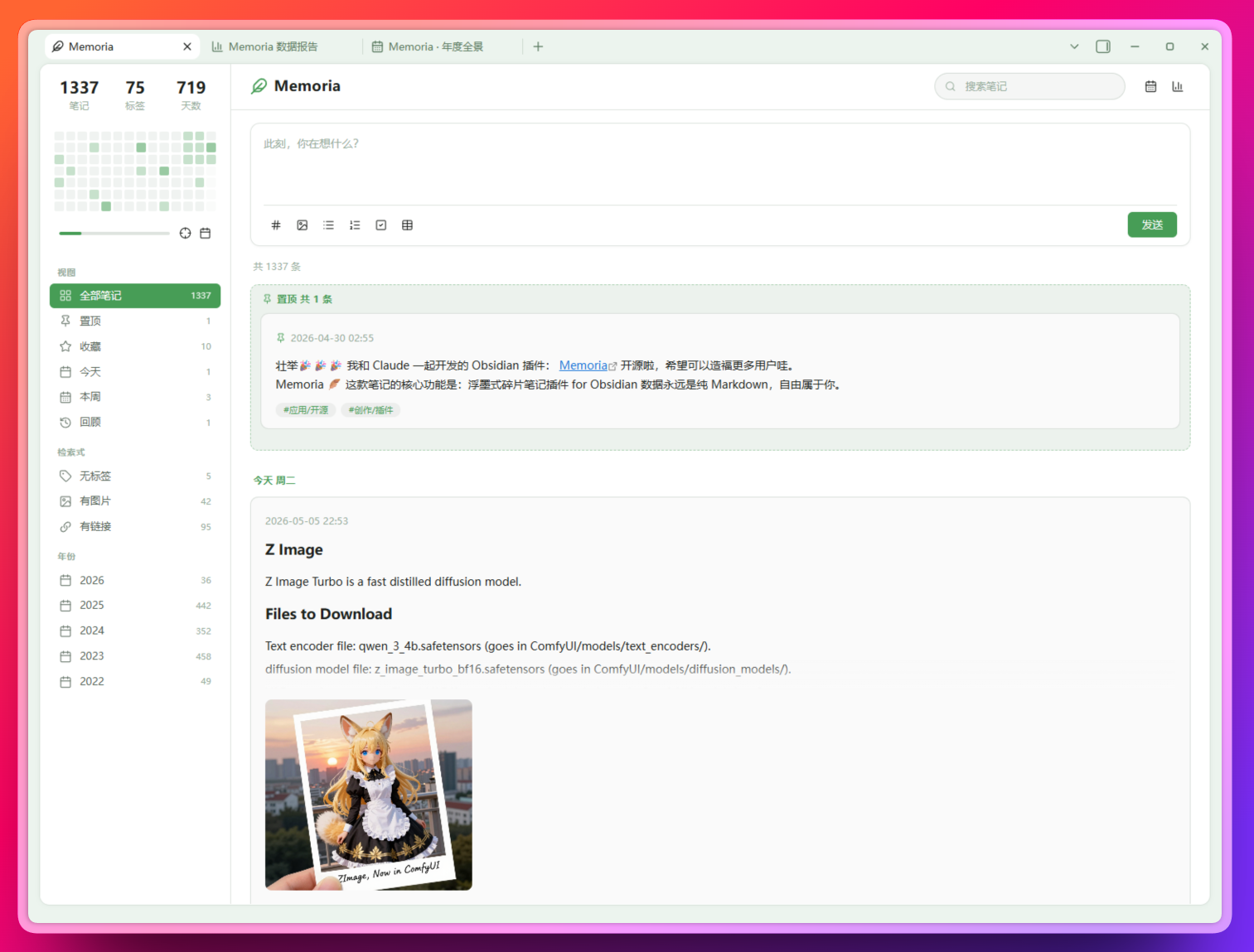
主视图(瀑布流 + 侧栏热力图 + 置顶笔记)
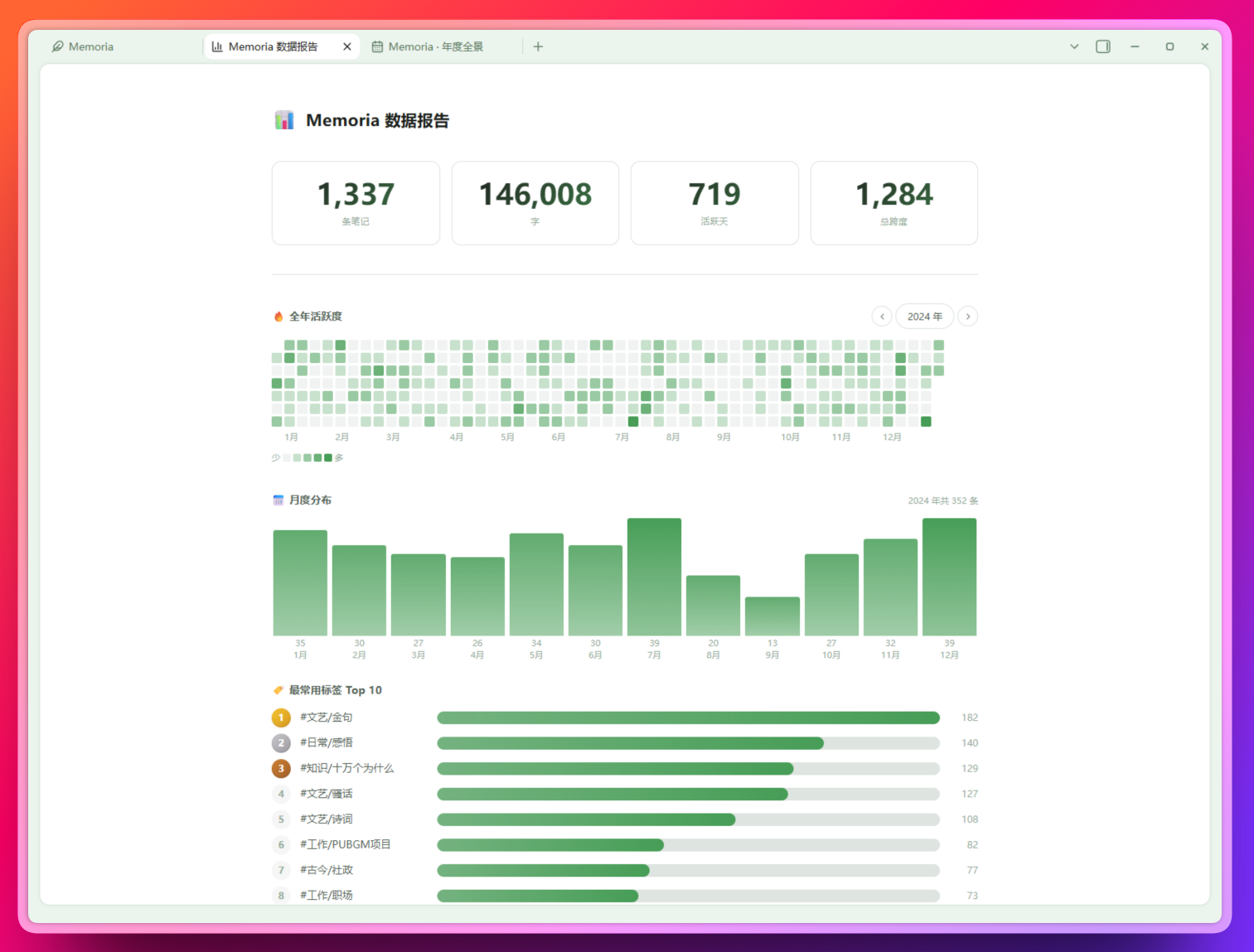
数据报告(365 天热力图、月度柱图、Top 10 标签、24 小时分布、有趣的发现)
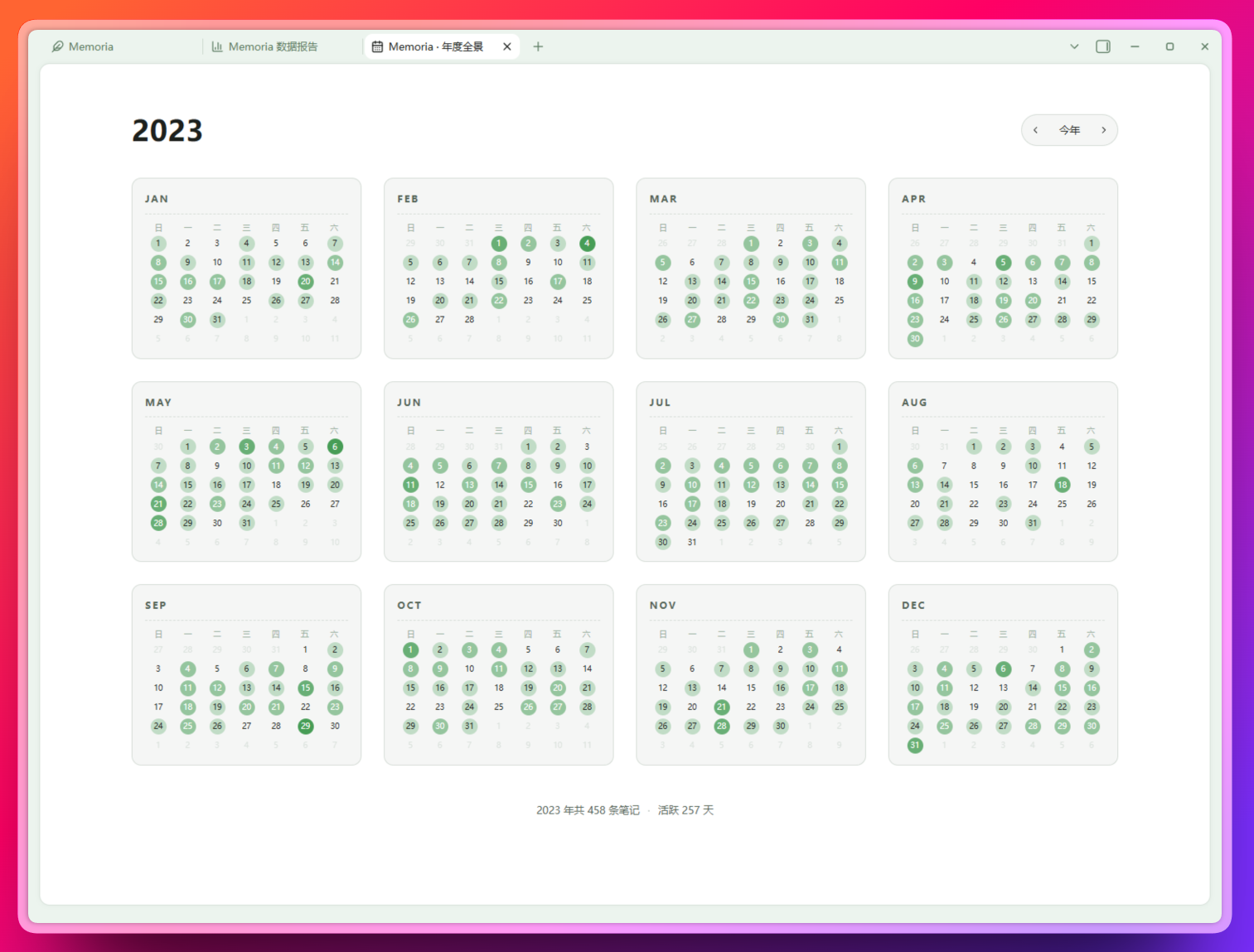
年度全景(12 个月铺开的日历,点任一天跳回主视图看那天的笔记)
💭 为什么做这个
我想要一个随手记想法的地方。
不需要复杂的双向链接,不需要知识图谱,也不需要每条笔记都想着"放进哪个文件夹"。就是一个输入框、一个发送按钮,按时间倒序瀑布流显示,偶尔翻翻过去的自己。
但我同时希望:这些想法永远是我能随时 grep 的纯 markdown 文件。哪一天我不再用这个插件,不再用 Obsidian,甚至不再用电脑的图形界面——那些笔记还躺在硬盘上,文本编辑器打开就能读,命令行 grep 就能搜。
Memoria 就是这样一个插件:把"浮墨式的快速记录体验"搬进 Obsidian,数据落到你自己的 vault 里,存成最普通的 YYYY.md 文件。
✨ 它能做什么
随手记
- 输入卡片 +
Ctrl/Cmd+Enter发送 - 全局快捷键
Ctrl/Cmd+Shift+M任意位置唤出速记弹窗 - iOS 快捷指令通过
obsidian://memoria-capture直接写入文字闪念 - 图片:粘贴 / 拖拽 / 选择文件,自动入库为 vault 附件
- 标签联想(汇集 vault 所有标签)、列表 Tab 缩进、Enter 自动续行
- 草稿自动保存,重启不丢
随手翻
- 按天分组瀑布流,置顶自动置顶
- 侧栏 14 周热力图 ↔ 月历一键切换
- 预设视图:今天 / 本周 / 置顶 / 收藏 / 往年的今天 / 随机 5 条
- 组合搜索:
#标签 关键词空格分隔,多标签多关键词 AND
看见自己
- 数据报告独立标签页:365 天大热力图、月度分布、Top 10 标签、24 小时活跃、标签云
- 年度全景:12 个月完整日历铺开,看一整年的节奏
- 有趣的发现:最长连续打卡、最活跃的一天、夜猫子次数、年同比等
贴心细节
- 长笔记自动折叠,点"全文"展开
- 任务列表可勾选,自动回写 md
- 卡片右键菜单:置顶 / 收藏 / 编辑 / 引用 / 保存为图片 / 打开原文
- 删除可软删除到
_trash.md(可关) - 移动端:抽屉侧栏、长按编辑、表格选择器适配手指
📂 存储格式
Memoria 在指定文件夹下维护 YYYY.md 文件,采用「时间独占一行 + 内容缩进」格式:
# 2026

## 2026-04-25 周六

- 12:43
  这是今天的第一条想法 #灵感

- 14:20
  又想到了一件事
  可以换行继续写,每一行都缩进 2 空格

- 15:47
  > [!tip] callout / 任务列表 / 标题等块级语法都能正确渲染

- 16:30
  - [ ] 任务列表也 OK
  - [x] 自动勾选回写
每条 - HH:MM 开头是一条独立 memo。停用插件那一刻,笔记依然是完整可读的 md 文件。
🚀 安装
目前支持手动安装。从 Releases 下载最新版的三件套:
<Your Vault>/.obsidian/plugins/memoria/
├── main.js
├── manifest.json
└── styles.css
然后 Obsidian → 设置 → 第三方插件 → 启用 Memoria → 左侧 Ribbon 点 🪶 打开面板。
也可以用 BRAT 插件输入
i-iooi-i/obsidian-memoria自动安装和更新。
⌨️ 常用快捷键
| 动作 | 快捷键 |
|---|---|
| 发送当前输入 | Ctrl/Cmd + Enter |
| 快速记录(全局弹窗) | Ctrl/Cmd + Shift + M |
| 列表缩进 / 反缩进 | Tab / Shift+Tab |
| 进入编辑模式 | 双击卡片(移动端长按) |
| 退出编辑 | Esc |
📱 iOS 快捷指令
Memoria 支持通过 iOS 快捷指令输入文字并写入当前时间的笔记:
- 在 Memoria 设置页找到「iOS 快捷指令」,点击「复制 URI 模板」。
- 新建快捷指令,依次添加「请求输入」「URL 编码」「URL」「打开 URL」。
- 将复制的 URI 模板粘贴到「URL」,并把「URL 编码」的结果追加到模板末尾。
- 运行快捷指令;Obsidian 会打开目标仓库,Memoria 保存后显示通知。
也可以把快捷指令加入主屏幕、Siri,或设置为接收分享菜单中的文字。URI 不带 content 参数时,手机端会打开 Memoria 并展开与右下角 ➕ 相同的输入卡片;桌面端则打开快速记录弹窗。
iOS 会唤醒 Obsidian 后再运行社区插件,因此冷启动时需要等待目标仓库和插件加载。目前仅支持文字,不支持图片。
🛠 开发
npm install
npm run dev     # watch 模式
npm run build   # 生产打包
📜 变更日志
详见 CHANGELOG.md。
📝 许可
Memoria,意思是「记忆」。
祝你的每一份记忆,都被温柔保存。