Search...Search plugins and themes...
⌘K
Sign in
  • Get started
  • Download
  • Pricing
  • Enterprise
  • Account
  • Obsidian
  • Overview
  • Sync
  • Publish
  • Canvas
  • Mobile
  • Web Clipper
  • CLI
  • Learn
  • Help
  • Developers
  • Changelog
  • About
  • Roadmap
  • Blog
  • Resources
  • System status
  • License overview
  • Terms of service
  • Privacy policy
  • Security
  • Community
  • Plugins
  • Themes
  • Discord
  • Forum / 中文论坛
  • Merch store
  • Brand guidelines
Follow us
DiscordTwitterBlueskyThreadsMastodonYouTubeGitHub
© 2026 Obsidian

Meld Diff

Andrew PullinsAndrew Pullins3 downloads

Meld-style split diff and merge, plus configurable sync-conflict discovery.

Add to Obsidian
  • Overview
  • Scorecard
  • Updates4

icon.png

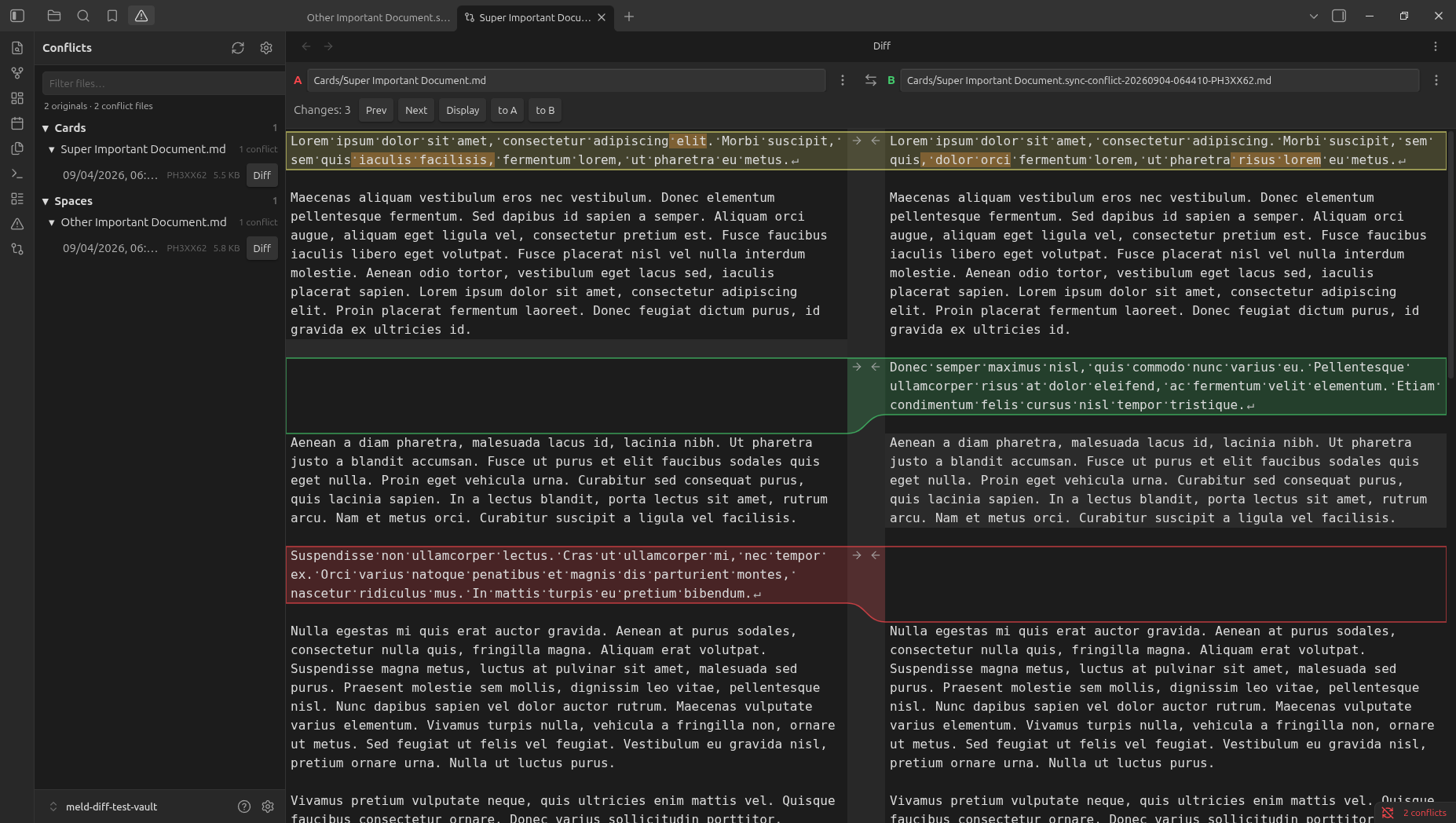
A two-pane diff inside Obsidian, the way Meld works on the desktop. Compare any two notes, or paste text that is not a note yet. It also finds sync-conflict files and pairs them with the original.
desktop-split.png

If you already use Meld, the gestures are the same. Click an arrow to take that hunk. Shift-click deletes it. Hold Ctrl (Cmd on macOS) to insert above or below, only when both sides have text there.

This is for you if

  • Syncthing, Nextcloud, Dropbox, or Obsidian Sync left a note.sync-conflict-… file next to a note and you want to merge it by hand.
  • You want to compare two notes in the vault without leaving Obsidian.
  • You want to paste a block from somewhere else, diff it against a note, and save the result as a new note.

This is not a git client. It does not talk to Syncthing. It does not diff images, PDFs, or canvases.

Conflicts

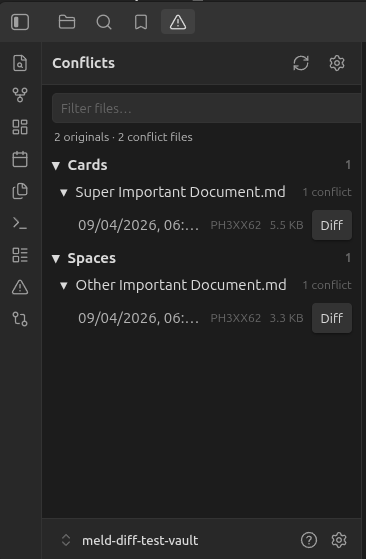
Conflict view lists originals and the conflict files next to them. Open a row and the pair loads in the diff. Syncthing names are recognized by default. Other tools can be added with a glob or a regex in settings.
conflict-list.png

If the original is not in the same folder, the diff still opens and offers to find a note with that name. It will not load one from another folder unless you confirm.

The diff

Both panes are source editors. Markdown stays raw, so [[links]], list markers, and punctuation are part of the diff.

  • Text only on A is red. Text only on B is green. A change on both sides is yellow, with the differing words marked.
  • The file bar shows the folder and the name (folder/note.md). The long .sync-conflict-… tail is what gets cut off.
  • Original on A puts the original on the left. On a phone, A is the top pane. Turn the setting off and the original opens on B.
  • Autosave is on for a side that is already a note. A side with no file says No file until you use Save as and pick a folder and a name.

![Close-up of a changed line.png](screenshots/Close-up of a changed line.png)

![Close-up of addition.png](screenshots/Close-up of addition.png)

![Close-up of deletion.png](screenshots/Close-up of deletion.png)

![Blank diff with pasted text on one side and a note on the other.png](screenshots/Blank diff with pasted text on one side and a note on the other.png)

Phone

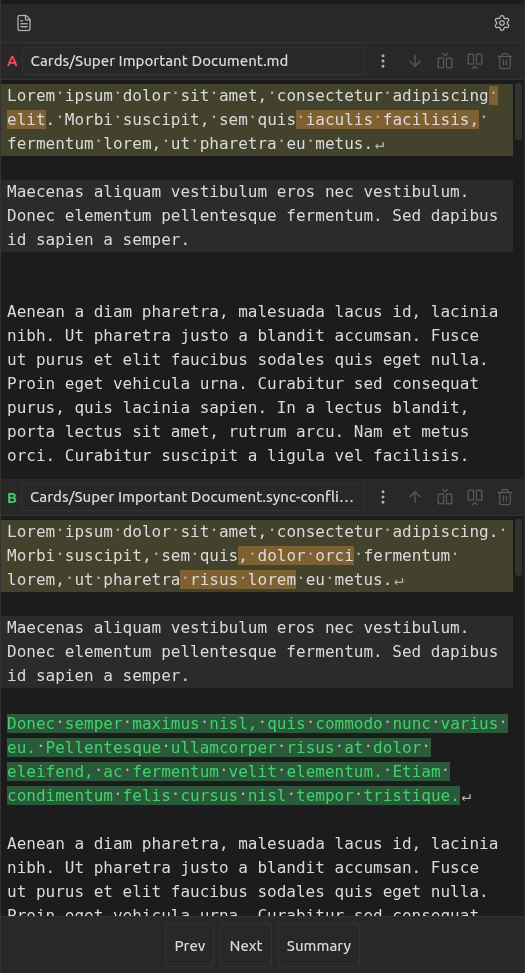
The same diff, stacked. Conflict view is in the left drawer, with Files and Search. The cursor picks the hunk. The buttons on the file bar replace, insert above, insert below, or delete it.
mobile-stack.png

Colors

Hunk colors follow the theme: red, green, yellow, orange. They do not follow the accent color. Settings and Style Settings can override them.

License

MIT

HealthExcellent
ReviewPassed
About
Compare any two notes in a two-pane Meld-style diff inside Obsidian, or paste external text to diff and save the result as a new note. Find sync-conflict files paired with originals, open them side-by-side, and merge changes by taking or removing hunks while editing raw Markdown in both panes.
FilesEditingSyncing
Details
Current version
0.1.3
Last updated
10 hours ago
Created
6 days ago
Updates
4 releases
Downloads
3
Compatible with
Obsidian 1.13.0+
Platforms
Desktop, Mobile
License
MIT
Report bugRequest featureReport plugin
Author
Andrew PullinsAndrew Pullinsandroid272
GitHubandroid272
  1. Community
  2. Plugins
  3. Files
  4. Meld Diff

Related plugins

Thino

Quickly capture memos and display them in the sidebar with a heatmap. (Closed source)

Google Drive Sync

Syncs a vault into Google Drive for cross-platform use (works for iOS).

Gemini Scribe

Allows you to interact with Gemini and use your notes as context.

Nutstore Sync

Sync your vault with Nutstore (坚果云) using WebDAV protocol.

Remember cursor position

Remember cursor and scroll position for each note.

Code Space

Professional code file management with visual dashboard, syntax highlighting editor, Markdown embedding, external folder mounts, and terminal integration.

Note Refactor

Extract note content into new notes and split notes.

Notebook Navigator

A better file browser and calendar inspired by Apple Notes, Bear, Evernote and Day One.

Claudian

Embeds Claude Code/Codex and other local Agents as AI collaborators in your vault.

Self-hosted LiveSync

Sync vaults securely to self-hosted servers or WEBRTC.