Meeting Detector
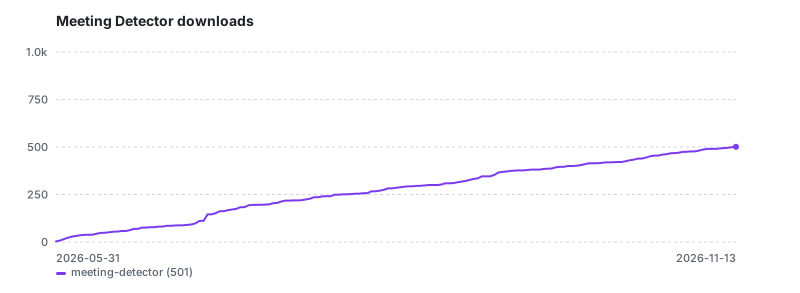
 Yuto Takagi502 downloads
Auto-detect online meetings (Zoom, Google Meet, Teams) and prompt to record or create meeting notes.
- Overview
- Scorecard
- Updates3
Automatically detect online meetings (Zoom, Google Meet, Microsoft Teams) and prompt you to start recording or create meeting notes.
Features
- Auto-detect meetings — Monitors for Zoom, Google Meet, and Microsoft Teams (new and classic) in the background
- One-click actions — Start recording, create a meeting note, or both from a single popup, with a title you can edit
- Record the other side too — Record with the core Audio Recorder (your microphone) or with the System Recording plugin (system audio + microphone, so the other participants are recorded even with headphones)
- Meeting notes from templates — Generate notes with
{{title}},{{date}},{{time}},{{app}}variables - Meeting end detection — Optionally auto-stop recording or show a notification when a meeting ends
- Noticed in the background — A system notification is shown when Obsidian is not in front
- Local only — No network access. Detection runs
pgrepandosascripton your Mac
How It Works
The plugin periodically checks for running meeting applications:
| App | Detection Method |
|---|---|
| Zoom | Process detection (pgrep -x zoom.us) |
| Microsoft Teams | Process detection (pgrep -x MSTeams for the new Teams, pgrep -x Teams for classic Teams) |
| Google Meet | Browser tab detection via osascript (Chrome, Brave, Edge, Arc, Safari) |
When a meeting is detected, a modal appears with a Title field (used for the note and the recording file names) and options to:
- Start Recording — Starts the recorder chosen in the settings
- Create Meeting Note — Creates a note from your template
- Record & Create Note — Creates the note first, then starts recording (System Recording links the recording into that note)
- Dismiss — Close the modal (won't show again for this meeting)
A meeting counts as ended only after the app has been missing for 3 checks in a row (15 seconds at the default interval). A check that fails or times out (for example osascript taking too long) is treated as "unknown" and never ends a meeting, so a recording is not stopped in the middle of a call.
Settings
| Setting | Description | Default |
|---|---|---|
| Enable plugin | Toggle monitoring on/off | On |
| Zoom / Google Meet / Teams | Enable/disable each app | All on |
| Polling interval | How often to check (seconds) | 5 |
| Ignore apps already running at startup | Don't announce apps that were already running when Obsidian started, until they quit and start again (useful if you keep Zoom open all day) | Off |
| Desktop notification | Also show a system notification when Obsidian is in the background | On |
| Record with | Core audio recorder, or the System Recording plugin (offered only when it is installed and enabled) | Core audio recorder |
| Template file path | Path to a template in your vault | (built-in default) |
| Notes folder | Where meeting notes are saved | Meetings |
| File name format | Date tokens and {{title}} (see below) |
YYYY-MM-DD_{{title}} |
| Action on meeting end | Stop recording / Show notice / Do nothing | Show notice |
File name format
- Date tokens:
YYYYMMDDHHmmss(alsoYYMMMMMMMDodddddddhh), formatted with Obsidian's moment. A run of letters is treated as a date only when it is made entirely of tokens, so words likeMeetingstay as they are {{title}}: the title from the popup- Text in
[brackets]is kept as is - Characters that are not allowed in file names or links (
\ / : * ? " < > | # ^ [ ]) are removed. If a note with the same name exists,1,2, … is added
Template Variables
Use these in your template file:
| Variable | Description | Example |
|---|---|---|
{{title}} |
Title from the popup | Zoom meeting |
{{date}} |
Current date | 2026-04-06 |
{{time}} |
Current time | 14:30 |
{{app}} |
Detected app name | Zoom |
Recording with System Recording
With Record with: System recording plugin, Meeting Detector uses the API of System Recording 1.1.0+ (app.plugins.plugins["system-recording"].api, apiVersion 1) and passes the title and the meeting note, so the recording file is named after the meeting and linked into its note. With System Recording 1.0.x (no API) it runs its "Start recording" / "Stop recording" commands instead. If System Recording is not enabled, the core audio recorder is used and a notice says so.
Requirements
- macOS (uses
pgrepandosascriptfor detection) - Obsidian v1.4.0+
- Audio Recorder core plugin, or the System Recording plugin (optional, for recording)
Installation
From Community Plugins
- Open Obsidian Settings
- Go to Community Plugins and disable Safe Mode
- Click Browse and search for "Meeting Detector"
- Click Install, then Enable
Manual Installation
- Download
main.js,manifest.json, andstyles.cssfrom the latest release - Create a folder
meeting-detectorin your vault's.obsidian/plugins/directory - Copy the downloaded files into that folder
- Restart Obsidian and enable the plugin in Settings > Community Plugins
Development
git clone https://github.com/yut0takagi/obsidian-meeting-detector.git
cd obsidian-meeting-detector
npm install
npm run dev
npm test        # unit tests (vitest)