Search...Search plugins and themes...
⌘K
Sign in
  • Get started
  • Download
  • Pricing
  • Enterprise
  • Account
  • Obsidian
  • Overview
  • Sync
  • Publish
  • Canvas
  • Mobile
  • Web Clipper
  • CLI
  • Learn
  • Help
  • Developers
  • Changelog
  • About
  • Roadmap
  • Blog
  • Resources
  • System status
  • License overview
  • Terms of service
  • Privacy policy
  • Security
  • Community
  • Plugins
  • Themes
  • Discord
  • Forum / 中文论坛
  • Merch store
  • Brand guidelines
Follow us
DiscordTwitterBlueskyThreadsMastodonYouTubeGitHub
© 2026 Obsidian

Markdown Columns

Czeglédy PéterCzeglédy Péter114 downloads

Create responsive Markdown columns using a simple syntax.

Add to Obsidian
  • Overview
  • Scorecard
  • Updates4

One of Markdown's major limitations is the inability to create columns, even though doing so would be extremely useful in some cases. This plugin attempts to address this issue by introducing a new columns block.

With this plugin, you can create an unlimited number of columns that retain the original Markdown formatting, without needing to rewrite the note in HTML.

Features

  • Unlimited number of columns
  • Full Markdown rendering inside each column
  • Supports code blocks, callouts, tables, lists, images, and links
  • No HTML required
  • Responsive layout

Usage

It's recommended to use 4 backticks instead of 3, because this allows you to use code blocks inside columns without breaking the outer columns block.

Columns are separated with 3 colons: :::
Each column can contain any valid Markdown content.

Example

````columns
# Column 1

- Item 1
- Item 2
- Item 3

:::
# Column 2
```css
.markdown-column {
    min-width: 0;
}
```
````

Will be rendered as:
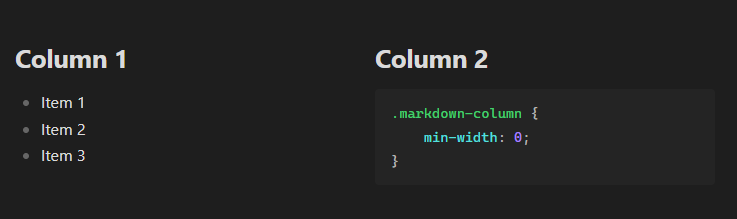
Demo image

Installation

The plugin can be downloaded from the Obsidian plugin browser.

License

MIT License

HealthExcellent
ReviewPassed
About
Create responsive multi-column layouts directly in Markdown using a columns block. Render unlimited columns with full Markdown support — including code blocks, callouts, tables, lists, images, and links — without writing HTML.
MarkdownFormatting
Details
Current version
1.0.3
Last updated
3 weeks ago
Created
3 weeks ago
Updates
4 releases
Downloads
114
Compatible with
Obsidian 1.12.7+
Platforms
Desktop, Mobile
License
MIT
Report bugRequest featureReport plugin
Author
Czeglédy PéterCzeglédy Péterpeterczegledy
GitHubpeterczegledy
  1. Community
  2. Plugins
  3. Markdown
  4. Markdown Columns

Related plugins

Linter

Format and style your notes. Linter can be used to format YAML tags, aliases, arrays, and metadata; footnotes; headings; spacing; math blocks; regular Markdown contents like list, italics, and bold styles; and more with the use of custom rule options.

Blur

Create obfuscated blocks of text.

Columns

Create columns in Markdown.

Image Captions

Add captions to images with inline Markdown and link support. The caption format is compatible with the Commonmark spec and other Markdown applications.

Paste Reformatter

Reformats pasted text for precise control.

Inline spoilers

Adds Discord-like syntax for inline spoilers.

Importer

Convert your data to Markdown files you can use in Obsidian. Works with Apple Notes, OneNote, Evernote, Notion, Google Keep, and many other formats.

Outliner

Work with your lists like in Workflowy or Roam Research.

Admonition

Admonition block-styled content.

Custom Frames

Turn web apps into panes using iframes with custom styling. Also comes with presets for Google Keep, Todoist and more.