Map of Content Generator
 danybeam168 downloads
Generates a map of content for your vault based on folder structure.
- Overview
- Scorecard
- Updates2
This is a utility that generates pre-filtered bases on a folder of your choice so that you can use them as maps of content if you use Maps of Content. I found myself going through the same motions over and over so I made this to automate and manage that.
Settings
Enable ribbon button
Description:
Whether to display the ribbon button for manual generation
Default value:
On
Example:
Map of content directory
Description:
Path of the folder where your maps of content will be stored.
Default value:
empty
Notes:
Do not add the leading / to the path of the folder
Example:
Map of content template
[!caution] This is temporarily disabled as I figure out how to use the file search API to make it use a file instead of raw text
Description:
The text that will be inserted/updated into the maps of content (except root)
Root map template
[!caution] This is temporarily disabled as I figure out how to use the file search API to make it use a file instead of raw text
Description:
The text that will be inserted/updated into the root map of content
Exclude all bases
Description:
Whether to show other bases in the view
Default value:
On
Example on:
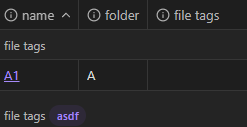
Example off:

Exclude self
[!important] This might be removed as it doesn't really apply
This was left undocumented intentionally
Delete empty folders on generation
[!caution] This can and will delete your map of content folder if it contains no files after the generation process.
Make sure you have at least one other folder before starting the generation if this is turned on.
This can also be avoided by having Generate root map of content set to on.
Description:
Delete any empty sub-folders under the map of content folder after generation
Default value:
On
Generate on startup
[!warning] The processing time grows the more folders and maps of content you have.
If Obsidian is taking a long time to start up try turning this off and running it manually every now and then.
Description:
Whether to generate and/or update the maps of content on startup.
Default value:
On
[!note] The base results themselves are updated by Obsidian.
On update only the queries and views are updated.
Update templates on generation
[!warning] This is a destructive operation.
Once a base has been updated you'll lose any customization you might've put on top of it.
Description:
Whether to update the bases queries regardless of when they were created
Default value:
On
Ignore extras during update
Description:
Whether to update or ignore the queries for bases that do not map to any specific folder.
On = Extras will be ignored This was made with the intention to allow people to have custom bases beyond what this tool provides.
See also Remove extra bases
Default value:
On
Generate root map of content
Description:
Whether to generate a special map of content that maps other bases in the map of content folder.
This is intended to be the entry point for the maps of content themselves.
Default value:
On
Root map of content name
Description:
Name of the root map of content if generated.
This is the name of the file, not the whole path.
Default value:
root
Example:
Remove extra bases
Description:
Whether to remove bases from the map of content folder that do not map to any folder in the vault.
This was made with the intention to allow people to have custom bases beyond what this tool provides.
For obvious reasons this precedes "Ignore extras during update"
See also ignore extras during update
Default Value:
On