Search...Search plugins and themes...
⌘K
Sign in
  • Get started
  • Download
  • Pricing
  • Enterprise
  • Account
  • Obsidian
  • Overview
  • Sync
  • Publish
  • Canvas
  • Mobile
  • Web Clipper
  • CLI
  • Learn
  • Help
  • Developers
  • Changelog
  • About
  • Roadmap
  • Blog
  • Resources
  • System status
  • License overview
  • Terms of service
  • Privacy policy
  • Security
  • Community
  • Plugins
  • Join the community
  • Discord
  • Forum / 中文论坛
  • Merch store
  • Brand guidelines
Follow us
DiscordTwitterBlueskyThreadsMastodonYouTubeGitHub
© 2026 Obsidian

Map of Content

robin-haupt-1robin-haupt-141k downloads

Automatically generate a Map of Content for your vault.

Add to Obsidian
  • Overview
  • Scorecard
  • Updates23

With this plugin, you will always know exactly where you are in your vault and how all of your notes are connected to each other. It helps you organize your notes in a decentralized manner, where every note is connected to a central note through different other notes.

It will find the shortest path from the central note to the currently open note and display it. It will also display the notes that are hierarchically below the current note (it's descendants) and their descendants.

It there are different paths to any one note that have the same length, they will all count. That way a note can have several parents and show up in different contexts, just like thoughts in your brain and ideas in real life tend to do do.

Because it generates this information from the links in your notes, the structure stays flexible and can adapt to any changes you make to your links. It will automatically update when you switch between notes, so you don't have to do anything to keep it up to date. You can also trigger a manual update by clicking on the little sync icon in the top bar.
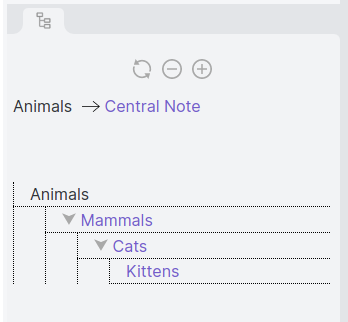
Example Map of Content

This Map of Content will be displayed in the plugin pane, right of the editor. You can choose which note should be at the center of your vault in the settings tab.

Here's another example of what the view can look like if you have a lot of notes:
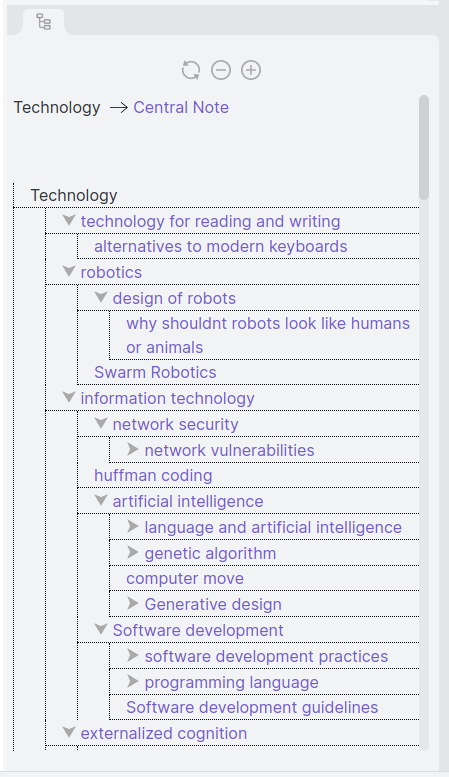
Second example Map of Content

You can download it by searching for "Map of Content" in the Obsidian community plugin store.

67%
HealthFair
ReviewCaution
About
Display the shortest path(s) from a chosen central note to the open note and list its descendants. Update automatically as you switch notes, show all equal-length alternative paths so notes can appear in multiple contexts, and render the map in a side pane beside the editor.
NavigationLinksSidebar
Details
Current version
1.4.0
Last updated
3 years ago
Created
5 years ago
Updates
23 releases
Downloads
41k
Compatible with
Obsidian 1.4.5+
License
GPL-3.0
Report bugRequest featureReport plugin
Author
robin-haupt-1robin-haupt-1
github.com/Robin-Haupt-1/Obsidian-Map-of-Content
GitHubrobin-haupt-1
  1. Community
  2. Plugins
  3. Navigation
  4. Map of Content

Related plugins

Notebook Navigator

Alternative file browser with folders, tags, properties, shortcuts, previews, keyboard navigation, drag and drop, and pinned notes.

Recent Files

Display a list of recently opened files.

TagFolder

Show tags as folder.

Strange New Worlds

Reveal networked thought and the strange new worlds created by your vault.

Natural Language Dates

Create date-links based on natural language.

Reveal Active File Button

Add a button to the top of the File Explorer, to reveal the active file.

Breadcrumbs

Visualise the hierarchy of your vault using a breadcrumb trail or matrix view.

Table of Contents

Create a table of contents for a note.

Surfing

Surf the net like a web browser.

Floating TOC

A floating directory that hovers a widget of the current directory on the notes page.