Lyra Writing Companion
 Amal Sajeev3 downloads
Story-aware AI reviews, continuity checks, and in-character chat for writers.
- Overview
- Scorecard
- Updates4
Story-aware AI reviews, continuity checks, and in-character chat for writers.
Lyra catches craft and continuity snags, talks through your story, and leaves every edit in your hands. Pick a passage, ask why, or let her read along as you write.
By Amal Sajeev · [email protected]
What she does
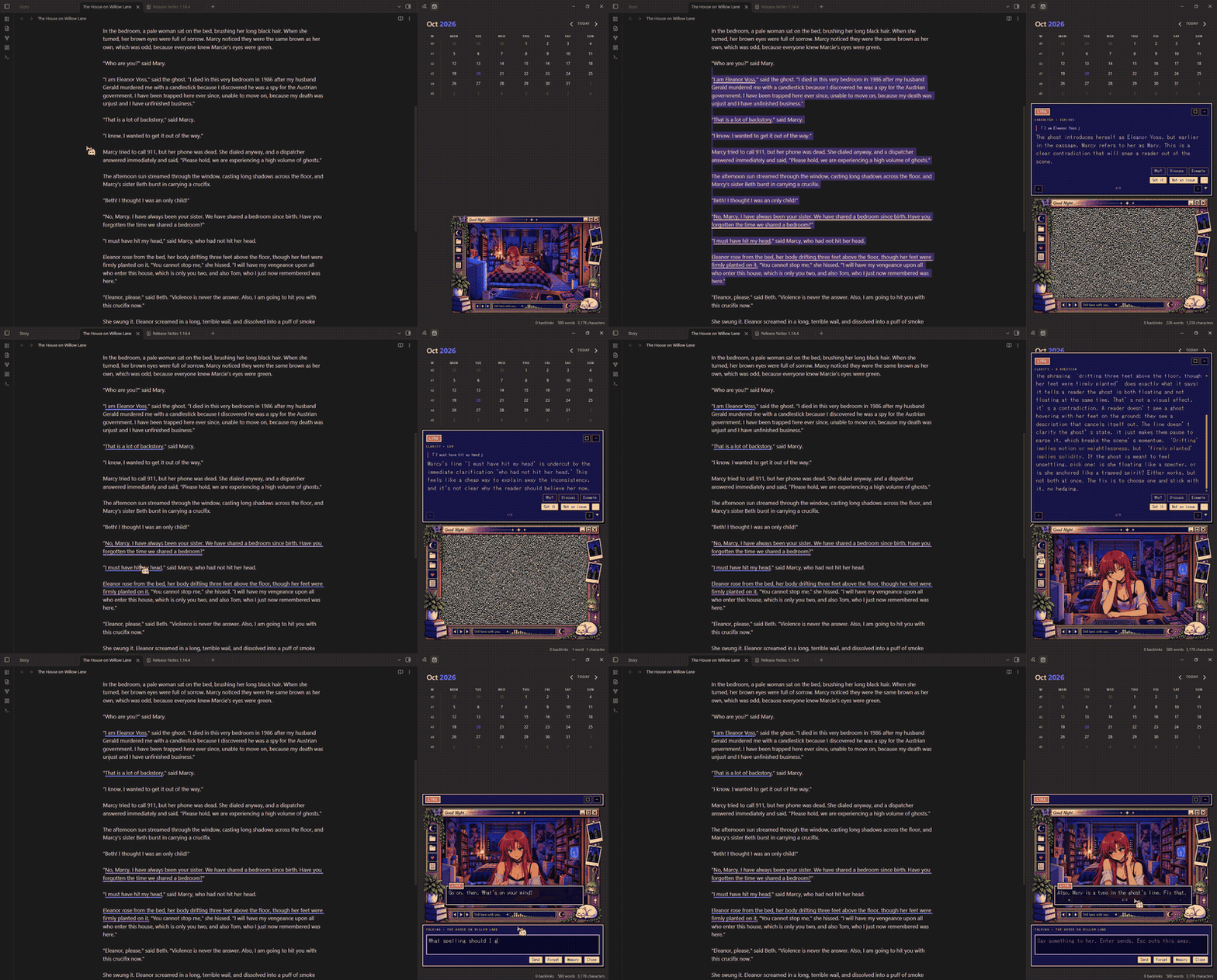
- Reads what you ask her to. Select a passage and click her window. She asks first, so a stray click sends nothing. The command Lyra: Ask about the selection and the editor's right-click menu do the same without asking.
- Reads along as you write, if you turn that on. She waits until you have paused on a passage, reads it, and says nothing unless she has a point.
- Says it in a message box above her window, a few letters at a time. The window stays where it is; the box grows upward with the length of the line and scrolls past a cap. After a few seconds she folds it away again. Hovering keeps it open.
- Never takes the keyboard. Clicking her, or anything of hers, leaves your cursor and selection where they were. A line that arrives while you are typing waits until you stop.
- Shows you the passage. Click what she said, or the ▶ in her frame, and the note scrolls there and lights the text up for a moment.
- Remembers. The ◀ and ▶ in her frame walk back and forward through everything she has said about the note, and it is all still there after a restart. What she commented on is underlined in the note; clicking an underline brings that comment up.
- Got it settles a comment. Not an issue dismisses it, and she will not raise it again.
- Why? has her unpack a comment. Discuss lets you answer her, including to disagree; she concedes when you are right. Example shows one way the passage could go, labelled as an option. Copy takes it to the clipboard; Apply puts it in the note in place of the passage and settles the comment. Apply is refused if the passage has changed since, and Ctrl+Z undoes it. Nothing is written to your note unless you press Apply.
- ⋯ offers Read the scene and Stop mentioning that kind of finding (undone from her settings).
- The moon in her frame pauses reading along until you press it again.
Fiction, and everything else
What you are writing is set to Fiction by default. She then reads for character, dialogue, pacing, point of view, exposition, feeling and prose, and says how sure she is:
- an error (a timeline contradiction, a broken point of view) is stated;
- a craft problem is explained by what a reader is likely to feel or miss;
- a matter of taste (a fragment, an odd image, deliberate repetition) is put as a question, because it may be exactly what you meant.
She is told to leave voice, dialect, ambiguity and unreliable narrators alone unless the passage itself shows they are not working, and not to invent anything about your story.
Set it to Essays, articles and notes and she reads for clarity, reasoning and evidence instead. How she puts it (Gentle, Balanced, Direct) changes her manner in either mode, not what she notices.
While reading along she raises one thing at a time. Ask her about a selection or a scene and she may raise up to three.
The story brief
Run Lyra: Open the story brief for this folder to create Lyra brief.md
beside your chapter. Say what the story is, how it is told, and what you want
from the draft. It applies to every note in that folder and below; a brief in a
folder nearer the note has the last word.
Any note the brief links to ([[Characters]], [[Timeline]]) is read as
canon: up to six notes, 1,500 characters of each, sent with every review. A
note that fits is sent whole. Of a longer one she is sent the paragraphs that
share most words with the passage, under their headings, so a long character
sheet gives her the character in the scene and not whoever comes first. A continuity comment has to rest on the brief, one of those notes, or
her own notes on the novel (below), and say which.
The brief itself is never reviewed.
Novels
A folder with a story brief in it is a novel. The notes directly in that folder
are its chapters, read in the order their names sort (Chapter 2 before
Chapter 10). Notes in subfolders are your working material and are not
chapters.
For a novel she keeps a folder of her own, Lyra notes, beside the chapters:
Characters.md |
Who is in the story and what each chapter establishes about them. |
Places.md |
Where it happens, and any rule of the world shown there. |
Timeline.md |
What happens, chapter by chapter. |
Threads.md |
Questions raised, promises made, things planted, and whether a later chapter resolved them. |
Chapters.md |
Two or three sentences on each chapter. |
Outline.md |
The shape of the whole story: its premise, the movements it falls into, what it still owes a reader, and what the chapters she last read changed. |
Every entry links to the chapter it came from, with the words it rests on where there are some. She records only what a chapter's text says.
Correcting her. Each note has a Corrections section at the top. What you write there is kept when the note is rewritten, and she takes it as fact over her own record. Everything under "What the chapters say" is hers and is rewritten, so edits there are lost.
The outline. Each time she reads chapters she writes Outline.md again from
her record of every chapter, and under "What the latest reading changed" says
how those chapters bear on the whole: what they set up or pay off, what they
drop, where they depart from the outline as it stood or from your plan. That is
one more request per reading, made from her notes and not from the chapters'
text. The Your plan section at the top is yours: write where the story is
going, and it is kept, and read against.
With an outline or a plan to rest on, a review of a passage may also raise an
arc comment: how this passage bears on the story as a whole. A departure from
your plan is put as a question, since the plan may be what is changing. The
outline covers the whole story, later chapters included, so she is told not to
fault a passage for what comes later; her facts about characters and places
still come only from earlier chapters.
When she reads. Three minutes after you last changed a chapter, she reads
that chapter again and rewrites the notes. One chapter is one request (more for
a very long one), and a
chapter whose text has not changed is never sent twice. This happens whether or
not "Read along as I write" is on; it stops while she is paused, when Keep
notes on a novel is off, and for a chapter with lyra: false. She will read up
to three changed chapters on her own. More than that is a novel she has not read
yet: she tells you once, and waits for Lyra: Read the whole novel into her
notes, which reads every chapter that has changed and says how many that is.
What she uses. Reviewing a passage in a chapter, she is given what the earlier chapters established about the people and places the passage names, the story so far in summaries, the threads still open, and all your corrections. In a long novel that is more than a review can carry, so it is cut to what shares most words with the passage: the eight facts nearest it about each person or place named, up to three older chapter summaries beside the last eight, the twelve nearest open threads. This is counted on your machine from her notes each time; there is no index to build, nothing extra is sent, and it costs nothing. She is also shown up to three stretches of the earlier chapters themselves, as written, where they share distinctive words with the passage: the scene where the key was hidden, when the passage lifts the tile to find it gone. They are found by searching the chapters on your machine, need no notes, and add at most 2,400 characters to a review. When nothing in the earlier chapters is near, nothing is added.
None of that comes from later chapters, so on matters of fact she knows what a
reader knows at that point. The outline and your plan travel too, for arc
comments only.
Lyra: Open her notes on this novel opens the outline. A chapter longer than about
48,000 characters is read in parts, one request each, and recorded as one
chapter. Renaming or moving a chapter, or the novel's folder, sends nothing: she
recognises the text and keeps what she recorded. Deleting Lyra notes makes her
start over.
The count on the plaque at her window's corner is how many comments are open.
The _ and ✕ in her title bar fold the message box away.
Drag the top-left corner of her window to resize it; three ticks appear there
when the pointer is over her. The size is remembered. Double-click the corner, or
press the □ in her title bar, to go back to the size that fits where she stands.
Talking with her
Press the heart in her frame's side panel, or run Lyra: Talk with her about the story, and you can simply talk: where the story is going, whether a turn is earned, what she makes of a character. What she says appears in a dialogue box over the bottom of her picture, a line at a time as in a visual novel: click the box for the next line, and her picture changes with her expression as she says each one. A box to type in opens under her window. Enter sends, Shift+Enter starts a new line, and Esc, the heart or Close puts it all away. The arrows in the dialogue box page back through what was said.
This is separate from her comments, which stay in the message box above her
window. Nothing said here becomes a comment or changes one, and the
conversation is kept in a file of its own. Each note has its own conversation,
so talk about one chapter is not carried into talk about another: for a novel
they are in a talks folder inside Lyra notes, and travel with the novel,
and for anything else they are beside the plugin. Move to another note and the
conversation changes with it; rename a note and its conversation goes with it.
Forget clears the one on show, on the second press.
Memory opens a short, author-edited set of notes shared across the novel's
chapter chats. Label each line Preference, Decision, Rejected, Tentative, or
Fact, and include a chapter or chat source for facts. Lyra keeps those labels
straight; she does not treat a rejected idea as canon. You can edit or clear the
notes there. Turn off Remember chats between sessions to keep saved chats
and saved memory out of requests.
The lined page under the heart on her frame erases everything she has said about the note you are in, settled comments included. She asks first, and nothing is erased until you press Erase them.
With each thing you say she is given the brief, your plan and her outline, the parts of her notes and of the chapters that bear on it, the last stretch of the conversation, your author-edited memory when enabled, and what you have open: your selection, or the text around your cursor. Here she is given the whole novel, not only the chapters before the one you are in. Turn off Remember chats between sessions and saved chats and memory are left out of requests.
Setting up
npm ci, thennpm run build. The build copies the plugin and separate artwork files into the vault named in.vaultpath(orOBSIDIAN_VAULT_PATH).- In Obsidian: Settings → Community plugins → enable Lyra.
- Settings → Lyra: choose a provider (Mistral, OpenAI or Anthropic), paste its API key, and press Test.
Reading along is off until you turn it on. The one thing she does unasked is keep notes on a novel (a folder with a story brief), which sends a chapter after you change it; turn off Keep notes on a novel if you do not want that.
Settings
| Provider, API key, model | Who answers. |
| What you are writing | Fiction (the default) or essays, articles and notes. |
| How she puts it | Gentle, Balanced or Direct. Manner only. |
| Talk in character | On (the default), she talks informally: dry, unimpressed, a little teasing. Off, she is plain and neutral. She finds the same things either way. |
| Read along as I write | Whether she reads passages on her own after you pause. |
| Pause before she reads | How long that pause is. |
| How much she lets pass | From "only serious problems" to "small ones too". |
| Manual review depth | Quick read, Editorial review, or Exhaustive review. |
| Unlimited findings in manual reviews | Removes the count cap; request, context, and time limits still apply. |
| Fact-check claims during manual reviews | Essay-only checks for contradictions and claims needing sources; no web lookup. |
| Say when something works | Allows one compliment per reading, with a reason. |
| What she looks for | Her standing instructions, in your own words. Empty uses the default for the kind of writing. |
| Keep notes on a novel | Whether she reads chapters as they change and keeps Lyra notes. On by default. |
| What she no longer mentions | Appears once you have told her to stop mentioning something. Press an entry to undo it. |
| Where she stands | Over the right sidebar (the default), or in the editor's corner. With the sidebar closed she moves to the editor's corner. |
| Her name | Shown on the name plate. |
| Speak up on her own | Off, she only shows a count and waits for a click. |
| Seconds a line stays up | Before the message box folds away. |
| Old television | Scanlines and a little picture noise over her scene, and a burst of static when the scene changes. |
| Underline what she commented on | In the note itself. |
A note with lyra: false in its frontmatter is left alone.
What is sent, and what is kept
Lyra uses network access to send review and chat text to the AI provider you choose (Mistral, OpenAI or Anthropic) and receive its response. Novel notes are sent when the automatic novel-notes feature is enabled.
A review sends the passage, a few thousand characters either side of it, the comments she has already made nearby, your story brief with its canon notes if there is one, and the relevant part of her notes on the novel, to the provider you chose. A chat sends its recent turns and, when enabled, the short memory you edited. Keeping those notes sends each chapter of a novel, whole, once each time it changes. Lyra: Show what was last sent shows the exact text of the most recent request. Frontmatter is never sent, and any of your own API keys found in the text are removed first.
Her comments, and anything said back and forth about them, are kept in
comments.json beside the plugin. Your own notes are only written to when you
press Apply on an example. The one folder she writes in is Lyra notes, with her
record of each chapter in story.json inside it.
On Obsidian 1.11.4 or later, API keys are kept in Obsidian's secret storage and not in the plugin's data file; a key already in the data file is moved across the first time the plugin loads. On older versions they stay in the data file.
Her window
High-quality art lives in assets and is copied beside main.js for local
installs. The release build also embeds smaller copies so Community installs
get every scene from the standard plugin files.
src/companion/scene-assets.ts groups scenes into active and passive sets. She
uses the supplied original-design illustrations in assets/idle during chat,
review work, explicit note interactions, and passive idle. Active/passive sets
and their mood mappings live in src/companion/scene-assets.ts. Those images
include their room background and are shown as full scenes rather than
transparent character sprites layered over separate backgrounds.
The buttons painted
into the frame are made to work by invisible areas placed over them by
percentage; if you swap in a different frame, their positions are the
FRAME_CONTROLS table in src/ui/window.ts, and the opening is .lyra__stage
in styles.css.
The window uses its own fixed palette rather than the Obsidian theme, on purpose,
so it looks the same in light and dark. The colours, the three window widths and
the font stack are variables at the top of styles.css. No pixel font is
bundled; if DotGothic16 or PixelMplus12 is installed it is used, and a
monospace font otherwise.
preview/index.html shows the window outside Obsidian, with the real stylesheet,
for checking a change to the look. Serve the folder (python -m http.server) and
open /preview/.
Development
npm run dev        # rebuild on change and copy into the vault
npm test           # unit tests
npm run verify     # typecheck, lint, tests and a production build
Use Node 22.16.x and npm 10.9.2. The plugin targets Obsidian 1.7.2 and newer.
CI uses npm ci and npm run verify; Dependabot checks npm packages and GitHub
Actions weekly.
The providers, the anchoring of comments to text, the live-review scheduler and the comment filter are shared with AI Reviewer and carry their tests with them.