Lovely-Mindmap
 shaunhurryup28k downloads
Build your own knowledge graph with smiles :-)
- Overview
- Scorecard
- Updates5
Obsidian canvas plugin to build your own knowledge graph with smiles : )
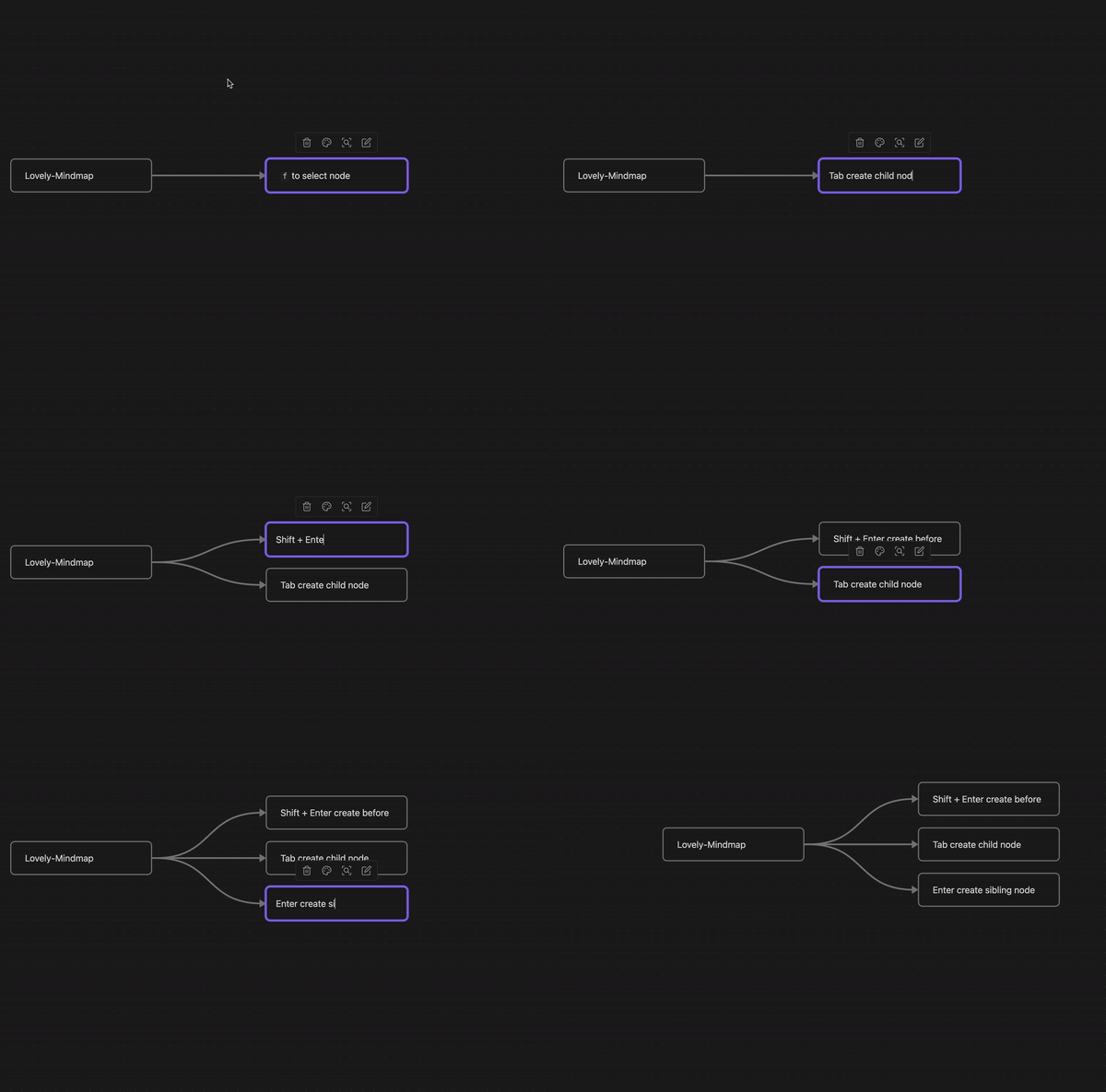
It is named mindmap, but not only mindmap. We will continue to introduce new features! Your unique and innovative idea has a good chance of being adopted by us.
Feel free to leave feature suggestions but please don't open issues for bugs or support requests just yet.
Any suggestion or question 👉 Discord
📕 Feature
As a plugin of mindmap, you can find basic mindmap feature in this plugin.
Tabcreate child node and zoom to fitEntercreate sibling node and zoom to fitShift + Entercreate sibling before and zoom to fitcmd + Escblur selection node and start navigating. Why notEsc?opt + ↑↓←→move around nodes with smart intention
🐮 Advanced
🕹 View
We declare three views in Lovely-Mindmap, they look similar, but have different interactions.
Touch: No nodes are selected
Navigation: One or more nodes are selected, you can do something
In the current scene, we just find the need to create and change the selection of a node.
We believe that in the feature, there will be various needs for multiple node interactions, such as layout.
Creation: One node is selected, and you can find the cursor inside the node
When you are creating, we don't want your thoughts and inspiration to be interrupted.
So at the plugin level, we only provide cmd + Esc to exit.
That means the modifier will do its original job,
Enter can wrap lines,
cmd + ←→ can move the cursor to the beginning/end of the line.
Dive into
As an accessibility enthusiast, I don't want to take my hands off the keyboard.
The keyboard f may be the first step to start your creation.
In touch view, f select the node closest to the center of the viewport.
In Navigation view, f activate selection node and start editing.
🚧 TODO
Canvas should only be applied in active graph
Double
fcreate node in the middle if no node in viewport
Not sure
- Automatically expand node while creating
Not sure
- Find node by keyword and zoom to fit
Woah!
- Import file like lark, XMind, and so on
Woah!
- Export obsidian mindmap to specified file format
Woah!
- Organize graph in a neat manner
Woah! I have both flexibility and practicality!
- Collision detection to avoid overlap
Woah!
- Create different layout by shortcut or option
Woah!
-
opt + ↑↓←→will move to next node out of the viewport if you confirm
Woah!
- 🥰 User suggestion
As mentioned at the beginning, Your unique and innovative idea has a good chance of being adopted by us.
✨ Change Log
- 09/21/2024 Fix shortcut key conflicts and allow customizable hotkeys
- 06/20/2024 Remove keymaps when viewport switched to non-canvas
- 07/06/2023 Debounce is support when nodes are created by
EnterorTab - 07/05/2023 Fix the first time you enter the editor canvas instance may be undefined
- 07/04/2023 Fix keyboard F fail to focus the nearest central node in viewport
- 07/04/2023 Fix node generated by Tab shortcut position error
🤔 Q&A
Why do I need press
cmd + Escinstead ofEscto exit creating view?
For two reasons:
- Individual
Esckeyboard events cannot be listened - Focus mode should be hard to interrupt
If needed, we'll consider putting it in the setting as a switch.
☕️ Donate
If you are interested in the project, you can ⭐STAR️⭐️ it~
If you think the project is lovely and enjoy creation, you can donate it~
当您通过以下方式进行捐赠时,请务必留下备注【Lovely-Mindmap】和姓名、GitHub 账号、其他社交媒体账号之一,以便我将其添加到捐赠者名单中,以表谢意。
支付宝

微信

Thanks for the sponsorship below
- *云(微信)
- Shiki(微信)
- *春(微信)
- Tony何(微信)