Search...Search plugins and themes...
⌘K
Sign in
  • Get started
  • Download
  • Pricing
  • Enterprise
  • Account
  • Obsidian
  • Overview
  • Sync
  • Publish
  • Canvas
  • Mobile
  • Web Clipper
  • CLI
  • Learn
  • Help
  • Developers
  • Changelog
  • About
  • Roadmap
  • Blog
  • Resources
  • System status
  • License overview
  • Terms of service
  • Privacy policy
  • Security
  • Community
  • Plugins
  • Themes
  • Discord
  • Forum / 中文论坛
  • Merch store
  • Brand guidelines
Follow us
DiscordTwitterBlueskyThreadsMastodonYouTubeGitHub
© 2026 Obsidian

Logwell

MHElnourMHElnour1 downloads

Tasks with natural-language Quick Add, lists, sections, tags, repeats, habits, a calendar, a board, an Eisenhower matrix and a focus timer.

Add to Obsidian
  • Overview
  • Scorecard
  • Updates8

Logwell is a task manager for Obsidian. It brings tasks, a calendar, an Eisenhower matrix, a focus timer and habits into one tab, and keeps all of it in one database file in your vault.

It is for people who plan their days in Obsidian and want their tasks next to their notes, without turning every task into a note. You type a task as a sentence, and Logwell finds the date, list, tags and priority in it. Most changes can be undone.

Logwell runs on Obsidian for desktop.
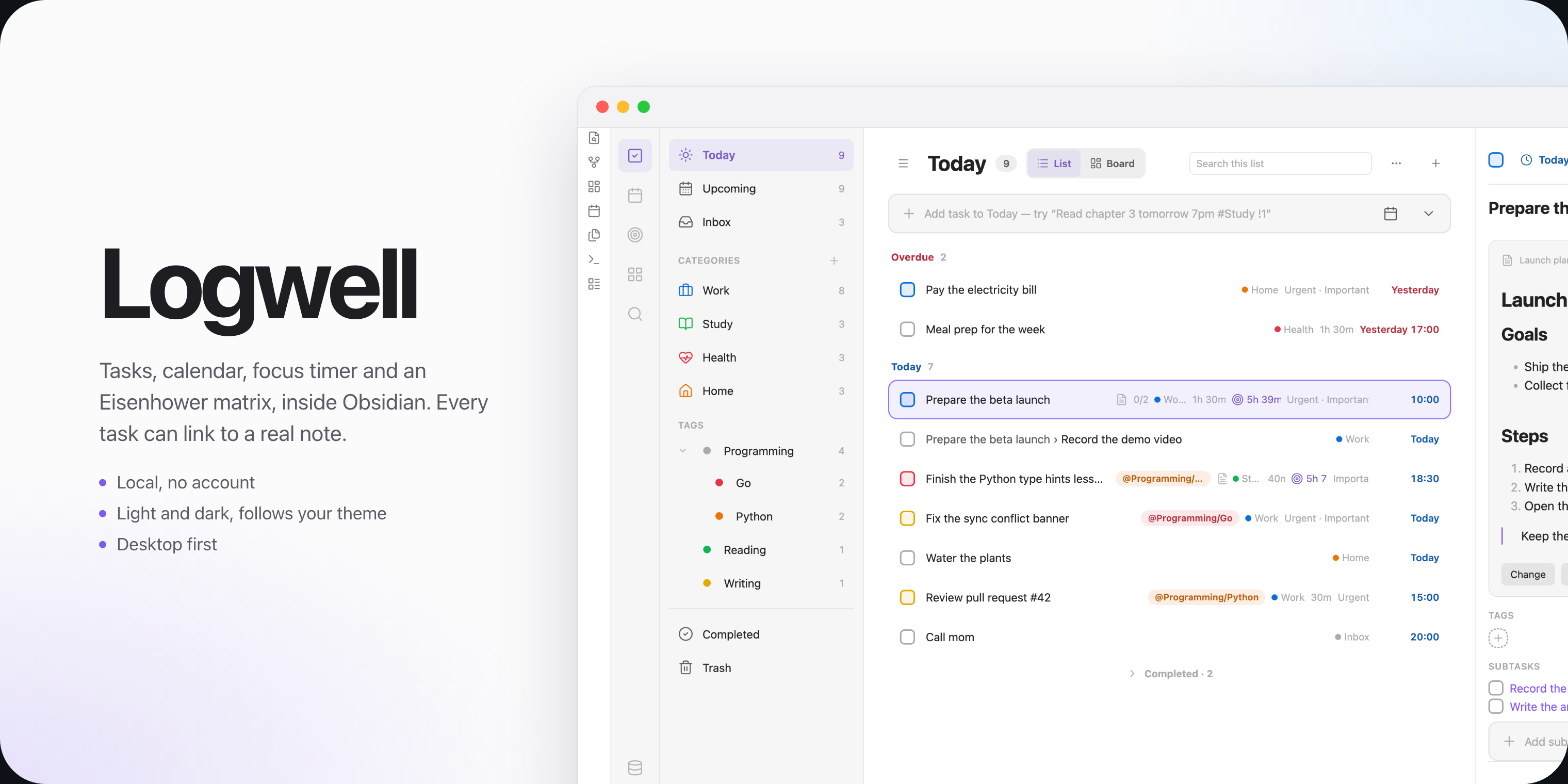
Logwell showing the Today view with lists, tags and a task's details

Features

  • Tasks with dates, times, deadlines, durations, priorities, subtasks and a linked description note.
  • Quick Add reads a line such as Pay rent friday #Home @errands !1 as you type.
  • Lists, sections and tags, with nested tags and a board of columns.
  • Views: Today, Upcoming, Inbox, Completed and Trash, with sorting, grouping and search.
  • Repeating tasks that stay one task and keep their history.
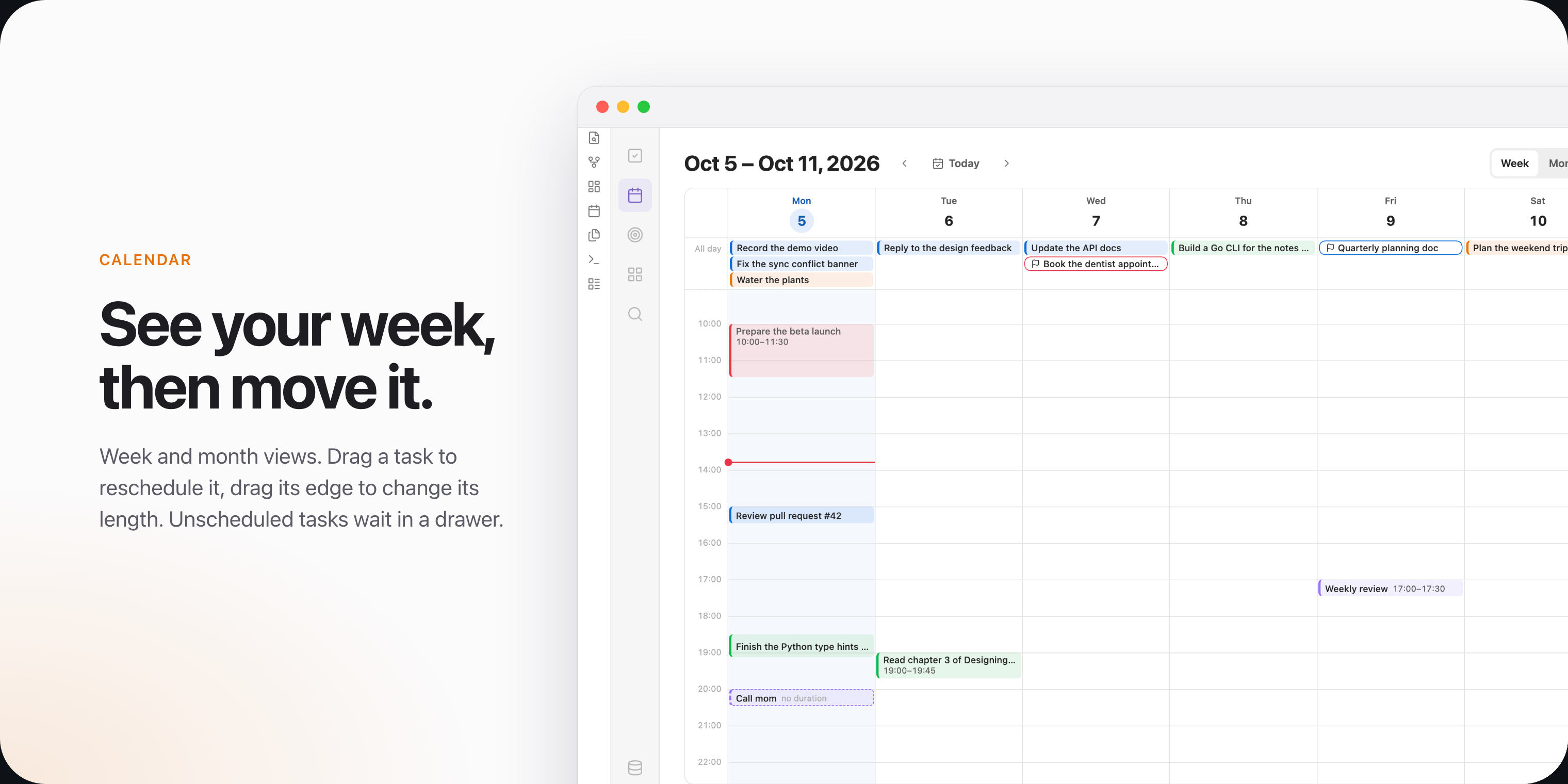
  • A calendar with week and month views, where you drag tasks to reschedule them.
  • An Eisenhower matrix that sorts tasks by urgency and importance.
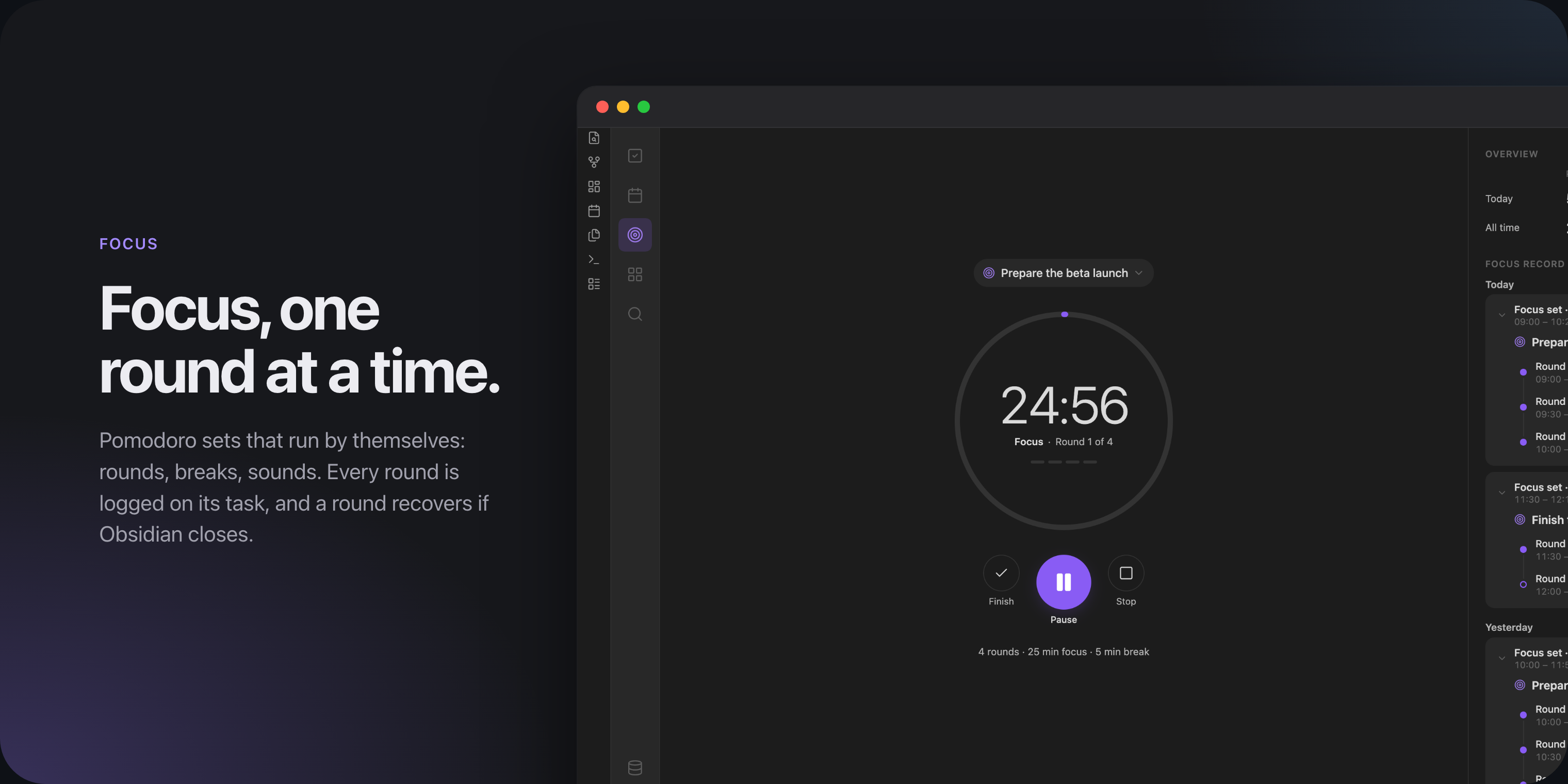
  • Focus: timed rounds with breaks, and a record of every round.
  • Habits with check-ins, streaks, goals and reminders.
  • A task block that shows a live list of tasks inside any note.
  • Optional TickTick sync, off until you turn it on. See Privacy.
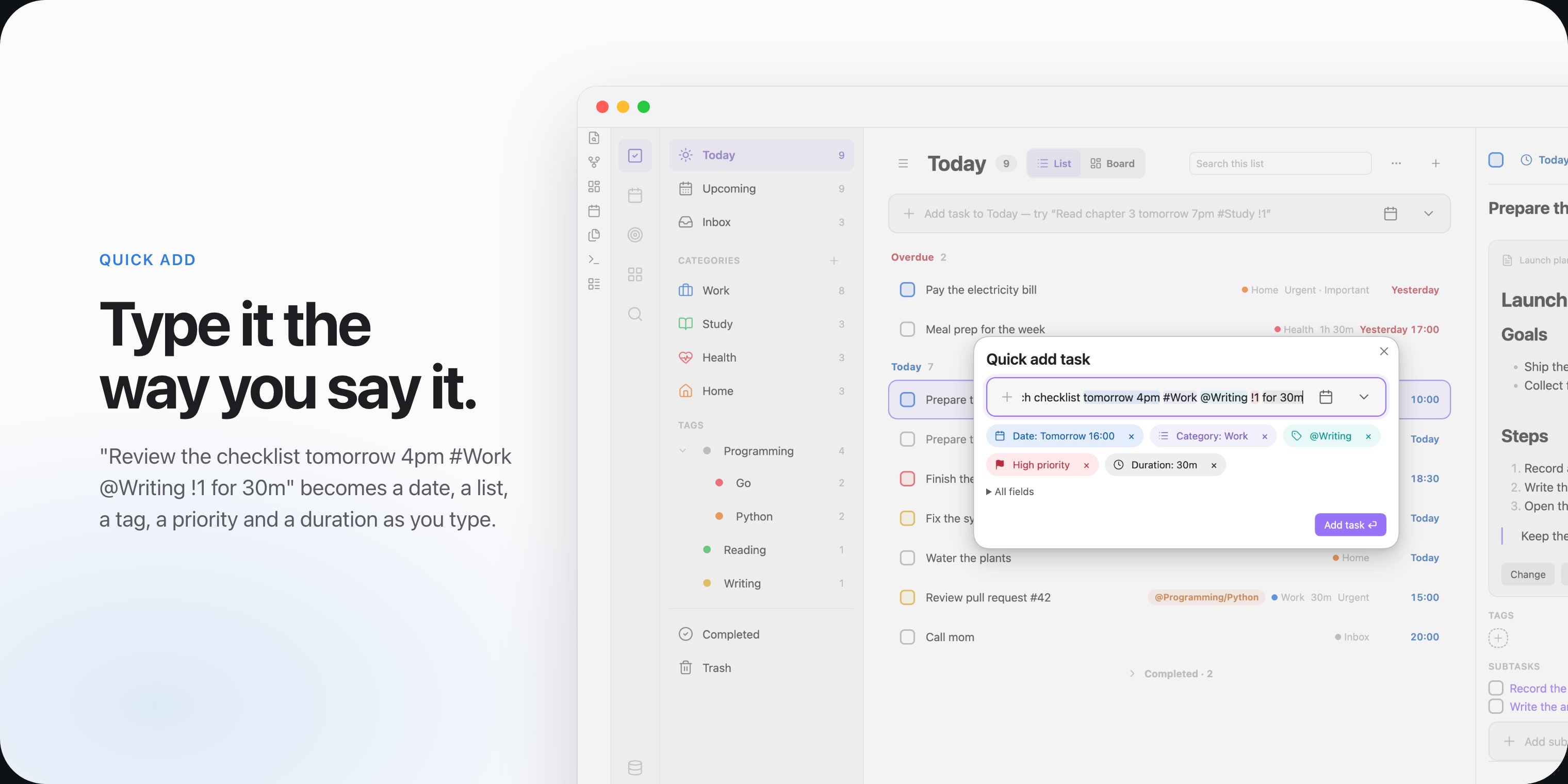
Quick Add turning a sentence into a date, a list, a tag, a priority and a duration The week view of the calendar with timed tasks and an all-day row

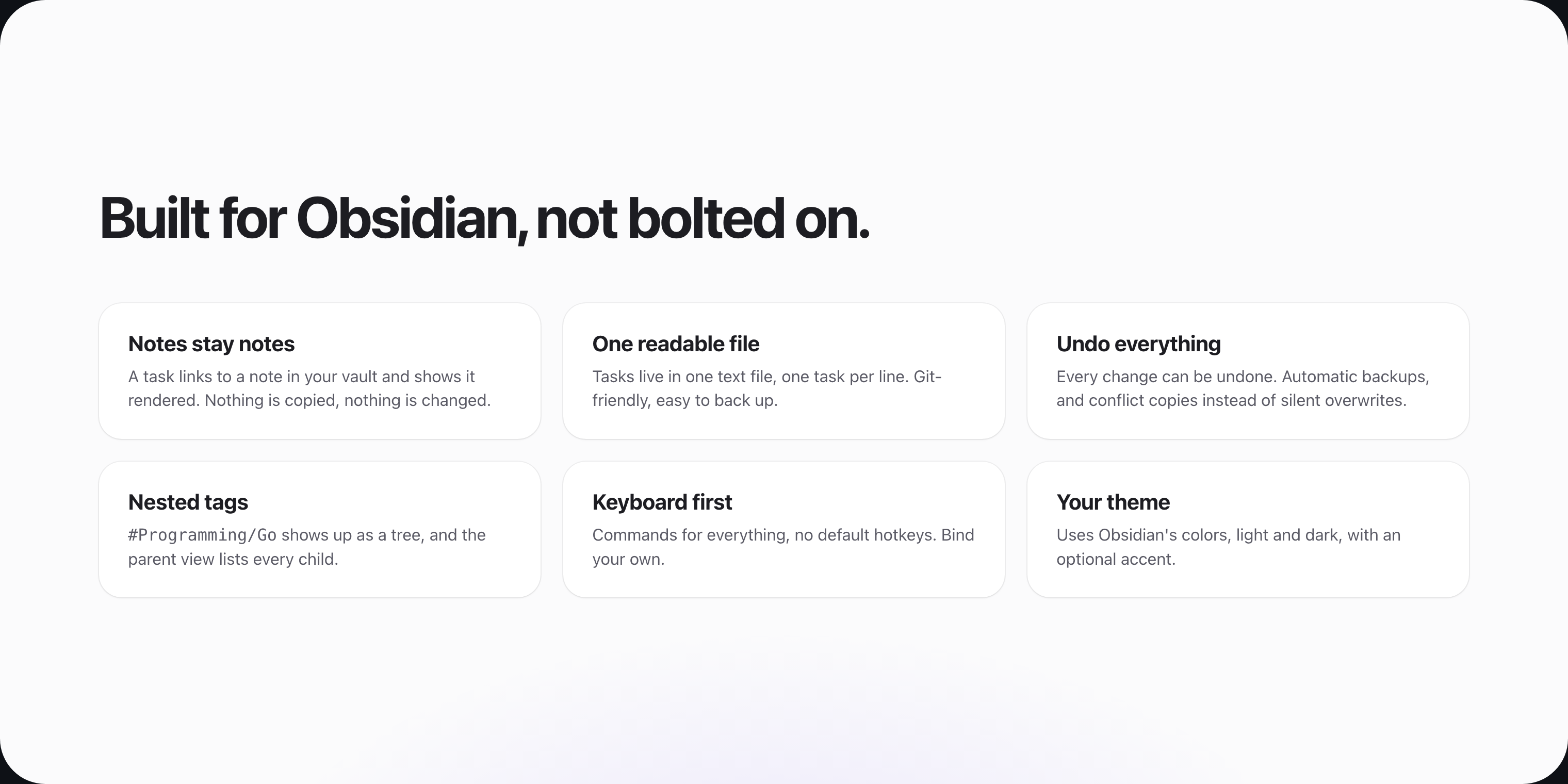
The focus timer with the focus record beside it Six points on how Logwell fits Obsidian: notes stay notes, one readable file, undo, nested tags, commands for everything and your theme

Install

Logwell is not in the community plugin directory. Install it by hand:

  1. Download main.js, manifest.json and styles.css from the latest release.
  2. Put them in <your vault>/.obsidian/plugins/logwell/. Create the folder if it does not exist.
  3. In Obsidian, open Settings, then Community plugins. Turn on community plugins if they are off, reload the list and turn on Logwell.
  4. Choose Create database in the notice that appears.

Getting started walks you through these steps and your first task.

Your data

Your tasks stay in your vault, in one plain text file that works with Git and file-sync tools. Logwell keeps backups and never copies your notes into it. See Your data.

Documentation

  • Documentation: every page, from first steps to reference.
  • Release notes: what changed in each release.

License

Logwell is released under the MIT License.

HealthExcellent
ReviewPassed
About
Manage tasks, calendar, habits and focus sessions in one Obsidian tab, stored in a single plain-text database file in your vault. Type tasks as sentences to auto-detect dates, lists, tags and priorities; use Quick Add, calendar drag-and-drop, repeating tasks, an Eisenhower matrix, embedded task blocks and views for Today, Upcoming and Inbox.
TasksCalendarProject management
Details
Current version
0.2.1
Last updated
9 hours ago
Created
5 days ago
Updates
8 releases
Downloads
1
Compatible with
Obsidian 1.13.0+
Platforms
Desktop only
License
MIT
Report bugRequest featureReport plugin
Author
MHElnourMHElnourmhelnour
GitHubmhelnour
  1. Community
  2. Plugins
  3. Tasks
  4. Logwell

Related plugins

Operon

Task and project management system that unifies inline tasks and file-based tasks in the same workflows with Tables, Filters, Calendars, Kanban boards, Gantt views, Canvas, and time tracking.

Abyss Tasks

A task management interface for Markdown tasks.

TaskChute Plus

Execute TaskChute that slots today's tasks, tracks projects, adds comments, and keeps you focused on now.

Tasks

Track tasks across your vault. Supports due dates, recurring tasks, done dates, sub-set of checklist items, and filtering. Maintained by Clare Macrae and Ilyas Landikov, created by Martin Schenck.

TaskNotes

Note-based task management with calendar, pomodoro and time-tracking integration.

Day Planner

Turn tasks from daily notes, the Tasks plugin, and calendars into time blocks on an editable timeline, with built-in time tracker.

TickTickSync

Sync TickTick tasks.

Base Board

Organize notes into Kanban boards using frontmatter properties. Drag and drop cards between columns powered by Bases.

dotpm

Full-featured task and project management: stunning Gantt charts, Kanban boards, Table views, customizable fields, due date notifications, dependancies

Tasks Calendar Wrapper

Simple wrapper for Tasks Calendar and Tasks Timeline.