Search...Search plugins and themes...
⌘K
Sign in
  • Get started
  • Download
  • Pricing
  • Enterprise
  • Account
  • Obsidian
  • Overview
  • Sync
  • Publish
  • Canvas
  • Mobile
  • Web Clipper
  • CLI
  • Learn
  • Help
  • Developers
  • Changelog
  • About
  • Roadmap
  • Blog
  • Resources
  • System status
  • License overview
  • Terms of service
  • Privacy policy
  • Security
  • Community
  • Plugins
  • Themes
  • Discord
  • Forum / 中文论坛
  • Merch store
  • Brand guidelines
Follow us
DiscordTwitterBlueskyThreadsMastodonYouTubeGitHub
© 2026 Obsidian

Logic-Electric Circuit Builder

Hamza MartinHamza Martin124 downloads

Design electrical and logic circuits with 72 symbols, custom blocks and smart wire routing. Keep editable diagrams in your notes, or export SVG/PNG. Offline on desktop, tablet and phone.

Add to Obsidian
Logic-Electric Circuit Builder screenshot
  • Overview
  • Scorecard
  • Updates8

Draw circuits inside Obsidian, on desktop, tablet and phone.

A clean, intuitive workspace with the tools to build complete electrical and logic schematics. Search 72 symbols, create your own ICs, and reshape connected circuits with precise wire routing. Keep your diagrams beside the notes that explain them, with everything offline and in your vault.

72 built-in symbols · Custom IC blocks · Explicit bus lanes · Live note previews · SVG & PNG export

Your circuits, inside your notes

Explain the topic around the drawing. Embed a live circuit preview in a study note, lab notebook or project write-up, and open the original whenever you want to edit it.

Logic · light theme. A four-bit ripple-carry adder, its gate-level connections, worked arithmetic and an explanation of delay and overflow.

Example logic study note in Obsidian's light theme, with an embedded twenty-gate ripple-carry adder, a worked 0110 + 0011 example and explanations of carry, delay and signed overflow

Electrical · dark theme. A complete photodiode signal chain with filtering, amplification and threshold detection, plus component calculations and lab questions.

Example electrical lab note in Obsidian's dark theme, with an embedded photodiode front end, two-stage RC filter, non-inverting amplifier, comparator and explanatory text

Try these example notes and editable circuits.

From electrical circuits to digital logic
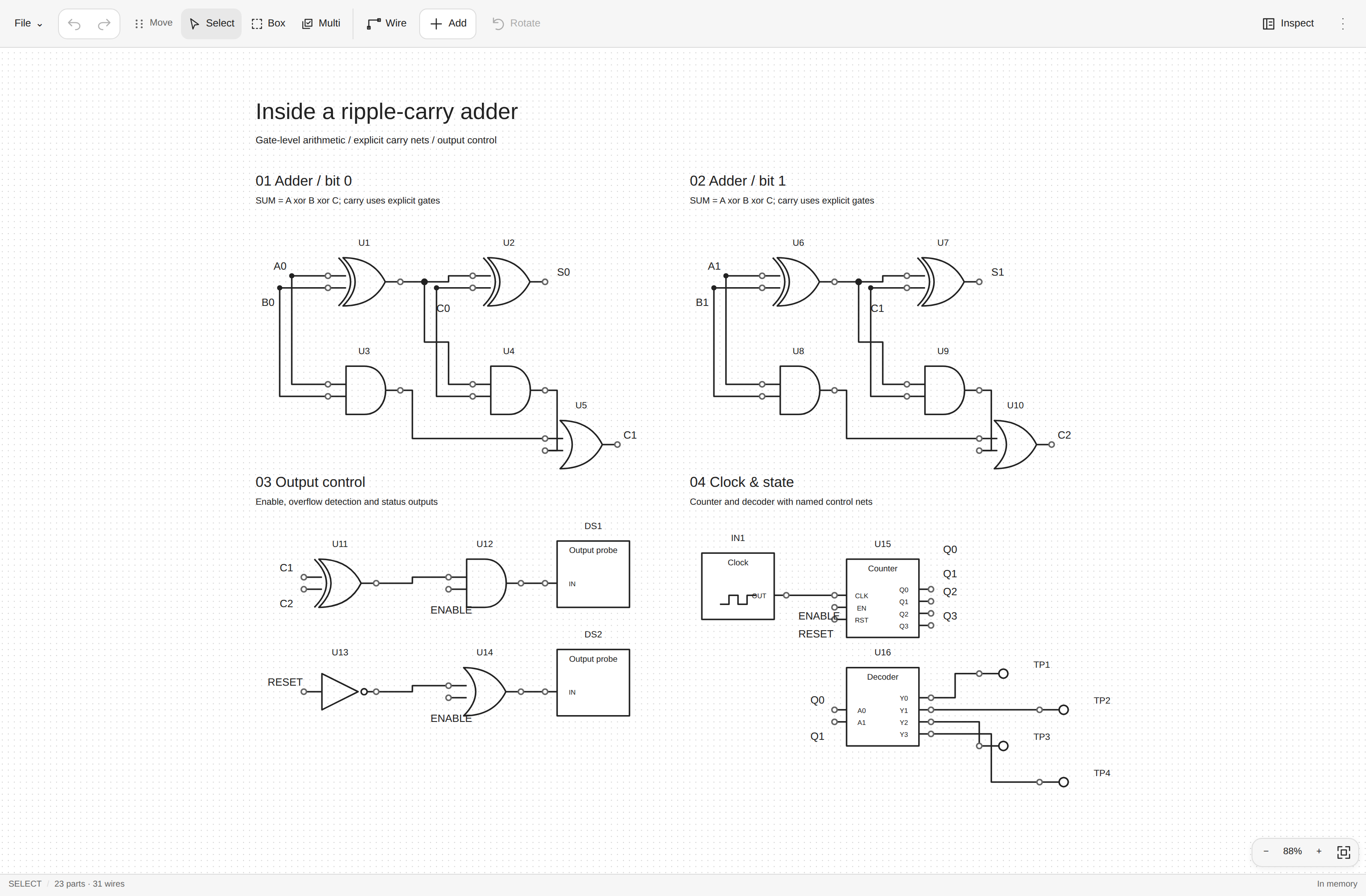
Gate-level ripple-carry adder with output control and clock circuitry in the desktop editor

Power supplies Analog signal chains
Protected input, two regulated rails and a load monitor Photodiode sensor, RC filters, amplifier and comparator
Custom blocks & 8-bit buses Timers & transistor drivers
Custom controller, eight explicitly mapped bus lanes and output logic 555 timer with decoupling, a protected relay driver and indicators

Take your circuits with you

The same circuit tools on a screen that suits you. Swipe to pan, pinch to zoom, and tap to place parts or connect pins. A dockable toolbar keeps the main tools together on smaller screens, defaulting to the top, with Undo/Redo always above and properties a tap away.

Phone: protected power supply and rail monitor Phone: photodiode sensor, filter and amplifier Phone: two-bit gate-level adder and output control Phone: custom controller and eight bus lanes Phone: timer, timing capacitors and transistor relay driver

Click any image for full resolution, or explore all twelve screenshots and editable examples.

Powerful tools, clean workspace

  • Intuitive from the first circuit. Find parts by name, choose a symbol preview, then click or tap to place and connect. Clear pin targets and brief visual feedback help you see each action.
  • Electrical and logic together. Build power supplies, analog signal chains and digital logic with 72 built-in symbols. Define custom ICs, map bus lanes and reuse your own circuit snippets.
  • Organized around your drawing. Related tools stay together in a compact toolbar. Open properties when you need them, work in your Obsidian theme, and keep the canvas spacious.
  • Precise editing as circuits grow. Move, rotate and mirror connected parts, select regions and group objects. Use alignment guides, undo/redo and structural checks to refine larger schematics.
  • Control over every connection. Route around components, choose your own wire bends, branch through explicit junctions and name nets. Crossed wires stay separate until you join them.
  • Diagrams that belong in your notes. Embed live circuit previews, then export SVG or PNG for lessons, reports and sharing. Your circuit files stay in your vault, ready to edit again.

Installation

In Obsidian, open Settings → Community plugins → Browse, search for Logic-Electric Circuit Builder, then select Install and Enable. Requires Obsidian 1.14.0 or later.

Usage

Open a new circuit with the ribbon icon or Logic-Electric Circuit Builder: New circuit in the command palette. Choose Add, pick a part from Electrical, Logic or Connections, place it, and tap two pins to connect them.

From a note, run Insert circuit preview to bring the drawing into your notes. Explore the editable example circuits for ideas, or follow the editing and shortcuts guide.

Have an idea or found a problem? Open More → Send feedback in the circuit editor to help shape the next update.

Built for schematic drawing and documentation. Simulation is outside its scope.

Created by Hamza. MIT licensed. Contributing and technical documentation.

HealthExcellent
ReviewPassed
About
Turn circuit ideas into editable diagrams without leaving Obsidian. Build power supplies, analog front ends and digital logic with 72 searchable symbols, custom IC blocks and explicit bus splitters. Move, rotate and mirror connected parts while preserving their pin connections. Smart routing avoids component bodies; manual bends and junctions give you precise control. Use named nets, reusable snippets, box selection and structural checks to organize larger drawings. Embed live circuit previews in your notes, or export SVGs and PNGs for reports, lessons and sharing. Work offline on desktop, tablet and phone with touch panning, pinch zoom and a compact toolbar. Subtle feedback supports Reduce Motion, while undo/redo, autosave status and conflict recovery help you manage changes. Your files stay in your vault, with no account or cloud service required. Designed for schematic drawing and documentation; simulation is outside its scope.
DrawingCanvasMath
Details
Current version
0.1.11
Last updated
2 days ago
Created
2 weeks ago
Updates
8 releases
Downloads
124
Compatible with
Obsidian 1.14.0+
Platforms
Desktop, Mobile
License
MIT
Report bugRequest featureReport plugin
Author
Hamza MartinHamza Martinhamza-martin
GitHubhamzamrtn
  1. Community
  2. Plugins
  3. Drawing
  4. Logic-Electric Circuit Builder

Related plugins

Excalidraw Extras

Companion plugin for Excalidraw high-privilege and large components.

Draw in Canvas

Draw freehand annotations on Obsidian JSON Canvas files.

Blackboard

Draw with native stylus and Apple Pencil directly in Canvas nodes and Markdown embeds.

Pencil

Infinite whiteboard for handwriting with Apple Pencil. Supports pencils, erasers, colors, and works on iPad, desktop, and mobile.

Formula Library

Visual LaTeX editing, a searchable formula library, customizable templates, Mermaid diagrams, and parameter-driven function plotting for Obsidian.

InkedMark

Handwrite inside your markdown notes with pressure-aware ink, a searchable text layer, inline sketches, and Apple Pencil support.

Excalidraw

Visual PKM powerhouse. Create and edit Excalidraw drawings.

Advanced Canvas

Supercharge your canvas experience. Create presentations, flowcharts and more.

Latex Suite

Make typesetting LaTeX math as fast as handwriting through snippets, text expansion, and editor enhancements.

Mermaid Tools

Improved Mermaid.js experience: visual toolbar with common elements and more.