LLM Endpoint Manager
 Johannes Kaindl94 downloads
One place for your LLM endpoints: URLs, models, capabilities and API tokens in the keychain — shared with other plugins through a small API.
- Overview
- Scorecard
- Updates10
🇬🇧 English · 🇩🇪 Deutsch
One place for your LLM endpoints: URLs, models, capabilities and API tokens in the Obsidian keychain — shared with other plugins through a small API.
If several plugins in your vault talk to language models, each one normally asks you for the same server address and the same API token. LLM Endpoint Manager is the one place where you enter them once. Tokens are never written to data.json — they live exclusively in Obsidian's keychain — and other plugins reach the endpoint list through a small API. It owns endpoints, tokens, model lists and reachability checks; it knows nothing about prompts, roles or requests, which stays with the plugins that consume the API.
Features
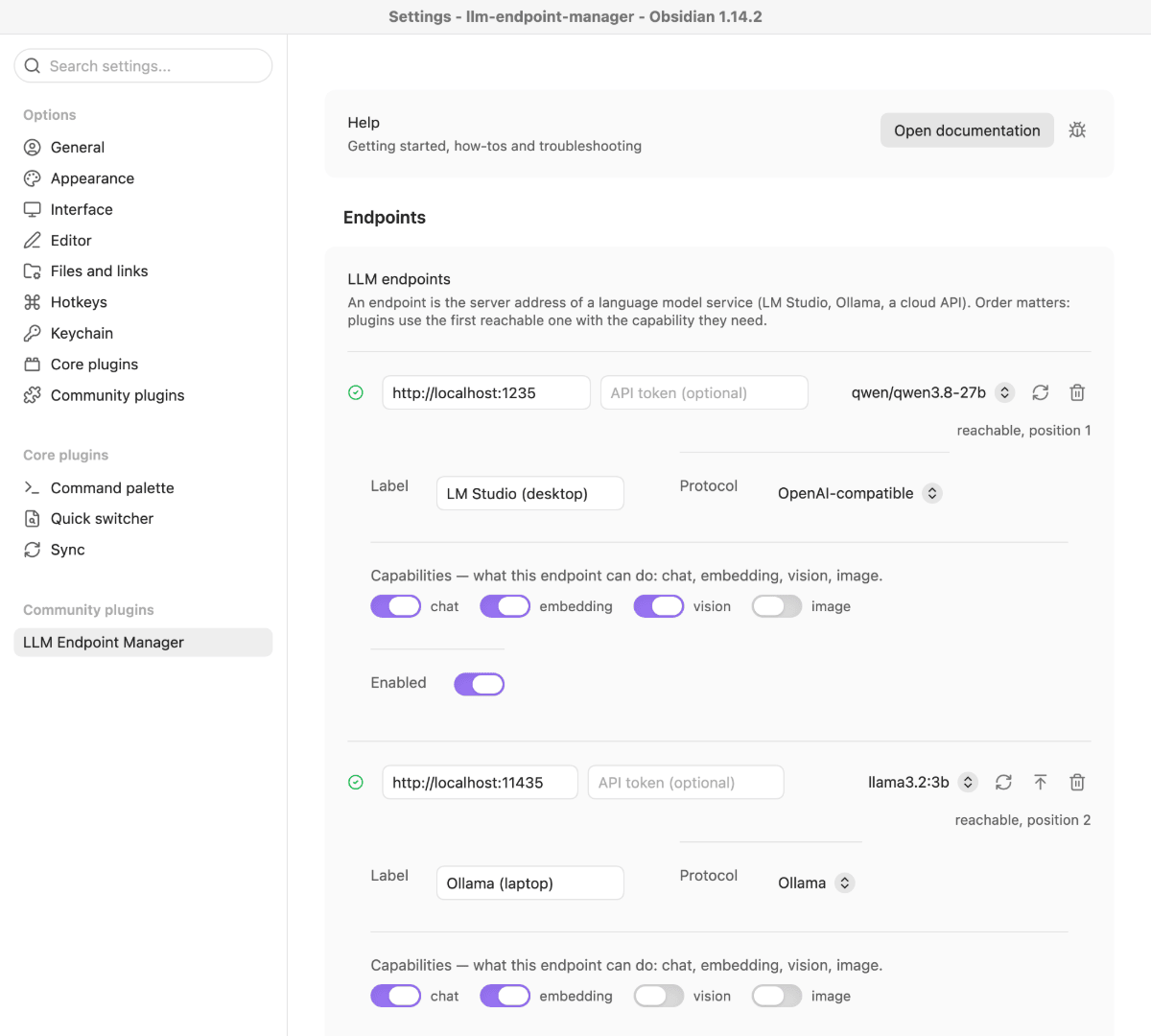
- One endpoint list for all plugins — URL, protocol (OpenAI-compatible, Ollama, Automatic1111, ComfyUI), capabilities (
chat,embedding,vision,image), default model and an on/off switch per endpoint. The order is the priority: a plugin gets the first enabled, reachable endpoint that can do what it asked for. - Tokens in the keychain, never in your notes — the token field writes straight into Obsidian's keychain (Obsidian 1.11.4+). Without a working keychain the field is locked and says so; endpoints without a token keep working.
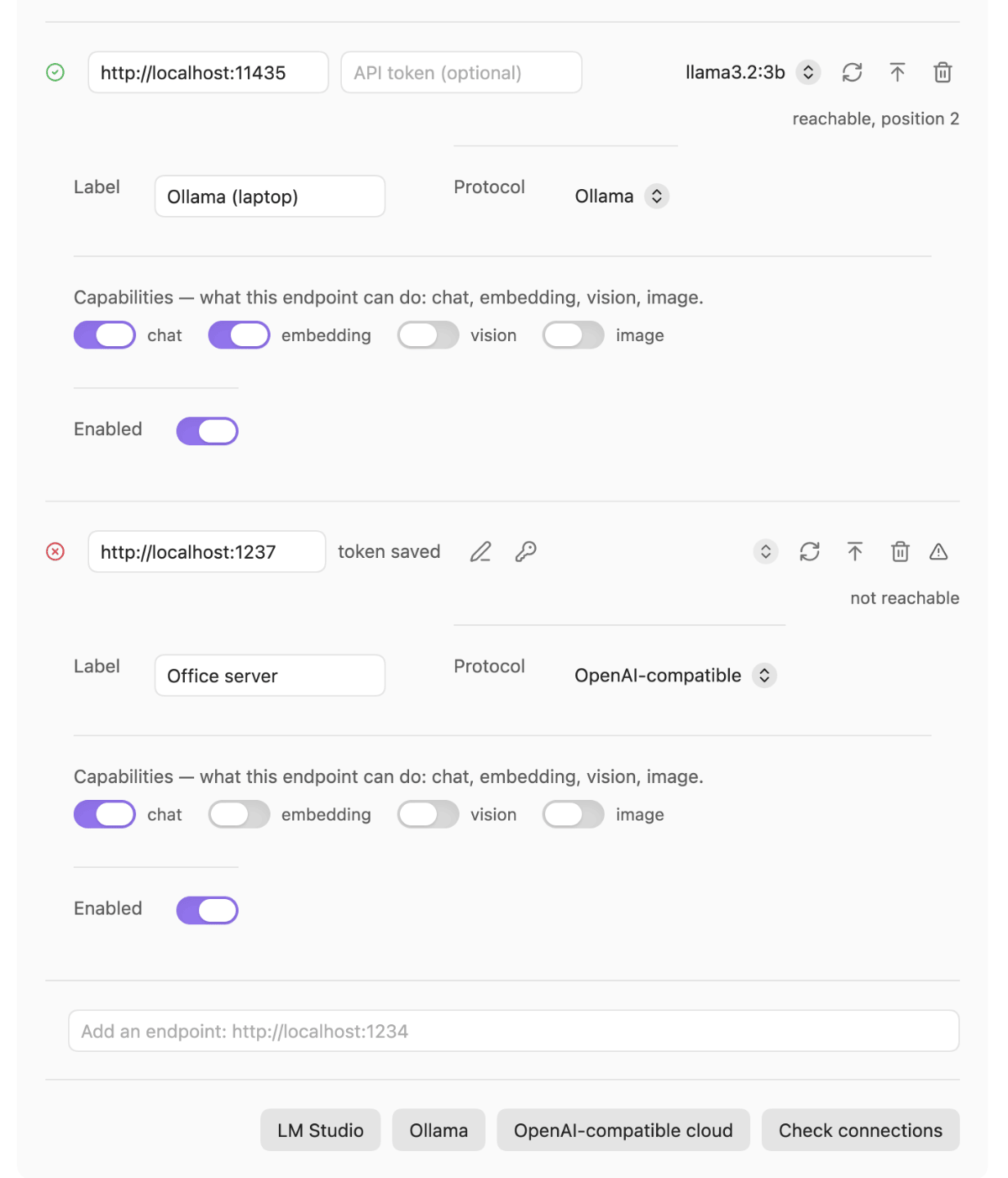
- Live reachability — every row shows a status indicator and, on hover, the reason (connection refused, host not found, timeout, "answers, but not like a model API", token rejected). "Check connections" re-tests all rows. A reachable row with a model also shows the model's context length ("Context: loaded N · max M tokens") when the server reports it.
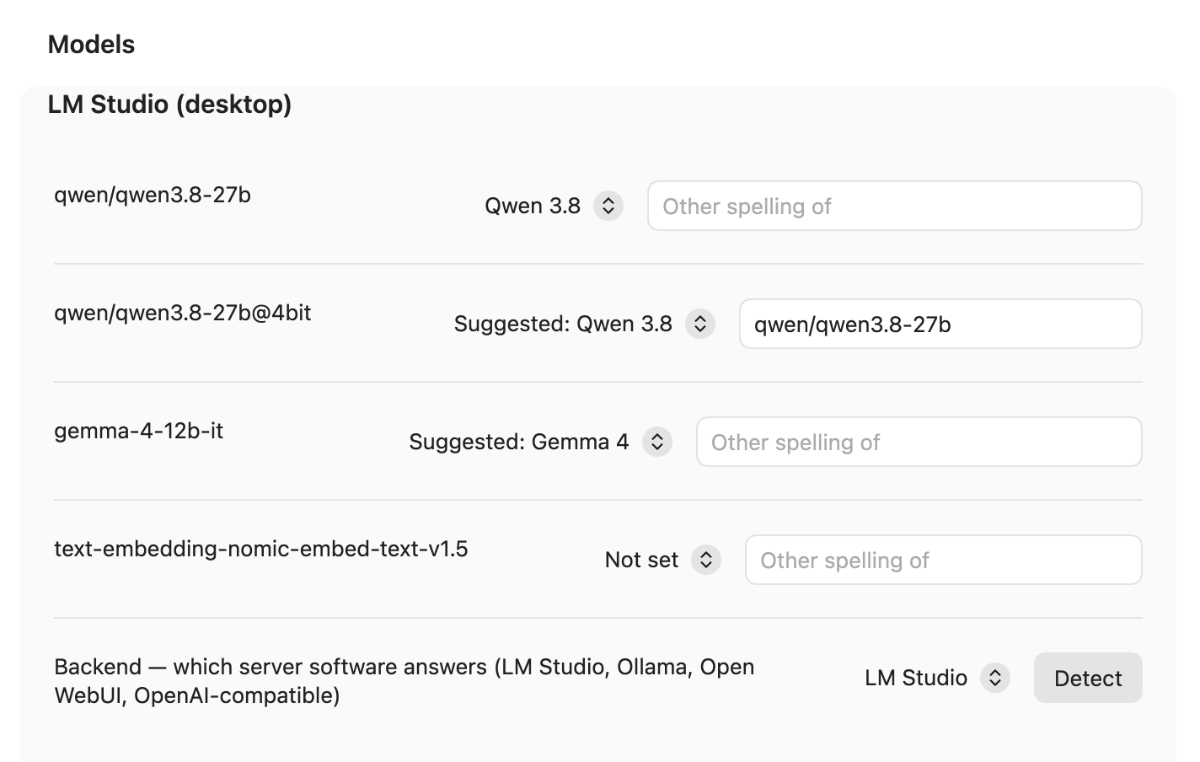
- Model table — per endpoint, every model the server reports plus the ones you already configured. Set a model's family (a suggestion is offered from the model name) and mark it as another spelling of a second model id, so plugins send the id you prefer.
- Backend detection — "Detect" recognizes LM Studio, Ollama, Open WebUI or a plain OpenAI-compatible server with read-only requests; it never loads a model.
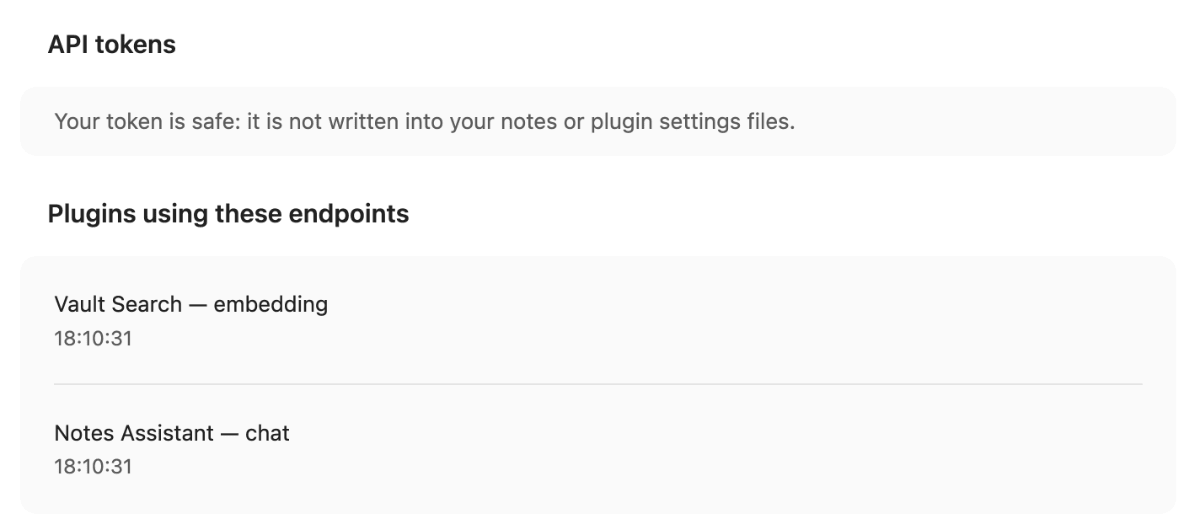
- See who uses it — the settings tab lists which plugins asked for an endpoint during the current session, and for which capability.
Requirements
- Obsidian 1.11.4+ (desktop and mobile). The keychain needs this version; older versions cannot store tokens.
- A model server you can reach — for example LM Studio or Ollama on your own machine, or a hosted OpenAI-compatible API if you add its token. New to local LLMs? The local LLM setup guide covers server setup, the endpoint address including the
/v1question, and access from a phone. - At least one plugin that uses the API. The manager works on its own, but it only stores and checks endpoints — it does nothing else until another plugin asks it for one.
Install
Plugin catalog (recommended)
Install AnySource Sideloader, add the catalog https://git.jkaindl.de/jkaindl/obsidian-catalog/raw/branch/main/catalog.json, then install LLM Endpoint Manager from it and enable it under Settings → Community plugins. Or download llm-endpoint-manager.zip from the release — it contains exactly these files — and unpack it into .obsidian/plugins/; checksums.sha256 lets you verify the download.
Manual
Download main.js, manifest.json and styles.css from the latest release, put them into <vault>/.obsidian/plugins/llm-endpoint-manager/, then enable LLM Endpoint Manager under Settings → Community plugins.
From source
git clone https://github.com/johannes-kaindl/llm-endpoint-manager
cd llm-endpoint-manager && npm install && npm run build
# copy main.js, manifest.json and styles.css into <vault>/.obsidian/plugins/llm-endpoint-manager/
Usage
The plugin has no commands and no ribbon icon; everything happens in Settings → LLM Endpoint Manager.
- Under Endpoints, type an address into the field Add an endpoint: http://localhost:1234 and click out of the field (rows are saved when a field loses focus) — or click a one-click preset button (LM Studio, Ollama, OpenAI-compatible cloud).
- Check the row's Protocol and Capabilities. A row without a capability is invisible to every plugin and shows a warning.
- Optional: paste an API token (optional) into the row. It goes into the keychain; the row then shows token saved.
- Read the status indicator on the row: reachable, position 1 means this is the first choice for a plugin (given the capability it asks for), reachable, position 2 means a better one comes first. Use Use first to change the order.
- Under Models, review the model list per endpoint, set a Family where the suggestion is wrong, and use Detect to fill in the Backend.
Configuration
| Setting | Effect | Default |
|---|---|---|
| Address | Base URL of the server. A trailing /v1 is stripped automatically. |
— |
| Label | Name shown in this tab and to other plugins. | derived from the address |
| Protocol | Wire format: OpenAI-compatible, Ollama, Automatic1111 (image), ComfyUI (image). | OpenAI-compatible |
| Capabilities | chat, embedding, vision, image — what the endpoint can do. |
chat (presets set more) |
| Enabled | Disabled endpoints are never handed to a plugin. | on |
| API token | Stored in the Obsidian keychain, never in data.json. |
none |
| Default model | Hint that plugins may use; each plugin decides for itself. | empty |
| Family (per model) | Which model family a model belongs to. | suggested from the name |
| Another spelling of (per model) | Model id that plugins send instead of this one. | empty |
| Backend (per endpoint) | Server software; Detect fills it in. | not set |
How it works
The manager keeps the endpoint list in the plugin's data.json — without tokens — and the tokens in Obsidian's keychain. A plugin that wants to talk to a model asks the manager for a capability; the manager checks reachability (cached for 30 seconds, so a dozen plugins asking about one server do not send a dozen requests), walks the list in your order and returns the first enabled, reachable endpoint with a ready-to-use base URL. It never sends prompts itself. The code layout is described in AGENTS.md.
Documentation
- Documentation index
- Getting started — from installation to your first working endpoint
- Troubleshooting — what a message means and what to do about it
API
Other plugins reach this plugin's API at app.plugins.plugins["llm-endpoint-manager"].api. Read the API object fresh on every call — never cache it — the plugin can be disabled at any time, in which case app.plugins.plugins["llm-endpoint-manager"] is undefined.
The contract is vendored into src/vendor/kit/endpoint-source.ts (from obsidian-kit's endpoint-source module, re-exported unchanged by src/core/api-types.ts) — see that file for the full LlmEndpointManagerApi interface (version, list, get, resolve, materialize, models, importEndpoints, on), the ApiEndpoint/ResolvedEndpoint/ImportResult shapes and the ApiErrorCode union. It also exports LLM_ENDPOINT_MANAGER_PLUGIN_ID ("llm-endpoint-manager"), the id this plugin registers itself under in app.plugins.plugins[...].
Provideris"openai" | "ollama" | "a1111" | "comfy",Capabilityis"chat" | "embedding" | "vision" | "image".- Errors are values, not exceptions. Every method that can fail returns
ApiErrorinstead of throwing — callers check"error" in resultrather than wrapping every call intry/catch. list/getreturn a snapshot for display; they never carry a token.resolve(capability)finds the first enabled, reachable endpoint offering that capability (in configured order) and returns it materialized — the fastest way for a caller that just wants "something that can dochat".materialize(id)resolves one specific endpoint the caller already knows about (e.g. one the user picked explicitly).models(id)lists the models a specific endpoint currently reports (cached until the endpoint changes orforce: trueis passed — the list does not expire on its own;resolve()/materialize()use a separate 30 s reachability cache, so twelve plugins asking about the same server don't send twelve requests).importEndpointslets a caller (e.g. a migration from an older, plugin-local endpoint list) add or merge endpoint configs in bulk, including their secret values.on("changed", cb)subscribes to endpoint list changes and returns an unsubscribe function.
Security boundary
Tokens never cross the API. list() and get() return an ApiEndpoint with a boolean hasSecret flag only — the token value itself is not part of that shape (toApiEndpoint in src/core/api.ts builds the object field by field and never touches secretId/apiKey). Only resolve() and materialize() hand back a ResolvedEndpoint whose config carries the token — and only to a caller that explicitly asked to send a request to that endpoint, at the moment it needs it, never as part of a listing.
Contributing
Issues and pull requests on GitHub. Test-driven (npm run gate); see AGENTS.md.
License
- Code: AGPL-3.0-or-later (
LICENSE). - Docs/Text: CC BY-SA 4.0 (
LICENSE-DOCS).
Copyright © 2026 Johannes Kaindl.