
- Overview
- Scorecard
- Updates13
This plugin renders six-line divination diagrams in Obsidian from a fenced liuyao code block.
Recent Updates
0.4.1 Released
- Enhanced copyright watermark with author attribution and year
- Improved type declarations for better type safety
- Minor styling improvements to watermark display
0.3.x Released
- Watermark enhancements for proper attribution
0.2.x Released
- Color customization for dynamic Yaos
Supported Syntax
```liuyao
  123123
```
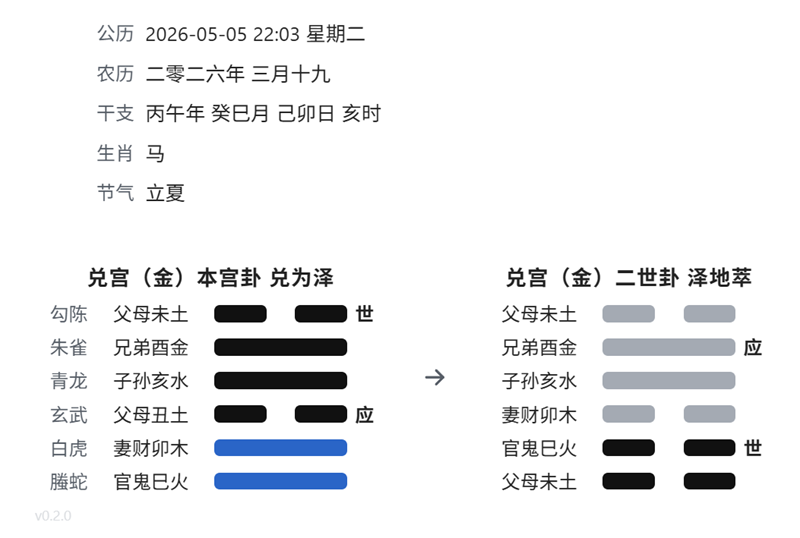
The liuyao block can also include a date on the first non-empty line and the hexagram input on the second line:
```liuyao
  2026-05-05 22:03
  332112
```
It will be rendered like
Rules
- The input must contain exactly 6 digits.
- Each digit must be one of
0,1,2, or3.0: old yin, 老阴1: young yang, 少阳2: young yin, 少阴3: old yang, 老阳
- The first digit is the bottom line, and the sixth digit is the top line.
- The plugin looks up the matching hexagram metadata from
src/core/common.ts. - A
liuyaoblock may optionally use the first non-empty line as a date and the second non-empty line as the hexagram input. - The hexagram input also supports 6 trigram names, such as
坤坎离离震兑.
The rendered card shows:
- The six gods on the far left when a valid date is provided
- The family and hexagram name at the top, such as
乾宫 乾为天 - The line relation text on the left of each line
- The
世or应marker on the right when present - A copyright watermark at the bottom left:
v{VERSION} © {YEAR} Kasukabe Tsumugi. All Rights Reserved.
Watermark
Each rendered divination card includes a copyright watermark in the bottom left corner. The watermark displays:
- The current plugin version
- The current year
- Author attribution: "Kasukabe Tsumugi"
This watermark is styled with the .kasukabe-watermark CSS class and can be customized if needed.
Development
The source entry is src/main.ts, and build artifacts are written to dist/.
- Install dependencies:
pnpm install - Build the plugin:
pnpm build
The build produces:
dist/main.jsdist/manifest.jsondist/styles.css
Copy those three files into your vault at .obsidian/plugins/liuyao/.
HealthExcellent
ReviewSatisfactory
About
Render six-line liuyao divination diagrams from fenced liuyao blocks using a six-digit code or trigram names and an optional date. Show six gods when a date is present, display family and hexagram name, annotate each line with relation text, and mark 世 or 应 when applicable.Details
Current version
0.5.3
Last updated
4 weeks ago
Created
4 months ago
Updates
13 releases
Downloads
213
Compatible with
Obsidian 1.5.0+
Platforms
Desktop, Mobile
License
MIT