Search...Search plugins and themes...
⌘K
Sign in
  • Get started
  • Download
  • Pricing
  • Enterprise
  • Account
  • Obsidian
  • Overview
  • Sync
  • Publish
  • Canvas
  • Mobile
  • Web Clipper
  • CLI
  • Learn
  • Help
  • Developers
  • Changelog
  • About
  • Roadmap
  • Blog
  • Resources
  • System status
  • License overview
  • Terms of service
  • Privacy policy
  • Security
  • Community
  • Plugins
  • Themes
  • Discord
  • Forum / 中文论坛
  • Merch store
  • Brand guidelines
Follow us
DiscordTwitterBlueskyThreadsMastodonYouTubeGitHub
© 2026 Obsidian

Lite Gallery

jpoles1jpoles15k downloads

Easily create carousel galleries to better organize/view images in your notes.

Add to Obsidian
  • Overview
  • Scorecard
  • Updates7

The Lite Gallery plugin for Obsidian makes it easy to create carousel image galleries in your notes. This allows you to neatly organize mutiple images into your notes while improving readability and usability.

How to use

  1. Install the plugin
  2. Open up the plugin settings and configure your image directories (separated by commas). In order to make inserting images easier full image paths are not required; the plugin will search through each image directory from your settings list in order, using the first image match it finds:
    • For example /,images,media will first search the root folder of your vault, then the images directory, and finally the media directory to search for each image in your gallery.
  3. Create a new gallery in your note using the following "codeblock" format:
 ```litegal
[[image1.jpg]]
this_also_works.png
path/to/image3.jpg
 ```
  • Note that you can use the obsidian file search by entering [[ in the codeblock; this will not include an absolute path to the file, but as long as the file is in the image directory.

Demonstration:
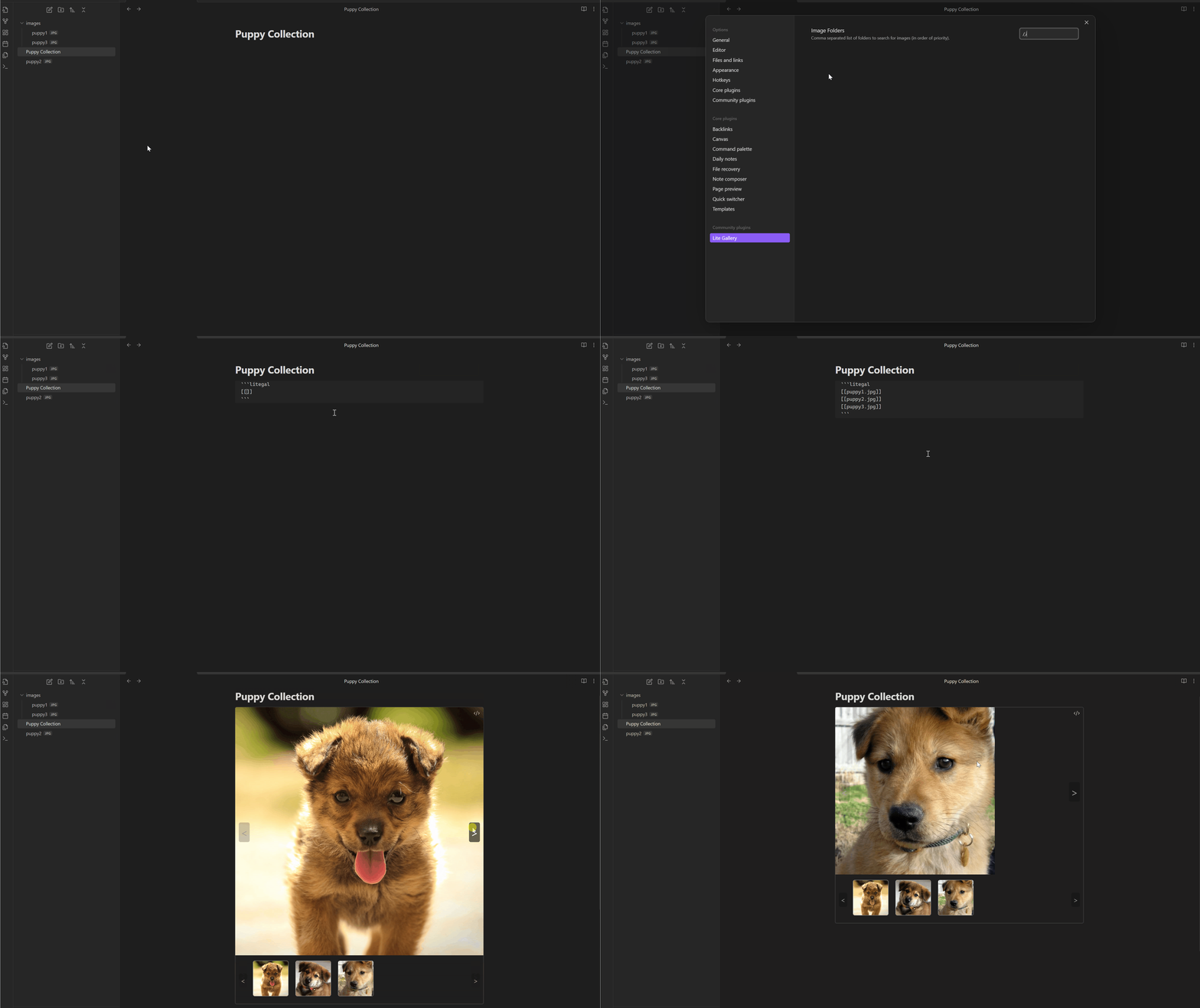
Lite Gallery Demo

69%
HealthGood
ReviewCaution
About
Create carousel image galleries inside notes by listing image files or [[wiki links]] in a litegal code block. Search configured image folders for matches so full paths aren’t required and keep multiple images neatly organized for easier viewing.
ImagesVisualizationFiles
Details
Current version
1.0.6
Last updated
2 years ago
Created
2 years ago
Updates
7 releases
Downloads
5k
Compatible with
Obsidian 0.15.0+
Platforms
Desktop, Mobile
License
GPL-3.0
Report bugRequest featureReport plugin
Author
jpoles1jpoles1
github.com/jpoles1/
GitHubjpoles1
  1. Community
  2. Plugins
  3. Images
  4. Lite Gallery

Related plugins

Image Converter

Convert, compress, resize, annotate, markup, draw, crop, rotate, flip, align, drag-resize, rename with variables, and batch process images: WEBP, JPG, PNG, HEIC, TIF

Kanban

Create Markdown-backed Kanban boards.

Leaflet

Interactive maps inside your notes.

Notebook Navigator

A better file browser and calendar inspired by Apple Notes, Bear, Evernote and Day One.

Local REST API & MCP Server

Unlock your automation needs by interacting with your notes over a secure REST API.

Advanced Canvas

Supercharge your canvas experience. Create presentations, flowcharts and more.

QuickAdd

Quickly add new notes or content to your vault.

Recent Files

Display a list of recently opened files.

Omnisearch

Intelligent search for your notes, PDFs, and OCR for images.

Claudian

Embeds Claude Code/Codex as an AI collaborator in your vault. Your vault becomes agent's working directory, giving it full agentic capabilities: file read/write, search, bash commands, and multi-step workflows.