Search...Search plugins and themes...
⌘K
Sign in
  • Get started
  • Download
  • Pricing
  • Enterprise
  • Account
  • Obsidian
  • Overview
  • Sync
  • Publish
  • Canvas
  • Mobile
  • Web Clipper
  • CLI
  • Learn
  • Help
  • Developers
  • Changelog
  • About
  • Roadmap
  • Blog
  • Resources
  • System status
  • License overview
  • Terms of service
  • Privacy policy
  • Security
  • Community
  • Plugins
  • Themes
  • Discord
  • Forum / 中文论坛
  • Merch store
  • Brand guidelines
Follow us
DiscordTwitterBlueskyThreadsMastodonYouTubeGitHub
© 2026 Obsidian

Manta Calendar

woonyong-choiwoonyong-choi179 downloads

Find dated Markdown notes in a calendar, open the original, and optionally sync selected notes with Google Calendar.

Add to Obsidian
  • Overview
  • Scorecard
  • Updates39

Manta Calendar

Find dated notes in a calendar and open them with one click.

Install in Obsidian · Try the demo Vault · User guide

Version: 4.0.0 · Obsidian 1.13.0+ · macOS and Windows. See release notes for changes and the roadmap for work in progress and plans.

Manta Calendar: select dates and see their notes

A six-second loop of the current view using sample notes. Timing is condensed. This is a view fixture; the original Obsidian capture is below.

Install and try

  1. Open the existing Community entry in Obsidian, then install and enable it.
  2. Add - 2026-09-10 scheduled · Project check-in to a normal note, outside a code block.
  3. Run Open Manta Calendar, navigate to September 2026, and select September 10. Select the event to open its note.

The local calendar needs no account. Optional Google sync connects selected note folders to a dedicated Manta Calendar; manual two-way sync is opt-in. Sign in with your own Google account in your default browser. Authorization and calendar requests go directly between your computer and Google, with no Manta server or personal domain in between. Setup and limitations.

Upgrading from 3.x requires one new Google sign-in on each computer. Existing calendars, source selections, and event mappings are preserved. If the old calendar is unavailable through the new connection, select Create calendar if unavailable to prepare an empty Manta Calendar. Old events remain in their original calendar; synchronization is a separate action. Version 4 supports desktop Obsidian on macOS and Windows; it does not run on iOS or Android.

Manual installation: download the three plugin files from Releases into .obsidian/plugins/link-calendar/, then reload Obsidian.

Original runtime capture and recorded version
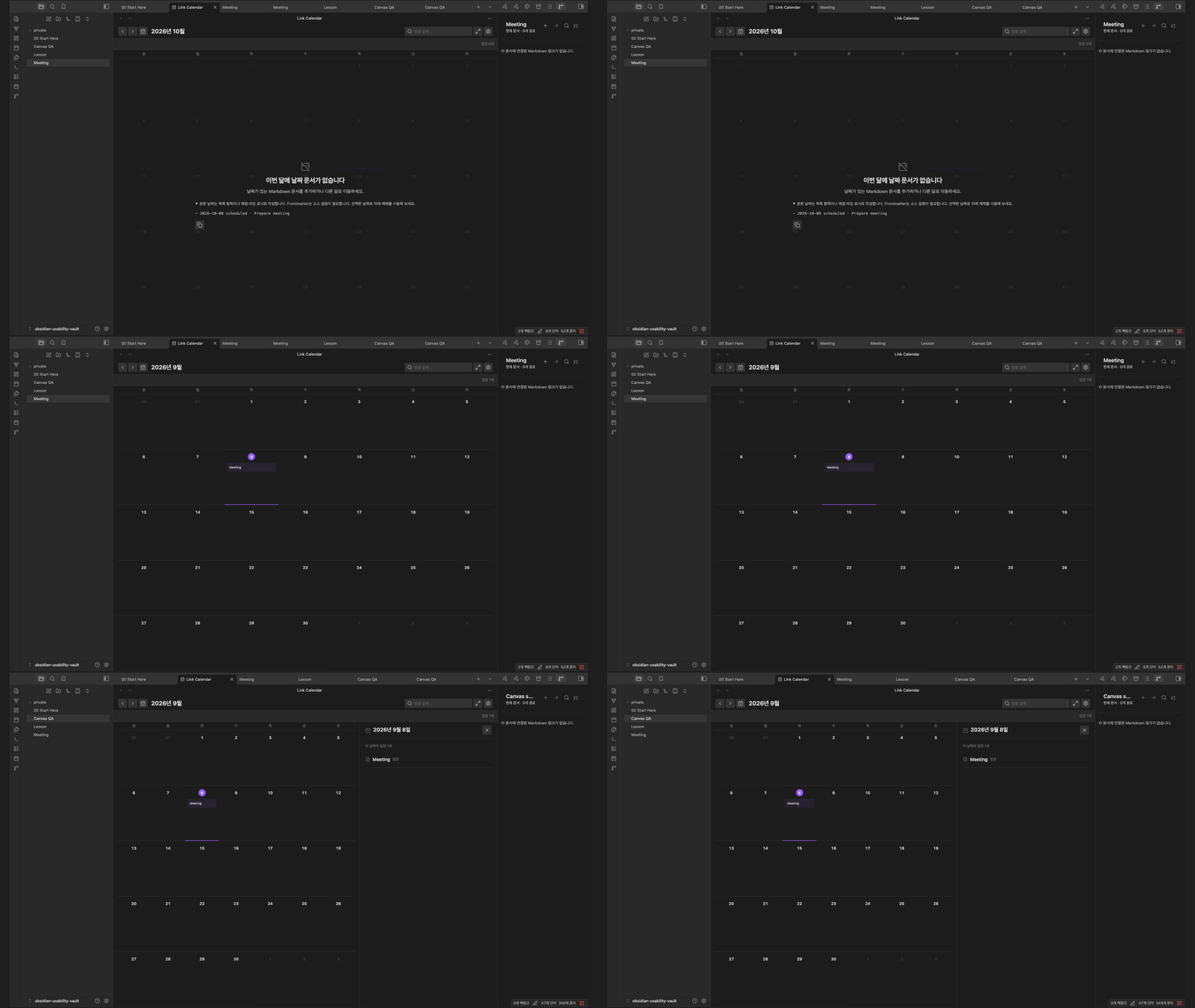
Manta Calendar walkthrough

Obsidian desktop capture, September 8, 2026 (3.6.0); the illustrated calendar view is unchanged in 4.0.0. Google authentication is not shown.

Part of the Manta family

Return to a dated experiment, then follow its supporting notes, diagram and runnable example. Manta Diagrams, Manta Graph, Manta Code Blocks each work on their own. Ordinary notes and links connect the work today; automatic handoffs are planned.

Manta itself is in development and has not been released. I’m building it to turn source material into a personal wiki you can keep adding to. Shared AI tools and the full wiki workflow are still in development.

Help and development

User guide · Report a problem · Community page · Contributing

Read the Google data privacy policy before connecting your account.

MIT

HealthExcellent
ReviewSatisfactory
About
Manta Calendar turns dates in Markdown into a month view and daily agenda. Select a day to find its notes, then open the original. Local navigation works offline without an account. Optional, manual Google Calendar sync connects selected folders; conflicts are reported and deletions are not propagated. The README includes a short, automatically repeating demo. Use Manta Diagrams to explain a process, Manta Graph to follow its supporting notes, Manta Code Blocks to try the example, and Manta Calendar to return to a dated review. Each plugin works independently; ordinary Markdown and links connect them today. Manta itself is being developed as a personal wiki workflow and has not been released. Shared AI tools and automatic handoffs are planned.
CalendarDatesNavigation
Details
Current version
4.0.0
Last updated
7 days ago
Created
Last month
Updates
39 releases
Downloads
179
Compatible with
Obsidian 1.13.0+
Platforms
Desktop only
License
MIT
Report bugRequest featureReport plugin
Author
woonyong-choiwoonyong-choi
github.com/woonyong-choi
GitHubwoonyong-choi
  1. Community
  2. Plugins
  3. Calendar
  4. Manta Calendar

Related plugins

Day Planner

Turn tasks from daily notes, the Tasks plugin, and calendars into time blocks on an editable timeline, with built-in time tracker.

Full Calendar Remastered

Complete Calendar HUB experience. Work with all your calendars in one place. Analyze your time and take action!

Journals

Manage your journals.

Periodic Notes

Manage your daily, weekly, and monthly notes.

Tasks Calendar Wrapper

Simple wrapper for Tasks Calendar and Tasks Timeline.

Prisma Calendar

Prisma turns any note with a date into a flexible planning system inside Obsidian. There are no rigid schemas or predefined structures — just your data, your rules, fully under your control.

Calendarium

Craft mind-bending fantasy and sci-fi calendars.

Contribution Graph

Generate an interactive heatmap to visualize and track your productivity.

Yearly Glance

Year at a glance - overview of annual events with customizable management options.

Chronology

A calendar and a timeline of the note's creation and modification.