Search...Search plugins and themes...
⌘K
Sign in
  • Get started
  • Download
  • Pricing
  • Enterprise
  • Account
  • Obsidian
  • Overview
  • Sync
  • Publish
  • Canvas
  • Mobile
  • Web Clipper
  • CLI
  • Learn
  • Help
  • Developers
  • Changelog
  • About
  • Roadmap
  • Blog
  • Resources
  • System status
  • License overview
  • Terms of service
  • Privacy policy
  • Security
  • Community
  • Plugins
  • Themes
  • Discord
  • Forum / 中文论坛
  • Merch store
  • Brand guidelines
Follow us
DiscordTwitterBlueskyThreadsMastodonYouTubeGitHub
© 2026 Obsidian

LeetAny

Aital UnarovAital Unarov38 downloads

Solve Python, C++, Rust, and Go exercises alongside your course notes and check your answers with local tests.

Add to Obsidian
  • Overview
  • Scorecard
  • Updates9
LeetAny — Turn notes from your Karpathy-style vault into LeetCode-style exercises.

Example learning topics
Python React Docker PyTorch Rust

Your coding agent turns a lesson in your Obsidian vault into a challenge. Open it in Obsidian, write your solution, and run the fixed tests. When a case fails, compare your output with the expected answer. When every case passes, the exercise earns a ✅ in your vault.

Get LeetAny · Set up your vault
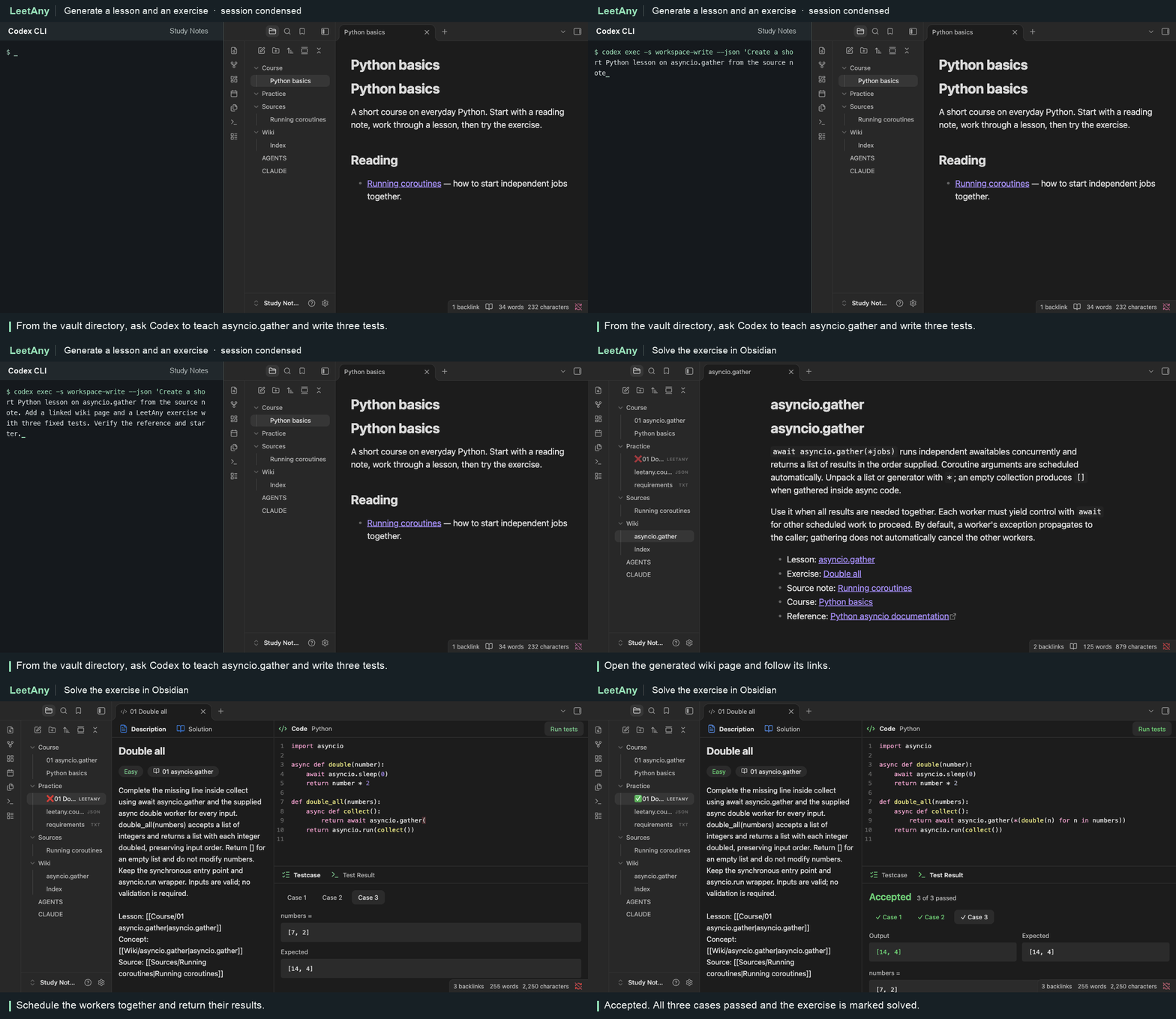
Codex turns a Python note into an exercise. The learner completes it in Obsidian and all three tests pass.

Install and try an exercise

You’ll need Obsidian Desktop 1.15+ and Python 3.10+. Exercises can use Python, C++, Rust or Go. Tests execute locally with your OS permissions, so open exercises from sources you trust.

  1. Download main.js, manifest.json and styles.css from the latest release. Put them in <vault>/.obsidian/plugins/leetany/.
  2. Reload Obsidian and enable LeetAny under Settings → Community plugins.
  3. Run LeetAny: Add sample LLM course from the command palette. Open a .leetany file, edit the starter and click Run tests.

Try it with your notes

Run LeetAny: Install course authoring skill, then open your vault in Codex or Claude Code and try this prompt.

Turn my asyncio.gather lesson into one exercise with three fixed tests. Link it to the lesson and verify the reference solution.

Watch the walkthrough · Configure languages and dependencies · Build from source

HealthExcellent
ReviewSatisfactory
About
Turn Karpathy-style notes into LeetCode-style coding exercises with auto-generated challenges linked to your lessons. Run fixed tests locally in Python, C++, Rust or Go, compare outputs to expected answers, and earn a ✅ when every case passes. Edit solutions inline in Obsidian and iterate until all tests pass.
CodeAIDevelopers
Details
Current version
0.6.0
Last updated
4 days ago
Created
6 days ago
Updates
9 releases
Downloads
38
Compatible with
Obsidian 1.15.0+
Platforms
Desktop only
License
MIT
Report bugRequest featureReport plugin
Author
Aital UnarovAital Unarovaitalun
GitHubaitalun
  1. Community
  2. Plugins
  3. Code
  4. LeetAny

Related plugins

Claudian

Embeds Claude Code/Codex and other local Agents as AI collaborators in your vault.

CodeScript Toolkit

Allows to do a lot of things with JavaScript/TypeScript scripts from inside the Obsidian itself

CustomJS

Reuse custom JavaScript across desktop and mobile.

Smart Chat

Integrate OpenAI's ChatGPT seamlessly in notes. Automatically saves links, allows marking threads as done, and integrates with Dataview.

BRAT

Easily install a beta version of a plugin for testing.

Templater

Create and use dynamic templates.

Smart Connections

Find related notes and excerpts while writing. Your AI link building copilot displays relevant content in graph + list view. A local embedding model powers semantic search. Zero setup. No API key.

Fast Note Sync

Real-time sync of your vaults across server, mobile, and web; shareable with anyone; supports REST and MCP integrations to build your personal AI knowledge base.

Mermaid Tools

Improved Mermaid.js experience: visual toolbar with common elements and more.

Local REST API with MCP

Unlock your automation needs by interacting with your notes over a secure REST API.