Layer Base
 CryObs42 downloads
Multi-dimensional tables in self-contained .layer files: 16 column types, formulas, relations and rollups.
- Overview
- Scorecard
- Updates4
🚨 Much of this plugin's code is AI-generated
It was written under human direction, with heavy AI assistance. If you would rather not use AI-generated code, please stop using the plugin and uninstall it. It is provided as-is, without warranty of any kind.
English | 简体中文
Layer Base
Multi-dimensional boards for Obsidian. A .layer file is a self-contained
database — field definitions, records and several views — that renders as a
table or a board, independent of your vault's folder structure.
A look at it
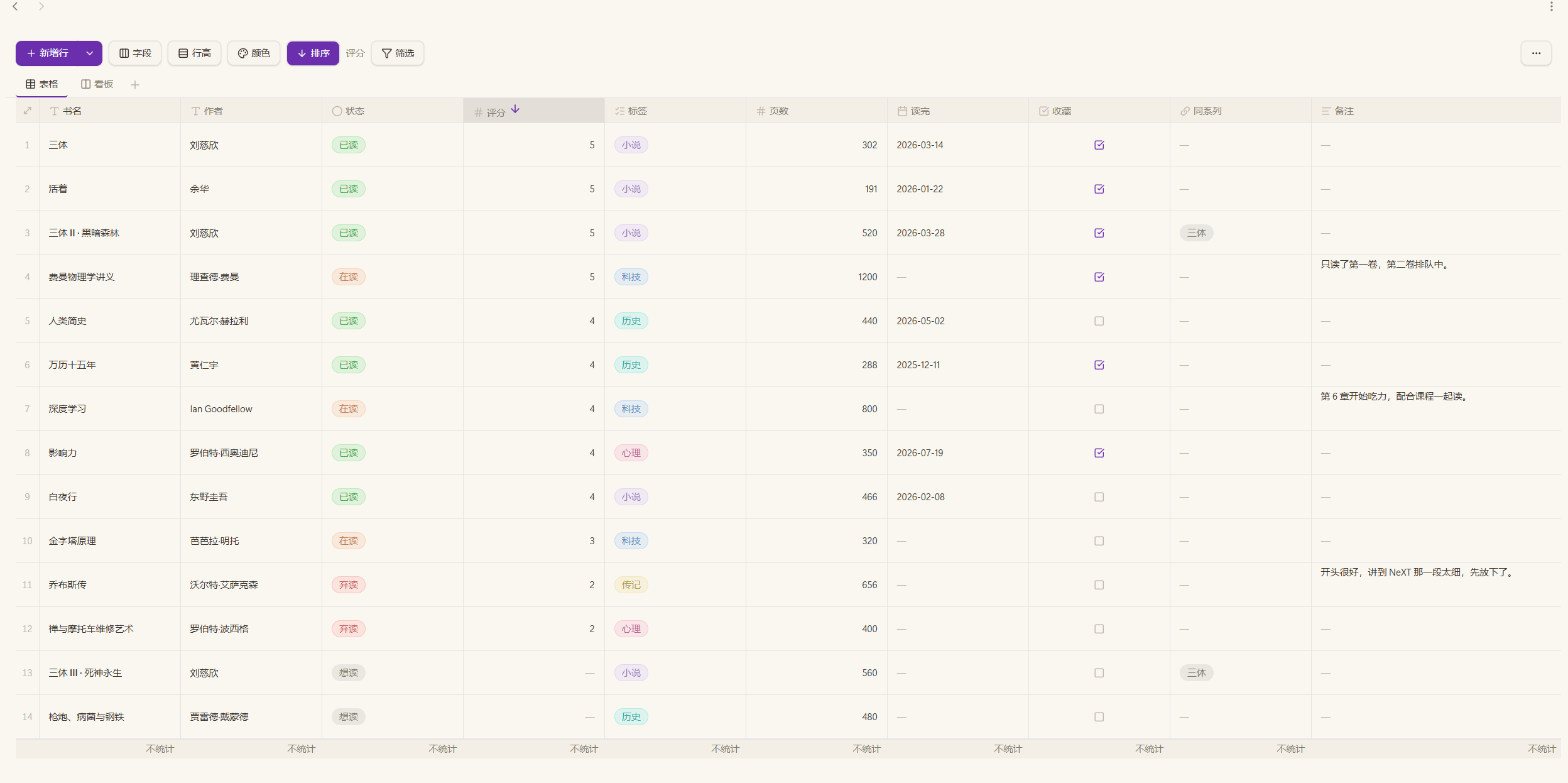
Table view — colour-coded selects, tags, links to other rows, and column footers that total nothing until you ask.
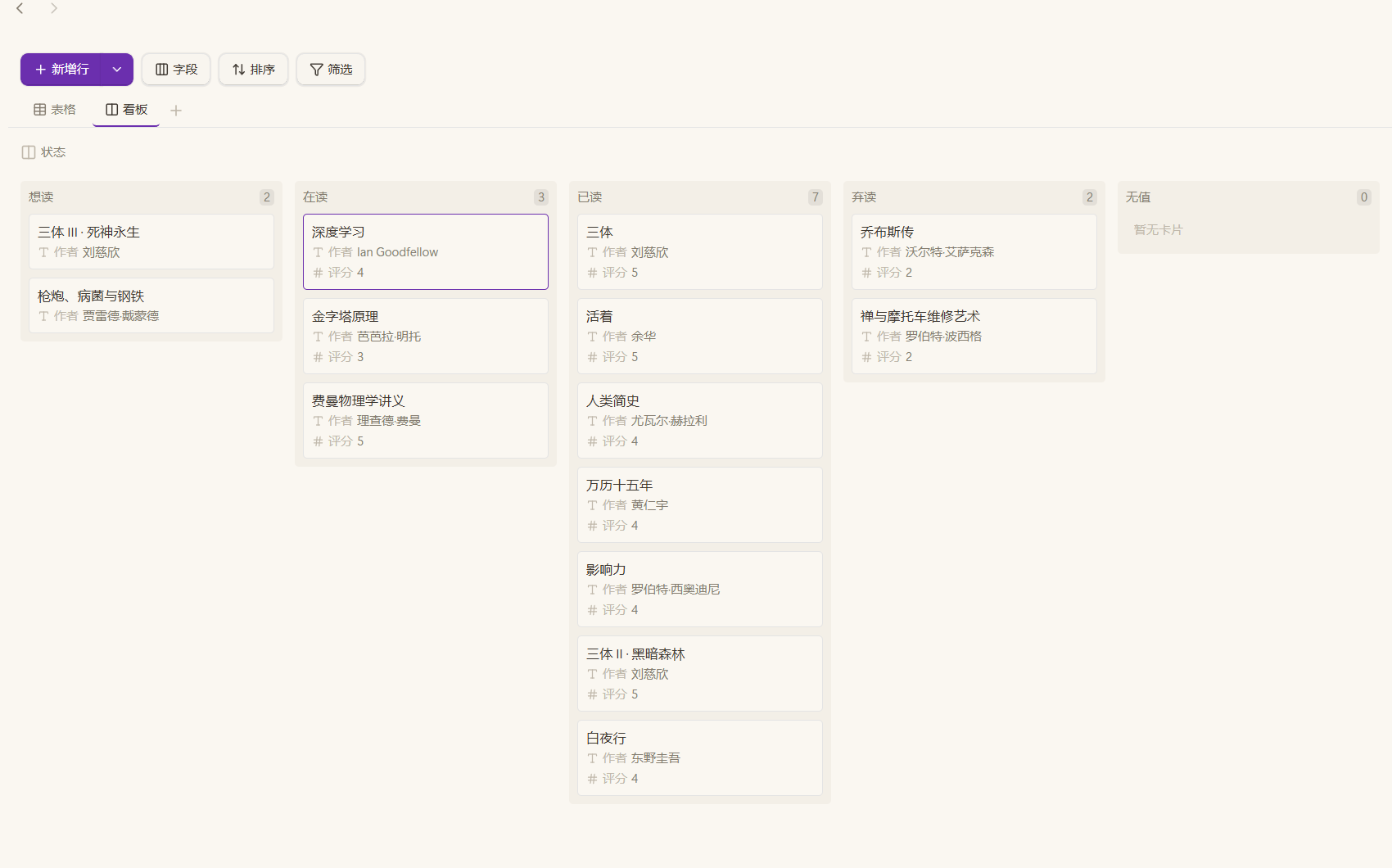
Board view — the same rows grouped by any column, cards dragged between columns.
What it does
- Table view — edit in place, paste from a spreadsheet, drag columns, resize rows and columns, filter and sort.
- Board view — group by any column, drag cards between columns, choose which columns a card shows, several boards per file.
- 16 column types — text, long text, number, date, date and time, relation, lookup, backlinks, auto number, rollup, formula, select, multi-select, checkbox, note, note property.
- Formulas read computed columns — a formula naming a relation column gets the names of the linked rows, and one naming a lookup, rollup, backlink or note property gets what the cell shows. A number column hands the formula its number, not the text it is dressed in on screen.
- Columns read computed columns — a relation showing a column the other table computes (formula, rollup, lookup, backlinks, numbering, note property) shows what that cell reads as, and so does a lookup, a backlink title and a rollup gathering it. One answer, asked of the table the column belongs to.
- Required columns — a column you fill in yourself can be marked required; a column the table computes (formula, rollup, lookup, backlinks, note property, numbering) is not offered that option.
- Column totals — an opt-in footer per column: filled, empty, unique, sum, average, min, max, or a date range.
- Undo and redo — for everything that changes data. View settings (column widths, filters, sorts, totals, hidden columns) are deliberately outside the undo stack.
- Notes — a
notecolumn links a row to a note, creating it when missing; anote propertycolumn reads and writes one key of that note's frontmatter. - AI access — an optional MCP server lets an assistant edit tables through structured tool calls. See AI access below.
Install
Needs Obsidian 1.13.0 or newer. Works on desktop and mobile.
From the community store — open Settings → Community plugins → Browse, search for Layer Base, then Install and Enable. Updates come through the same listing.
By hand — get the files from the Releases page; there is nothing to compile.
- Download
main.js,manifest.jsonandstyles.cssfrom the latest release, or the.zip, which holds exactly those three. - Put them in
<Vault>/.obsidian/plugins/layer-base/(create the folder if it is not there). - Restart Obsidian, then enable Layer Base under Settings → Community plugins.
Updating by hand is those same steps with the newer files.
With BRAT — install BRAT,
then run BRAT → Add beta plugin and enter
CryingObsidian-CO/obsidian-layer-base. BRAT also picks up each later release.
Back up your vault before the first use. A .layer file is plain JSON, so a
backup is just a copy of it.
Want the AI access as well? Also download mcp-server.cjs from the same
release — see AI access.
Using it
Create a board from the ribbon icon, the command palette, or by right-clicking a folder in the file explorer (New board).
- Fields — the Fields button in the toolbar decides what a view shows. On a table it hides and shows columns; on a board it sets the grouping column, the card title and the columns a card lists.
- Column totals — click a column's footer to pick what it reports. Nothing is totalled until you ask.
- Numbering — an auto number column counts "which one of its group this is",
and nothing is written to the file: adding, removing or regrouping rows shifts
the numbers after them. It is a position, not a permanent id — build a fixed id
with a formula if you need one. A formula reads the padded text the cell shows
(
{Module} + "-" + {No}givesMOD-01); write{No} * 1when you mean arithmetic. - Undo —
Ctrl/Cmd+Z,Ctrl/Cmd+Shift+Z,Ctrl/Cmd+Y, but only inside a table or board. They are bound by the view itself rather than as global hotkeys, so they never interfere with the editor. The commands appear in the palette, which means Settings → Hotkeys lists them as unassigned — that is expected, not a fault.
File format
A .layer file is plain JSON: it stays readable, diffable and editable by hand,
and works with Obsidian Sync and file history.
{
  "version": 1,
  "name": "Project board",
  "fields": [
    { "id": "f_a", "name": "Title", "type": "text", "primary": true },
    { "id": "f_b", "name": "Status", "type": "select",
      "options": [{ "id": "o_1", "name": "Todo", "color": "default" }] }
  ],
  "records": [
    { "id": "r_1", "created": "2026-01-01T00:00:00.000Z",
      "cells": { "f_a": "Write the spec", "f_b": "o_1" } }
  ],
  "views": [
    { "id": "v_1", "name": "Table", "type": "grid" },
    { "id": "v_2", "name": "Board", "type": "kanban", "groupByFieldId": "f_b" }
  ]
}
Six rules keep the data safe across edits:
cellsis keyed by field id, so renaming a column never orphans values.selectcells store option ids, so renaming an option never orphans values.- The order of a column's
optionsis that column's order: a board draws its columns in it and a choice column sorts by it, so reordering options moves nothing but positions — no cell changes. - A computed column (formula, rollup, lookup, backlinks, note property) stores nothing.
- A
note propertyvalue lives in that note's frontmatter, not in the.layer. - A file written by a newer build is not opened: its
versionis above the one this build knows, so reading it would drop whatever the newer format added and the next save would write that loss back. Update the plugin to open it.
AI access (MCP)
mcp-server.cjs is a Model Context Protocol
server that lets an assistant edit tables through structured calls instead of
hand-writing JSON. It runs as its own Node process over stdio, so Obsidian
does not need to be running — the app reloads the file when it changes.
It is deliberately not built into the plugin: hosting a server inside Obsidian would need a listening port and would force the plugin to become desktop-only.
You need Node 18 or newer on the machine that runs the assistant.
1. Get the file
Download mcp-server.cjs from the same release and put it anywhere stable, for
example next to the plugin:
<Vault>/.obsidian/plugins/layer-base/mcp-server.cjs
2. Point your client at it
Any MCP client reads a server list shaped like this:
{
  "mcpServers": {
    "layer-base": {
      "command": "node",
      "args": [
        "C:/Vault/.obsidian/plugins/layer-base/mcp-server.cjs"
      ],
      "env": {
        "LAYER_VAULT": "C:/Vault"
      }
    }
  }
}
Two paths, both absolute:
| Field | Meaning |
|---|---|
args[0] |
Where mcp-server.cjs sits |
LAYER_VAULT |
The vault root — the only folder the server may touch |
Forward slashes work on every platform, Windows included. If you paste a Windows
path with backslashes, double each one in JSON (C:\\Vault).
Claude Desktop and similar — paste the block into the client's config file
(claude_desktop_config.json for Claude Desktop) and restart it.
DeepSeek Harness — the same fields in the connector dialog:
- Name:
Layer Base - Transport:
stdio - Command:
node - Args:
["<vault>/.obsidian/plugins/layer-base/mcp-server.cjs"] - Env:
{"LAYER_VAULT":"<vault>"}
3. Use it
"In
Projects/tasks.layer, mark every row whose Status is Todo as Done."
The assistant reads first (list_tables → read_table), then writes
(update_cells). Nothing is written silently: a value a column cannot hold comes
back in refused.
Tools
| Tool | What it does |
|---|---|
list_tables |
Every .layer in the vault, plus the vault root the paths are relative to |
create_table |
Create an empty .layer file; an existing file is never overwritten |
read_table |
Columns, views (with each view's filter, sorts, hidden columns) and rows |
add_records |
Append rows, keyed by column name |
update_cells |
Set single cells by row id |
delete_records |
Remove rows by id |
add_field |
Add a column. Options for select types; a relation needs the column it shows, a formula its expression, a rollup what to gather, a lookup the link it reads through and the column over there, a numbering column its digits and what it counts within |
update_field |
Change a column: name, type, required, number format and bounds, choice options (add, remove, rename, recolour, reorder), a relation's target, a formula, a rollup, a lookup, a numbering column's digits and grouping, a note property's key |
delete_field |
Remove a column and its values |
add_view |
Add a board view |
update_view |
Change a view's name, filter, sorts, hidden columns; a board's grouping, card columns and limit; a table's row height, wrapping, footers, colour rules and column widths |
delete_view |
Remove a board view (the table view cannot be removed) |
Things to know
- Paths are relative to
LAYER_VAULT.list_tablesnames the root and returns paths you can pass back unchanged. A path outside the vault is refused. - A column is changed with
update_field, not deleted and rebuilt. Name, type, required, number format and bounds, options, a relation's target, a formula, a rollup, a lookup, a numbering column's digits and grouping, a note property's key: only what you pass is touched, so changing a column never loses its values. Changing a column's type does clear it, and the answer says how many cells that dropped. - A cell is emptied by writing
"". Every column type accepts it, including number and date, whose own parser has no empty value; a clear is what the app does when a cell is emptied. - A computed column reads back as the value the screen shows. Numbering is
counted here too. Each field says whether it is
readableandwritable, and carriesreadLimit/writeLimitwhen a value has a limit. A rollup, lookup or relation that reads a computed column in another table carriescomputedFrom, which names the table and column; the value is computed, not stored, so it cannot be written here. A note property reads top-level frontmatter values; nested mappings read as empty and are named in that row'snotes. - A write is refused if the file changed after it was read. The server re-reads the file immediately before writing; if another writer — Obsidian, a sync client, another assistant — saved it in between, nothing is written and the call fails. Read the table again and re-apply the change.
- An open table follows the file. When another program writes it, the open view reloads it. If the view had unsaved edits, your version is saved as a conflict copy named in the notice instead of overwriting the other writer.
- A view is named, never "the one on screen". The file does not record which
view is open and the server cannot see Obsidian, so pass the view's name or
id. Read the views with
read_tablefirst.
Values are text as a person would type them — a number is "42", a checkbox is
"true", a date is "2026-01-31", a select is the option name, a
multi-select is "Red, Blue". The column's own parser decides, and every save
goes through the same parse and serialize the plugin uses, so a file stays valid
whatever a caller asks for.
Numbering is the exception: the plugin counts it from the row order, read_table
reports it, and a write to it is refused — it is not a stored value.
If something goes wrong
| Symptom | Cause |
|---|---|
No table at "..." |
The path is not relative to the vault root — run list_tables |
Outside the vault |
The path escapes LAYER_VAULT |
| The client lists no tools | node is not on PATH, or args[0] is wrong |
| Changes are not visible in Obsidian | This view had unsaved edits when the file changed; your version is in a conflict copy named in the notice |
Known limitations
- A board shows a note property but cannot edit it; editing is a table action.
- A numbering column is counted from the row order: adding, removing or regrouping rows shifts the numbers after them. It is a position, not a permanent id.
- Filtering or sorting a formula column recomputes the formula for each comparison, which is noticeable on very large tables.
- A note property is read when the view opens. Changes made to that note elsewhere show up after the table is reopened.
Troubleshooting
| Symptom | What to check |
|---|---|
| The plugin is not in the community list | Obsidian older than 1.13.0 |
| Opening a file says it was written by a newer build | Update the plugin: the file's version is above what this build reads, and reading it anyway would drop what the newer format added |
| A row is missing from a board | Its grouping column is empty, and an empty value is not a column of its own. Give it a value |
| Numbers in an auto number column shifted | Numbering is a position, not a stored id; adding, removing or regrouping rows moves the numbers after them |
Ctrl/Cmd+Z does nothing |
Undo is bound inside a table or a board, not globally, so the editor is unaffected |
Languages
The interface follows the Obsidian app language, shipping English, Simplified Chinese and Traditional Chinese.
Privacy
No network requests and no telemetry. The plugin reads and writes only the
.layer files you open, plus the frontmatter of notes you link to with a
note property column. The MCP server touches nothing outside LAYER_VAULT.
Questions, bugs and requests
Both are welcome, in English or in Chinese. Everything goes through Issues, which has a bug template and a feature template.
Reporting a bug. What helps most:
- What you clicked, and what happened instead. "The board is broken" cannot be investigated; "I dragged a card into the empty column and it bounced back" can.
- Your Obsidian version, and the plugin version from Settings → Community plugins.
- Desktop, mobile, or both.
- Anything from the developer console (
Ctrl/Cmd+Shift+I). It usually names the cause faster than a description does. - If it involves one table, a stripped copy of the
.layer. Replace the values you would rather not share; the structure is what matters.
Asking for a feature. Describe the situation rather than the button you want: what you are trying to do, and where the current version gets in the way. An example from your own table says more than a specification.
This is one maintainer's project, written with heavy AI assistance. Every report is read. Not every one gets a reply, and none comes with a date; a request without an answer is not a refusal.
If you would rather not write anything: a star on the repository is the only support this project asks for.
Contributing
CONTRIBUTING.md has the branch model, the gates and the release
steps. In short: work goes to develop, a change worth reviewing gets a branch of its
own, and npm run verify has to pass before a pull request is merged.
License
GNU General Public License v3.0 — Copyright (C) 2026 CryingObsidian-CO.
You may use, modify and redistribute this plugin under the terms of the GPL-3.0. A modified version you distribute must carry the same licence, with its source available. The full text is in LICENSE.
This program is distributed in the hope that it will be useful, but WITHOUT ANY WARRANTY; without even the implied warranty of MERCHANTABILITY or FITNESS FOR A PARTICULAR PURPOSE. See the GNU General Public License for more details.
Building from source
Only needed if you want to change the plugin. Released builds are attached to the Releases page and need none of this.
npm install
npm run dev        # watch build to main.js
npm run build      # type check + production build
npm run build:mcp  # bundle the MCP server
npm test           # unit tests
npm run lint
npm run check:i18n
npm run verify:css
Strings live in one typed catalogue (src/i18n); every key must appear exactly
once per language, which npm run check:i18n enforces. Developer-facing output
(console messages, parser warnings) stays in English on purpose.