Last Edit Location
 awfrok607 downloads
Put the cursor at the last edit location when opening a note. Work well with multiple notes.
- Overview
- Scorecard
- Updates9
When a user open a note in obsidian, the plugin moves the cursor to the last edit location.
This occurs only once for each note.
The plugin is designed to work well with multiple notes.
To do this, internally
the plugin utilizes
unique identifier, which can be one ofplugin generated UUID,user provided field, orfile pathWhen editing a note, the plugin stores the note's
unique identifieras well as the edit line number and character number.
how a user can use the plugin
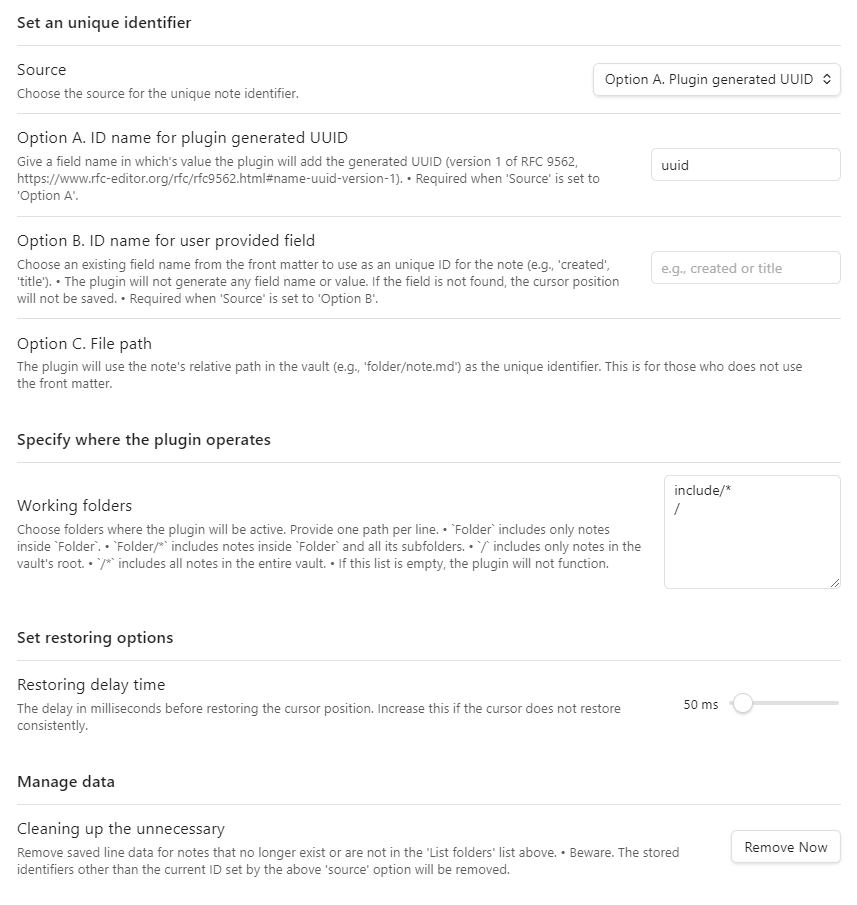
settings tab example
the format of unique identifier in the front matter
{ID name}: {ID}
choose source option and give an ID name for the unique identifier
Option A. Plugin generated UUID: If UUID is missing in the front matter, the plugin will automatically generateUUIDfor the note.- The form
unique identifierwill be this:uuid: xxxxxxxx-xxxx-xxxx-xxxx-xxxxxxxxxxxx - UUID is version 1 of RFC 9562, one using timestamp, with an npm package
uuid
- The form
Option B. User provided field: A user can choose one of exising field names to use as theunique identifier's name, such astitleorcreateddatetime. This option will not generate any field name or value but is to offer a flexibility for those who does not want to add additional UUID to the front matter. So, if the plugin cannot find the name of theunique indentifierin the front matter, the plugin does not save nor restore the cursor location.- The form
unique identifierwill vary according to what a user chooses.
- The form
Option C. File path: If a user does not use the front matter, the note's relative path in the vault can be used as itsunique identifier. This is for those who does not want to use the front matter.
choose folders where the plugin operates
/means the root of the vault./*means the rood and all the sub folders.foldermeans the folder in the root.folder/*means the folder and all its sub folders.
set restoring delay time
- 10ms to 1000ms, 10ms steps
remove the unnecessary
- A user can clean up the unnecessary data of location caused by moving notes out from the working folders or deleting them.
- Beware. The stored identifiers other than the current ID set by the above 'source' option will be removed.
The plugin has two commands (v 0.1.3)
Go to last edit locationScroll cursor line to center of view
the plugin does not
- trace a user's manual modification of
unique identifier, any ofUUIDoruser provided field- When under Option B and C, if a user manually changes
unique identifierof a note, the plugin cannot find it in the stored data.json; which means the plugin will save location with a newunique identifier.
- When under Option B and C, if a user manually changes
what will be added next
- a command to put the cursor at the last edit position and to scroll the cursor in the vertical center of the view (v 0.1.3)
- a command to scroll the current cursor line in the vertical center of the view (v 0.1.3)
what will not be added
- an option to store and restore
last navigation location
support
- If you like this project, please support.
License
MIT
HealthGood
ReviewCaution
About
Restore the cursor to the last edit position when opening a note, applying the jump once per note. Use a plugin-generated UUID, a frontmatter field, or the file path as the note identifier, and restrict behavior to chosen folders with an adjustable restore delay.Details
Current version
0.1.4.4
Last updated
11 months ago
Created
Last year
Updates
9 releases
Downloads
607
Compatible with
Obsidian 1.8.10+
Platforms
Desktop, Mobile
License
MIT
Sponsor