Search...Search plugins and themes...
⌘K
Sign in
  • Get started
  • Download
  • Pricing
  • Enterprise
  • Account
  • Obsidian
  • Overview
  • Sync
  • Publish
  • Canvas
  • Mobile
  • Web Clipper
  • CLI
  • Learn
  • Help
  • Developers
  • Changelog
  • About
  • Roadmap
  • Blog
  • Resources
  • System status
  • License overview
  • Terms of service
  • Privacy policy
  • Security
  • Community
  • Plugins
  • Themes
  • Discord
  • Forum / 中文论坛
  • Merch store
  • Brand guidelines
Follow us
DiscordTwitterBlueskyThreadsMastodonYouTubeGitHub
© 2026 Obsidian

Langscape

KeylimeKeylime11 downloads

Turn obsidian into your ultimate local first conlanger's toolkit.

Add to Obsidian
  • Overview
  • Scorecard
  • Updates3

A conlanger's toolkit for Obsidian. Use your own writing systems, build syntax trees, and run sound changes without leaving your vault.

Install in Obsidian · GitHub releases · Changelog
Langscape trailer: click to watch

Watch the trailer · Visual credits

Features

Writing systems Lexurgy workbench
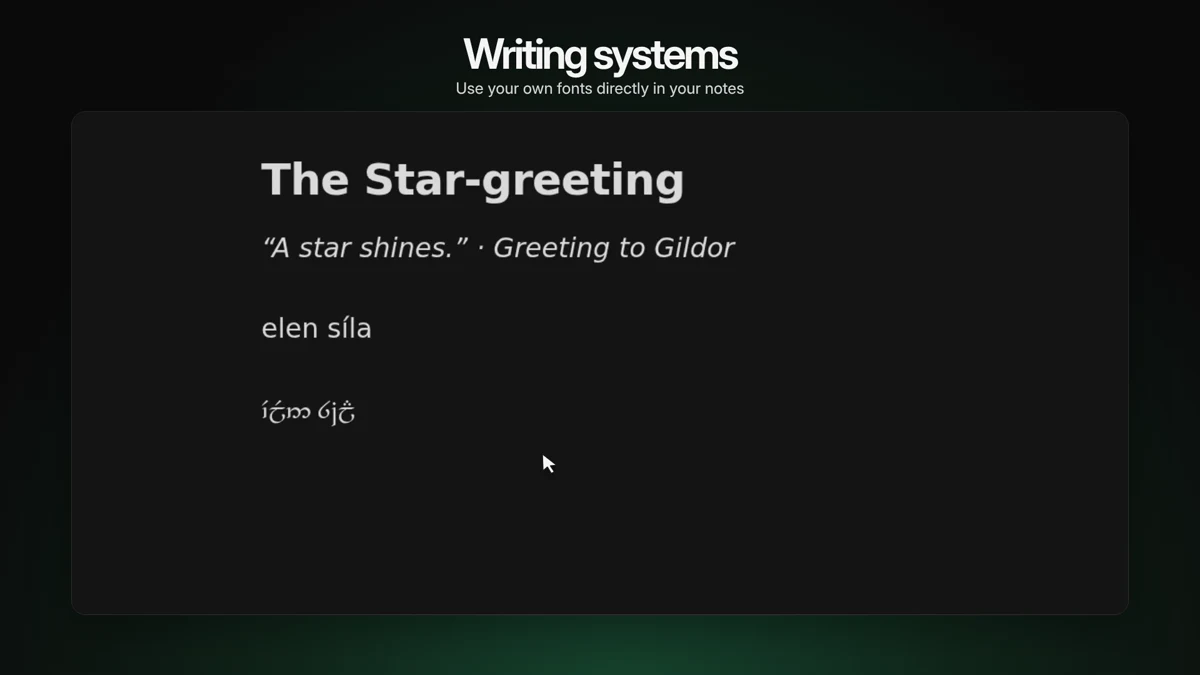
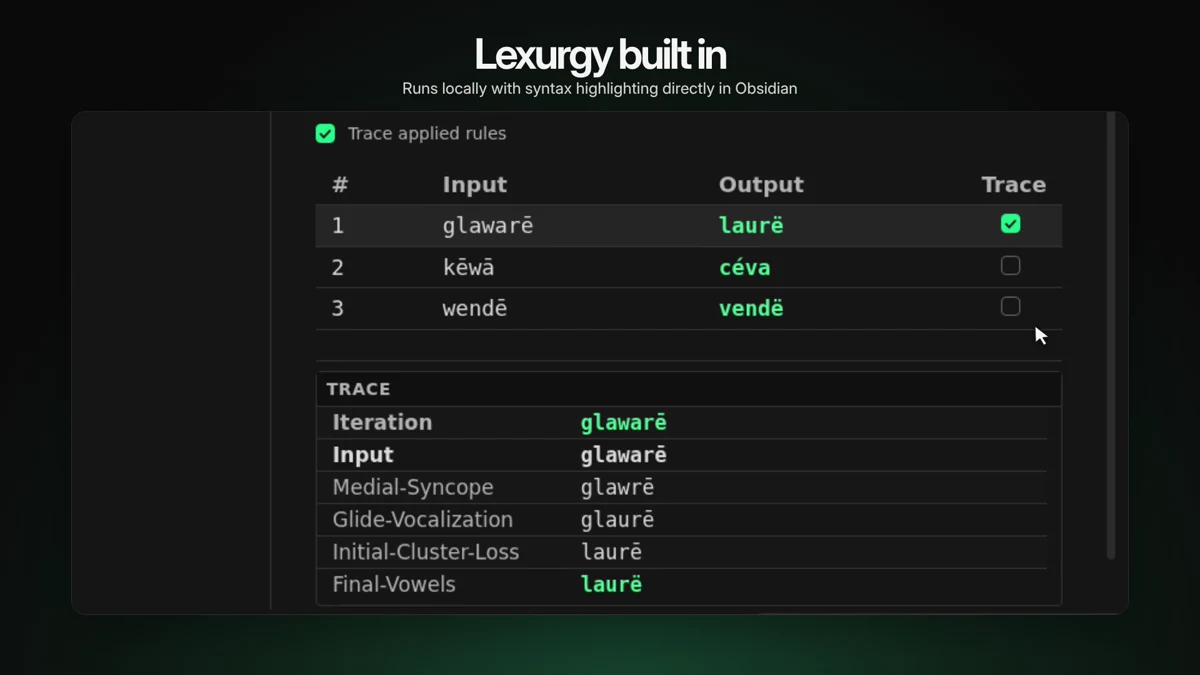
Tengwar rendered directly in an Obsidian note The Lexurgy test bench showing input, output, and a rule-by-rule trace
Drop a font into your vault and apply it to part of a note with {nickname: text} or to the whole note with the langscape-font property. Edit .lsc files with syntax highlighting and live validation. Test words and see which rules changed them. Lexurgy runs locally.
Sound change automations Syntax trees
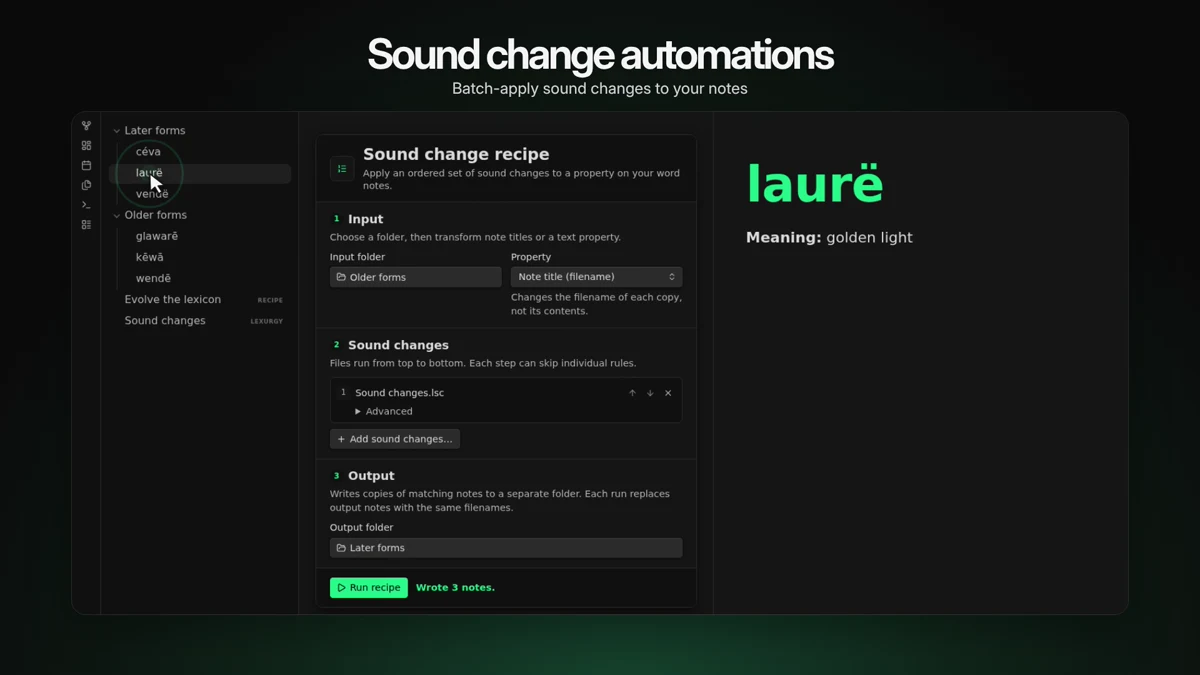
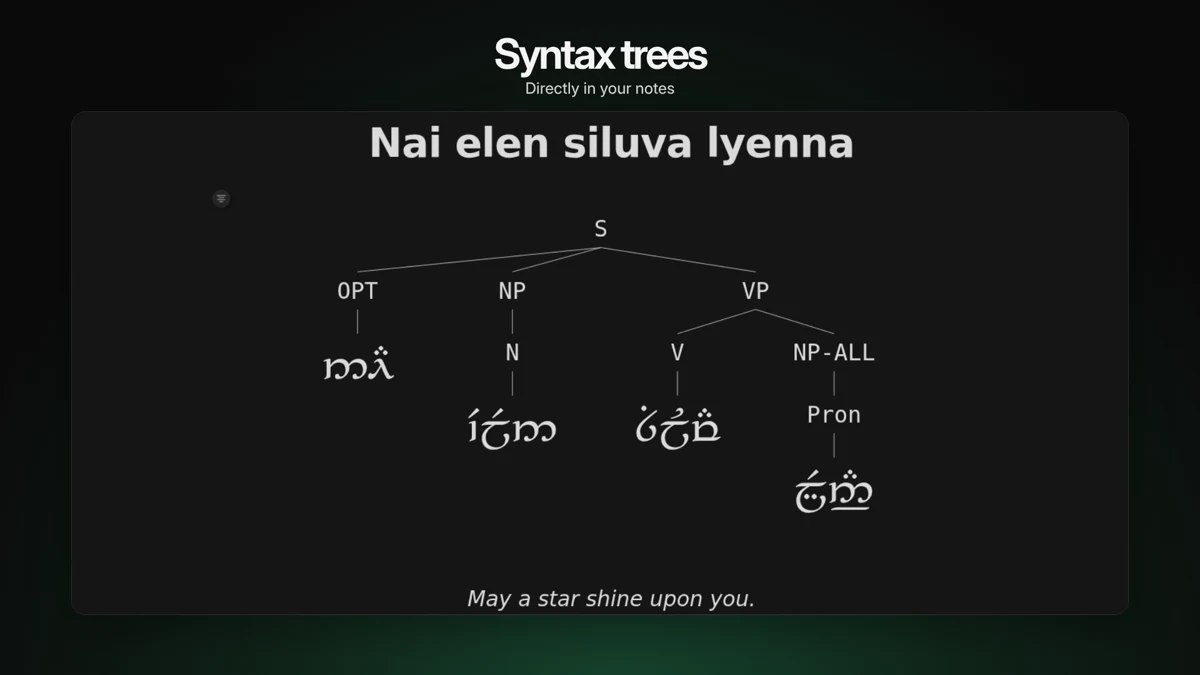
A recipe and the note it generated in the Later forms folder A Quenya sentence tree with four Tengwar leaves
Batch-apply sound changes to note titles or properties. Recipes leave the source notes alone and create or refresh copies in a separate folder. Create and edit syntax trees directly in your notes with {tree: S(NP, VP)}. Labels can use custom fonts too.

You can also merge and split cells in Markdown tables without converting the table to HTML.

Get started

  1. On desktop Obsidian 1.15.0 or later, open Settings → Community plugins, search for Langscape, then install and enable it.
  2. Run Langscape: Create starter vault from the command palette to try a demo. Java and Lexurgy aren't needed for fonts, trees, or tables.
  3. To run sound changes, install Java 17+ and extract the official Lexurgy distribution. In Settings → Langscape → Lexurgy → Advanced, set the Lexurgy path if it isn't detected, then click Test. Langscape doesn't bundle or install Lexurgy.

For manual installation, download main.js, manifest.json, and styles.css from GitHub Releases and place them in <vault>/.obsidian/plugins/langscape/ (or your vault's custom configuration folder).

Contributions

Langscape is open source under the MIT license, but I accept pull requests only rarely. GitHub gets a lot of low-effort AI-generated contributions, and I want to keep Langscape focused rather than let it grow bloated. Please open an issue before starting a patch. Small, tested fixes for an agreed problem are more likely to be accepted than unsolicited features or rewrites.

Privacy

Langscape checks local paths for Java and Lexurgy, including locations outside your vault, and runs them as local processes. Rules and words are passed to Lexurgy locally, not uploaded. The in-app Docs tab fetches public manual pages from lexurgy.com and examples from raw.githubusercontent.com. Vault fonts load locally; older font entries configured with a URL still load from that host. Langscape has no telemetry.

HealthExcellent
ReviewCaution
About
Langscape turns Obsidian into the ultimate conlanger's toolkit: - Writing systems: Install and use your own writing system fonts natively in your notes - Syntax trees: Create syntax trees natively in your notes - Sound change editor: Integrate a Lexurgy editor and server directly into obsidian - Recipes: Automatically take words from one folder, apply sound changes, and store the outputs in another folder - Merge cells: Add the ability to merge cells in markdown tables As a conlanger, I made langscape for my own use to document my own conlangs, so I know exactly the kinds of problems conlangers deal with when it comes to documentation. Langscape is the solution I made for myself, and I hope other conlangers out there will find it useful as well. I will try to be dedicated to maintaining Langscape now and in the future. If you like it, please give Langscape a star on github so I can land an internship https://github.com/KeylimeVI/Langscape Kofi: https://ko-fi.com/keylimevi
LanguagesFontsIntegrations
Details
Current version
1.0.2
Last updated
11 hours ago
Created
2 weeks ago
Updates
3 releases
Downloads
11
Compatible with
Obsidian 1.15.0+
Platforms
Desktop only
License
MIT
Report bugRequest featureReport plugin
Author
KeylimeKeylimekeylimevi
GitHubkeylimevi
reddit.com
discord.com
ko-fi.com
  1. Community
  2. Plugins
  3. Languages
  4. Langscape

Related plugins

Dictionary

A multilingual dictionary that shows word definitions in the sidebar and popover synonyms.

Minimal Theme Settings

Control the colors and fonts in Minimal Theme.

BRAT

Easily install a beta version of a plugin for testing.

LanguageTool Integration

Advanced grammar and spell checking, powered by LanguageTool.

Self-hosted LiveSync

Sync vaults securely to self-hosted servers or WEBRTC.

Fast Note Sync

Real-time sync of your vaults across server, mobile, and web; shareable with anyone; supports REST and MCP integrations to build your personal AI knowledge base.

Custom Frames

Turn web apps into panes using iframes with custom styling. Also comes with presets for Google Keep, Todoist and more.

Local REST API with MCP

Unlock your automation needs by interacting with your notes over a secure REST API.

Terminal

Integrate consoles, shells, and terminals.

Google Drive Sync

Syncs a vault into Google Drive for cross-platform use (works for iOS).