LaC.LifeFlow
 sin510 downloads
Life as Code - LifeFlow: a timeline plugin to manage and display your life events in a timeline view.
- Overview
- Scorecard
- Updates3
English | 简体中文
Life as Code - LifeFlow is a timeline plugin to manage and display your life events in a timeline view.
Features
🎯 Core Features
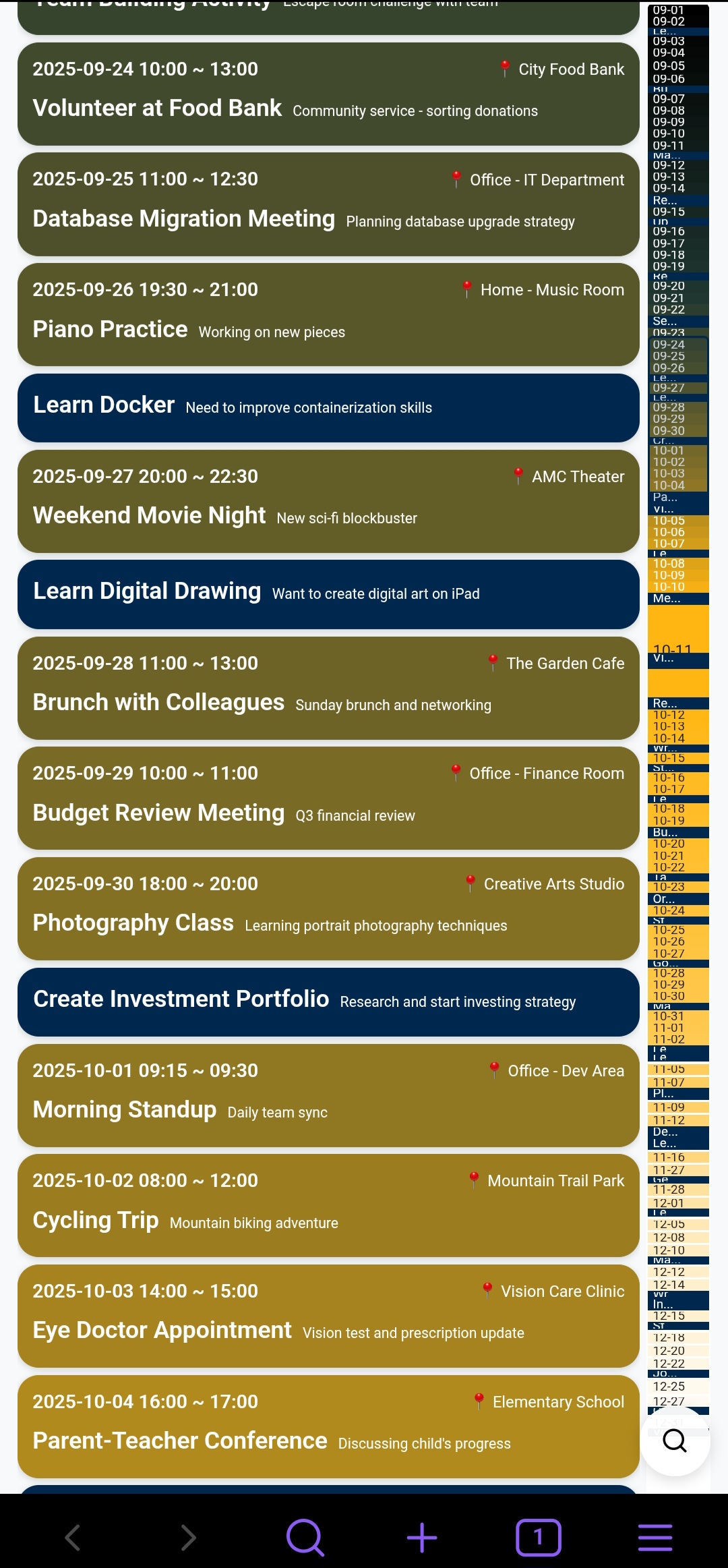
- Timeline View: Display life events and activities in chronological order
- Event Management: Add, edit, and delete life events
- Time Sorting: Automatically sort events by date and time
- Search Function: Quickly search and filter events
- Location Recording: Record the location where events occurred
📊 Data Format
Uses TOML format to store event data, perfectly integrated with Obsidian's Markdown files:
Root File (lifeflow.md):
type = "root"
renders = ["lifeflow"]

[[TestEvent1]]
[[TestEvent2]]
[[Watching Netflix]]
Event File (TestEvent1.md):
name = "Practice Coding"

[detail]
start_time = "2025-07-17 13:09"
end_time = "2025-07-17 14:21"
address = { name = "Beach" }
description = "Explored new places"
Event File with Location Information:
name = "Watching Netflix"

[detail]
start_time = "2025-10-01 14:02"
end_time = "2025-10-01 18:59"
description = "Made delicious food12"

[detail.address]
name = "Xiaomi Store (Tianyang Plaza)"
address = "Xiaomi Store, 1st Floor, Building C, Tianyang Plaza, Yanjiao"
longitude = 116.821768
latitude = 39.964811
coordinate_system = "GCJ-02"
🔧 Plugin Commands
- Open LaC.LifeFlow - Open the timeline view
- File Context Menu - Open Markdown files with LifeFlow
📁 File Structure
The plugin creates the following files in the specified folder:
lifeflow.md- Root file containing the event reference listTestEvent1.md- Event file with specific event dataTestEvent2.md- Event file with specific event dataWatching Netflix.md- Event file with specific event data- ... More event files
⚙️ Settings
- Entry File: Specify the file path for storing event data (default: LaC/LifeFlow/lifeflow.md)
- Enable Context Menu: Show "Open with LaC.LifeFlow" option in file context menu
- Language Settings: Interface language (auto/Chinese/English)
- Map API Provider: Choose map service provider (None/Amap/Google Maps)
- None: Disable map features, use simple text address input
- Amap: Use Amap (高德地图) service for China regions
- Google Maps: Use Google Maps service for international regions
- Amap Web Service Key: Amap API key for address search, geocoding, and coordinate conversion
- Get your free API key from Amap Open Platform
- Required features: Web Service API (address search, geocoding)
- Google Maps API Key: Google Maps API key for address search, geocoding, and coordinate conversion
- Get your free API key from Google Open Platform
- Required features: Maps JavaScript API, Places API, and Geocoding API
Installation
Method 1: Using BRAT (Beta Reviewers Auto-update Tester)
- Install BRAT plugin from Community Plugins
- Open BRAT settings
- Click "Add Beta plugin" and enter:
alvinfunborn/lac-lifeflow - Enable the plugin in Community Plugins
Method 2: Manual Installation
- Download the latest release from GitHub
- Extract the files to
.obsidian/plugins/lac-lifeflow/directory - Enable the plugin in Obsidian Settings
Usage
1. Open Timeline
Use the command palette (Ctrl+P) and search for "Open LaC.LifeFlow". The plugin will automatically create sample data files.
2. Manage Events
In the timeline interface:
- Add Event: Click the "+" button to add a new event
- Edit Event: Click on an event card to edit it
- Delete Event: Delete events in the editing interface
- Search Events: Use the search box to quickly find events
- Select Location: Click on the address field to open the map selector and choose event location
3. Using Map Features
When a map provider is configured:
- Interactive Map Selector: Click the address field to open a full-screen map interface
- Search Addresses: Type to search for locations by name or address
- Click to Select: Click anywhere on the map to select a location
- Auto-save Coordinates: Longitude, latitude, and coordinate system are automatically saved
- Coordinate Systems Support: WGS84, GCJ-02 (China), BD-09 (Baidu)
- Offline Access: Once saved, location data is stored locally and works offline
4. Time Sorting Rules
- Events are strictly sorted by occurrence date in ascending order
- Events on the same day are sorted by time
- Events without specific times maintain their original order in the document
5. File Organization
- Root File:
lifeflow.mdcontains the reference list of all events - Event Files: Each event has its own
.mdfile containing complete event data - Location Information: Supports simple addresses and detailed coordinate information
- Time Format: Uses
start_timeandend_timefields in "YYYY-MM-DD HH:mm" format
Technical Implementation
- Uses Obsidian Plugin API for file operations
- Supports TOML format for data storage
- React + TypeScript for building responsive UI
- Supports both mobile and desktop platforms
- Fully local storage to protect user privacy
- Integrates Amap API for address search and coordinate conversion
- Supports multilingual interface (Chinese/English)
- Distributed file storage: each event in a separate file for easier management and version control
- Supports multiple coordinate systems: WGS84, GCJ-02, BD-09
Development
The plugin is developed based on Obsidian Plugin API. Main components:
LifeFlowPlugin: Main plugin classLifeFlowView: Timeline view componentStoryList: Event list componentStoryEditModal: Event editing modalSearchComponent: Search componentMapSelector: Map selector componentAddressInput: Address input componentLifeFlowRepository: Data repository class
License
MIT License
Privacy and network use
Maps are optional. With provider None, no map service is requested. Enabling Google Maps or AMap loads that provider's remote JavaScript SDK and map tiles, and sends place search queries and coordinates to the selected provider for search, geocoding. These features require your own provider account and API key and may incur provider charges. Notes stay in your vault; map queries are processed by the provider. API keys are saved in local plugin settings (data.json); do not commit or share that file. The plugin does not collect analytics.