Search...Search plugins and themes...
⌘K
Sign in
  • Get started
  • Download
  • Pricing
  • Enterprise
  • Account
  • Obsidian
  • Overview
  • Sync
  • Publish
  • Canvas
  • Mobile
  • Web Clipper
  • CLI
  • Learn
  • Help
  • Developers
  • Changelog
  • About
  • Roadmap
  • Blog
  • Resources
  • System status
  • License overview
  • Terms of service
  • Privacy policy
  • Security
  • Community
  • Plugins
  • Themes
  • Discord
  • Forum / 中文论坛
  • Merch store
  • Brand guidelines
Follow us
DiscordTwitterBlueskyThreadsMastodonYouTubeGitHub
© 2026 Obsidian

Ketcher

yulei-chenyulei-chen9k downloads

View or draw chemical structures and reactions using Ketcher.

Add to Obsidian
  • Overview
  • Scorecard
  • Updates7

An Obsidian desktop plugin for viewing and drawing chemical structures and reactions with Ketcher, a web-based molecule sketcher.

Installation

One-click installation: Add Ketcher to Obsidian

or install from Obsidian under Settings → Community plugins.

Get started

Select the Ketcher ribbon icon to create a new .ket file. New files are saved to the folder configured under Settings → Ketcher → Ketcher folder.
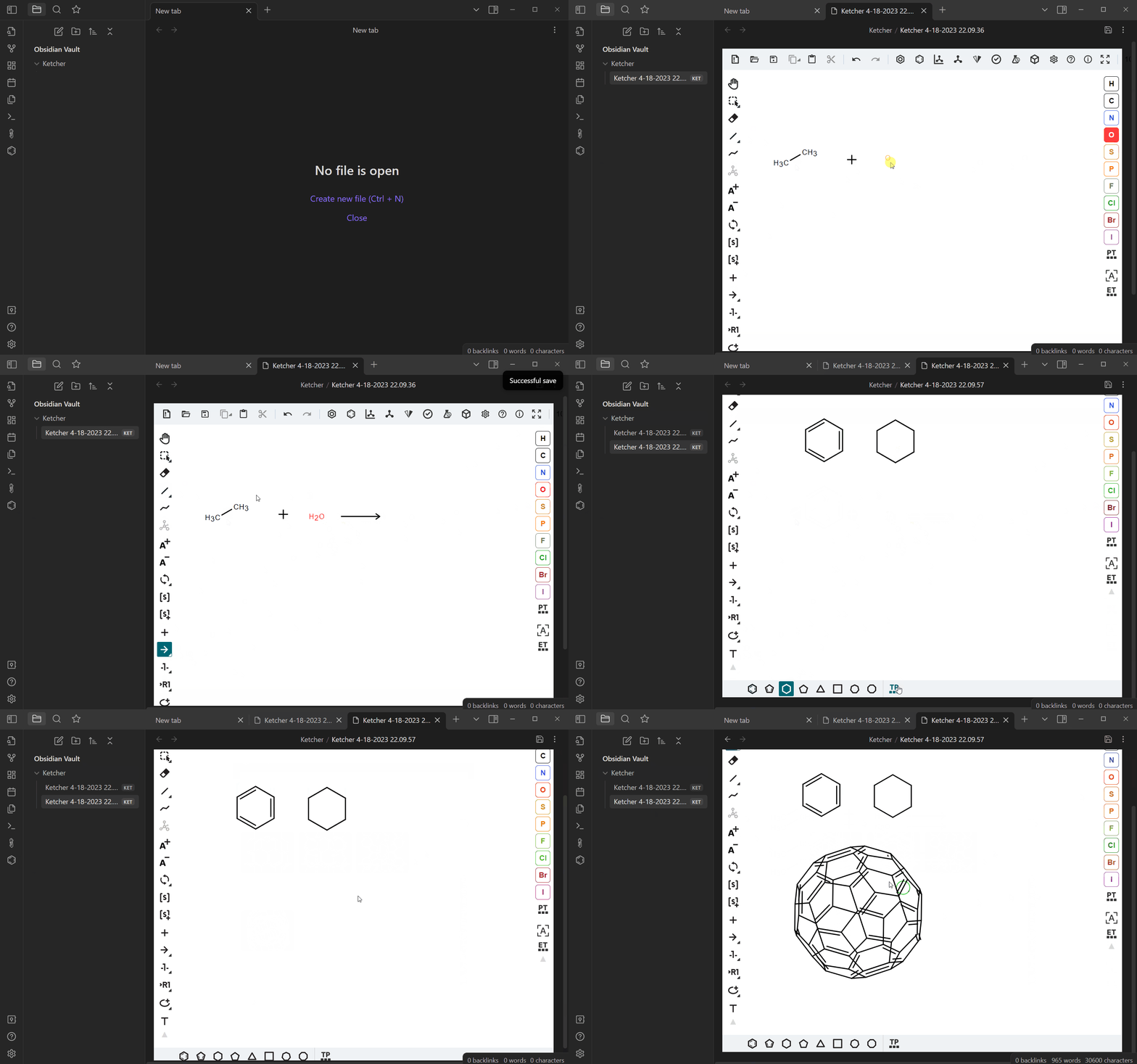
Obsidian Ketcher demo

Link to a structure with [[example.ket]]; hovering the link displays a read-only structure preview. Embed a structure directly in a note with ![[example.ket]]; click the preview to open it in Ketcher. Both forms work in Live Preview and Reading view.

For editor features and shortcuts, see the Ketcher user guide.

Development

Development requires Node.js 24.14.1 or newer and npm.

npm ci
npm run dev

Run the production checks before committing:

npm run build
npm run lint

The production build creates the three release assets at the repository root: main.js, manifest.json, and styles.css.

Releasing

The release workflow follows the Obsidian GitHub Actions release guide.

Before the first release, open GitHub → Settings → Actions → General → Workflow permissions, select Read and write permissions, and save.

Bump the version

Use npm version. The repository's version lifecycle script also synchronizes manifest.json and versions.json.

npm version patch # 0.2.0 -> 0.2.1
npm version minor # 0.2.0 -> 0.3.0
npm version major # 0.2.0 -> 1.0.0

then

git push origin 0.2.0
git push
HealthExcellent
ReviewCaution
About
Draw and view chemical structures and reactions inside Obsidian using the Ketcher web-based sketcher. Embed editable molecular sketches into notes and render reactions inline for easy reference.
DrawingScienceVisualization
Details
Current version
0.2.3
Last updated
Last month
Created
3 years ago
Updates
7 releases
Downloads
9k
Compatible with
Obsidian 1.1.0+
Platforms
Desktop only
License
Apache-2.0
Report bugRequest featureReport plugin
Author
yulei-chenyulei-chen
github.com/yuleicul
GitHubyulei-chen
  1. Community
  2. Plugins
  3. Drawing
  4. Ketcher

Related plugins

Excalidraw

Visual PKM powerhouse. Create and edit Excalidraw drawings.

Mermaid Tools

Improved Mermaid.js experience: visual toolbar with common elements and more.

Kroki

Render Kroki diagrams.

Simple mind map

A mind map that combines aesthetics and functionality. 一个颜值与功能并存的思维导图。

draw.io

Create and edit diagrams with draw.io (diagrams.net), locally and offline.

D2

A modern diagram scripting language that turns text to diagrams.

Advanced Canvas

Supercharge your canvas experience. Create presentations, flowcharts and more.

Breadcrumbs

Visualise the hierarchy of your vault using a breadcrumb trail or matrix view.

Maps

Adds a map layout to bases so you can display notes as an interactive map view.

Ink

Handwriting and drawing directly between paragraphs using a digital pen, stylus, or Apple pencil.