Search...Search plugins and themes...
⌘K
Sign in
  • Get started
  • Download
  • Pricing
  • Enterprise
  • Account
  • Obsidian
  • Overview
  • Sync
  • Publish
  • Canvas
  • Mobile
  • Web Clipper
  • CLI
  • Learn
  • Help
  • Developers
  • Changelog
  • About
  • Roadmap
  • Blog
  • Resources
  • System status
  • License overview
  • Terms of service
  • Privacy policy
  • Security
  • Community
  • Plugins
  • Themes
  • Discord
  • Forum / 中文论坛
  • Merch store
  • Brand guidelines
Follow us
DiscordTwitterBlueskyThreadsMastodonYouTubeGitHub
© 2026 Obsidian

JustFTables

codeforge11codeforge1146 downloads

A minimal extension that fixes a very annoying limitation: seamless column and row merging for tables

Add to Obsidian
  • Overview
  • Scorecard
  • Updates4

Just a minimal extension that fixes a very annoying limitation: seamless column and row merging for Obsidian tables.

⚠️ Note: The merged layout is rendered and visible only in Reading View. In Live Preview or Source mode, you will see the raw syntax.

Example

Without extension:
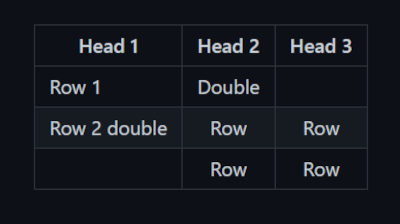
Without ext

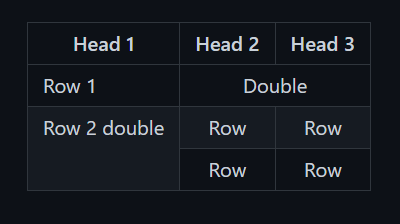
With extension:
With ext

How to use it

Merging Columns (colspan - sideways)

To merge a cell horizontally across multiple columns, start the cell text with -> followed immediately by a number indicating how many columns to span (e.g., ->2, ->3).

Example Markdown:

| Header 1 | Header 2 | Header 3 |
| :--- | :--- | :--- |
| ->2 Merged across two columns |   |Normal cell |

Merging Rows (rowspan - downwards)

To merge a cell vertically down across multiple rows, start the cell text with -/ followed immediately by a number indicating how many rows to span (e.g., -/2, -/3).

Example Markdown:

| Header 1 | Header 2 |
| :--- | :--- |
| -/2 Spans 2 rows down | Normal cell |
|                      | Another cell |

Commands

The following commands are available via the Obsidian Command Palette (Ctrl/Cmd+P):

  • JustFTables: Add example fixed table: Creates a sample table, making it easier to get familiar with how the extension works.
  • JustFTables: Show version: Shows the currently installed version.
HealthExcellent
ReviewSatisfactory
About
Merge table cells in Obsidian using simple markers to span columns (->n) or rows (-/n), rendering seamless colspan/rowspan in Reading View. Show merged layout only in Reading View — Live Preview and Source display raw table syntax.
TablesFormatting
Details
Current version
1.2.1
Last updated
4 weeks ago
Created
4 weeks ago
Updates
4 releases
Downloads
46
Compatible with
Obsidian 1.0.0+
Platforms
Desktop, Mobile
License
MIT
Report bugRequest featureReport plugin
Author
codeforge11codeforge11
GitHubcodeforge11
  1. Community
  2. Plugins
  3. Tables
  4. JustFTables

Related plugins

Simple Table Math

Do some math (sum, average, etc.) in your markdown tables.

Linter

Format and style your notes. Linter can be used to format YAML tags, aliases, arrays, and metadata; footnotes; headings; spacing; math blocks; regular Markdown contents like list, italics, and bold styles; and more with the use of custom rule options.

Advanced Tables

Improved table navigation, formatting, and manipulation.

Admonition

Admonition block-styled content.

Editing Toolbar

The Editing Toolbar is modified from cMenu, which provides more powerful customization settings and has many built-in editing commands to be a MS Word-like toolbar editing experience.

Image Captions

Add captions to images with inline Markdown and link support. The caption format is compatible with the Commonmark spec and other Markdown applications.

Sort and Permute lines

Sort and Permute lines in whole file or selection.

Datacore

An even faster reactive query engine for the data obsessed.

dotpm

Full-featured task and project management: stunning Gantt charts, Kanban boards, Table views, customizable fields, due date notifications, dependancies

Super Simple Time Tracker

Multi-purpose time trackers for your notes.