JSON Editor
 Johannes Kaindl1k downloads
View and edit JSON files with a Tree/Source toggle. Renders JSON code blocks in Markdown notes.
- Overview
- Scorecard
- Updates35
View and edit .json and .jsonc files inside Obsidian, with a Tree↔Source toggle and comments that survive editing.
Renders ```json and ```jsonc code blocks inside Markdown notes as collapsible, theme-aware trees, too. Every structural edit on a .jsonc file is applied as a targeted text edit, so your comments and formatting stay exactly where you put them.
Auch auf Deutsch verfügbar: README.de.md.
Target platform: Obsidian 1.11.4+ on desktop and mobile. No external services of its own, no remote resources, no telemetry. The optional LLM repair talks only to the endpoint you configure.
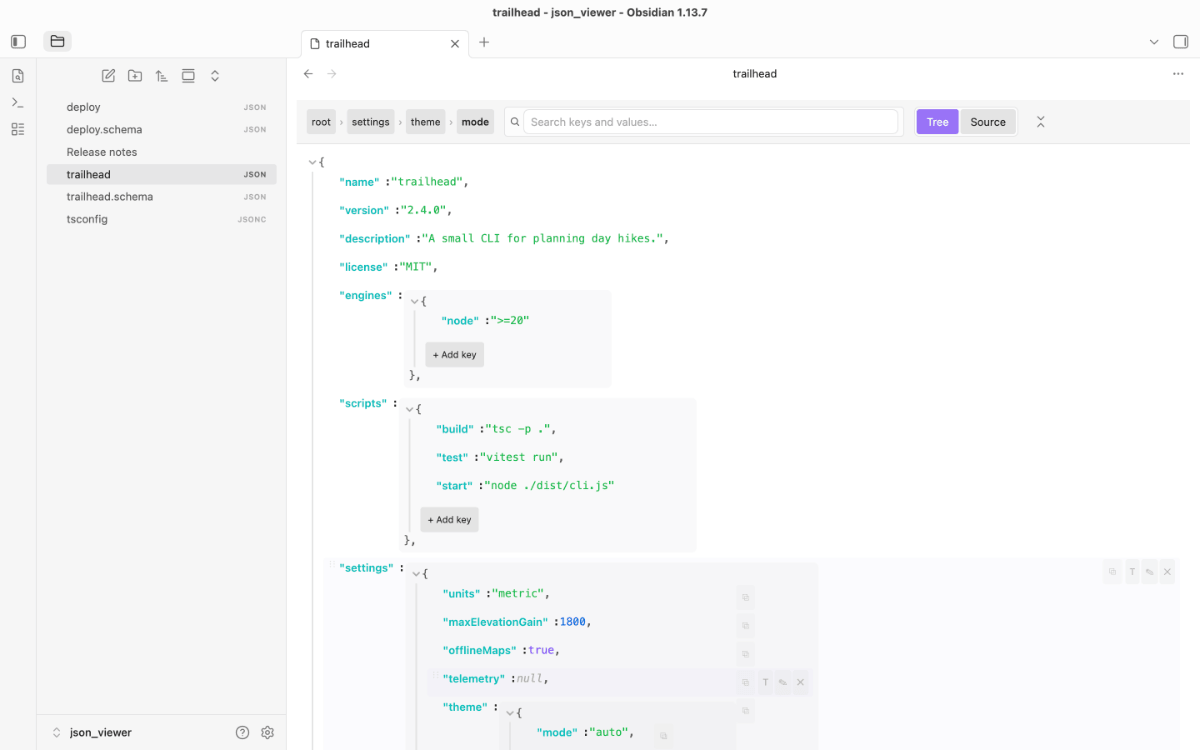
About
JSON inside Obsidian — without losing the editing affordances you'd expect from a real editor. Open a .json file and it opens in a dedicated view with two modes:
- Tree mode — fold and inline-edit values, restructure with add/rename/delete/reorder/type-switch, with a breadcrumb that follows the cursor.
- Source mode — CodeMirror 6 with JSON syntax highlighting, a parse-error banner, and
Cmd/Ctrl+Ffind. - Schema-aware (optional) — opt-in JSON Schema validation flags invalid rows in real time against a companion
*.schema.jsonfile.
The plugin also renders ```json fences inside regular Markdown notes as read-only collapsible trees, so your config snippets and API examples stop being unreadable walls of text.
Everything stays inside your vault. The plugin uses Obsidian's own CSS variables, so it follows whichever theme you're using — light, dark, minimal, anything.
Features
.jsonand.jsoncfile view with a Tree↔Source mode toggle in a unified top toolbar..jsonccomment preservation — open a JSONC file (comments + trailing commas) and edit it in the tree; every edit is applied as a targeted text edit on the source, so comments and formatting are kept. An unedited open→save is byte-identical..jsonstays strict (comments are an error). On reorder a comment travels with the element it belongs to — the trailing comment behind it and the comment lines directly above it; a comment set off by a blank line reads as a heading for its position and stays there.- Inline editing of strings, numbers, and booleans in tree mode — click a value, press Enter to commit, Escape to cancel.
- Structural editing — add keys to objects (
+ Add keyaffordance at the bottom of each container), append items to arrays, rename object keys (✎ hover button), delete any row (✕ hover button orBackspace/Deleteon focused row). - Drag-and-drop reorder — hover a row to reveal a
⋮⋮handle; drag it up/down within its container (array items or object keys). Same-parent only; undoable. - Type-switching — every row has a
Tbutton to switch a value's JSON type (string / number / boolean / null / object / array). Destructive but undoable. - Undo / redo —
Cmd/Ctrl+Zreverts the last edit;Cmd/Ctrl+Shift+Zredoes. The history is unified across tree and source mode (a single 100-deep text-based stack since 1.2.0); switching modes no longer wipes it. While you're typing in an inline editor, undo falls through to the native input. The undo/redo and focus-search commands ship with no default hotkeys — a view-local keymap handlesCmd/Ctrl+Z/Shift+Z/Fwhile the JSON view is focused; bind your own in Settings if you prefer. - Search & filter —
Cmd/Ctrl+Fopens a live search that strict-filters the tree to matching keys and primitive values (case-insensitive substring); in source mode it opens CodeMirror's find panel instead.Enter/Shift+Enterjump to the next / previous match (the counter shows3/17), ESC clears or blurs. Clearing the search restores the collapse state it had opened. - JSON Schema validation (opt-in) — enable in settings to auto-load a companion
data.schema.jsonnext todata.json; a banner shows the error count and offending rows get a red outline + hover message. Off by default — auto-loading schema files from a shared vault is a trust decision. - Large-file guard — files past a render budget (~1 MB or ~15k nodes) open in source mode with a Load tree anyway banner, so a multi-MB file never freezes the UI on open.
- Big-integer / lossy-number safety — files containing integers JSON can't represent exactly (> 2^53) open the tree read-only with a banner; source mode stays editable, so an edit can't silently corrupt 64-bit IDs.
- Keyboard navigation — Tab focuses the tree;
↓/↑walk visible rows;→/←expand-collapse or jump children / parent;Home/Endjump to first / last visible row;Enter/F2open inline-edit on a primitive. WAI-ARIA tree roles (role="tree",role="treeitem",aria-expanded) for screen-reader support. - Collapse all / Expand all — one toolbar button toggles between them; the commands Collapse all, Expand all and Collapse to default depth are also in the palette. The collapse state is remembered per file (50 most recent) and survives closing and reopening.
- Go to path — a quick-switcher style picker over every path in the file; choosing one scrolls to that row.
- Long values are shortened at 120 characters with a Show more chip. Editing and copying always use the full value.
- Breadcrumb showing the current path; clicking a segment scrolls back up the tree.
- Copy buttons on hover — click copies the value, Alt-click copies the JSON path.
- Repair broken JSON with an LLM — an invalid
```json/```jsoncblock shows a Repair button in its error card (and the command Repair JSON in the current code block works at the cursor). The block and the parser error go to a language model; you see a side-by-side line diff and nothing is written until you press Apply. See Repair with an LLM. - Theme-aware styling via Obsidian CSS variables — no hardcoded colors, no theme breakage.
- Embedded code blocks —
```jsonand```jsoncfences in any Markdown note render as a titled card with a collapsible tree (the```jsoncvariant tolerates comments). Blocks over 20 lines auto-collapse. Invalid JSON renders as a styled error card with line/column info, not a crash. - Settings — default mode, indent (2 / 4 / tab), tree marker style (modern / classic), auto-collapse depth, JSON Schema validation (opt-in), companion-schema suffix.
- No telemetry, no remote resources. All assets ship with the plugin.
See it in action
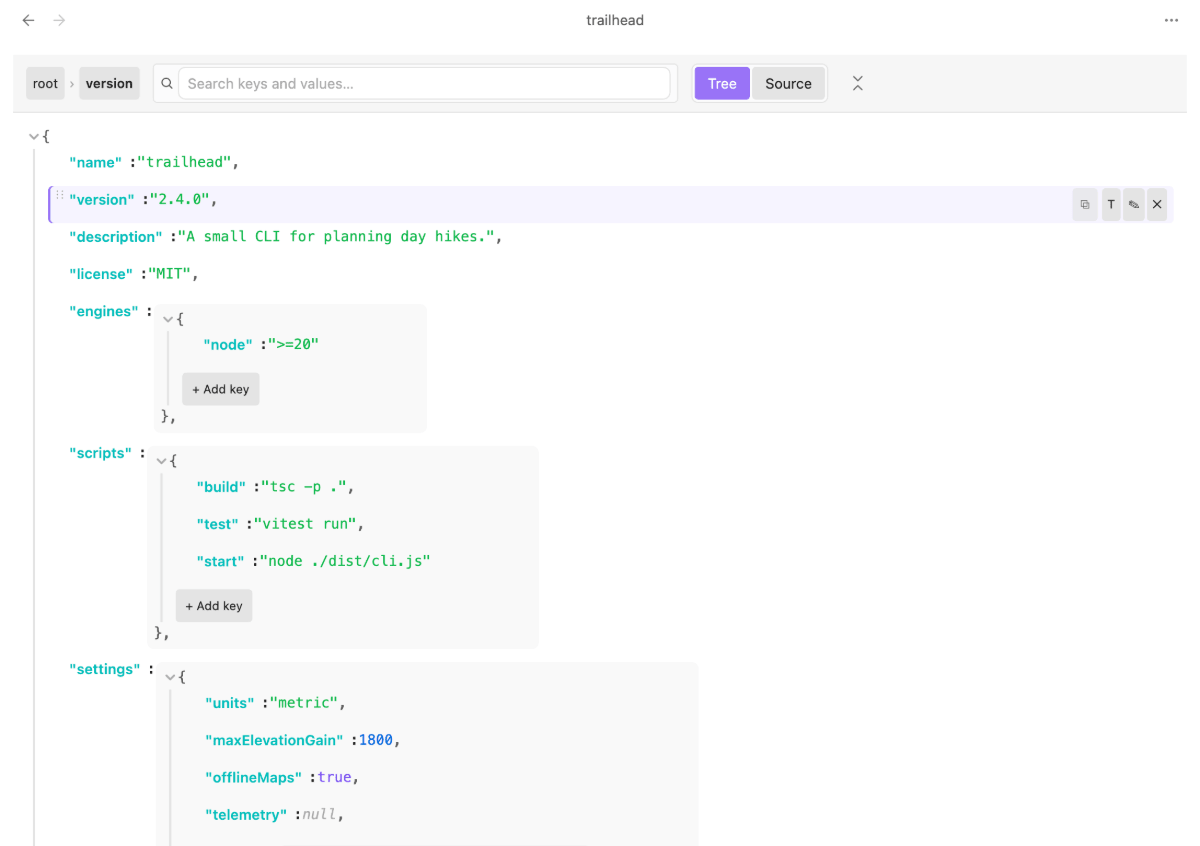
Tree mode: hover a row for rename, delete, type-switch and drag handle; the breadcrumb follows the active path.
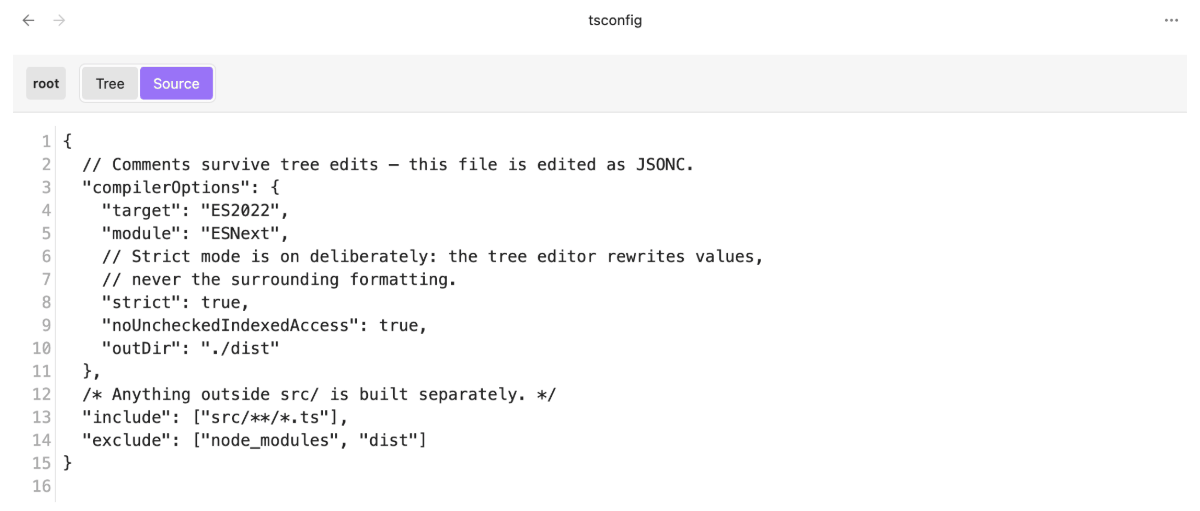
Source mode on a .jsonc file — comments and formatting are preserved across tree edits.
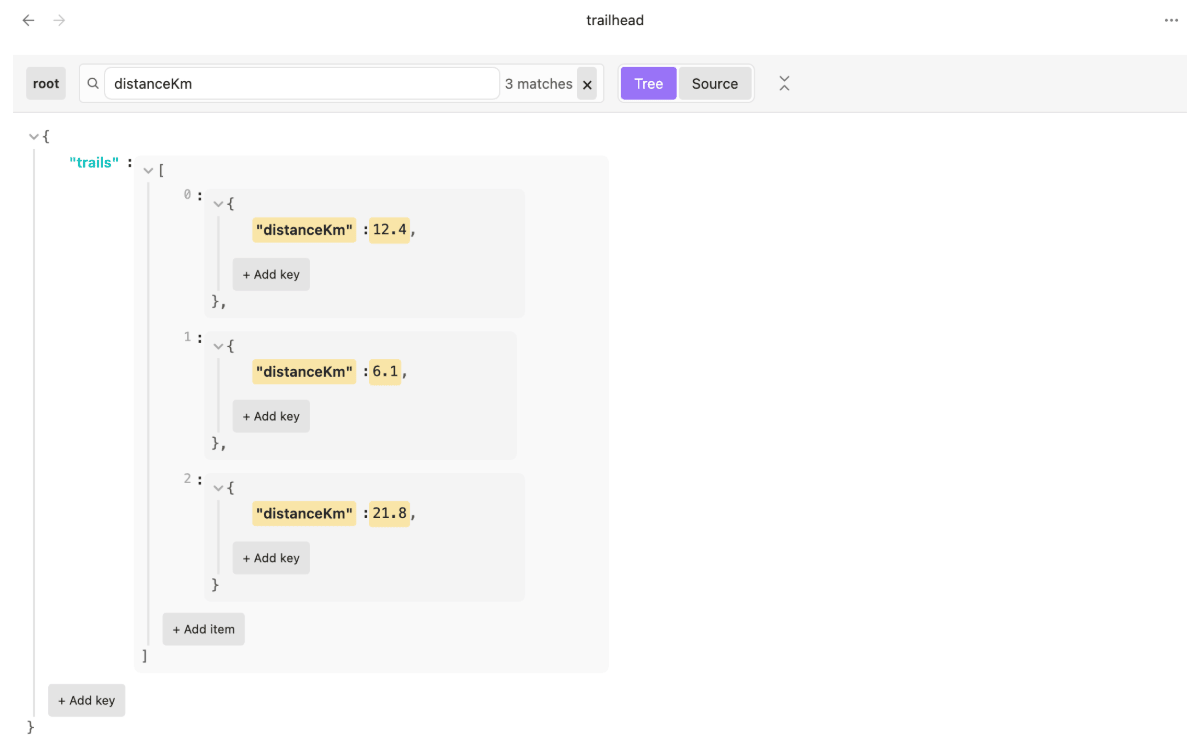
Cmd/Ctrl+F filters the tree to matches and counts them; Enter steps from match to match.
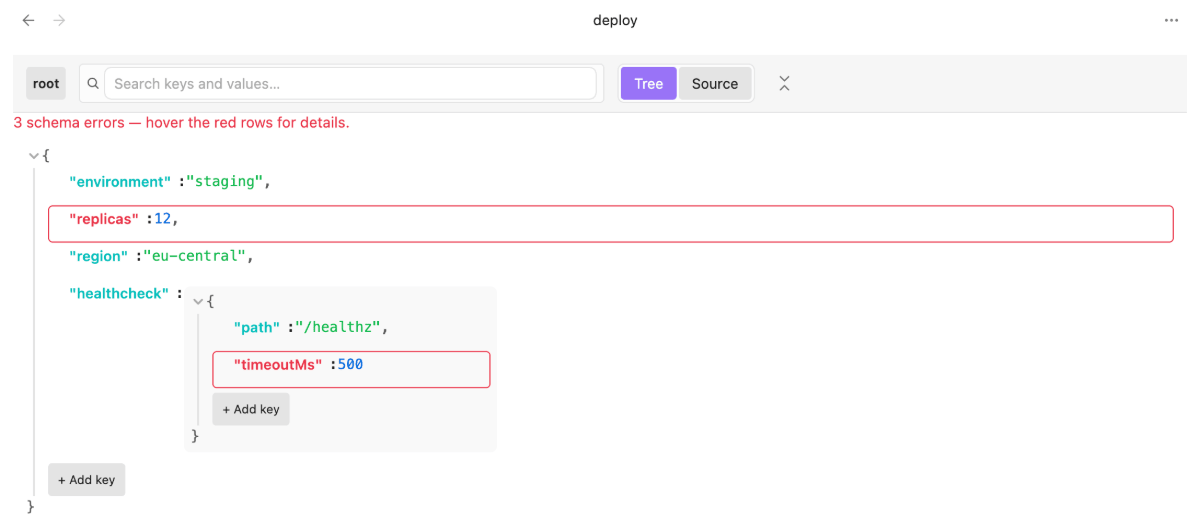
Opt-in schema validation marks the offending rows and counts them in a banner.
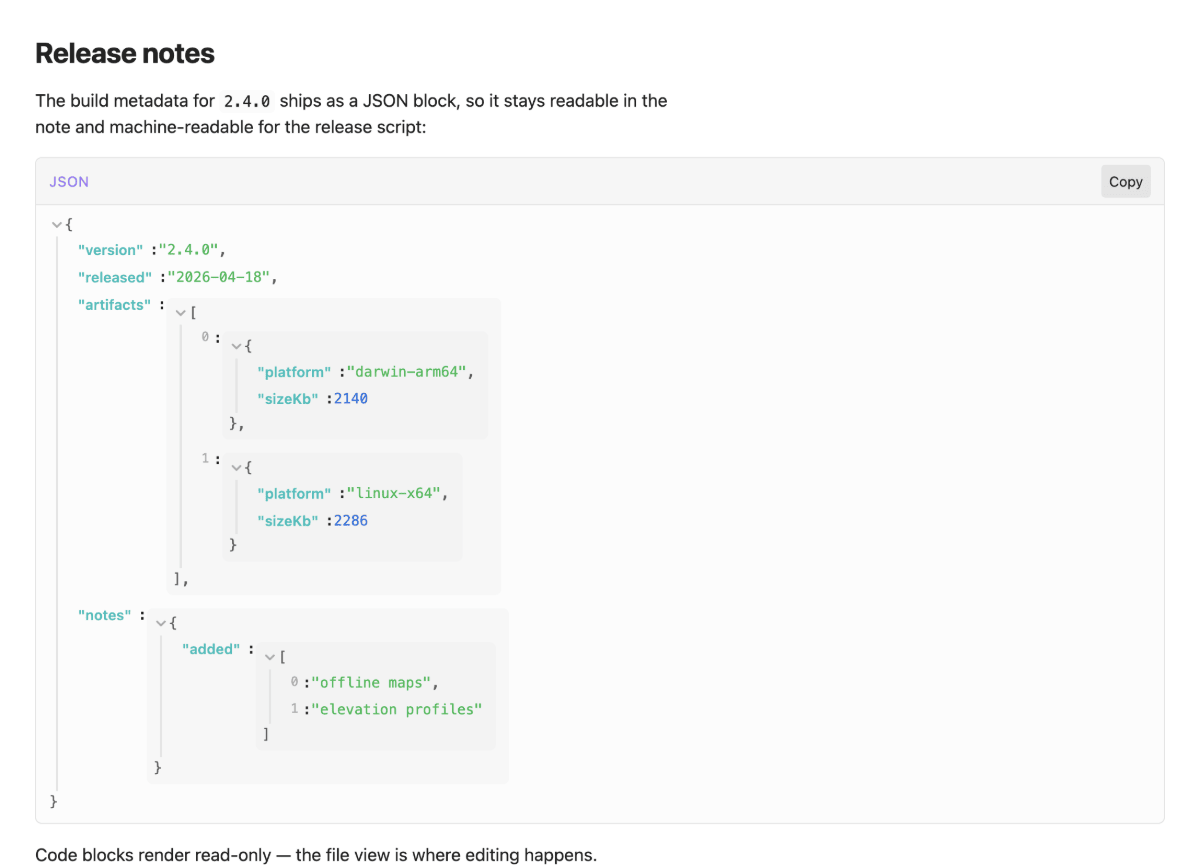
A ```json fence in a note, rendered read-only in reading view.
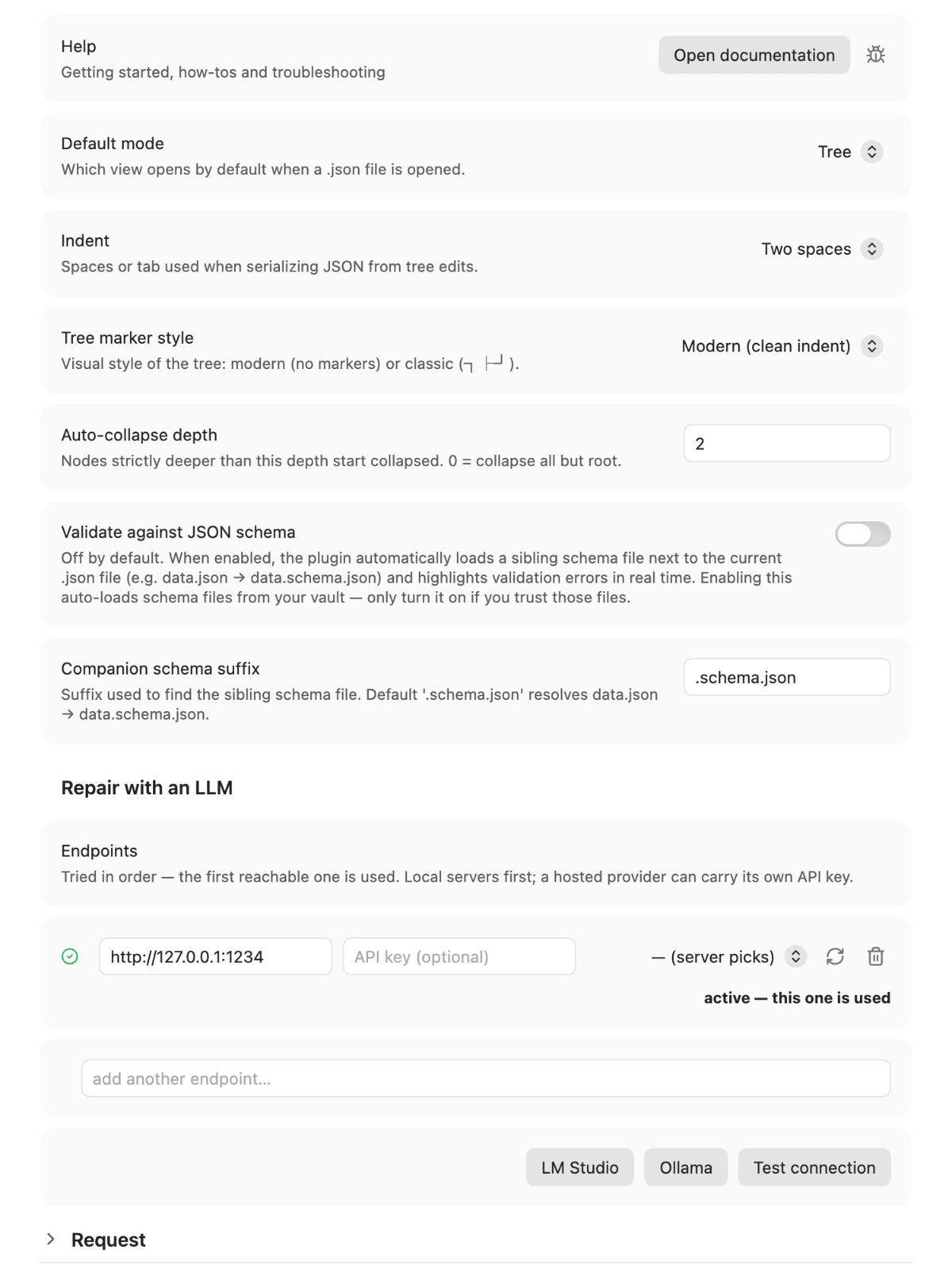
Click the preview for the full-size settings tab.
Requirements
| Obsidian | 1.11.4 or newer (minAppVersion) — API keys for the LLM repair are stored in Obsidian's keychain (app.secretStorage), added in 1.11.4. |
| Platform | Desktop and mobile. Not desktop-only; the tree has a dedicated touch interaction model (long-press menu instead of hover buttons, Alt+arrow reorder). |
| Dependencies | None to install. The two runtime libraries (@cfworker/json-schema, jsonc-parser) are bundled into main.js. |
| Network | None. No telemetry, no remote resources, no schema fetching over the network — everything resolves inside the vault. |
| Building from source | Node.js 20+ and npm (see Development). |
Install
From Obsidian's Community plugins browser (recommended)
- Settings → Community plugins → Browse, search for "JSON Editor", select Install.
- Enable it.
Updates then arrive like any other community plugin update.
With AnySource Sideloader
AnySource Sideloader installs and updates Obsidian plugins from any git forge, which is exactly the single point of failure described above. Once it is installed, subscribe to this catalog under Browse catalogs:
https://git.jkaindl.de/jkaindl/anysource-sideloader/raw/branch/main/catalog.json
JSON Editor is listed there and installs from its Forgejo release. Updates are then offered like any store update — visible, and never applied without confirmation.
Manually
- Download
main.js,manifest.json, andstyles.cssfrom the latest release. Each release also shipschecksums.sha256, so you can verify what you downloaded:shasum -a 256 -c checksums.sha256 - Drop the three files into your vault's
.obsidian/plugins/json-editor/directory. - In Obsidian: Settings → Community plugins → Installed → Enable "JSON Editor".
Already installed it by hand and want updates? AnySource Sideloader recognises plugins that are already in the vault and can adopt them without a reinstall.
From source
git clone https://git.jkaindl.de/jkaindl/json-editor.git
cd json-editor
npm install
npm run build
# copy main.js, manifest.json, styles.css to <vault>/.obsidian/plugins/json-editor/
Usage
- Open a
.jsonfile — the plugin's view is registered as the default opener for that extension. - Switch mode with the Tree / Source pills on the right of the toolbar, or press Cmd/Ctrl+E while a JSON file is focused (this only toggles tree/source inside JSON views — the core "Toggle reading view" binding is untouched everywhere else). You can also bind your own key via the Toggle tree/source view command.
- Edit values in tree mode by clicking them. Strings get an
<input>, numbers get numeric validation, booleans get a toggle. Press Enter to commit, Esc to cancel. - Edit structure in tree mode —
+ Add key/+ Add itemat the bottom of each container; hover a row for ✎ (rename key), ✕ (delete),⋮⋮(drag to reorder), andT(switch JSON type).Backspace/Deleteremoves the focused row. - Edit free-text in source mode — full CodeMirror editing with
Cmd/Ctrl+Ffind. Switching back to tree re-renders from the current text. - Copy any value with the hover button — plain click = value, Alt-click = JSON path (e.g.
$.users[2].address.city). - Inside Markdown notes, write a JSON code block and it renders as a collapsible tree:
```json { "feature": "tree-rendered", "collapsible": true } ``` - Reorder a row with Alt+↑ / Alt+↓ (keyboard), or drag the
⋮⋮handle (mouse). - Collapse or expand the whole tree with the toolbar button, or via the Collapse all / Expand all commands. Collapse to default depth returns to the state a freshly-opened file has. Where you left the tree is remembered per file.
- Jump to a path with the Go to path command, then type any part of it.
On mobile
Hover and drag-and-drop don't exist on touch, so the row actions are consolidated into a menu:
- Long-press a tree row to open its action menu: Copy value · Copy path · Rename key · Change type · Move up / Move down · Delete.
- Single-tap a value to edit it; tap the chevron to collapse/expand.
- Undo / Redo buttons appear in the toolbar (no hardware Cmd/Ctrl+Z on touch).
Configuration
| Setting | Default | Effect |
|---|---|---|
| Default mode | tree |
Mode .json files open in. |
| Indent | Two spaces |
Serialization indent (Two spaces / Four spaces / Tab). |
| Tree marker style | modern |
Visual style of the tree connectors (modern / classic). |
| Auto-collapse depth | 2 |
Tree nodes deeper than this start collapsed. |
| Validate against JSON schema | off |
When enabled, auto-loads a companion *.schema.json next to the open file and flags validation errors live. Off by default (auto-loading vault files is a trust decision). |
| Companion schema suffix | .schema.json |
Suffix used to locate the sibling schema (data.json → data.schema.json). |
| Endpoints / endpoint choice | one local endpoint | Where the LLM repair sends its request (see Repair with an LLM). API keys are kept in Obsidian's keychain, not in data.json. |
| Request | model defaults | Sampling values and thinking level of the repair request, per model family. |
Settings live under Settings → Community plugins → JSON Editor.
Repair with an LLM
An invalid ```json or ```jsonc code block renders as an error card. That card has a Repair button in its title row; the command Repair JSON in the current code block does the same for the block under the cursor in the editor.
- The block's text and the parser's error message are sent to a language model, with the instruction to change as little as possible and answer with the document only.
- The answer is checked with the same parser that rejected the block. Only a valid answer can be applied; an invalid one shows its reason instead.
- A modal shows the original on the left and the proposal on the right, with the changed lines marked. Apply replaces only the content of that one code block (the rest of the note stays byte-identical), Try again asks the model again, Discard writes nothing.
If the note changed between the request and Apply, nothing is written and the modal says so.
Endpoint. Under Settings → JSON Editor → Repair with an LLM. With the LLM Endpoint Manager plugin installed, the endpoint, its API key and the model come from there; without it you list your own OpenAI-compatible endpoints (LM Studio, Ollama, a hosted provider). The Request section shows the model family and backend the plugin recognised, the exact values sent in the last request and any deviation in the answer; every value can be overridden per model family. The repair uses the structured profile (low temperature, thinking off). The request waits up to 15 minutes for the answer; there is no timeout setting. Secrets in the block (API keys, Bearer tokens, private-key blocks) are replaced by placeholders before the request leaves your machine and put back into the proposal you see.
The plugin sends nothing until you press Repair — the note is never uploaded in the background.
How it works
Two layers. The rendering and editing logic is plain TypeScript with no Obsidian imports (src/core/); a thin adapter (src/obsidian/) binds it to the Obsidian API. That boundary is why the core is unit-testable in isolation — and why the same tree renderer serves both the file view and the code blocks in your notes.
Opening a file. The text is parsed into a plain JavaScript value and rendered as a DOM tree — no virtual DOM, no framework. Before that, two guards run: a render budget (very large files open in source mode with a Load tree anyway banner) and a lossy-number scan (a file with integers beyond 2^53 opens read-only, so an edit cannot silently corrupt 64-bit IDs).
Editing. Every structural operation — edit a value, add, delete, rename, change type, reorder — is a pure, immutable function on the parsed value. Which route the result takes back to disk depends on the file type:
.json— the edited value is re-serialized with your indent setting. Clean and total, but it rewrites the whole document (see the object-key-order caveat below)..jsonc— re-serializing would throw your comments away, so nothing is re-serialized. The edit is translated into a targeted text edit on the source viajsonc-parser, leaving every byte you didn't touch alone. Comments and formatting survive; an unedited open→save is byte-identical.
Undo. Both modes push the pre-edit text onto one shared 100-deep stack, so undo works across a mode switch — edit in the tree, switch to source, and Cmd/Ctrl+Z still steps back through what you did.
Schema validation (off by default) looks for a sibling data.schema.json next to data.json and validates with the eval-free @cfworker/json-schema — a tree-walking validator, no new Function, no eval. It is opt-in because auto-loading a schema file from a shared vault is a trust decision, and a hostile regex inside one is a denial-of-service vector; pattern and size guards cover the rest.
Known conflicts / Compatibility
This plugin registers itself as the editor for the .json file extension. Obsidian allows only one plugin to own a given extension, so installing it alongside another plugin that also claims .json will conflict. Known examples: JSON Viewer (read-only viewer), JSON Collapsible, and Data Files Editor.
What happens on conflict (since 1.5.0): whichever plugin loads second fails to claim the extension. Rather than crashing, JSON Editor catches the error and shows a notice — "another plugin already handles .json — file view disabled, code-block rendering still active." The dedicated .json file view is disabled, but everything else keeps working: settings, the toggle / undo / redo / search commands, and ```json code-block rendering inside Markdown notes.
To use JSON Editor as your .json editor: disable the other .json plugin and reload Obsidian. Load order is not user-controllable, so two .json editors enabled at once is unsupported by design.
Tree-edit limitation — object key order: a tree edit re-serializes the whole document, and JavaScript reorders integer-like object keys (e.g. "10" before "2"). So editing an object whose keys are numeric strings may reorder them on save. Files with big integers (> 2^53) are already protected — they open read-only (edit them in source mode). For numeric-string keys where order matters, prefer source mode.
Development
npm install                                # use --legacy-peer-deps if needed; .npmrc handles it
npm test                                   # ~850 Vitest tests, ~4s
npm run dev                                # esbuild watch mode
npm run build                              # production build (tsc-check + esbuild)
npm run lint                               # eslint incl. eslint-plugin-obsidianmd (store scanner mirror)
npm run lint:biome                         # Biome (format + general lint)
npm run gate                               # typecheck + tests + both linters + build
npx vitest run tests/core/parse.test.ts    # single test file
npx vitest                                 # watch mode
The codebase is strict TDD — every change in src/core/ and src/obsidian/ is backed by a failing test first. See CONTRIBUTING.md for the workflow.
Project layout
json-editor/
├── src/
│   ├── core/                  pure TS, no Obsidian imports — fully unit-testable
│   │   ├── types.ts           JsonValue, JsonPath, ParseResult, RenderOptions
│   │   ├── parse.ts           parse(text) → ParseResult (line/col errors)
│   │   ├── serialize.ts       serialize(value, opts) → string
│   │   ├── jsonc.ts           comment-preserving JSONC edit engine (text-in/text-out,
│   │   │                      wraps jsonc-parser; used only on the .jsonc path)
│   │   ├── edit.ts            structural ops (add/delete/rename/move/changeType), immutable
│   │   ├── history.ts         generic undo/redo stack (unified text history)
│   │   ├── render.ts          renderTree(value, opts) → HTMLElement
│   │   ├── search.ts          findMatches(value, query) for the tree filter
│   │   ├── schema.ts          compileSchema (@cfworker/json-schema) + Pointer→JsonPath + draft-07 meta-validation + ReDoS guards
│   │   ├── draft07-meta-schema.ts  canonical draft-07 meta-schema (detects malformed companion schemas)
│   │   ├── roundtrip.ts       detects lossy number literals (> 2^53, format)
│   │   ├── render-budget.ts   large-file guard (byte + node budget)
│   │   ├── textdiff.ts        minimal-span diff for source-mode undo
│   │   └── path.ts            pathToString utility
│   ├── obsidian/              adapter layer — imports core/ + obsidian API
│   │   ├── JsonFileView.ts    TextFileView; mode toggle, view Scope, banners, per-file reset
│   │   ├── TreeView.ts        wraps core/render + inline edit + copy/row actions + drag
│   │   ├── SourceView.ts      CodeMirror 6 wrapper (@codemirror/lang-json + search)
│   │   ├── CodeblockProcessor.ts  read-only tree for ```json blocks in notes
│   │   ├── SettingsTab.ts     the six settings
│   │   ├── Breadcrumb.ts      path display, segment-click → scrollToPath
│   │   ├── SearchBar.ts       tree-filter input + match count
│   │   ├── RowActions.ts      ✎ / ✕ / T hover buttons per row
│   │   ├── AddAffordance.ts   + Add key / + Add item per container
│   │   ├── TypeMenu.ts        JSON-type picker popover
│   │   ├── SchemaBanner.ts    schema-error count banner
│   │   ├── LossBanner.ts      lossy-number warn banner
│   │   ├── LargeFileBanner.ts large-file banner + "Load tree anyway"
│   │   ├── CopyButton.ts      hover-only buttons; click=value, Alt+click=path
│   │   └── Tooltip.ts         singleton hover-tooltip
│   └── main.ts                plugin entry — registers view (guarded .json claim),
│                              codeblock processor, settings, and commands
├── tests/                     core/ + obsidian/ + toolchain/ (640 tests)
│   └── __mocks__/obsidian.ts  Vitest-only mock (resolved via vitest.config + tsconfig.test.json)
├── .github/workflows/         release.yml + test.yml (CI: tests, lint:obsidian, build)
├── eslint.config.mjs          eslint-plugin-obsidianmd guideline gate
├── manifest.json              Obsidian plugin manifest
├── styles.css                 token-based theme-aware stylesheet
├── THIRD-PARTY-NOTICES.md      bundled-dependency license texts
├── CHANGELOG.md               Keep-A-Changelog release notes
├── CONTRIBUTING.md            bug reports, PRs, TDD workflow
└── SECURITY.md                security-reporting policy
Three tsconfigs:
tsconfig.json— IDE + the community-portal eslint scan; no paths alias, soobsidianresolves to the realobsidian.d.ts(this is what keeps the portal review clean).tsconfig.build.json— productiontsccheck (validates against realobsidian.d.ts).tsconfig.test.json— editor typing of tests, with thepathsaliasobsidian→tests/__mocks__/obsidian.ts(Vitest itself resolves the mock viavitest.config.ts).
Documentation
- Documentation index — the guides, organised after Diátaxis.
- Getting started — from the install to your first edited file.
- Troubleshooting — the exact message you see, what it means, what to do.
README.de.md— German version of this file (the English README is authoritative).CHANGELOG.md— per-release notes (Keep-A-Changelog format).CONTRIBUTING.md— bug reports, pull requests, commit conventions, TDD workflow.SECURITY.md— how to report a security issue.
Hosting
The canonical repository is on Forgejo; GitHub carries the releases the Community plugins browser installs from.
| Remote | URL | Role |
|---|---|---|
| Forgejo | https://git.jkaindl.de/jkaindl/json-editor | Canonical — source development, issues, PRs |
| GitHub | https://github.com/johannes-kaindl/json-editor | Releases (Community plugins browser), issues, mirror of the released state |
Bug reports and questions are welcome on either; releases are published from the Forgejo repository to both.
Contributing
Bug reports and pull requests are welcome on Forgejo. For larger changes, please open an issue first to discuss the approach. See CONTRIBUTING.md for the full workflow — commit conventions, branch naming, TDD requirements, and review notes.
Project status
Actively maintained by a single maintainer (@jkaindl / @johannes-kaindl). Built for personal use, released because it might be useful to others.
Listed in the Obsidian Community plugins browser (since 12 July 2026; the listing was interrupted in September 2026 and is live again — see Install). Its review is an automated check; no Obsidian staff review is implied.
Shipped (see CHANGELOG.md): structural tree editing & undo/redo (1.0.0), drag-and-drop reorder + type-switching (1.1.0), unified cross-mode undo/redo (1.2.0), JSON Schema validation (1.3.0, opt-in since 1.5.0), data-integrity & crash hardening (1.5.0), guideline alignment + large-file guard + source-mode search (1.6.0), submission-prep + plugin rename to json-editor (1.7.0), mobile interaction model + toolbar polish (1.8.0), pop-out window correctness + community-review cleanup (1.8.1–1.8.2), eval-free schema validation with a ~52% smaller bundle (1.9.0), .jsonc support with comment-preserving tree editing (1.10.0–1.10.1), tree-rendering polish (1.10.2), storefront description (1.10.3), tree navigation & comfort — collapse-all, remembered collapse state, match-to-match search, go-to-path, shortened long values (1.11.0), portal-review hygiene: zero reviewer warnings, declarative settings (1.11.1).
Roadmap (rough, 2.x ideas):
- Tree search match navigation — next/prev jumps and match highlighting, beyond the current strict filter.
- Schema-aware autocompletion — key/enum suggestions when a companion schema is loaded.
License
- Open source (default): GNU Affero General Public License v3.0 or later (AGPL-3.0-or-later) — see LICENSE. This applies to everyone by default.
- Commercial license (on request): If the AGPL's copyleft does not fit your use case — for example a proprietary/closed-source product or an Apple App Store build (App Store terms are incompatible with the AGPL) — a separate commercial license is available. See
LICENSING.md. - Contributing: external contributions are accepted under the Contributor License Agreement, which keeps the dual-licensing model possible.
- Documentation/text: Creative Commons Attribution-ShareAlike 4.0 (CC BY-SA 4.0) — see
LICENSE-DOCS.
Dependency licenses (bundled in main.js): This plugin statically bundles @cfworker/json-schema (MIT) for JSON Schema validation and jsonc-parser (MIT) for comment-preserving .jsonc editing, plus the source-mode JSON grammar @codemirror/lang-json (MIT) and @lezer/json (MIT). All are AGPL-3.0-compatible. Full license texts and copyright notices are in THIRD-PARTY-NOTICES.md. The remaining @codemirror/* and @lezer/{common,highlight,lr} packages, and the Obsidian plugin API, are not bundled — they are provided by Obsidian at runtime (marked external in esbuild.config.mjs).
Copyright © 2026 Johannes Kaindl. Code: AGPL-3.0-or-later · Docs: CC BY-SA 4.0.