Isotask
 Diego Pasquali51 downloads
Notes as tasks: due dates, recurrence, priorities, and feed and calendar views built on Bases.
- Overview
- Scorecard
- Updates5
Install · Quick start · Agent guide · Docs · Development
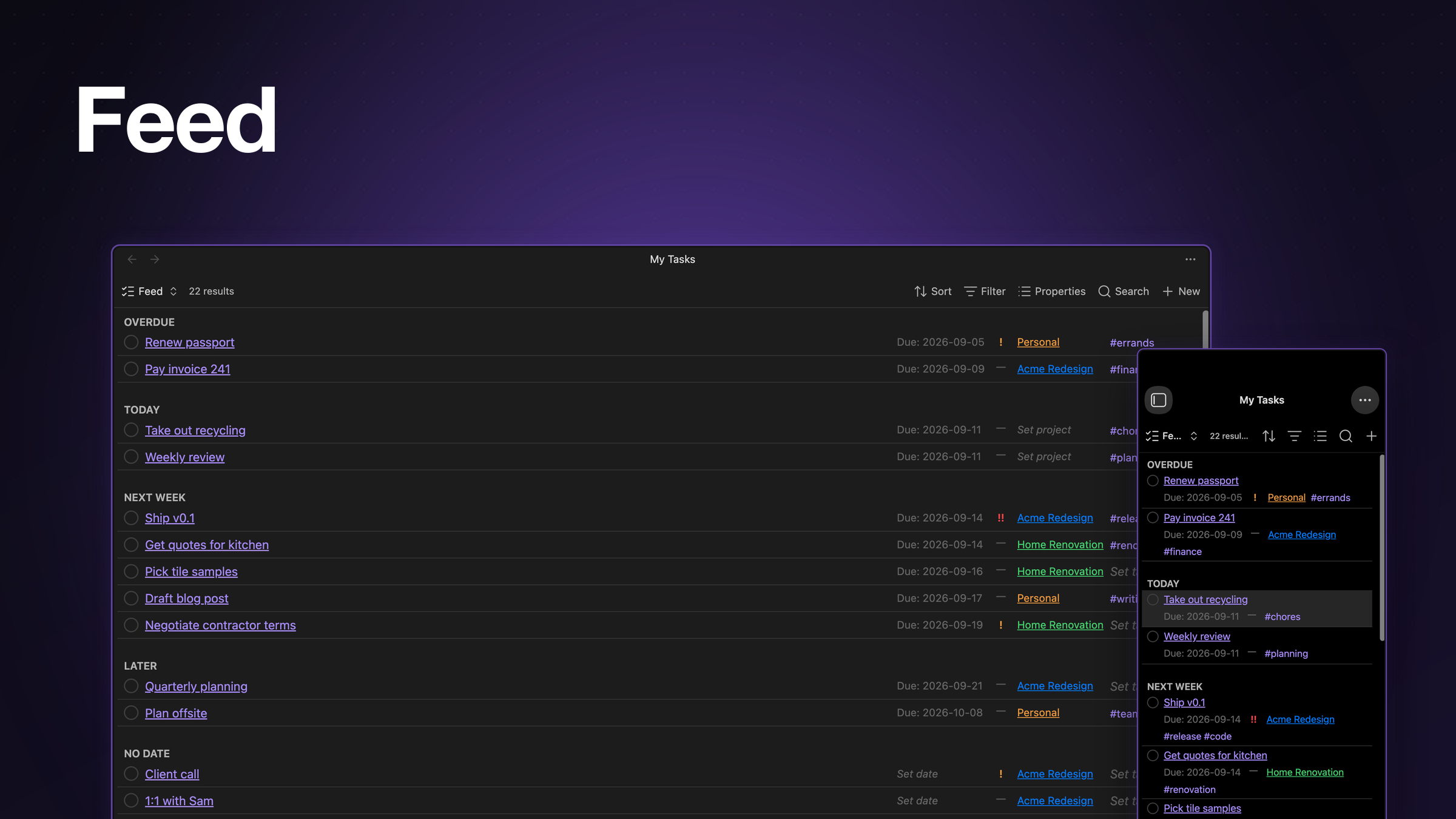
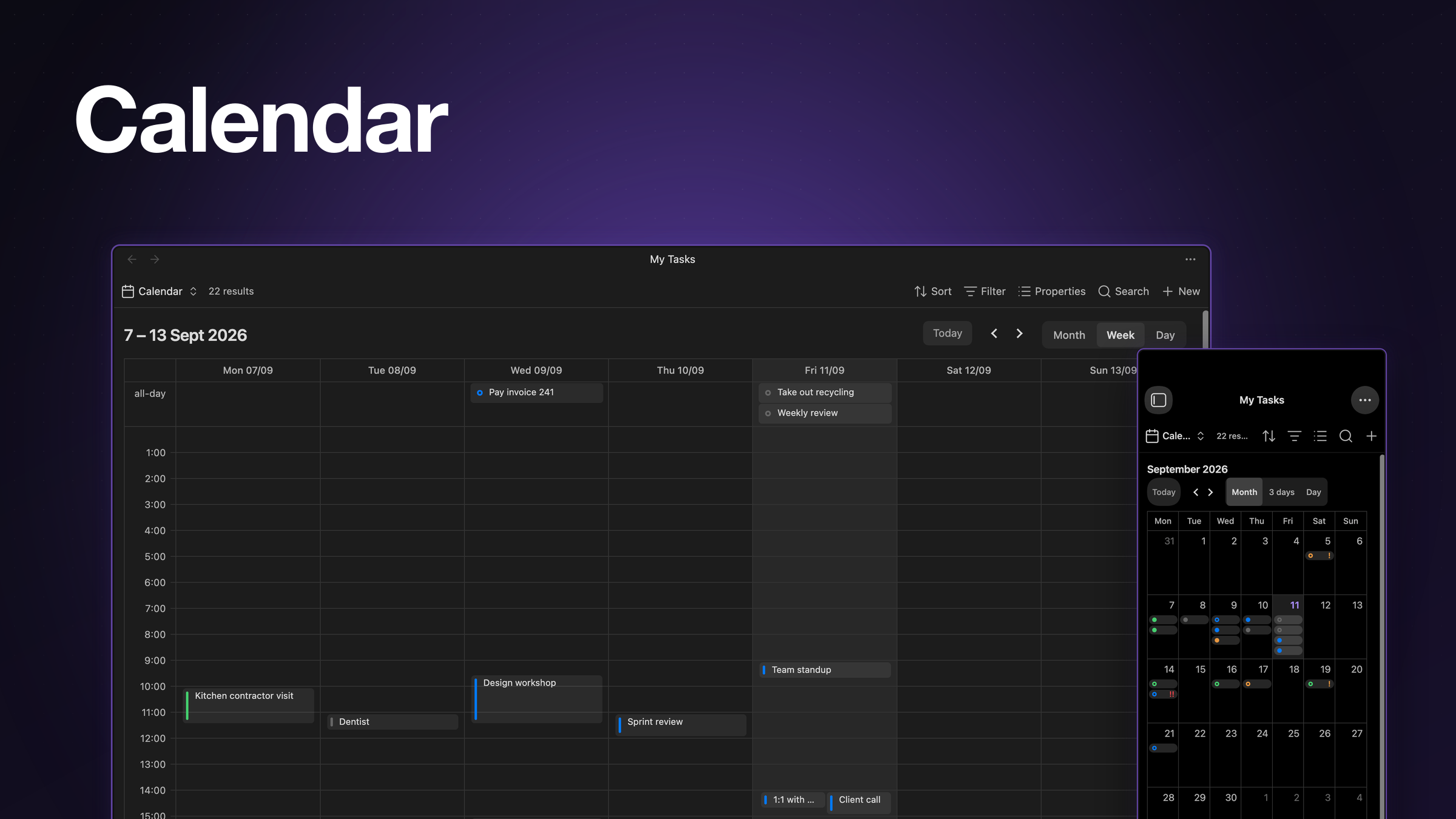
Your notes are your tasks. Frontmatter in, feed and calendar out, built on Obsidian Bases.
Why
One markdown note is one task. Every field (status, due date, priority, project, recurrence) is an ordinary frontmatter property, not a hidden database or a bespoke query language. The feed and calendar are just Bases views, so Bases' own filters, sorting, and properties toolbar work on them exactly like they work on any other view you build. There is nothing to migrate to and nothing to migrate away from: the notes are still just notes.
Features
- Feed buckets tasks into Overdue, Today, This week, Next week, Later, and No date. See feed buckets.
- Calendar month, week, and day views. Drag or resize an event to reschedule, click an empty slot to create a task, undo or redo a reschedule from the command palette.
- Recurrence is RRULE-based; completing an occurrence spawns the next one as a new note. See recurrence semantics.
- Statuses are two kinds, open and done, toggled from the feed's status circle, the file menu, or the task panel.
- Priorities are normal, high, or urgent.
- Projects are a wikilink to a project note; that note's
colorproperty colours the task in the feed and on the calendar. - Task panel is a sidebar form for the active note, with a command for every field.
- Mobile ready: no desktop-only APIs, long-press to drag events on the calendar, haptic feedback on iOS (toggle in settings).
- Your property names every frontmatter key is renameable in settings, not just the ones shown above.
- Commands for everything above, plus convert note to task, create/open the tasks base, and undo/redo a reschedule, all in the command palette.
Settings
- Task folder, tasks base path: where new task notes and the generated
.basefile live. - New task filename template, spawn filename template: filename for a new or spawned task
note, supporting
{{title}}and (spawn only){{due}}. - Week starts on: which day the feed's this week / next week buckets split on.
- Property keys: every frontmatter key above, plus the marker key/value that identifies a note as a task, individually renameable.
Using isotask with AI agents
Point an agent that writes notes into your vault at
docs/AGENT-GUIDE.md — it
covers the frontmatter schema and recipes an agent needs, with no plugin source access required.
For the vault's actual property keys, statuses, and task folder, run
app.plugins.plugins.isotask.api.agentInstructions() (Obsidian CLI eval) or the Copy agent
instructions command, and hand the agent the result.
What the plugin reads
Isotask never reads note bodies and never sends anything off-device. It lists vault files
only where a picker needs them: the project note picker (markdown notes), the tag picker
(tags from the metadata cache) and the folder picker (folder paths). Task data is read from
the metadata cache of the notes your Bases views already select. It also writes completed
(and spawns a recurrence occurrence) whenever a task note's status changes while Obsidian is
running, whichever surface changed it — the plugin's own controls, the Properties view, or
anything else that edits frontmatter.
Install
Community plugins
Not yet listed; a submission is in progress.
Manual
Download main.js, manifest.json, and styles.css from the
latest release into
<vault>/.obsidian/plugins/isotask/, then reload Obsidian and enable Isotask in Settings.
Isotask requires Obsidian 1.13.0 or later (Bases).
To update, repeat the manual steps above with the new release's files.
Quick start
- Run the Create tasks base command. It creates
Tasks.basewith a feed and a calendar view. - Run Create task to add a task note.
- Set a due date, from the task panel or the Set due date… command.
- Open
Tasks.baseand switch between the feed and calendar views from Bases' view switcher. - Complete it: click the status circle on its feed row.
A task note's frontmatter, with the default property keys:
---
type: task
status: todo
due: 2026-09-15
scheduled: 2026-09-14
priority: high
project: "[[Website relaunch]]"
tags: [marketing]
repeat: FREQ=WEEKLY;BYDAY=MO
---
Docs
- Agent guide: frontmatter schema and recipes for an AI agent writing tasks into your vault.
- Architecture: layers, data flow, ports, and the composition root.
- Domain model: frontmatter schema, statuses, recurrence, feed buckets.
- Conventions: TypeScript, DOM, Obsidian API, and testing rules.
- ADRs: architecture decision records, indexed by number.
- Roadmap: milestones, what shipped, and what's left before release.
Development
pnpm install
pnpm dev         # esbuild watch build
pnpm check       # typecheck + lint + test + build
pnpm test        # vitest run
pnpm test:e2e    # full e2e suite (builds first)
pnpm wt feat/<name> # new worktree branched off main, deps installed
For a fast e2e debug loop, filter to one spec and one test name:
E2E_GREP="<pattern>" pnpm test:e2e --spec <substring>.
Contributing to isotask with an AI agent? Start from
AGENTS.md. Writing tasks into a vault? See Using isotask with AI agents above.
License
MIT © Diego Pasquali