Interlinear
 Yupeng Lin498 downloads
Paragraph-by-paragraph translation in Obsidian Reading view — bilingual or translation-only, with BYOK LLM and machine-translation backends. Never modifies your notes.
- Overview
- Scorecard
- Updates11
Reading-mode interlinear translation for Obsidian
English · 简体中文 · 繁體中文 · 日本語 · 한국어 · Tiếng Việt · Русский · Português (Brasil) · Español
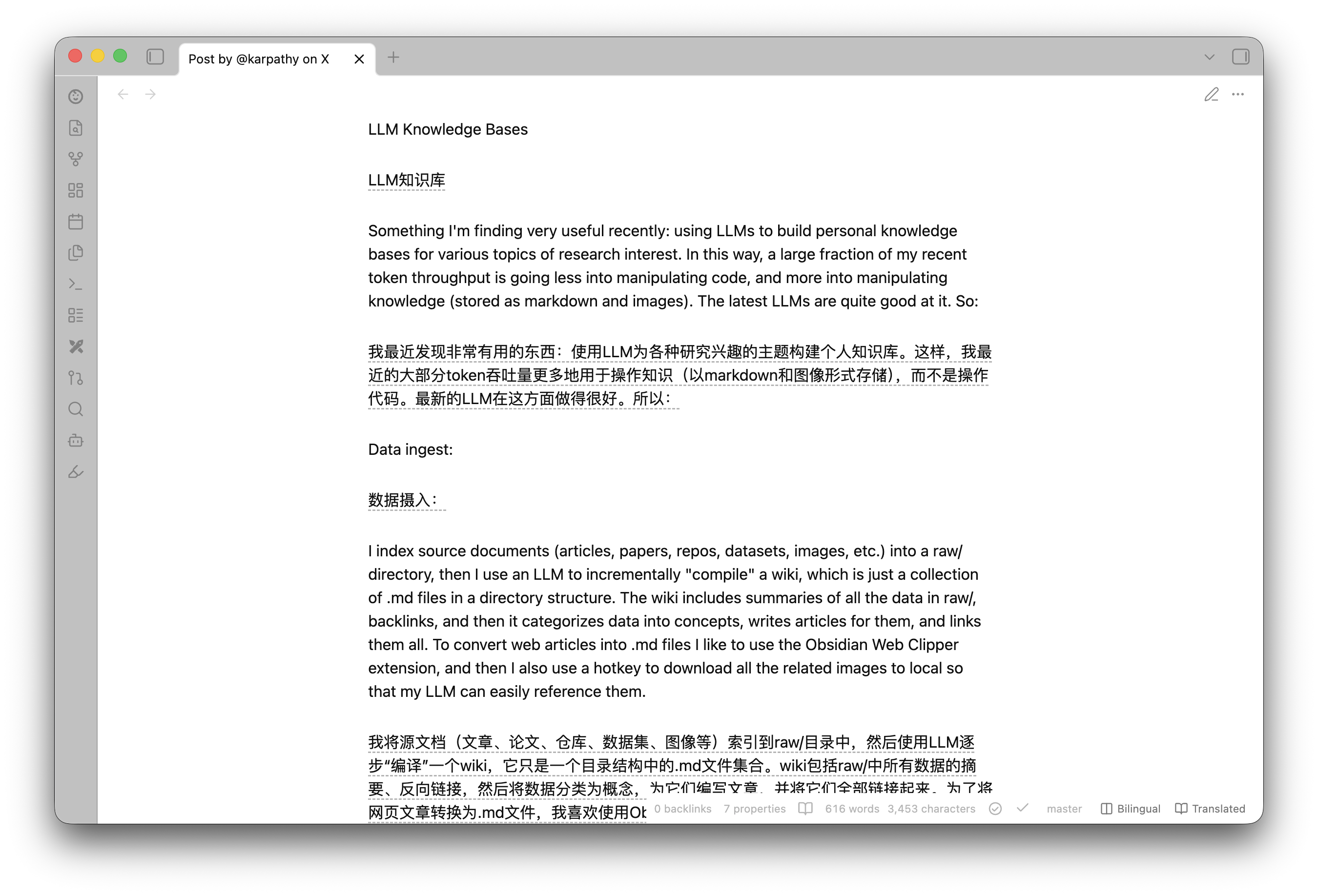
Reading-mode interlinear translation for Obsidian. Open a foreign-language note in reading view, click one button, and Interlinear renders a Chinese (or any target language) translation alongside the original — paragraph by paragraph, as bilingual or translation-only.
Why it's safe by design
- Never modifies your notes. Translations are injected as render-layer DOM only; the registered Markdown post-processor is a network-free boundary, while the DOM adapter handles Obsidian's virtualized reading view. Close and reopen the note and the file on disk is byte-for-byte unchanged.
- Never auto-translates. Opening/switching notes, layout changes, scrolling, and settings changes never send a translation request. Translation runs only when you explicitly click the floating / status-bar button (or run the command).
- BYOK, zero telemetry. Your credentials live only in vault-local plugin
settings files:
data.jsonand, after a settings migration, the one-timedata.backup.json(both ignored by this repository). They are never hard-coded, never logged, and never sent anywhere except to the translation endpoint you configure. - Reading view only (MVP). No edit/Live-Preview translation.
Features
- One-click whole-note translation, triggered from either surface:
- the floating button in the lower-right of the reading view — the entry point on mobile (which has no status bar), optional on desktop;
- the status-bar buttons (desktop) or the command palette.
Both show live batch progress (
3/12) while translating. Click again to toggle translation ↔ original (a CSS class swap — no new requests).
- Two display modes — bilingual (original + translation) ↔ translation-only — switched instantly with no re-translation. In translation-only mode, hover a translation (or tap it on mobile) to peek at its original inline.
- Five translation styles (pure CSS, switchable live): border, quote block, muted text, dashed underline, and a learning mask that blurs translations until you hover — for language practice.
- Persistent translation cache — content-hash keyed, LRU-capped, saved as
cache.jsonin the plugin folder. Reopening a note after a restart costs nothing; only hashes and translations are stored, never your source text. - Whole-note translation, virtualization-aware. Obsidian's reading view only
keeps on-screen blocks in the live DOM, so one click translates the visible
blocks immediately, pre-translates the rest into the cache, and a
MutationObserverinjects cached translations into each block the instant it renders as you scroll. - Skips what shouldn't be translated: code blocks, math, image-only blocks,
bare URLs, pure symbol/number blocks, and blocks safely recognized as already in
a distinctive-script target language (
zh,ja,ko,th,he, orel). Shared-script targets such as English or Vietnamese are translated conservatively because a script alone cannot distinguish languages that use the same alphabet. - Pluggable backend behind a
TranslationProviderinterface, with service presets across two families and a Test connection button in settings:- LLM (default): DeepSeek, OpenAI, SiliconFlow, Ollama, or any custom OpenAI-compatible endpoint;
- Traditional machine translation: Baidu Translate (百度翻译) and
Youdao (有道智云) — cheaper/faster APIs with generous free tiers; each
keeps its own credentials, so switching services never loses keys.
Requests use Obsidian's
requestUrl(notfetch).
Network use, accounts & privacy
- Remote service. When — and only when — you trigger a translation or click
Test connection, the plugin sends the translatable paragraph text of the
active note to the active LLM preset's configured endpoint (default
https://api.deepseek.com) or, for traditional MT, that service's fixed official API endpoint. Nothing is sent at any other time, and never to more than one service. - Account required. Bring your own API key / app credentials (BYOK) for the selected service; usage is billed by that provider, not by this plugin.
- No telemetry. The plugin collects nothing and phones home nowhere.
- Local files only. Settings (including credentials) live in the plugin's
data.json. A one-time pre-migration copy may live indata.backup.json; the translation cache lives incache.jsonnext to them (content hashes + translations only). Your notes are never modified. - Syncing caveat. These settings files sit inside your vault, so vault sync
(Obsidian Sync, iCloud, Dropbox, …) carries credentials to every synced device.
If you keep your vault in a git repository, add both
.obsidian/plugins/interlinear/data.jsonand.obsidian/plugins/interlinear/data.backup.jsonto that vault's.gitignoreso credentials are never committed.
Install
From Obsidian (recommended)
- Open Settings → Community plugins → Browse.
- Search for Interlinear, then select Install and Enable.
Or open the plugin's directory page in a browser and click Install.
Updates arrive through Obsidian's plugin update flow — Settings → Community plugins → Check for updates.
Upgrading to v0.3.0 from v0.2.5
v0.3.0 uses settings schema v2. It migrates v0.2.5's flat settings once and
preserves the original data in data.backup.json before rewriting data.json.
If you sync plugin settings, update Interlinear on every synced device before changing its settings on any device. Running mixed plugin versions and downgrading after the migration are not supported.
Via BRAT (early / beta builds)
To track the latest GitHub release before it reaches the directory:
- Install and enable BRAT from Settings → Community plugins → Browse (search "BRAT").
- Run the command BRAT: Add a beta plugin for testing.
- Enter the repository
linyp/obsidian-interlinearand confirm. - Enable Interlinear in Settings → Community plugins.
Manual
- Download
main.js,manifest.json, andstyles.cssfrom the latest release. - Put the three files in
<your-vault>/.obsidian/plugins/interlinear/. - Enable Interlinear in Settings → Community plugins.
(To build from source instead, see Develop.)
Configure
Open Settings → Interlinear:
| Setting | Default | Notes |
|---|---|---|
| Service | DeepSeek | One dropdown, two families. LLM: DeepSeek / OpenAI / SiliconFlow / Ollama / custom OpenAI-compatible. Traditional MT: Baidu Translate (百度翻译) / Youdao (有道智云). Each preset keeps its own credentials and Advanced tuning; LLM presets additionally keep their endpoint/model and custom instructions. The first selection initializes that preset's recommended defaults; later selections restore its saved values. |
| API key (LLM only) | (empty) | Required (BYOK). Stored only in local plugin settings files. |
| App ID + secret (Baidu / Youdao) | (empty) | The app credential pair from that service's developer console (BYOK, same storage rules). |
| Base URL (LLM only) | https://api.deepseek.com |
Any OpenAI-compatible endpoint. |
| Model (LLM only) | deepseek-v4-flash |
|
| Test connection | — | Sends one tiny request to verify the credentials and endpoint. |
| Target language | zh-CN |
First-class presets include zh-CN, zh-TW, en, ja, ko, vi, and more; custom BCP-47-style codes are also accepted. |
| Default display mode | Bilingual | |
| Translation style | Border | Border / quote / muted / dashed underline / learning mask. |
| Floating button | Mobile only | Always / mobile only / never. |
| Concurrency | 10 | Max in-flight requests (1–16). |
| Min interval (ms) | 0 | Spacing between request starts. |
| Max retries | 3 | On 429 / transient errors. |
| Batch char budget | 4000 | Characters packed per request. |
| Max segments per request | 12 | Blocks packed per request, alongside the char budget (1–100). Traditional MT services additionally enforce their own hard per-request caps. |
| Custom instructions (LLM only) | (empty) | Optional text appended to the system prompt — glossary, tone, or domain. Non-empty instructions are part of the cache identity, so changing them takes effect on the next explicit translation. |
| Persistent cache | On | Keep translations across restarts; shows size and offers one-click clear. |
DeepSeek's flash tier rate-limits by concurrent connections, not by RPM/TPM, so the defaults run several requests in parallel with no spacing. Selecting another preset applies a more conservative tuning (lower concurrency + request spacing for RPM/TPM-limited services like OpenAI/SiliconFlow; small batches for a local Ollama model). Baidu's basic text translation is free once you complete personal verification (个人认证): the Advanced plan allows 10 requests/second with 1M free characters/month, and the preset paces requests to stay under that (
150 ms spacing, one paragraph per request). On an unverified Baidu account (1 request/second) raise Min interval to ~1100 ms. Youdao's docs publish no QPS number, but its console assigns each app a QPS quota that is low in practice, so the Youdao preset runs strictly serial with ≥1.1 s spacing — lower Min interval only if your app's quota allows it (411/412 errors mean it doesn't).Traditional MT services also enforce hard per-request caps on top of your batch settings (the smaller value wins): Baidu 1 text / ~1 800 chars; Youdao 1 text / ~4 500 chars. Concurrency / Min interval / Max retries apply to every service; Custom instructions is LLM-only (traditional MT has no prompt) and is hidden for those services. A single paragraph larger than a service's per-request limit fails server-side and is surfaced as a failed batch — the notice includes the reason, and triggering again retries.
Use
- Open a note and switch to reading view.
- Click Translate in the status bar (desktop) or the floating button in the lower-right (mobile). It collects the translatable paragraphs, translates the whole note, and shows live progress while batches are in flight.
- Click again to toggle the translation ↔ original.
- Use the small mode button (or the status-bar one) to toggle bilingual ↔ translation-only (instant — no new requests). In translation-only mode, hover (desktop) or tap (mobile) a translation to peek at its original.
Commands (Command Palette, shown under the Interlinear: prefix). No default hotkey is set (per community guidelines) — bind your own under Settings → Hotkeys:
- Translate / show original — translate the note, or toggle translation ↔ original once translated. Re-running is idempotent: cached blocks are reused, so it also retries any batches that failed.
- Toggle display mode (bilingual / translation-only)
- Clear translations
Develop
Point the build output straight at a test vault (use a throwaway vault, not your daily one) via an environment variable, and rebuild on save:
INTERLINEAR_OUTDIR="/path/to/test-vault/.obsidian/plugins/interlinear" npm run dev
npm run dev runs esbuild in watch mode with inline sourcemaps and copies
manifest.json, styles.css, and .hotreload next to main.js. Install pjeby's
Hot Reload plugin in the test vault and the .hotreload marker makes it
auto-reload on every rebuild. (Reading-mode rendering only re-runs when you toggle
edit ↔ reading or reopen the note.)
Useful scripts:
npm run build      # tsc --noEmit + production bundle -> main.js
npm run typecheck  # tsc --noEmit
npm test           # vitest run
npm run test:watch # vitest (watch)
Release
npm version patch|minor|major  # syncs package.json, manifest.json, versions.json
git push && git push --tags
Pushing the tag triggers the GitHub Actions workflow, which tests, builds, and
creates a draft release with main.js / manifest.json / styles.css
attached as individual assets — review the draft, then publish.
Architecture
The hard part of this plugin is that its UI/rendering can only be verified inside Obsidian, so the design pushes all decidable logic into pure, tested modules and keeps the Obsidian/DOM/network surface thin.
src/
  core/         pure logic (no obsidian): hash, segmentation + batch pack/unpack,
                block skip-rules + same-language detection, rate limiter
                (concurrency/backoff), MD5/SHA-256 signing helpers
                (Baidu/Youdao), list-markdown reassembly for translated lists
  translator/   provider.ts (interface + typed errors + shared HTTP helpers),
                one pure request-builder/response-parser module per backend
                (deepseek.ts, baidu.ts, youdao.ts),
                factory.ts (settings -> provider), langCodes.ts (per-service
                target-language mapping), cache.ts (LRU + serialization),
                cachePersistence.ts (cache.json load/write/remove in the plugin
                folder only);
                requestUrlClient.ts is the only requestUrl adapter
  render/       postProcessor.ts — DOM adapter + collect/inject/clear/display-mode
                + style helpers
  ui/           translateButton.ts (status bar + FAB + translation flow),
                settingsTab.ts
  settings.ts   pure settings types + defaults + schema migration + normalize/validate
  main.ts       composition root
Pure logic modules never depend on the obsidian runtime (a types-only package).
The thin runtime shells are tested with an Obsidian stub and a lightweight DOM;
providers use an injectable HttpClient, so their real request/parse paths are
tested without contacting the network. DOM collection/injection, explicit-trigger
controller behavior, the requestUrl adapter, and cache persistence also have
focused tests.
On the LLM path, batches are packed with numbered <<<SEG k>>> sentinels. Every
provider.translate() call makes exactly one HTTP request; if the model returns
the wrong segment count, that batch fails visibly and can be retried by the next
explicit Translate action. Traditional MT APIs take one text per request —
inherently 1:1 — so they skip the sentinel protocol entirely; each provider
declares its hard per-request caps and the controller sizes batches to fit.
Want another backend? Adding one is deliberately small: a pure
request-builder/response-parser module in src/translator/ (see baidu.ts /
youdao.ts for the pattern — no obsidian imports, HTTP injected so it's
unit-testable), a case in factory.ts, a preset in settings.ts, and a
credentials row in the settings tab. PRs welcome!
Limitations (MVP)
- Reading view only — no editing/Live-Preview translation.
- Lists and tables are translated as a single block (best-effort). A flat list's translation is re-rendered as a list; nested structure is not reconstructed.
License
MIT