inREFens
 Eryk J.346 downloads
Find references/citations to publications of Jehovah's Witnesses and link them to wol.jw.org
- Overview
- Scorecard
- Updates14
inrefens (n.): The ongoing act of bringing a publication reference into the text — of adducing a cited source and binding it to the note. From Latin in- ("into") + referre ("to carry back, to refer") + -ens (present participle).
A publication citation parser and linker for Obsidian. Find references to publications of Jehovah's Witnesses and link them to wol.jw.org. Inferre et ligare ("To bring in and bind").
Security and Privacy
See the security and privacy notes for information on what this plugin does and does not do behind the scenes.
Note on third-party forks
https://github.com/erykjj/inrefens is the official source for in(REF)ens. This project is MIT-licensed, so forking is permitted. Beware that unofficial forks and repackaged versions exist that add functionality, modify behavior, or change the plugin's scope. Those versions are not reviewed, endorsed, or supported by me, and I cannot vouch for what they do with your data or your vault.
Features
- Automatic citation detection – Publication citations are automatically detected in both Reading View and Live Preview (Edit mode), and updated as you type. Recognized roots include The Watchtower (
w,ws,wp), Awake! (g), Kingdom Ministry (km), Meeting Workbook (mwb), Insight on the Scriptures (it-1,it-2), and hundreds of books, brochures, tracts, and online article series - Interactive links – Every detected citation becomes a clickable link. Clicking opens the result of the search for the citation on wol.jw.org
- Flexible citation forms – Accepts a wide range of user-written variants:
- Glued or separated years:
w15 2/15,w 15 2/15,w2015 2/15,w 4/2026 - Month/day in either order:
w15 2/15,w15 15/2 - Optional page ranges or lists:
w26.4 12-15,be 30-32,cl 166, 167 - Flexible paragraph introducers:
¶,/, or a space can all introduce a paragraph reference —cl 166 ¶22,cl 166/22, andcl 166 22are equivalent - Hyphenated or non-hyphenated roots:
it-1 450,it1 450 - Titles in reference works:
it-1 Abraham,it-1 "Abraham"
- Glued or separated years:
- Multi-language support – Links open in your chosen language on wol.jw.org.
- Supported languages: ASL, Cebuano, Chinese (Simplified Mandarin), Danish, Dutch, English, Estonian, Finnish, French, German, Haitian Creole, Hungarian, Italian, Japanese, Korean, Norwegian, Polish, Portuguese (Brazil and Portugal), Romanian, Russian, Spanish, Swedish, Tagalog, Ukrainian
- Configurable link color – Choose from presets or enter a custom hex value; changing the color requires restarting Obsidian
- Desktop and mobile support
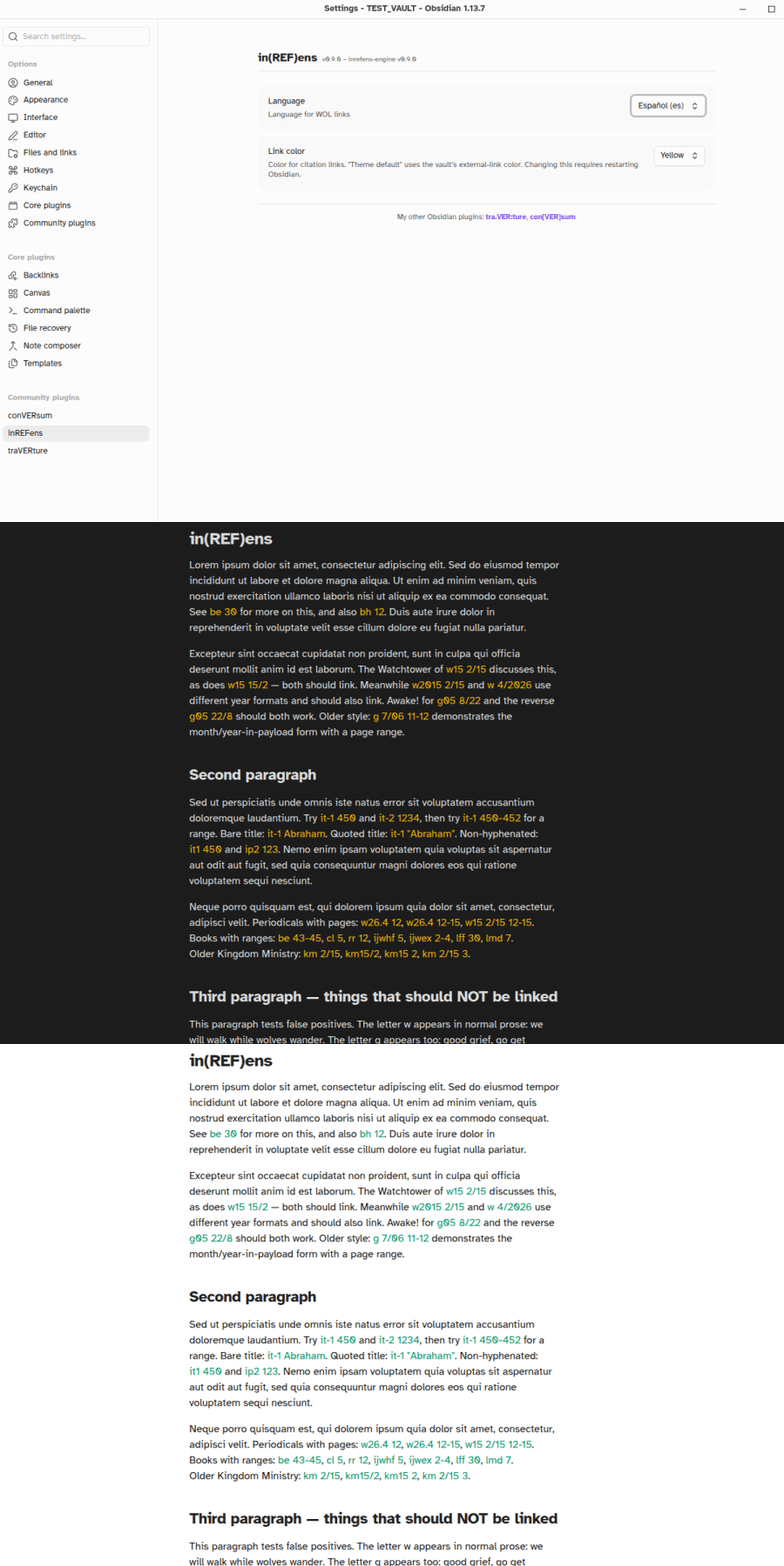
Settings
- Language – Language for wol.jw.org links
- Link color – Color for citation links; "Theme default" uses the vault's external-link color; presets and a custom hex option are provided; changing this requires restarting Obsidian
Known Limitations
- In Edit mode, a citation that includes markup (e.g.
*wp16.5* 13) renders as adjacent links rather than one link (Obsidian limitation); however, each link contains the URL for the whole citation - Paragraph references accept a single number or a range (
cl 166 ¶22,cl 166 ¶22-24); comma lists are not supported for paragraphs: the second number after a comma is interpreted as a separate page reference, not a second paragraph - A bare
it(without-1or-2) is not linked; Insight on the Scriptures has two volumes, and the volume must be specified to disambiguate; otherwise, the root would be too open to false positives (e.g. "it 'a house'") - Straight single quotes (
'...') are not accepted as title delimiters forit-1andit-2citations; use straight double quotes ("Eliab"), curly quotes (“Eliab”or‘Eliab’), or guillemets («Eliab») - When the tra.VER:ture plugin is also enabled, publication abbreviations that collide with Bible-book abbreviations (e.g.
re,pr,le) do not auto-link; use*** re 21 ***(lowercase, and the root must come right after the opening***) to link one - If you encounter a publication root that doesn't link, please open an issue
Performance
Detection runs on visible text only and is fast even on large documents. Changing the language in settings reloads the parsing engine, which may take a moment on mobile.
Installation & Updating
- In your vault's
.obsidian/plugins/directory, make a directory (folder) calledinrefens, if you don't already have one - Download main.js, styles.css, manifest.json
- If not already enabled, enable
in(REF)ensin Obsidian Settings → Community plugins - Configure the language in the plugin settings (if installing for the first time); defaults to English
Feedback, etc.
Feel free to get in touch and post any issues and/or suggestions.
My other Obsidian plugins:
- con[VER]sum: GitHub repo, Obsidian Community
- mu/TEX/tum: GitHub repo, Obsidian Community
- tra.VER:ture: GitHub repo, Obsidian Community