Index Notes
 adanielnoel3k downloads
Keep your notes indexed based on their (hierarchical) tags
- Overview
- Scorecard
- Updates5
Indices are probably the easiest way to navigate a large knowledge base, but keeping indices of notes by hand is usually time-consuming, error-prone, and not very scalable.
The Index Notes Plugin is a powerful tool for Obsidian users who want to automatically generate index blocks within their notes based on tags. The indices are updated automatically when tags are added or changed, offering a nested list of links to the notes following their tag hierarchy. As a bonus, by having the links actually written to the file the graph view reflects the organisation of the knowledge base.
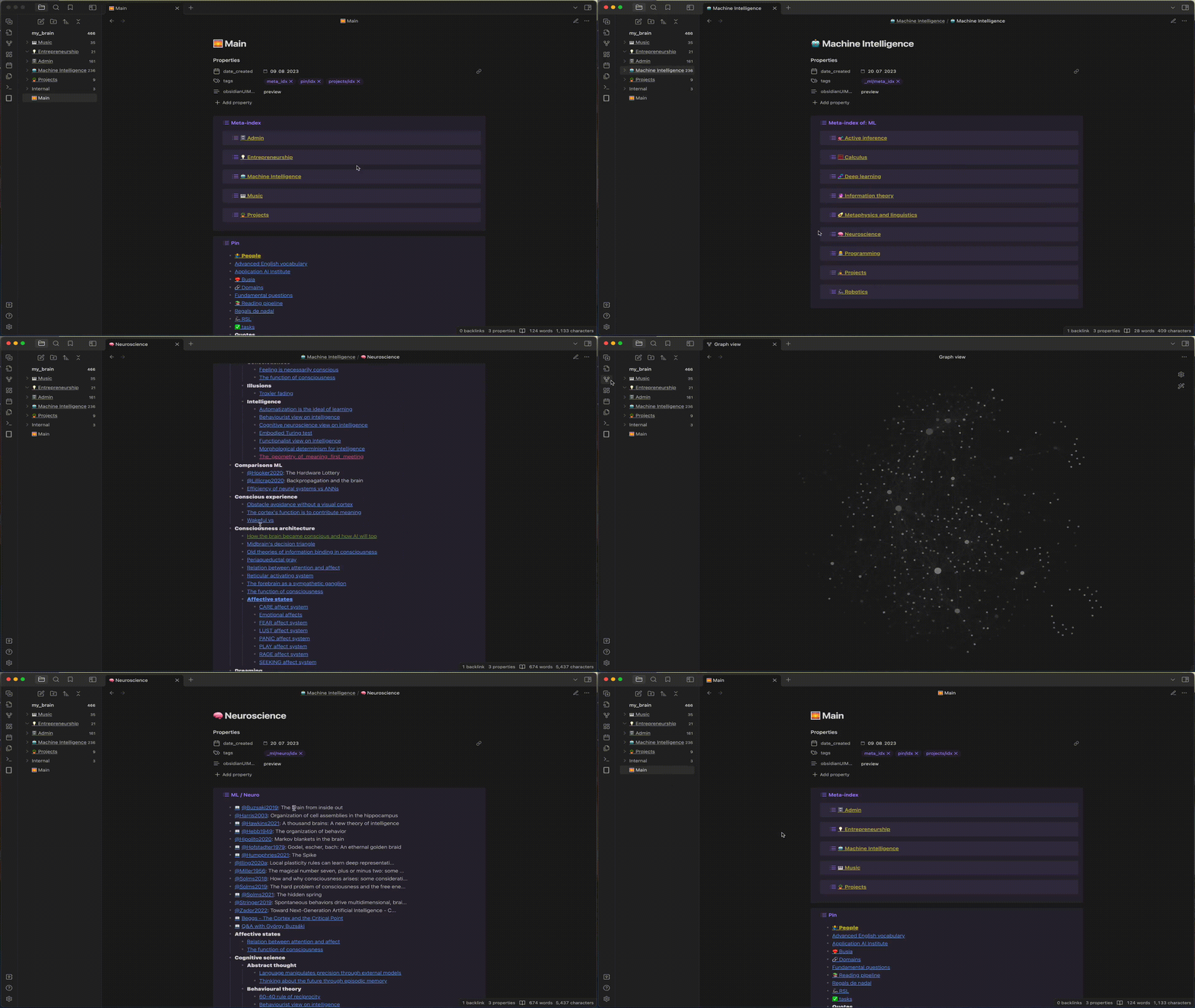
Tags are a much more flexible way of managing indices for the following reasons:
- Index information is in the same note that is being indexed.
- Tags can be set in the metadata section, keeping the content clean.
- Notes can have multiple tags, much more flexible than organising by folders!
- Tags are easy to refactor with tools like Tag Wrangler.
The plugin also introduces a handy command and ribbon icon to create a new note with the same metadata and location as the currently focused note. This speeds up the process of keeping things indexed: navigate to a note in the index branch that you want the new note in and just press that button and give it a name. The index should update in a few seconds with the new note.
Installation
You can install this plugin through the Community plugins interface in Obsidian.
Usage
- Set (hierarchical) tags on your notes'
tagsmetadata field. For instance, one might use the tags#projects/university,#projects/charity,#projects/personalto organise their notes. - To create an index, open a new note and set the tag path with the
/idxsuffix. For example,#projects/idx. After a few seconds an index block will be appended to the content of the note. - To create a meta index, open a new note and set the tag path with the
/meta_idxsuffix. For example, to create a meta index of all the indices in the vault simply use#meta_idx. After a few seconds a block should appear containing a link to theprojectsindex note. - Notes may have multiple indices and meta indices! For instance, I also use
#pinned/idxin my vault's home note to get an index of all the notes with the#pinnedtag.
Additional features
- New Note with Same Location and Tags: Creates a new note in the same directory as the currently focused note, copying its tags. This can be triggered from the command palette or by clicking the ribbon icon in the Obsidian UI. See the template in the settings for additional options.
- Priotity tag: Indices are sorted alphabetically, but notes that have the priority tag (
#topby default) are pushed to the top and formatted in bold. - Title property: For notes that have the
titleproperty in their metadata, the title is written in the index next to the link. This is useful for example when managing citation notes, usually named by their citation key by the Citations plugin. Having the title next to the citation key helps identify the notes in an index. - Index formatting: Sections in the index are derived from their tags. For instance,
#deep_learningbecomesDeep learningin the index. If you have an acronym then add an additional underscore before the word to make it all-caps. For example,#_mlbecomesMLand#comparisons__mlbecomesComparisons ML. - Excluded folders: you can set folders to exclude from indexing, like the templates folder.
Troubleshooting
If indices are not appearing as expected, ensure that:
- Tags are correctly spelled and used consistently.
- If the indices don't seem to update, you can use the "Refresh all indices" command from the command palette.
- If the block reference of the index is modified or deleted, the plugin will fail to detect the existing index and append a new index block rather than update it. If this happens, just delete the old block.
Credits
The settings page of the plugin has borrowed inspiration and code from Templater and Liam's Periodic Notes plugins.