
- Overview
- Scorecard
- Updates6
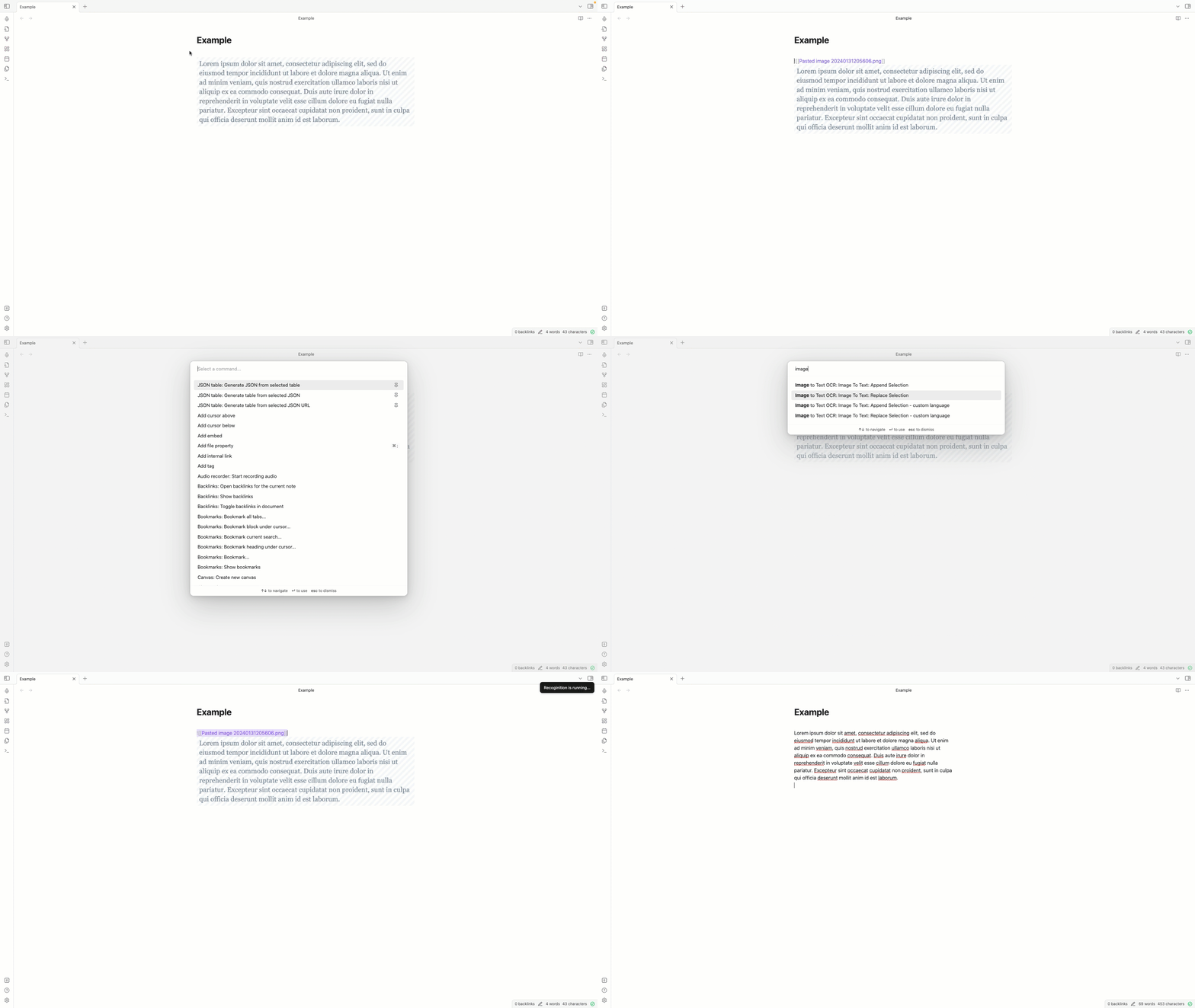
Recognize Text on images in your notes. Select the image and run the command. The recognized text will be appended to your image or will replace your image - depending on the command
Commands
| Command | Description |
|---|---|
| Replace selection | Replace your image with the recognized text. Recognize text based on the language defined in settings |
| Replace selection - custom language | Replace your image with the recognized text. Recognize text based on custom selection |
| Append selection | Append the recognized text to your image. Recognize text based on language defined in settings |
| Append selection - custom language | Append the recognized text to your image. Recognize text based on custom selection |
| Insert as alt text | Insert the recognized text as alt text to your image. Recognize text based on language defined in settings. Note: This will overwrite any existing alt text |
| Insert as alt text - custom language | Insert the recognized text as alt text to your image. Recognize text based on custom selection. Note: This will overwrite any existing alt text |
Example
Supported Image Types
- .jpg
- .jpeg
- .png
- .gif
- .bmp
- .pbm
- .webp
Supported Markup
| Format | Example | Description |
|---|---|---|
| Obsidian Image | ![[example.png]] |
Obsidian image tag |
| Obsidian Image including size | ![[example.png|300]] |
Obsidian image tag including size. Size is preserved when using "Insert as alt text" |
| Markdown Image |  |
Markdown image tag |
| URL | https://www.example.com/example.png |
URL to an image |
| img Tag | <img src="https://www.example.com/example.png" /> |
Img tag with a valid src attribute |
Installation
Community Plugin
- Follow this link Obsidian Plugin
- Or open Obsidian Settings, go to Community Plugins, browse "Image to Text OCR" click install and activate.
Manually installing the plugin
- Go to the latest Releases
- Download
main.js,manifest.json - save into your vault
VaultFolder/.obsidian/plugins/obsidian-image-to-text-ocr/
Settings
| Name | Description |
|---|---|
| Content language | Select language to recognize. Default is Englisch. If images contain special characters, changing the language may perform better results |
| Enable debug logging | If enabled, more will be logged in the console. |
Ressources
This plugin uses tesseract.js to recognize text.
Contribution
- Feel free to open an issue if you miss something
- Feel free to open a Pull request to implement a feature
- Please extend tests if you add logic
HealthGood
ReviewSatisfactory
About
Extract text from images in your notes. Select an image and run commands to append or replace the image with recognized text, choosing the recognition language and handling common image tags and formats (Obsidian links, Markdown, URLs).Details
Current version
1.0.5
Last updated
5 months ago
Created
3 years ago
Updates
6 releases
Downloads
6k
Compatible with
Obsidian 0.15.0+
Platforms
Desktop, Mobile
License
MIT
Sponsor