Hypernovum
 Randall Morgan658 downloads
Visualize your vault as a 3D city, launch AI coding agents with full context, and track Git activity live.
- Overview
- Scorecard
- Updates7
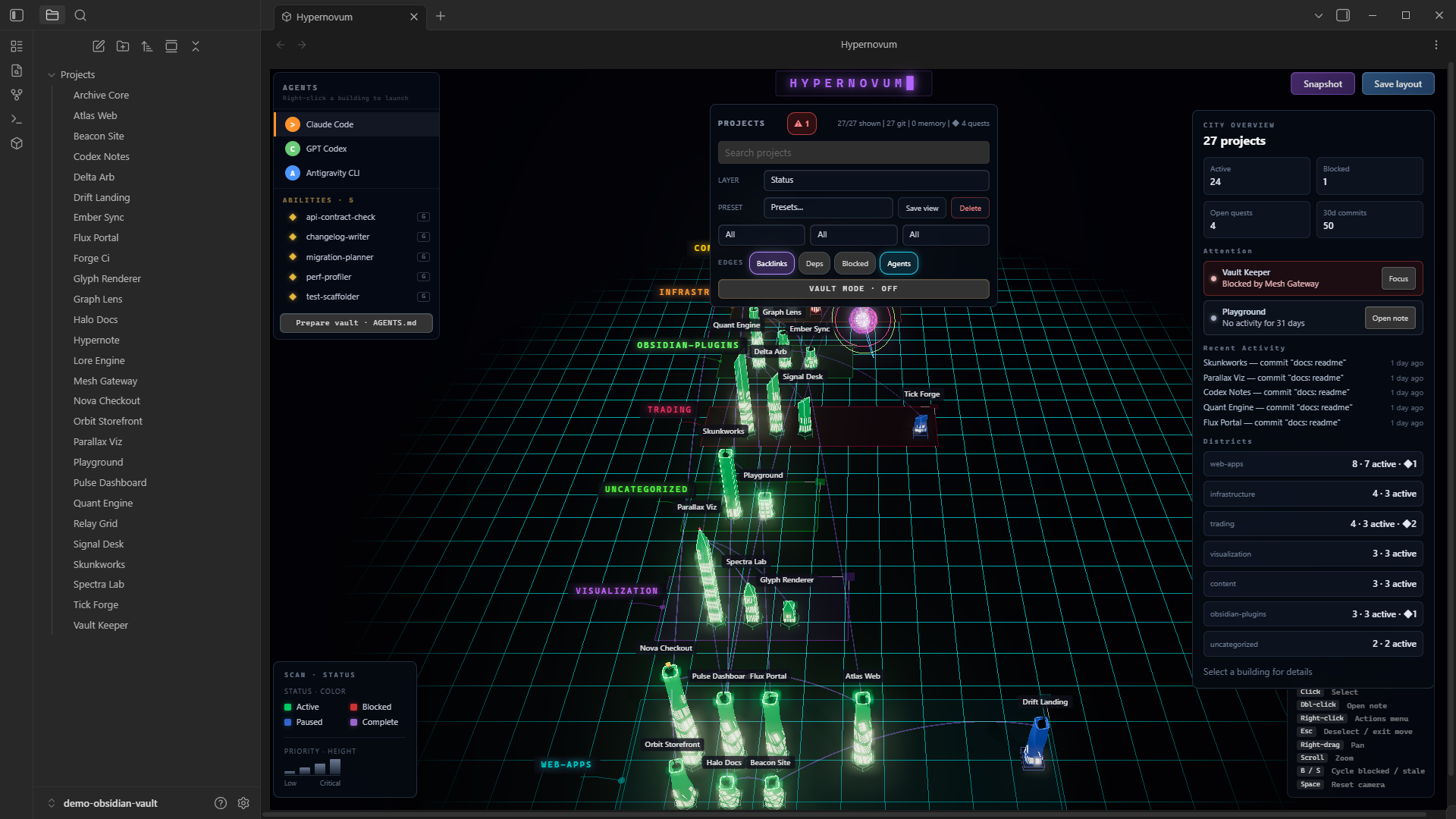
Turn the projects in your Obsidian vault into a live 3D city — then run your AI coding agents from it and watch them work.
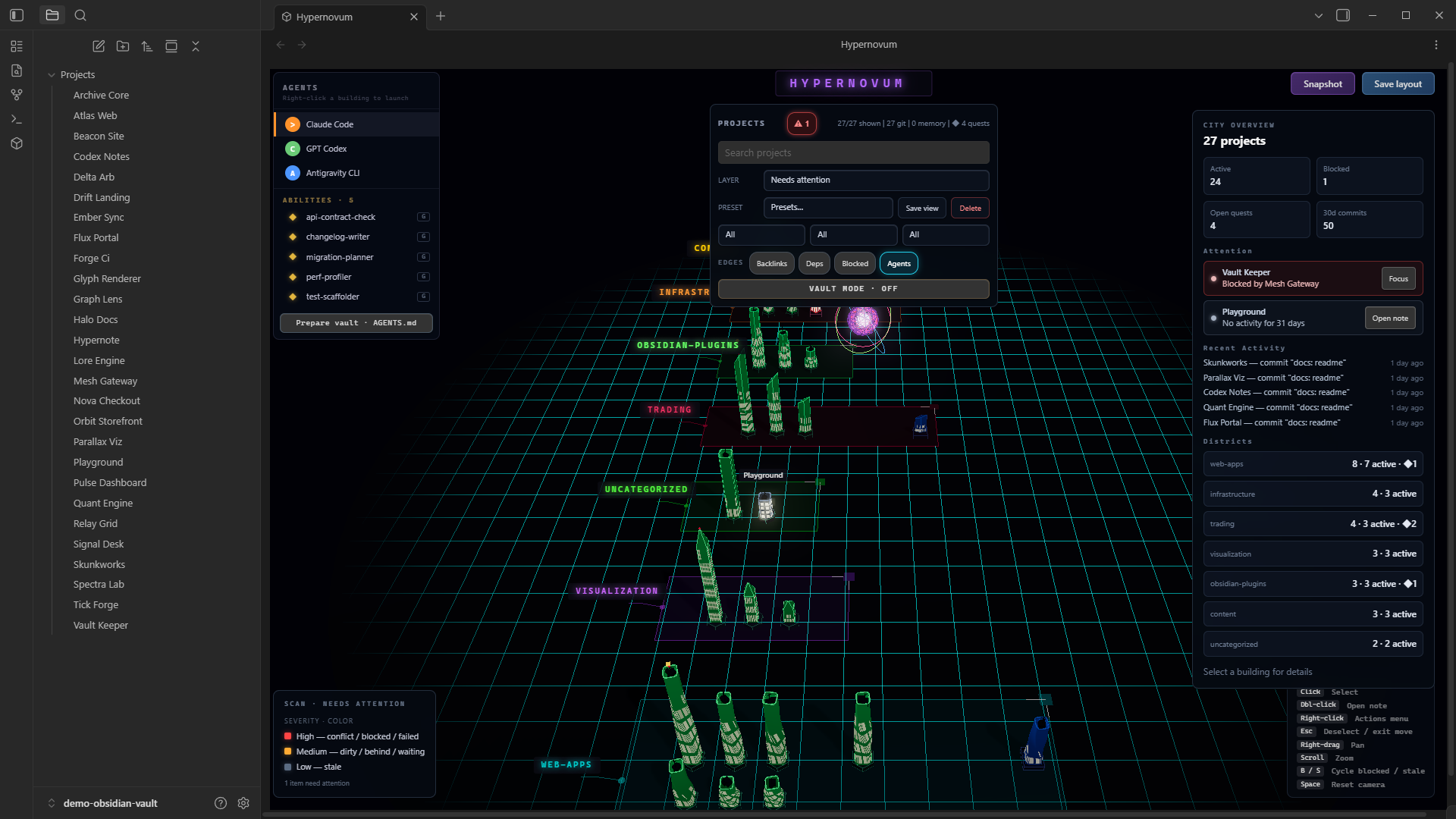
Each project note becomes a building. Status maps to color, priority to height, category to district, and vault backlinks to glowing Neural Link arcs. A central Neural Core pulses as you work, Data Arteries flow to buildings when files change, and every active agent (Claude Code, GPT Codex, Antigravity CLI) orbits its building as a colored orb.
Install
Install from Settings → Community plugins → Browse → "Hypernovum", then enable it and run Open code city from the command palette (or click the cube in the ribbon).
Desktop only — the agent half of the plugin talks to your local git and terminal.
Quick start
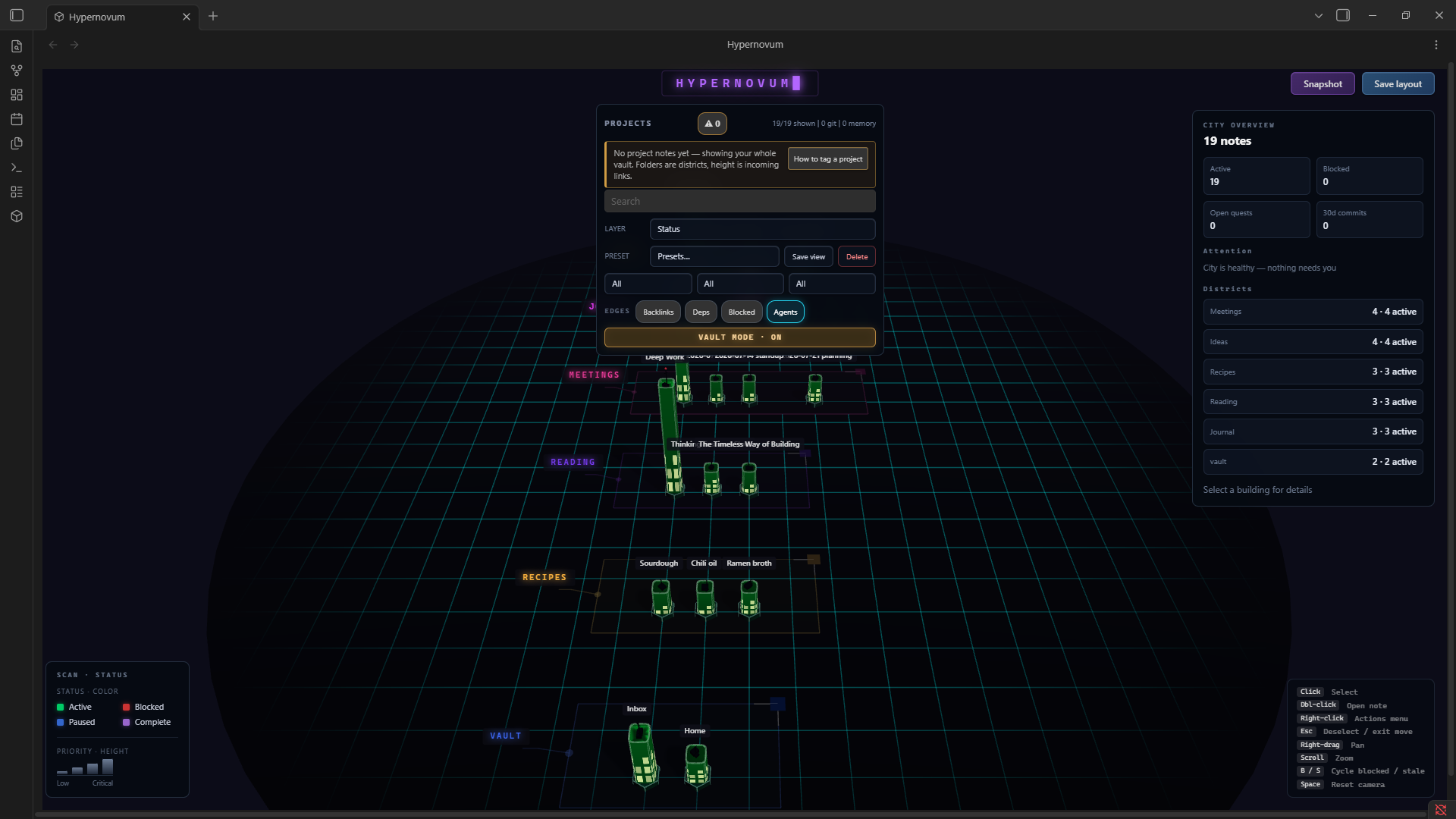
Until you tag anything, Hypernovum shows your whole vault — folders become districts, notes become buildings, and height is how many notes link in. That is a preview, not the product: tag one note and the city switches to project mode, where colour, height and windows start reporting real state. Add this frontmatter to a note:
---
tags: [project]
title: My Project
status: active          # active · blocked · paused · complete  → building color
priority: high          # low · medium · high · critical        → building height
category: web-apps      # any string                            → district
projectDir: C:\Users\me\projects\my-project   # unlocks Git signals + agent launch
---
The city rebuilds as you save. projectDir is the field that matters most: without it a
project has no Git activity, no dependency edges, and no Launch agent action. See
SCHEMA.md for every field.
What this plugin does on your machine
Hypernovum is desktop-only because the agent-ops half of it talks to your local tools. Here is exactly what that means — nothing below happens silently, and you choose on first run whether the agent layer is active at all.
Hypernovum makes no network requests. No telemetry, no analytics, no remote calls of any kind. Everything it reads or writes is on your own machine.
| What | When | Why |
|---|---|---|
Runs read-only git commands (branch, log, status, rev-list) |
On city build, in folders you link with projectDir |
The Git activity layer: commit velocity, branch, dirty tree, merge conflicts. Turn off with Settings → Git activity layer |
Runs where / which (no shell) |
When the city view opens | Detects whether claude / codex / agy are installed, to grey out agents you don't have. Skipped entirely in vault mode |
| Opens a terminal and runs your chosen agent CLI | Only when you click Launch agent | The point of the agent launcher |
| Opens your file manager | Only when you click Open folder | — |
| Reads files outside the vault | Project folders you link (package.json, .git) |
Dependency detection and the Git activity layer |
| Writes files outside the vault | .hypernovum/SETUP.md + .hypernovum/.gitignore in a project folder, only when you launch an agent there |
Hands the agent its project context |
| Writes inside the vault | AGENTS.md, .hypernovum/heartbeat.js, briefings, snapshots — each on an explicit action |
— |
| Reads the clipboard | Never. Only writes, when you click a copy button | — |
Vault mode (Settings, or the command palette) turns the entire agent layer off: no process execution, no reads outside the vault. The city, lenses, filters, and backlink graph all still work.
Features
City visualization
- Bin-packed layout with category districts, block outlines, and drag handles for rearranging
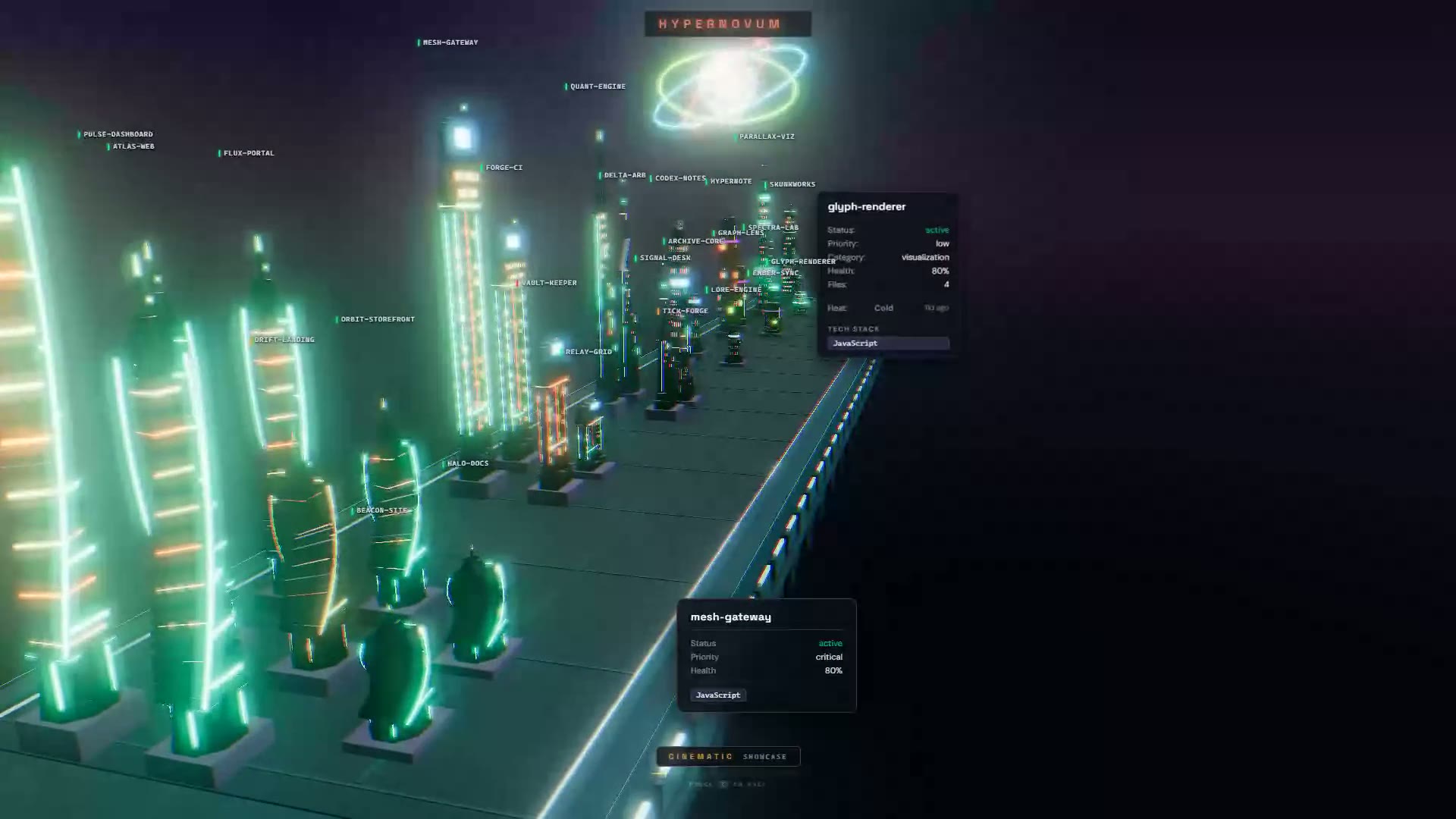
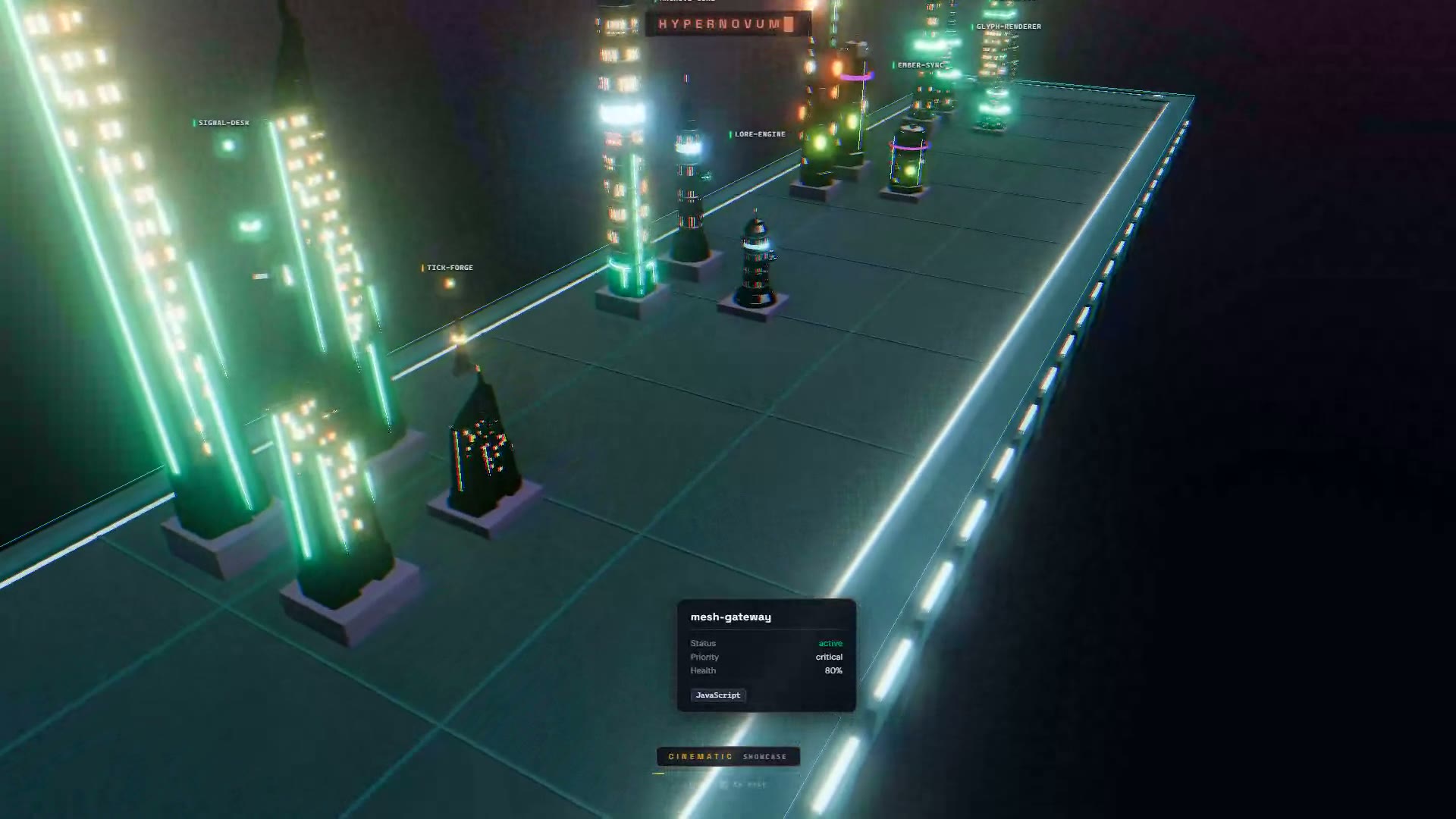
- Procedural architecture — seven silhouette families, one per category: spiral towers, stacked slabs, telescoping tiers, spires, sheared blades, hex clusters, and a quiet block for everything else
- Cyberpunk shader system with procedural windows, decay dithering, and bloom post-processing
- Smart labels with CSS2D rendering and leader lines
- Hover tooltips showing status, priority, health, and tech stack
Second brain and agent ops
- Prepare vault for AI agents — one click writes a marker-fenced
AGENTS.mdat the vault root: project schema, live inventory, quest board, skills roster, and heartbeat protocol, so any CLI agent instantly understands your second brain - Quest board: a
questions:list in project frontmatter renders as a floating gold quest marker over the building, shows in the inspector and tooltip, and is published to agents via AGENTS.md — resolving a quest (move it toanswered:) fires an emerald shockwave at the building - Skills roster: agent skills (
SKILL.mdfiles under<vault>/.claude/skills/) are published to agents in AGENTS.md, so a launched agent knows what it already has - Backlink arcs: the Backlinks chip in the EDGES row (off by default) draws vault backlinks between projects as pulsing violet knowledge arcs — your knowledge graph as city infrastructure
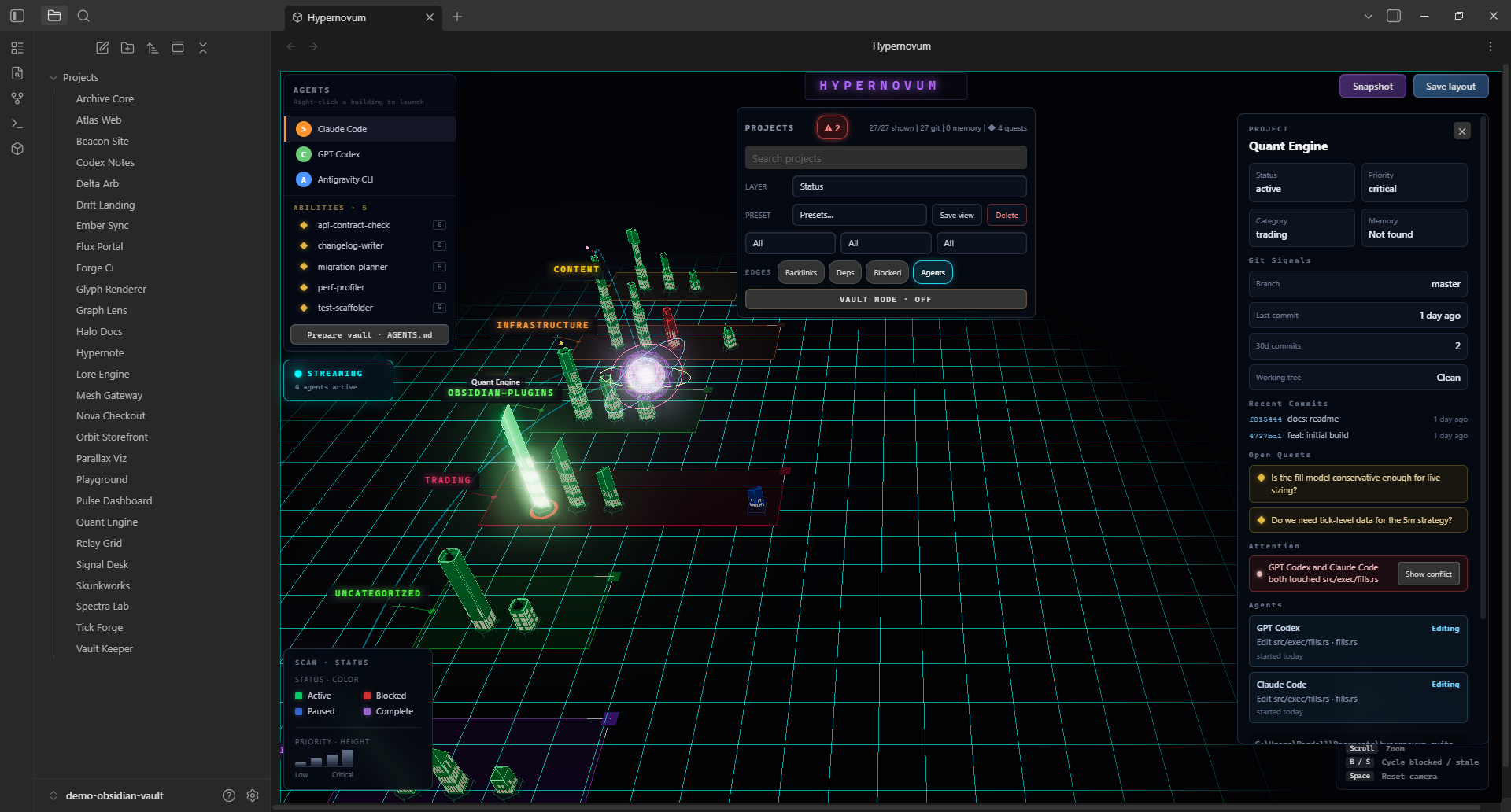
- Agent fleet presence: every heartbeat session gets its own state-colored orb with an identity tooltip (name/state/action/file); two agents touching the same file surface a deterministic conflict ring on the building and a conflict entry in the Attention warnings
- Daily briefing: one command writes a digest note — status counts, blocked/stale attention list, quest board, git heat
Interactions
- Single-click a building to select + focus it — the city dims around your selection and connected neighbors stay lit; the camera doesn't move. Double-click opens the note. (This changed in 0.4 — click no longer opens; a one-time hint appears.)
- Esc or a click on empty ground clears the selection; Move building is a right-click menu item.
- Right-click menu: Launch agent · Set project folder · Inspect project · Move building · Open folder · Open terminal · Copy path · Add quest · Trace impact · Open note · Focus camera.
- Search and filters narrow the city by title, status, priority, category, path, or stack — filtered-out buildings hide in place (no re-shuffling).
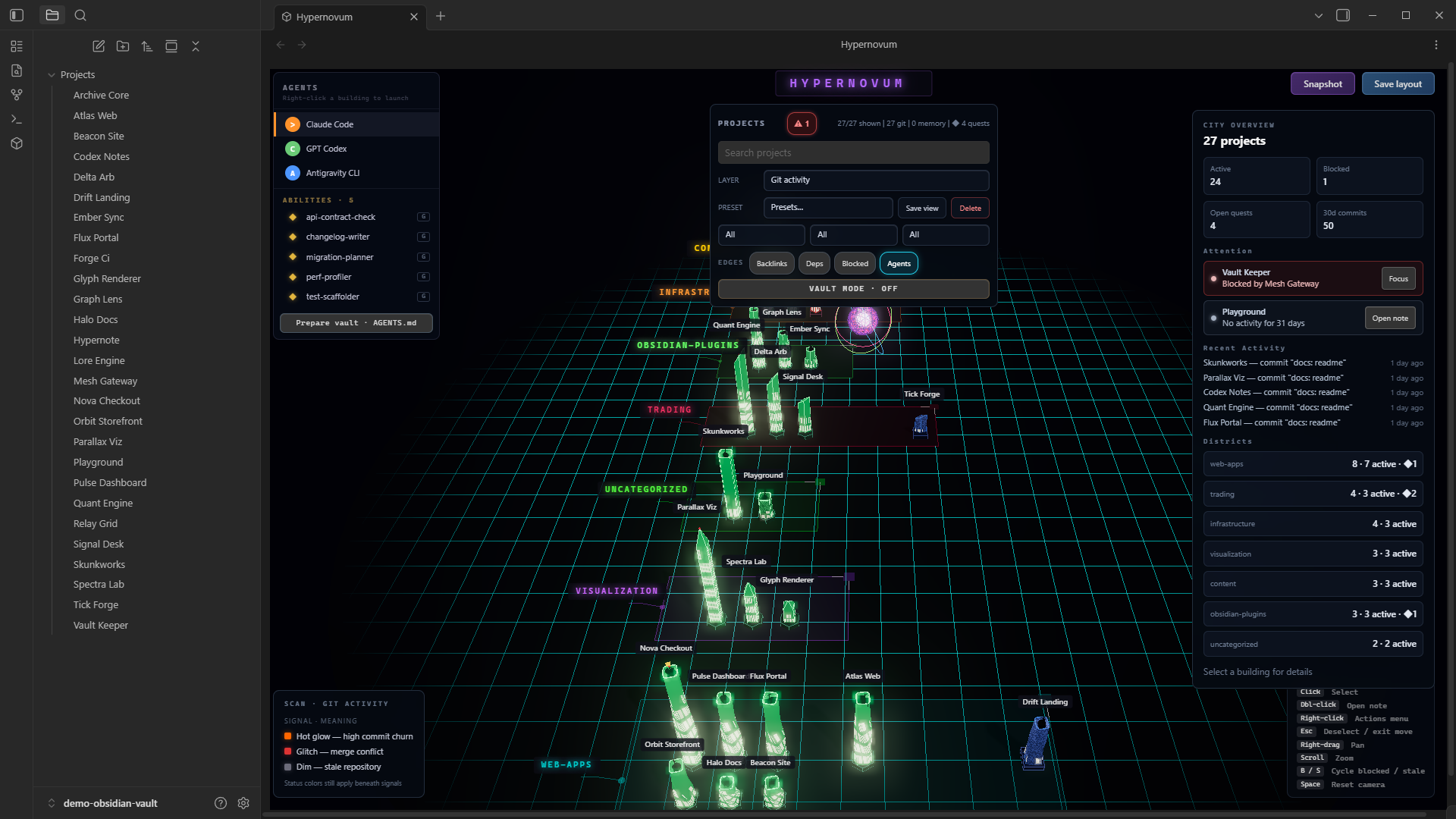
- Scan lenses (dropdown): status, Needs Attention (triage), Git activity, task-progress ramp, recency heatmap, tech-stack — with an adaptive legend. A ⚠ badge jumps to the attention lens.
- Lens presets: two one-click views — Active Work and Needs Attention.
- EDGES chips toggle the typed project graph: Backlinks · Deps · Blocked · Agents.
- Project inspector: git signals + recent commits, warnings, dependency sections (Depends on / Used by / Blocked by / Blocks), agent activity, and a last-session digest. City overview (nothing selected) shows district analytics, an attention list, and a recent-activity feed.
- Building style (settings): Parametric data-true towers — seven silhouette families whose window rows equal their real floor count — or the original Classic set. Applies live.
- Snapshot: one click saves a clean cinematic PNG (title card, no HUD) into your vault.
- Drag handles rearrange category blocks; scroll to zoom, right-drag to pan; keyboard cycles blocked/stale projects + resets camera.
Neural core and data arteries
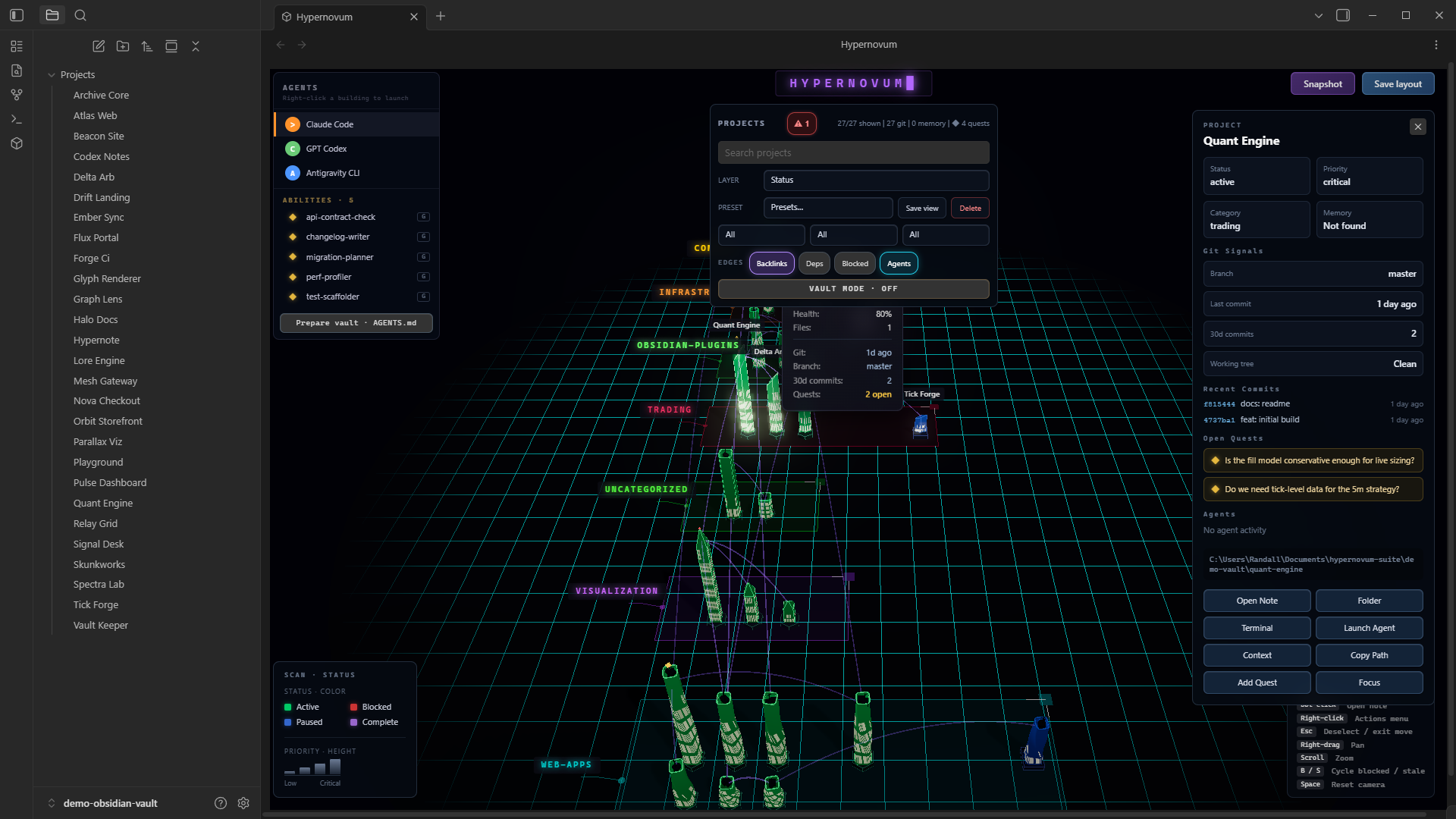
- Central geodesic wireframe sphere with RGB chromatic split and rotating rings
- Data Arteries — animated tube geometry flowing from core to buildings on file changes
- City states: IDLE (cyan) / STREAMING (cyan fast) / BULK_UPDATE (gold)
Agent integration
- Activity Monitor polls
.hypernovum/agents/(per-session snapshots) for real-time agent status - Persistent streaming artery while an agent is actively working on a project
- Activity indicator overlay shows current project and action
- Terminal Launcher for launching Claude Code, GPT Codex, Antigravity CLI, or a custom agent command
- Agent context handoff writes
.hypernovum/SETUP.mdwith project metadata, Git signals, and memory context pointers before launch - Heartbeat script installed into your vault at
.hypernovum/heartbeat.jsby the Install agent heartbeat hooks command, which also prints ready-to-paste hook JSON with every path already resolved
Git and memory signals
- Read-only Git activity layer shows recent commit velocity, branch, working-tree state, stale projects, and merge conflict signals
- Memory signal — the project inspector and the building tooltip show whether a project already has
.hypernovum/MEMORY_CONTEXT.md
HUD
- HYPERNOVUM neon title with flashing block cursor at top center
- Adaptive SCAN-MODE legend that re-renders per visual layer (status chips, gradient ramps, live stack roster)
- Controls hint overlay with all mouse and keyboard shortcuts
- Save Layout and Snapshot buttons
Platform support
| Platform | Terminal emulators | Notes |
|---|---|---|
| Windows | Windows Terminal, cmd.exe | Tries wt first, falls back to cmd |
| macOS | iTerm2, Terminal.app | Tries iTerm2 first (if running), falls back to Terminal.app |
| Linux | gnome-terminal, konsole, xfce4-terminal, xterm | Tries each in order until one succeeds |
All features — Neural Core, Data Arteries, agent integration, context menus — work identically on every platform. The only difference is which terminal emulator opens.
Frontmatter schema
Projects are detected by frontmatter tag project or field type: project (the tag is
configurable in settings). Beyond the quick-start fields, the ones worth knowing:
---
tags: [project]
stack: [TypeScript, React, Vite]   # shown on hover, drives the tech-stack lens
tasks: 24                          # window grid density
tasks_done: 15                     # lit windows
questions:                         # research quests — gold gems above the building
  - "Which vector DB fits this workload?"
depends_on: [Mesh Gateway]         # teal dependency arcs
blocked_by: [Relay Grid]           # red-amber arcs + a "Blocked by" warning
projectDir: C:\Users\me\projects\my-project   # Windows
# projectDir: /Users/me/projects/my-project   # macOS
# projectDir: /home/me/projects/my-project    # Linux
---
See SCHEMA.md for the full field reference.
AI integration
Hypernovum has no built-in AI. External AI tools (Claude Code, etc.) read SCHEMA.md to learn the frontmatter format, scan your project directories, and write frontmatter to vault notes. Hypernovum renders the result.
Prepare vault for AI agents (command palette, settings, or the agents panel) writes an AGENTS.md at the vault root containing the frontmatter schema, a live inventory of your projects, and instructions for making agent activity visible in the city — so any CLI agent launched in the vault immediately understands your second brain. Safe to re-run: only the marked Hypernovum section is regenerated; the rest of an existing AGENTS.md is preserved.
Agent presence (heartbeat v2)
Run the command palette action "Install agent heartbeat hooks". It installs the
heartbeat script into your vault at .hypernovum/heartbeat.js and shows you two
things with every path already filled in for your machine: a one-line command to
test with, and the JSON to merge into ~/.claude/settings.json. (Hypernovum shows
that JSON for you to copy — it never edits your global agent config itself.)
Once wired up, each agent session appears as its own orb. From a hook, use --hook
— the script then reads session_id, tool_name, and cwd from the hook's stdin
JSON, which is the only place Claude Code provides them (there is no
$CLAUDE_SESSION_ID environment variable):
# from a Claude Code hook — nothing to interpolate
node "<vault>/.hypernovum/heartbeat.js" --vault="<vault>" --hook \
  --name="Claude Code" --agent-type=claude

# by hand or from your own wrapper: reuse one --id for the whole session
node "<vault>/.hypernovum/heartbeat.js" --vault="<vault>" --id="my-session" \
  --name="Claude Code" --agent-type=claude --project="my-project" \
  --state=editing --tool=Edit --file=src/x.ts

# on finish
node "<vault>/.hypernovum/heartbeat.js" --vault="<vault>" --id="my-session" --stop
Heartbeat v2 gives every session its own snapshot file
(.hypernovum/agents/<sessionId>.json), so any number of agents run concurrently
without clobbering each other. The orb is colored by --state (working / waiting /
blocked / complete / stale), carries an identity tooltip, and — when two sessions
send overlapping --file values on one project — surfaces a deterministic conflict
in the city. Any agent or wrapper that can run a command can ping it; Claude Code
hooks are just the most convenient path.
The script's source of truth is
scripts/heartbeat.jsin this repository; the plugin carries an embedded copy and writes it into your vault, so an installed plugin never depends on having the repo checked out.
Development
npm install
npm run dev        # watch mode (also regenerates the embedded heartbeat source)
npm run build      # production build
npm run typecheck  # tsc across core + plugin (esbuild does NOT typecheck)
npm test           # vitest
Releases are cut from the root manifest.json — bump version there, then run
node scripts/check-versions.mjs --fix to mirror it into the plugin manifest, both
package.json files, and versions.json. Tag with the bare version (0.4.0, no
v prefix) and CI builds and attaches the release assets.
Built with Three.js, Zustand, and the Obsidian Plugin API.
Hypernovum Pro
This plugin stays free and open source. Hypernovum Pro is the standalone desktop app — the same city, rendered with realistic building models and image-based lighting, scanning your whole drive instead of one vault, plus Engram persistent agent memory, agent management, an MCP server, and the Tandem Terminal.
License
AGPL-3.0 — Free to use, modify, and distribute. Any modified version that is deployed must also be open-sourced under AGPL-3.0.