Search...Search plugins and themes...
⌘K
Sign in
  • Get started
  • Download
  • Pricing
  • Enterprise
  • Account
  • Obsidian
  • Overview
  • Sync
  • Publish
  • Canvas
  • Mobile
  • Web Clipper
  • CLI
  • Learn
  • Help
  • Developers
  • Changelog
  • About
  • Roadmap
  • Blog
  • Resources
  • System status
  • License overview
  • Terms of service
  • Privacy policy
  • Security
  • Community
  • Plugins
  • Themes
  • Discord
  • Forum / 中文论坛
  • Merch store
  • Brand guidelines
Follow us
DiscordTwitterBlueskyThreadsMastodonYouTubeGitHub
© 2026 Obsidian

HiDe

GraandGraand3 downloads

Build and browse skills as a hierarchy: each skill is built from its foundations. Focus view, states and quick creation of foundations.

Add to Obsidian
HiDe screenshot
HiDe screenshot
  • Overview
  • Scorecard
  • Updates3

A graph where every skill is built from its foundations. Pick a skill and the camera zooms in: its foundations unfold beneath it, and faded "ghosts" above show what the skill is used for. Arrows point from foundation to skill.
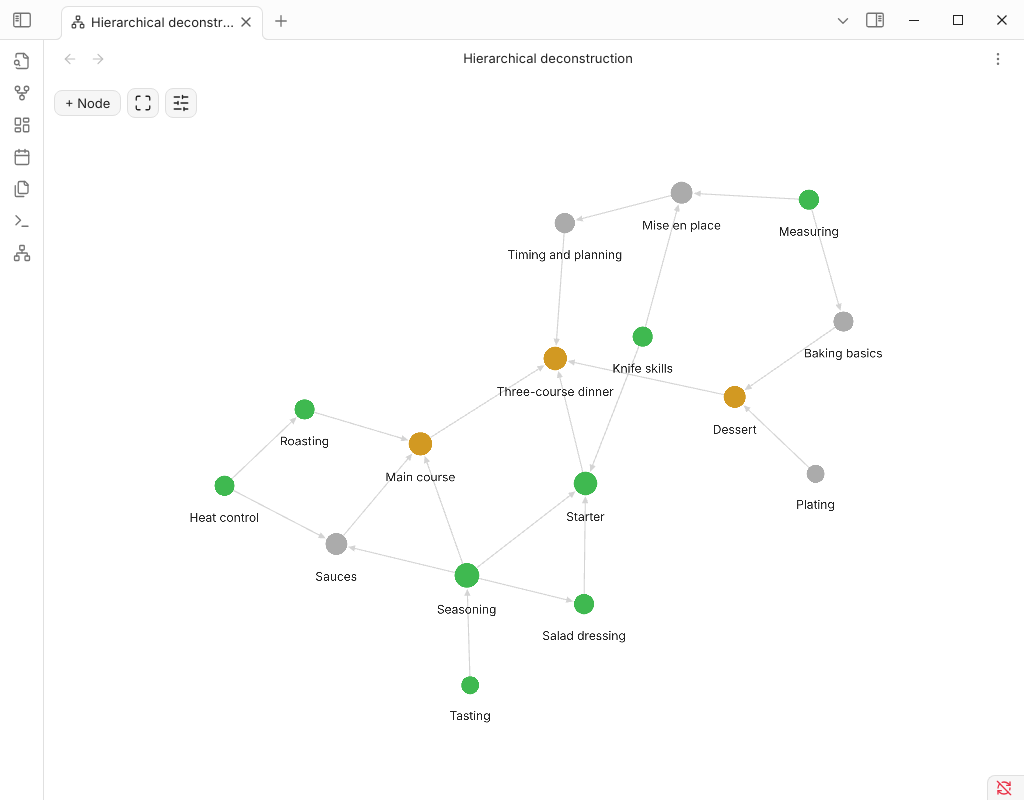
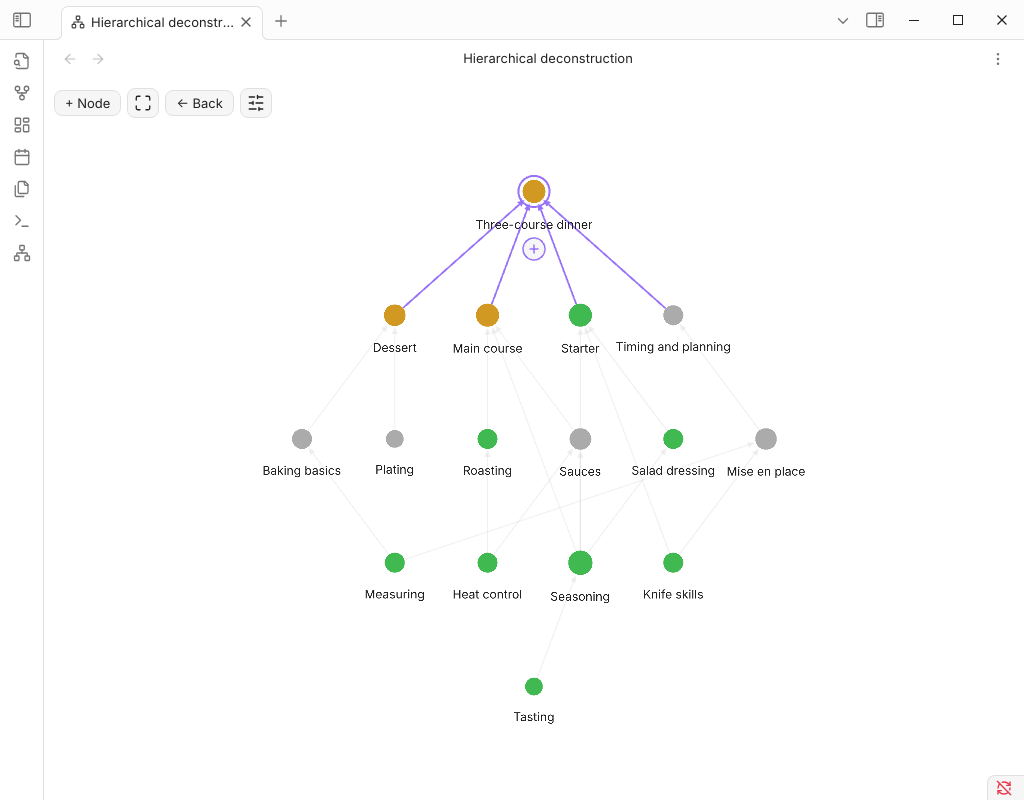
Overview Focus on a skill

How data is stored

Everything is plain notes — the plugin keeps no database:

---
requires: ["[[Empathy]]", "[[Sentence building]]"]   # what the skill is built from
state: done                                           # optional, sets the node color
---

requires are property links, so Obsidian's own graph, backlinks and rename-updates keep working. A skill is any note inside the plugin folder (default Hierarchical deconstruction) or any note with a requires property. Node positions, states and force settings live in the plugin's data.json.

Features

  • Graph view (ribbon icon or command Open hierarchical deconstruction): click = focus, double-click = open note, right-click = menu.
  • The interface is English; it switches to Russian automatically when Obsidian is set to Russian.
  • + Node creates a new skill; the + under a selected node opens the same dialog and attaches the new node as a foundation of the selected one (an existing title is linked, not duplicated).
  • Local graph of any note with adjustable depth.
  • Editable states with colors; live force sliders (center, repel, link strength/distance, hierarchy pull, line width).
  • Cycles are rejected: a skill can't be built from something built from it.
  • Physics by d3-force and WebGL rendering (PIXI), like the core graph.

Install (manual)

Copy main.js, manifest.json, styles.css into <vault>/.obsidian/plugins/hide/ and enable the plugin.

Development

npm install
npm run build

Release: bump the version in manifest.json and versions.json, push a git tag equal to the version — the workflow publishes the release.

HealthExcellent
ReviewSatisfactory
About
Visualize skills as a hierarchical graph built from plain Markdown notes. Zoom into a skill to unfold its foundations and show faded "ghost" nodes for its uses; follow arrows, create or attach foundation nodes, edit colored states and live layout settings, and prevent cyclic dependencies while keeping Obsidian links intact.
VisualizationLinksProperties
Details
Current version
0.1.2
Last updated
8 hours ago
Created
9 hours ago
Updates
3 releases
Downloads
3
Compatible with
Obsidian 1.8.7+
Platforms
Desktop only
License
MIT
Report bugRequest featureReport plugin
Author
GraandGraandx00-xxx-x0x
GitHubx00-xxx-x0x
  1. Community
  2. Plugins
  3. Visualization
  4. HiDe

Related plugins

Excalidraw

Visual PKM powerhouse. Create and edit Excalidraw drawings.

Advanced Canvas

Supercharge your canvas experience. Create presentations, flowcharts and more.

ExcaliBrain

An interactive, structured mind-map of your Obsidian vault.

Breadcrumbs

Visualise the hierarchy of your vault using a breadcrumb trail or matrix view.

Strange New Worlds

Reveal networked thought and the strange new worlds created by your vault.

Vault Graph

Your whole vault as one disc: notes packed into folder wedges on a fixed lattice, sized by links, with a growth heatmap, timeline, search and per-folder filters. Deterministic, not force-directed - the same vault always draws the same picture.

Frontmatter Markdown Links

Adds support for markdown links in frontmatter.

Smart Rename

Rename notes keeping previous title in existing links.

Smart Connections

Find related notes and excerpts while writing. Your AI link building copilot displays relevant content in graph + list view. A local embedding model powers semantic search. Zero setup. No API key.

Meta Bind

Make your notes interactive with inline input fields, metadata displays, and buttons.