Hermes Console
 Danny Shmueli8k downloads
Launch Hermes Agent from your vault. Share highlighted note text with Hermes Agent, then keep writing without switching apps, manage multiple Hermes easily
- Overview
- Scorecard
- Updates16
Launch Hermes from your vault, opt in per terminal tab to share selected note text or cursor context through a local JSON bridge, and keep working while Hermes runs. Hermes Console shows busy state per tab and can notify you when a background Hermes turn finishes, without switching to an external terminal.
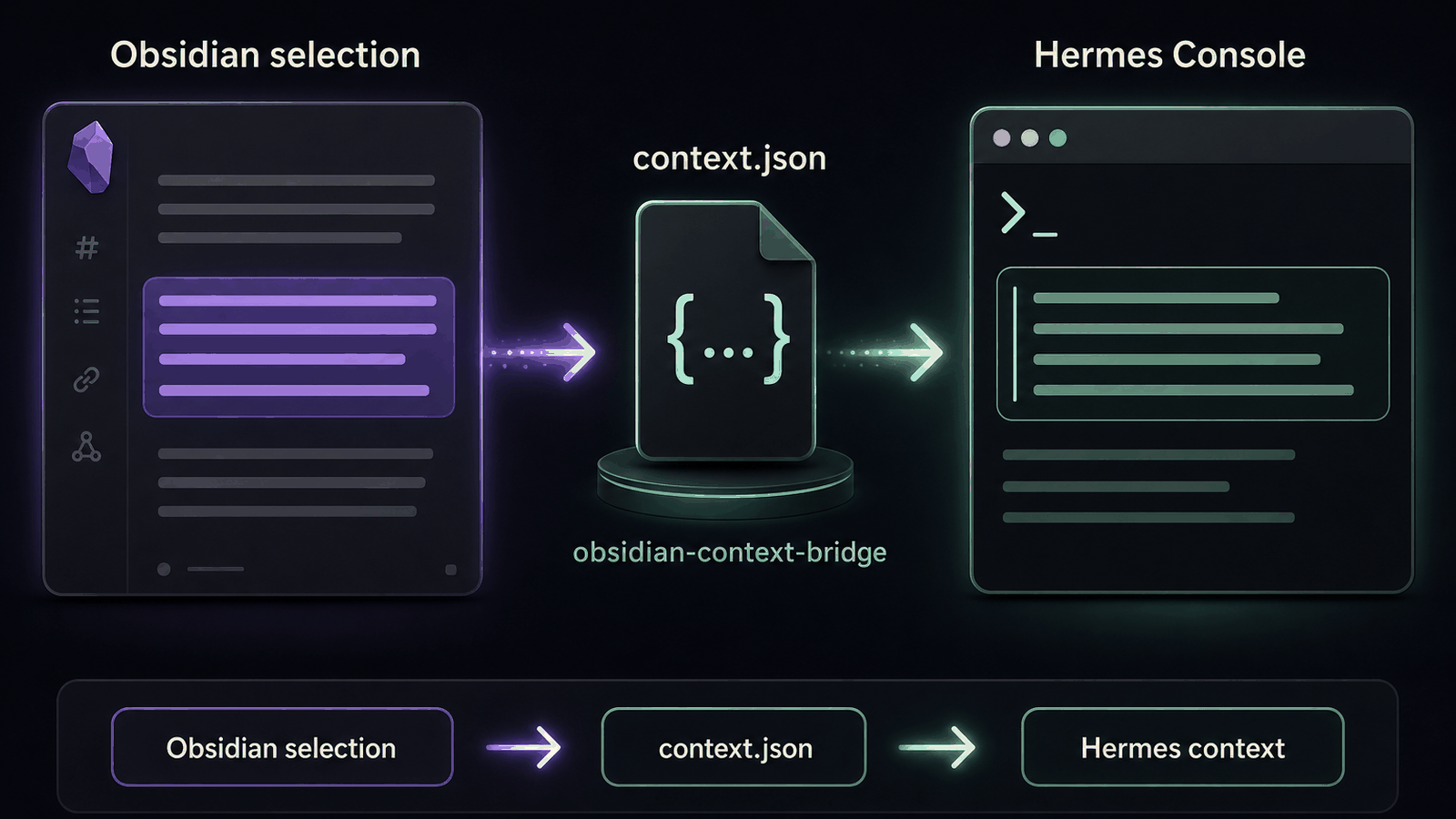
Highlight a paragraph in Obsidian, enable the Send context to Hermes header toggle for that terminal tab, press Enter in Hermes Console, and ask Hermes to rewrite, sharpen, research, or challenge that exact text. Selection in Obsidian becomes context in Hermes only for tabs where note context sharing is enabled.
Already use Hermes? Install the Hermes-side bridge once:
hermes plugins install dannyshmueli/obsidian-hermes-console --enable
Then install Hermes Console from Settings > Community Plugins: search for Hermes Console, install it, enable it, click Download binaries, open the console, turn on the Send context to Hermes header toggle for the tab you want to use, and press Enter on your next Hermes prompt. Community Plugins installs the Obsidian plugin only; the command above installs the Hermes plugin that makes selected-note context work. The Hermes-side plugin appears as obsidian-context-bridge; that is expected and no extra Obsidian plugin is needed.
Full install instructions: https://github.com/dannyshmueli/obsidian-hermes-console#installation
Hermes Console is built on a fork of Lean Terminal. We preserve upstream credit and license history, but this README now describes the Hermes Console product, roadmap, and Obsidian-to-Hermes workflow.
Quick start
If you already use Hermes
Install the Hermes bridge plugin once:
hermes plugins install dannyshmueli/obsidian-hermes-console --enableIn Obsidian, open Settings > Community Plugins.
Search for Hermes Console and click Install.
Enable Hermes Console.
Open Settings > Hermes Console > Download binaries and click Download.
Open Hermes Console from the ribbon icon or command palette.
Highlight text in any note, turn on the Send context to Hermes header toggle for the current terminal tab, type a prompt in Hermes Console, and press Enter.
Hermes Console does not install Hermes itself, and Community Plugins does not install Hermes plugins. If hermes is already available in your shell and obsidian-context-bridge is enabled, new console tabs start Hermes automatically. Note context is attached on submit only after you opt in for that terminal tab.
If you are new to Hermes
- Install Hermes Agent from https://github.com/NousResearch/hermes-agent.
- Run
hermes setupin your normal terminal and confirmhermesstarts. - Run
hermes plugins install dannyshmueli/obsidian-hermes-console --enableto install the Hermes-side bridge. - Install Hermes Console from Settings > Community Plugins.
- Open Hermes Console inside Obsidian and start working from your notes.
Architecture: one Obsidian plugin, one Hermes plugin, one bridge file
Hermes Console has three pieces. They are separate on purpose:
Obsidian plugin: Hermes Console
- This repository's visible Obsidian plugin.
- Owns the terminal UI, tabs, PTY sessions, Obsidian commands, settings, safe tab close, note-context status header, and Hermes busy/idle indicators.
- Captures selected text or cursor context from the active Obsidian note when note context sharing is enabled for that terminal tab and you press Enter in a Hermes terminal.
Bridge file:
.obsidian/hermes/context.json- A local JSON handoff file written by the Obsidian plugin inside the active vault.
- Plain Enter writes a fresh marker before the PTY receives Enter; disabled tabs write a detach marker instead of note context.
- It is not a plugin, not a background service, not clipboard paste, and not an Obsidian-to-Hermes network connection.
Hermes plugin:
obsidian-context-bridge- Repo-provided Hermes-side plugin installed with
hermes plugins install dannyshmueli/obsidian-hermes-console --enableand loaded by the Hermes process launched inside the terminal. - Appears in Hermes Plugins as
obsidian-context-bridge; that is correct. It is not a second Obsidian plugin. - Reads
OBSIDIAN_CONTEXT_BRIDGE_PATHor an explicit bridge path. - Uses Hermes hooks to inject the current selected-text/cursor context into the active Hermes turn, expose
obsidian_context()for large selections, and write busy/idle status for the matching terminal tab.
- Repo-provided Hermes-side plugin installed with
So: this is not two Obsidian plugins. It is one Obsidian plugin plus one Hermes plugin connected by one JSON bridge file.
End-to-end selected-text/cursor behavior requires all three pieces: Obsidian capture, bridge file write, and the obsidian-context-bridge Hermes plugin loading in the integrated Hermes process. Busy/idle tab status uses the same Hermes plugin plus a per-tab status file under .obsidian/hermes/runtime/.
Desktop only. Requires Obsidian 1.7.2+.
Features
Terminal Core
- Full PTY terminal (not a simple command runner) with interactive shell support
- Auto-detects your shell: PowerShell 7 / Windows PowerShell / cmd.exe on Windows,
$SHELLon macOS/Linux - Startup command: fresh new tabs run
hermesby default once the shell is ready if the Hermes CLI is installed and in PATH. Restored tabs and resume links do not re-run the startup command - Clipboard support: Ctrl+V / Cmd+V paste, Ctrl+C / Cmd+C copy (with selection)
- Clickable URLs in terminal output
- Auto-resize as the panel resizes
- Shift+Enter inserts a newline without submitting (muscle memory for Hermes and Claude-style prompts)
Tab Management
- Multiple Hermes tabs with icon rename, color-coding, and pinning support
- Drag tabs to reorder them in the tab bar
- Keyboard shortcuts: Next/Previous (with wrap-around), Jump to Tab 1-8, Jump to last - bindable under Settings > Hotkeys
- Tab bar positioning: Top (default), Left, or Right side for wide-monitor layouts
Vault Integration
- Opens in the right sidebar by default; command palette to open in the current file's folder; right-click any file or folder to open a terminal there
- Drag files from the Obsidian file explorer or Windows Explorer into the terminal to insert the absolute path (spaces auto-quoted)
- Wiki-link autocomplete: type
[[in the terminal to pick any vault note and insert as a wiki-link, vault-relative path, or absolute path
Search & Selection
- In-terminal search bar (Ctrl+Alt+F): match counter, case-sensitive toggle, and highlight decorations
- Copy on select: automatically copies selected text to the clipboard as you highlight
Appearance & Configuration
- 12 built-in color themes (Obsidian Dark, Obsidian Light, Monokai, Solarized Dark, and more); extend or override via themes.json
- Custom background color override with color picker (match your vault theme)
- Customizable ribbon and panel tab icon (any Lucide icon name)
- Configurable: shell path, font size, font family, cursor blink, scrollback, panel location
Sessions & Persistence
- Session persistence: tab names, colors, working directories, and scrollback are restored when Obsidian reopens
- Rescue recently closed tabs from the command palette (ring buffer of the last 10 sessions)
- Busy state per Hermes tab, unread status for background turns, and optional Obsidian notices when background Hermes turns finish
- Restore recently closed tabs and live Hermes CLI sessions from the command palette
- Optional Obsidian-to-Hermes context bridge for selected text or cursor context
Hermes Context Bridge
- Note context sharing is opt-in per Hermes Console terminal tab. Use the Send context to Hermes header toggle in the console header, or run Toggle note context for active Hermes Console tab from the command palette and bind it under Settings > Hotkeys.
- The per-tab toggle defaults off after plugin reload or Obsidian restart; enable it again for each terminal tab that should share note context.
- When enabled, selection wins when text is selected; if nothing is selected, Hermes Console sends cursor/file context with the current note location and nearby lines.
- Context is captured at submit time, not pasted into the terminal, so multi-line selections do not break prompt entry.
- The terminal process receives
OBSIDIAN_CONTEXT_BRIDGE_PATHso theobsidian-context-bridgeHermes plugin can read the right vault bridge file - Large selections can stay out of the prompt body and be fetched by Hermes through
obsidian_context()
Installation
Fast path: install Hermes Console from Settings > Community Plugins, then click Settings > Hermes Console > Download binaries. If you want selected-note/cursor context in Hermes, also install the Hermes-side bridge plugin with hermes plugins install dannyshmueli/obsidian-hermes-console --enable.
The plugin needs native node-pty binaries after install. Community Plugins and BRAT users download them from plugin settings. Manual/local development installs them with npm install and copies them into the vault plugin directory with install.mjs.
Hermes Console does not install the Hermes CLI or auto-enable Hermes plugins. Install Hermes separately if you want the default hermes startup command to work. Install obsidian-context-bridge with hermes plugins install dannyshmueli/obsidian-hermes-console --enable if you want selected-note/cursor context to reach Hermes.
Community Plugins
Recommended for most users.
- Open Settings > Community Plugins
- Search for "Hermes Console"
- Click Install
- Enable the plugin in Settings > Community Plugins
- Go to Settings > Hermes Console > Download binaries and click Download to fetch the native
node-ptybinary for your platform - Open the console via the ribbon icon or command palette
The upstream community plugin remains available as Lean Terminal.
BRAT beta
Use this path only for beta builds before they reach Community Plugins.
If you want selected-note context in Hermes, install the Hermes-side plugin first:
hermes plugins install dannyshmueli/obsidian-hermes-console --enableInstall the BRAT plugin if you don't have it
Open Settings > BRAT > Add Beta Plugin
Enter:
dannyshmueli/obsidian-hermes-consoleEnable the plugin in Settings > Community Plugins
Go to Settings > Hermes Console > Download binaries and click Download to fetch the native
node-ptybinary for your platformOpen the console via the ribbon icon or command palette
BRAT installs the Obsidian plugin release assets (main.js, manifest.json, styles.css). It does not run hermes plugins install for you.
Manual/local development
- Clone this repository
- Run
npm installto install dependencies, including localnode-pty - Run
npm run build - Run
hermes plugins install file://$PWD --enablefrom the repo root to install the Hermes-side bridge locally - Run
node install.mjs "/path/to/vault"to copymain.js,manifest.json,styles.css, the Hermes bridge plugin files, andnode-ptyinto.obsidian/plugins/hermes-console - Restart Obsidian and enable the plugin in Settings > Community Plugins
Verify the install
- Plugin is enabled in Settings > Community Plugins
- Native binaries are downloaded through plugin settings or copied by
install.mjs - Terminal opens from the ribbon icon or command palette
- Hermes CLI is installed separately and visible to Obsidian's PATH if you want Hermes autostart
- A new terminal tab starts
hermesby default when Hermes is available in PATH - If using note context: enable the Send context to Hermes header toggle for the current terminal tab;
<vault>/.obsidian/hermes/context.jsonis updated when you press Enter in that Hermes terminal - If using note context: the Hermes process has the
obsidian-context-bridgeplugin enabled and can receiveOBSIDIAN_CONTEXT_BRIDGE_PATH
Troubleshooting
If the console fails to open, check the node-pty native module first:
- Community Plugins or BRAT: run Settings > Hermes Console > Download binaries again
- Manual/local development: rerun
npm install,npm run build, andnode install.mjs "/path/to/vault" - Restart Obsidian completely after fixing binaries or native module files
ARM64 Windows binary download
If you see "Failed to download binaries" on an ARM64 Windows device (Surface Pro X, Windows Dev Kit, etc.):
- Close all terminal tabs in Obsidian (the binary may be locked in use)
- Disable the plugin in Settings, then re-enable it
- Restart Obsidian completely (not just reload)
- Manually delete the plugin's
node_modulesfolder: browse to.obsidian/plugins/hermes-console/node_modules/in your vault and delete it - Try downloading binaries again
If the issue persists, check that:
- You have write permissions to the plugin directory
- Your
.obsidianfolder is not synced to a cloud service (OneDrive, iCloud, Dropbox) that may lock files during sync - Your antivirus software is not blocking file extraction
How It Works
The plugin uses xterm.js for terminal rendering and node-pty for native pseudo-terminal support. node-pty spawns a real shell process (PowerShell, bash, etc.) and connects its stdin/stdout to xterm.js via Obsidian's Electron runtime. This gives you a fully interactive terminal - not just command execution.
On Windows, the plugin uses the ConPTY backend (correct UTF-8 and emoji support). A patched windowsConoutConnection.js replaces node-pty's Worker thread with inline socket piping so ConPTY works inside Obsidian's Electron renderer, which does not support Worker thread construction.
Related documents
See Usage for the full command reference.
See Settings for all configuration options.
See Session Persistence for how tab state is saved and restored.
See Hermes Obsidian Context Bridge for the context handoff and busy/idle status bridge.
See URI Handler for the canonical obsidian://hermes-console protocol reference.
See Security for the security review summary.
Changelog
See CHANGELOG.md for release history and feature documentation by version.
Feedback
Use this repo to report bugs, request features, or ask questions.
If you want to support my work, you can use this link to buy me a drink - thank you, I appreciate you.
Development
npm install
npm run dev          # Watch mode (auto-rebuild on save)
npm run build        # Production build
node install.mjs "/path/to/vault"
# Or: HERMES_CONSOLE_VAULT="/path/to/vault" node install.mjs
Credits
Hermes Console began as a fork of Lean Terminal, an open-source terminal plugin for Obsidian. Thank you to the Lean Terminal maintainers and contributors for the original terminal foundation.
This project has since diverged into Hermes Console: an Obsidian plugin for Hermes Agent, with its own UI, context bridge, settings, docs, and roadmap.
Upstream Lean Terminal contributors
The following credits refer to contributions made in the upstream Lean Terminal project before or outside this fork:
- @FarhadGSRX - Session persistence, session rescue buffer, original Claude Code session work in upstream Lean Terminal, color scheme catalog with themes.json support
- @ckelsoe - Per-tab color tint customization with editable palette, wiki-link autocomplete with path-insertion modes
- @c00llin - Terminal location options (Tab Right, Split Tab Right)
- @kkugot - Emoji rendering fixes, system theme detection with terminal color reporting protocol
- @CHodder5 - Zsh startup file forwarding (.zshenv and .zprofile) via ZDOTDIR override
Hermes Console contributors
See this repository's commit history and releases for Hermes Console-specific contributors and changes.