Search...Search plugins and themes...
⌘K
Sign in
  • Get started
  • Download
  • Pricing
  • Enterprise
  • Account
  • Obsidian
  • Overview
  • Sync
  • Publish
  • Canvas
  • Mobile
  • Web Clipper
  • CLI
  • Learn
  • Help
  • Developers
  • Changelog
  • About
  • Roadmap
  • Blog
  • Resources
  • System status
  • License overview
  • Terms of service
  • Privacy policy
  • Security
  • Community
  • Plugins
  • Join the community
  • Discord
  • Forum / 中文论坛
  • Merch store
  • Brand guidelines
Follow us
DiscordTwitterBlueskyThreadsMastodonYouTubeGitHub
© 2026 Obsidian

Harper

automatticautomattic86k downloads

The fastest grammar and spell checker that respects your privacy.

Add to Obsidian
  • Overview
  • Scorecard
  • Updates86

Put simply, Harper is a grammar checking plugin that doesn't violate your privacy. Other systems, like LanguageTool, ship your writing over the internet to centralized servers, where it's used for god-knows-what. Harper isn't like that.

Instead, Harper runs its grammar checking engine directly inside Obsidian. That means your data doesn't go anywhere you don't want it to. Your Obsidian vault should be just what you expect: locked down and private.
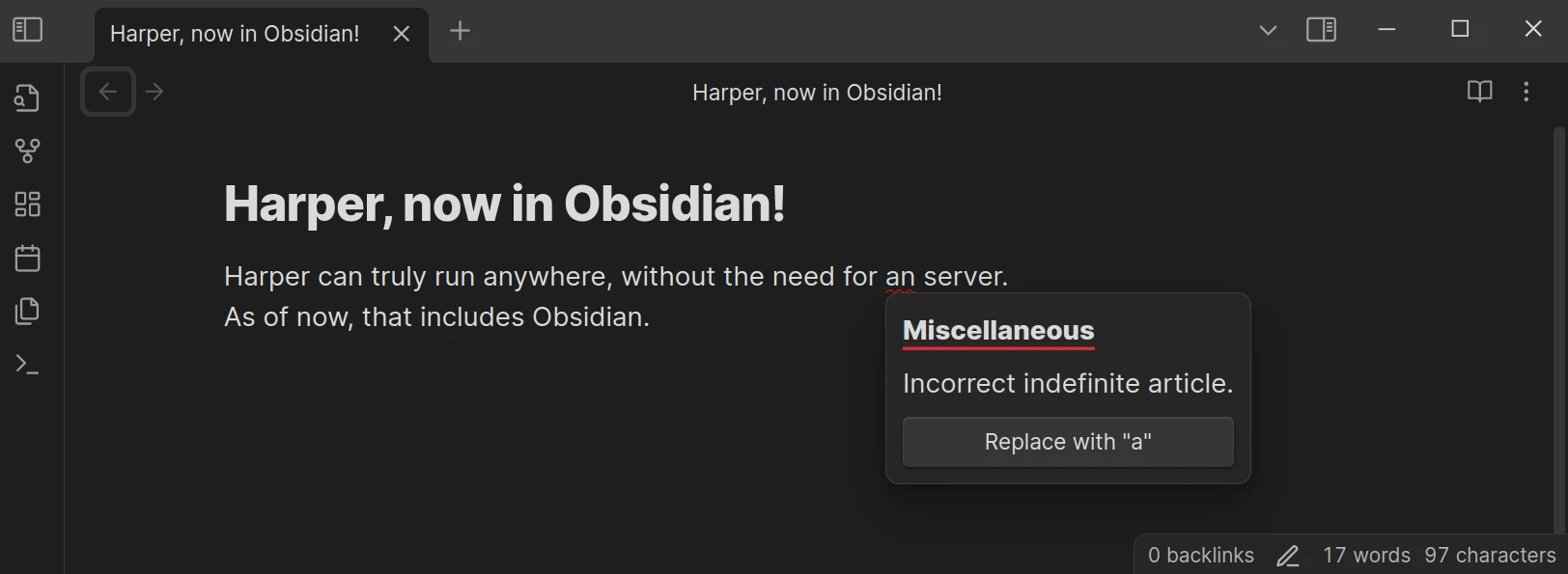
A screenshot of Obsidian with Harper installed

Unlike other offerings (like Grammarly) Harper also explicitly ignores the contents of code fences and inline code blocks. Since it runs entirely on-device, Harper also ends up being noticeably faster than alternatives, partly because there is no network latency.

Open Source

  • Harper is fully open source, allowing transparency and community contributions to improve its functionality.
  • Developers can review the codebase or contribute directly via the GitHub repository.

How It Compares to Other Plugins

Feature Harper LanguageTool
Privacy 100% offline Requires self-hosting for privacy
Real-Time Checking Yes Yes
Language Support English (extensible) 30+ languages
Open Source Yes Partially
Ease of Use Simple setup Requires API/self-hosting setup
Performance Fast and lightweight Resource-intensive

Installation Guide

  1. Open Obsidian and navigate to Settings → Community Plugins → Browse.
  2. Search for "Harper" in the plugin library.
  3. Click "Install" and then "Enable."
  4. Start typing in your notes—Harper will automatically highlight errors as you go!

Warning Harper expects an up-to-date version of the Obsidian installer. If you have issues, reinstall Obsidian or otherwise update your installer version.

Where's all the code?

All the code for the Harper Obsidian plugin lives in the main Harper monorepo. This repository exists to satisfy the requirements laid out by the Obsidian team for their plugins.

I have a problem or feature request...

Let me know if you have any problems, feature requests, or feedback of any kind by filling out an issue on the main repository.

76%
HealthGood
ReviewCaution
About
Check grammar and style locally inside Obsidian with a privacy-first, on-device engine that never sends your notes to the internet. Ignore code fences and inline code, get real-time, low-latency suggestions, and inspect or extend the open-source code with English support by default.
WritingEditing
Details
Official
Officially made by its original creators.
Current version
2.1.0
Last updated
2 weeks ago
Created
2 years ago
Updates
86 releases
Downloads
86k
Compatible with
Obsidian 1.7.7+
License
Apache-2.0
Report bugRequest featureReport plugin
Author
automatticautomattic
elijahpotter.dev
GitHubautomattic
  1. Community
  2. Plugins
  3. Writing
  4. Harper

Related plugins

LanguageTool Integration

advanced spell/grammar checks with the help of language-tool.

LanguageTool

Unofficial integration of the LanguageTool spell and grammar checker.

Advanced Tables

Improved table navigation, formatting, and manipulation.

Outliner

Work with your lists like in Workflowy or Roam Research.

Meta Bind

Make your notes interactive with inline input fields, metadata displays, and buttons.

Various Complements

Complete words similar to auto-completion in an IDE.

Text Generator

Generate text content using GPT-3 (OpenAI).

Smart Composer

AI chat with note context, smart writing assistance, and one-click edits for your vault.

Datacore

An even faster reactive query engine for the data obsessed.

Emoji Toolbar

Quickly search for and insert emojis into your editor.