Habit Charts
 kavodsky16 downloads
Draw daily habit progress charts in percent of a daily goal from the frontmatter of daily notes.
- Overview
- Scorecard
- Updates2
English · Українська · Deutsch · Magyar
Habit Charts draws your daily habit progress as line charts, in percent of a daily goal. The data comes from the frontmatter of your daily notes. It is a plain Obsidian plugin: no dependencies, no network, and no code is ever executed from your notes. Only a small YAML configuration is read.
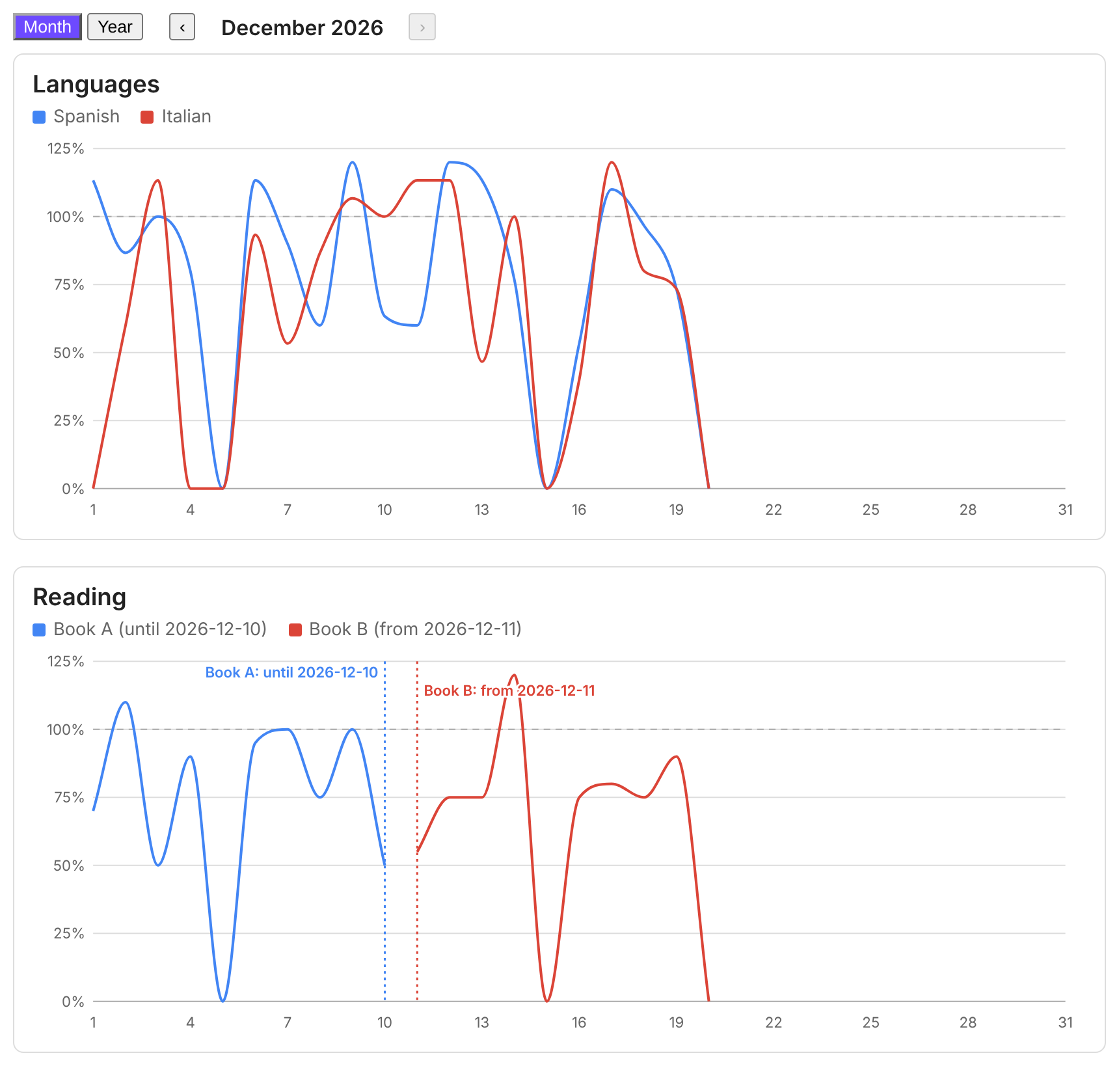
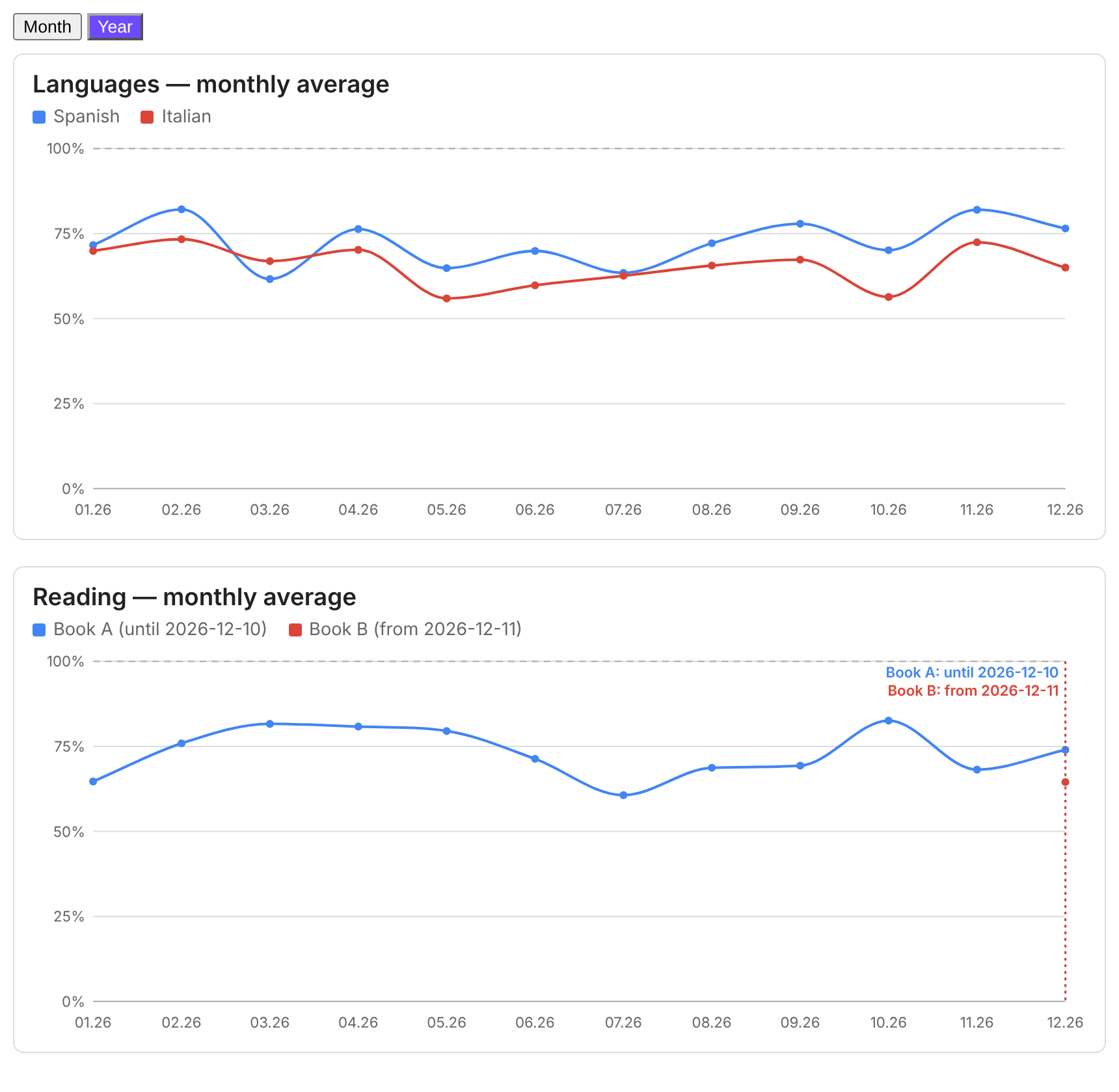
Features
- One line per habit, in percent of its daily goal (minutes ÷ goal × 100, two decimals). Values above 100% are allowed.
- Month | Year switch. The month view shows one calendar month with ‹ › buttons to move between months. The year view shows the monthly average for the last 12 months.
- Hover tooltips with minutes, goal and percentage.
- Switch to a new habit without losing history: give each habit its own dates (
from/to). A dashed marker with a label such as "Book A: until 2026-12-10" and "Book B: from 2026-12-11" shows where one ended and the next began. Days outside the life of a habit stay empty: they are not drawn and do not count in averages. - Interface in English, German, Hungarian and Ukrainian.
- Charts are plain SVG and follow your Obsidian theme.
Installation
From Obsidian: Settings → Community plugins → Browse → search for Habit Charts → Install → Enable.
Manually: download main.js, manifest.json and styles.css from the latest release, put them into
<your vault>/.obsidian/plugins/habit-charts/, then enable the plugin under Settings → Community plugins.
Your data
One note per day, named YYYY-MM-DD.md, with numeric frontmatter fields (minutes):
---
tags: [daily]
hc_spanish: 30
hc_italian: 10
---
A missing note, a missing field or a non-numeric value counts as 0%.
Tip: to keep the plugin's fields apart from the fields of other plugins, give them a common prefix such as hc_
and set prefix: hc_ in the configuration. The plugin reads only the fields listed in the configuration.
Usage
Add a code block with the language habits to any note:
```habits
folder: 100 Calendar/Daily
prefix: hc_
views: [month, year]
groups:
  - title: Languages
    series:
      - { name: Spanish, key: spanish, goal: 30 }
      - { name: Italian, key: italian, goal: 15 }
  - title: Reading
    series:
      - { name: Book A, key: book_a, goal: 20, to: "2026-12-10" }
      - { name: Book B, key: book_b, goal: 20, from: "2026-12-11" }
```
A longer example is in examples/dashboard.md. The charts update when your notes change.
Configuration
| Key | Meaning |
|---|---|
folder |
Folder of the daily notes. Without it the whole vault is searched. |
dateFormat |
Date format of the note names, default YYYY-MM-DD. |
prefix |
Optional prefix of all frontmatter fields, for example hc_ (key: spanish reads hc_spanish). |
lang |
en, de, hu or uk. Without it (or with auto) the Obsidian language is used, and English if that language is not supported. |
views |
[month, year], or only one of them. With both, a Month / Year switch appears. |
month |
Optional YYYY-MM: the month shown by default. Otherwise the current month. |
months |
Number of months in the year view, default 12. |
smooth |
false turns off line smoothing. |
groups |
List of charts, each with a title and a list of series. |
series |
{ name, key, goal, color?, from?, to? }. goal is minutes per day. from and to are the first and last day of the habit (YYYY-MM-DD). |
A habit that does not exist in the period being shown (for example Book B in November) is not shown at all.
Alternatively, one continuous line with a handover can be written with periods:
- periods:
    - { to: "2026-12-10", name: Book A, key: book_a, goal: 20 }
    - { from: "2026-12-11", name: Book B, key: book_b, goal: 20 }
Privacy and disclosures
- No network requests, no telemetry, no ads, no account needed.
- The plugin reads only the frontmatter of notes inside your vault, through Obsidian's metadata cache. It never writes to your notes and never runs code found in them.
Development
The plugin is plain JavaScript with no build step: main.js, styles.css and manifest.json are the plugin.
To release a new version, set version in manifest.json, commit, then push a tag that is exactly that version
(for example git tag 0.3.1 && git push origin 0.3.1). The workflow in .github/workflows/release.yml creates the
GitHub release with the three files and signs them with GitHub artifact attestations.
To verify a downloaded file: gh attestation verify main.js -R kavodsky/habit-charts.