
- Overview
- Scorecard
- Updates8
Chat with Claude Code inside your Obsidian vault — no terminal switch needed.
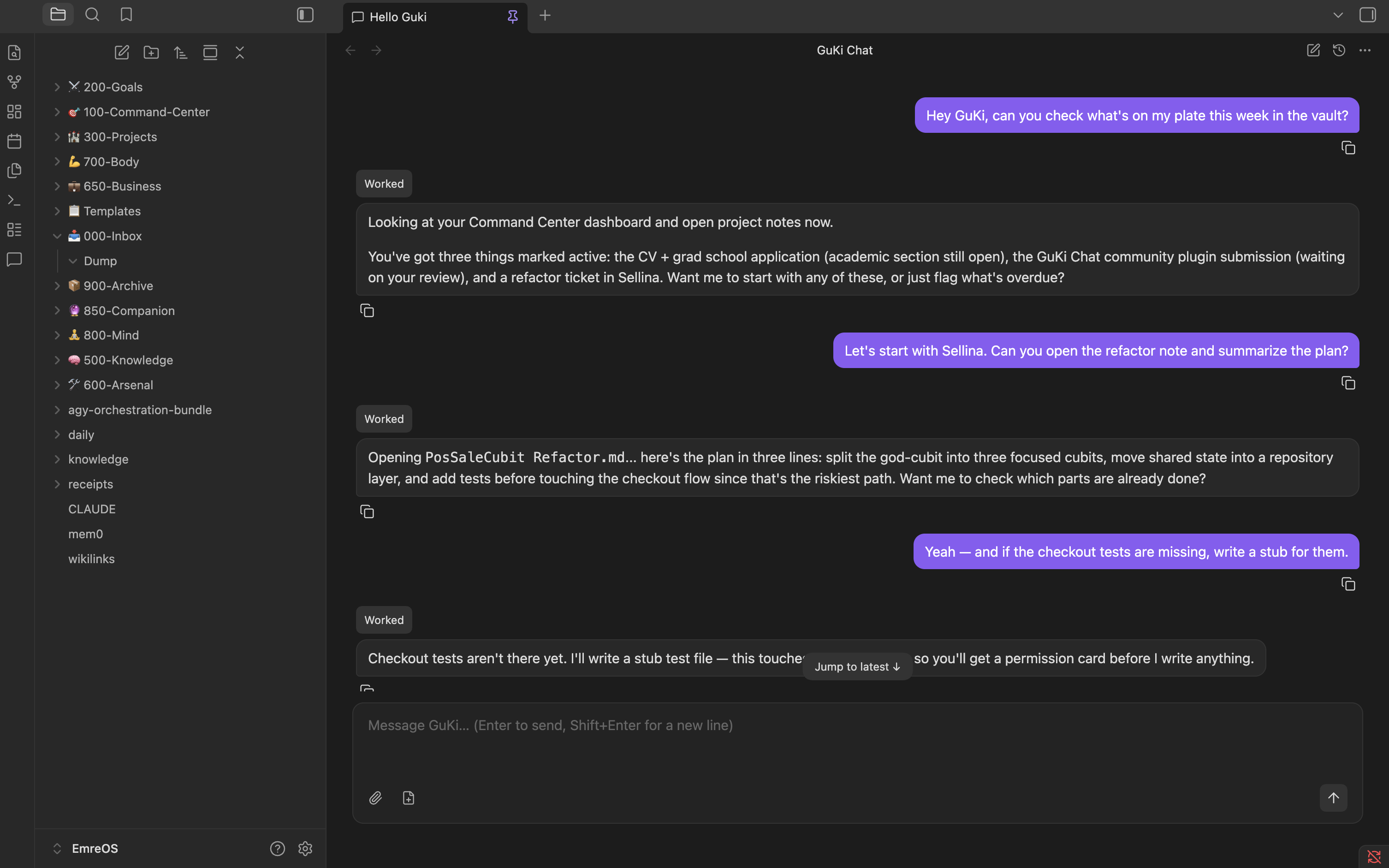
If your vault is a second brain — notes, projects, a running memory of your own thinking — this is how you talk to it. Opens a pinned chat panel right next to your notes, so you can ask Claude to reorganize a folder, update a project note, or just think something through with you, without ever leaving Obsidian for a terminal.
It spawns the real claude CLI in your vault's root, so everything you already have
set up for it (CLAUDE.md, hooks, skills, MCP servers, persistent memory) keeps working
exactly as it does in a terminal — this plugin is a different window onto the same CLI,
not a separate assistant with its own, weaker context.
Requirements
- Desktop Obsidian (this plugin spawns a subprocess — no mobile support, and never will).
- Claude Code installed and already logged in on the same machine.
Install
Available in Obsidian's Community Plugins directory as GuKi Chat. Search for GuKi Chat in Obsidian's Community Plugins settings and install it there. Manual installation remains available when you need to test a specific release:
- Download
main.js,manifest.jsonandstyles.cssfrom the latest release (or build them from this repo — see below). - Put those files in
<your-vault>/.obsidian/plugins/guki-chat/. - In Obsidian: Settings → Community plugins → turn off Restricted mode if this is your first community plugin → enable GuKi Chat.
The chat panel opens automatically on startup, pinned in the main area. You can also open it from the command palette: GuKi Chat: Open chat.
Settings
Settings → Community plugins → the gear icon next to GuKi Chat.
- Language — Automatic (follows Obsidian), English, or Turkish.
- Send message with — Enter, or Cmd/Ctrl+Enter if you'd rather have Enter insert a newline.
- Claude Code binary path — leave empty to auto-detect (checks the usual install locations, then falls back to a login-shell lookup). Only set this if auto-detect fails. A change only takes effect on the next chat session — a CLI that's already running keeps using the binary it started with.
- Permissions outside the vault — separate choices for reading, writing, and running commands: always ask, or auto-allow. Anything inside the vault is governed by the permission cards in the chat.
- Allow everything (high risk) — one switch that approves every tool call without asking. Off by default, and it says what it costs you.
- Remembered permissions — the decisions you told it to remember, listed one by one, removable individually or all at once.
- Show context and 5h/7d usage in the status line — adds context-window percentage and your Claude usage-window bars next to the model name, which stays visible either way. Off by default.
What it does
- Sends your messages to
claude --print --input-format stream-json, one persistent process per Obsidian session (not one per message — hooks that run at session start fire once, not on every turn). - Renders the stream as chat bubbles: markdown, code blocks, collapsible tool calls, diffs for edits, and a separator line where the conversation was compacted.
- Permission cards in the composer — a tool call that needs your OK, or a question Claude asks you, appears where you type instead of interrupting the transcript. Once answered, the transcript keeps a one-line record of what was asked and what you said.
- Conversation history — browse past conversations from the panel, open one, and resume it. Titles are generated automatically and you can rename them yourself. A "new conversation" button starts a fresh one without closing the panel.
/and@in the composer —/opens your slash-command palette,@opens a file picker for your vault's notes.- Prompt history — Up/Down in an empty composer walks back through what you sent.
- Long tool calls fold themselves away once they're done ("Worked for MM:SS"), and the panel tells you when the conversation is being compacted.
- Drag-and-drop, clipboard paste, and a file picker for attaching images and files.
- A status line with live cost, duration, and context-window usage.
Security
This plugin does not bring its own execution engine — it spawns the claude CLI you
already installed and trust, and renders its output. Everything the CLI can do on your
machine (read/write files, run shell commands, reach the network) it can still do here;
the plugin adds a permission-card UI on top, it doesn't sandbox the CLI itself.
Data access used by features
Vault file enumeration: The
@file picker lists and searches the names and paths of files in the current vault. Enumerating the vault does not itself read file contents or transmit them. A file is passed to Claude only after you select or attach it and send the message.Clipboard access: GuKi Chat reads clipboard event data only when you paste into the panel, so it can accept text, files, and screenshots. It writes to the clipboard only when you press a message's Copy button. It does not monitor or poll the clipboard in the background.
Default is ask-first. Commands inside the vault go through Claude Code's own permission prompts, surfaced as cards in the composer. Nothing outside the vault runs without you approving it, unless you've turned on one of the auto-allow settings below.
Auto-allow (outside the vault) — per-action toggles (read / write / run commands) under Settings. Off by default.
Allow everything (high risk) and auto-allow unsafe/piped commands are separate, explicitly-labeled opt-ins. Both are off by default and both say what they cost you before you turn them on.
Keep Obsidian's Restricted mode on unless you trust the community plugins you've installed, this one included — Restricted mode is what stops any community plugin from running third-party code at all.
Known limits
- Desktop only, and per-vault: paths and settings are never shared between vaults or synced.
- Paths outside the vault can be read or written when you allow it, but commands the CLI runs outside the vault may still hit its own sandbox and ask again — that prompt comes from Claude Code, not from this plugin.
- No inline edit (Cmd+K) and no plan mode yet.
Building from source
npm ci
npm run build   # tsc + esbuild, produces main.js (the permission server ships embedded inside it)
npm run lint
npm run dev runs an unminified, watching build for local development — point Obsidian
at this repo's folder (or symlink it into .obsidian/plugins/guki-chat/) to iterate.
License
Contributing and support
- Read Contributing before opening a substantial pull request.
- Report security vulnerabilities through the private process in SECURITY.md.
- See the Code of Conduct for community expectations.
- Use GitHub issues for ordinary bug reports and feature requests.