GTD No Next Step
 saibotsivad4k downloads
Add a badge to Getting Things Done (GTD) "project" files with no defined next step.
- Overview
- Scorecard
- Updates4
Obsidian plugin for GTD workflow that adds a badge to project files with no defined next step.
Motivation for Plugin
In the GTD framework, a project is in a bad state if there is no clearly defined next actionable step defined for it, and if at the same time it is not waiting for some external trigger.
This plugin simply looks at every "project" file and adds a red badge if there's not a task tagged as the next actionable, but if there's a task tagged as waiting for an external trigger it shows a gray badge. All other files display as normal.
What it Looks Like
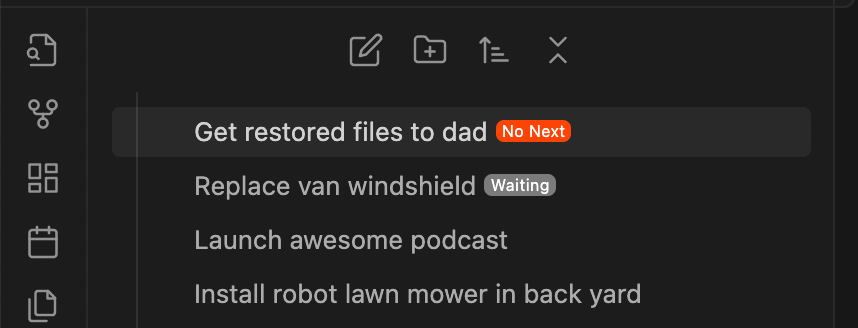
Files with red badges would need examination and processing:
- Maybe the project is actually complete and should be archived?
- Maybe you haven't actually gone through the mental effort of deciding the next actionable step?
- Perhaps you should double check the external "Waiting For" trigger?
Configuration
This plugin currently only has the following configurable options:
Projects folder
The folder where project files live.
Default: Projects/
This plugin also works for all sub-folders as well, e.g.:
Projects/
├── Big Project/
│   ├── Some part of it.md
│   └── Another part.md
└── Single file project.md
Next-Step tag
The tag that indicates a task has a next step.
Default: #next-step
Waiting-For tag
The tag that indicates a task is waiting for an external action.
Default: #waiting-for
My GTD Workflow
My workflow in Obsidian is that each GTD "project" is a file within a folder named "Projects":
Projects/
    Get restored files to dad.md
    Launch awesome podcast.md
    Replace van windshield.md
I also use the Tasks plugin, which lets you add tasks with tags, and then later query those.
For example, if I have a GTD-project likek Projects/Replace van windshield.md it might have, as the next actionable task:
- [ ] call Fred to get the phone number of the windshield place he likes #next-step
In various views I then query for incomplete tasks that have the #next-step tag:
```tasks
tags includes #next-step
not done
```
This plugin also has a #waiting-for tag, which is used to indicate things (technically Tasks) that are in a state of waiting on an external actor of some kind:
- [ ] #waiting-for Fred to get back to me with the windshield guys number
At various times I have used tags for people, so for example #Fred-Smith, in which case I can easily see what items are waiting on Fred for input:
```tasks
tags includes #waiting-for
tags includes #Fred-Smith
not done
```
These two things form the basis for a large portion of my GTD-in-Obsidian workflow.
License
Published and made available freely under the Very Open License.