Growth Stamp
 kkamanggoni22 downloads
Stamp the time, dates, start and end with duration, your own phrases, and random affirmations from the mobile toolbar, and copy a whole heading section in one tap.
- Overview
- Scorecard
- Updates1
Stamp the "when" on everything you write. One tap on the mobile toolbar types the time, the date, how long something took, your favorite phrases, or a line from your affirmations.
Made for people who grow by writing things down: daily logs, journals, habit notes, study notes. Notes that carry a time are easier to look back on, and easier to hand to AI as context.
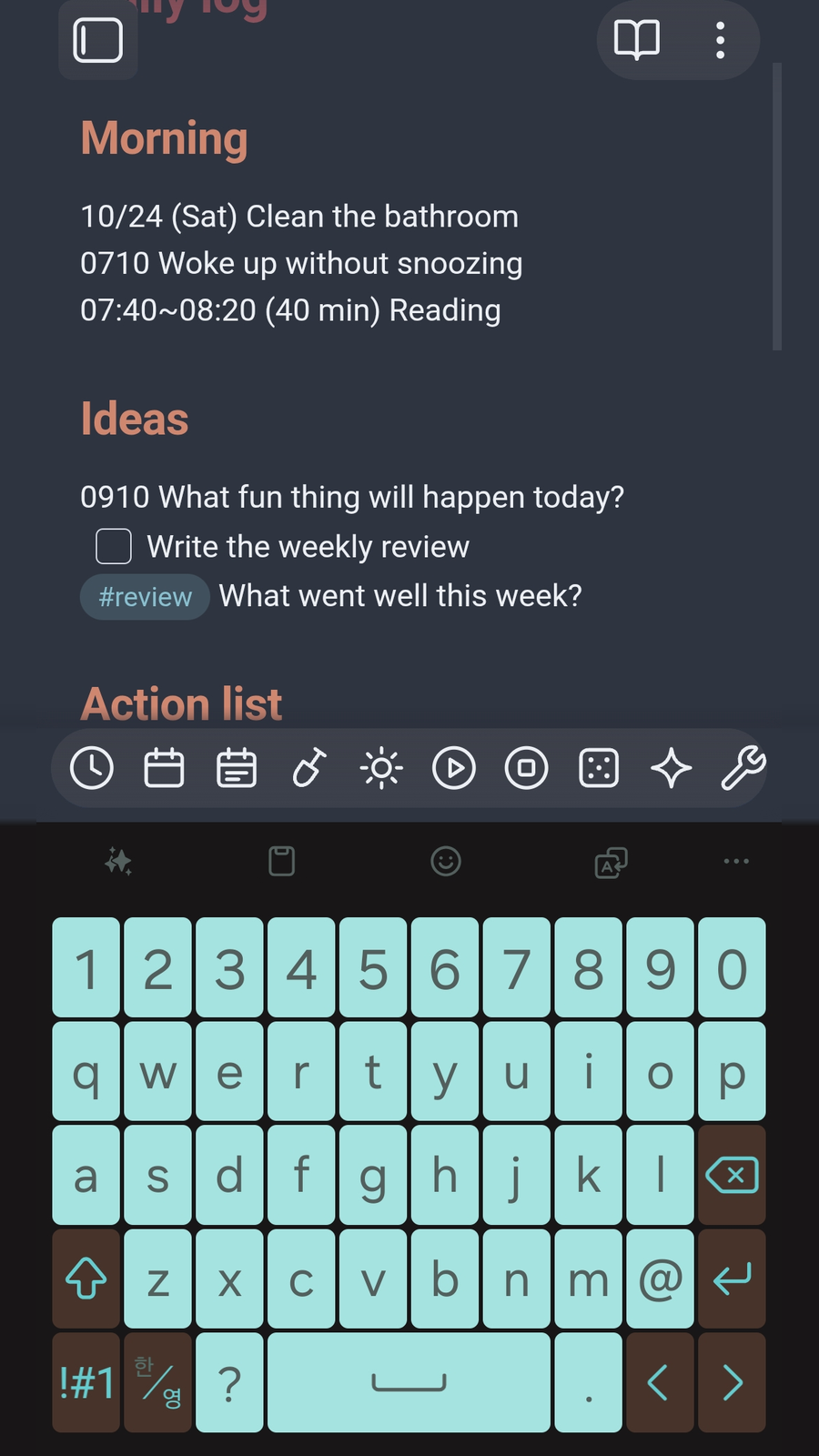
What each button does
| Button | What it types or does |
|---|---|
| Insert current time | 14:10 rounded to 5, 10, 15, 30 minutes, or any interval you choose |
| Insert today's date | 10/24 (Sat) Make as many date buttons as you like, each with its own style |
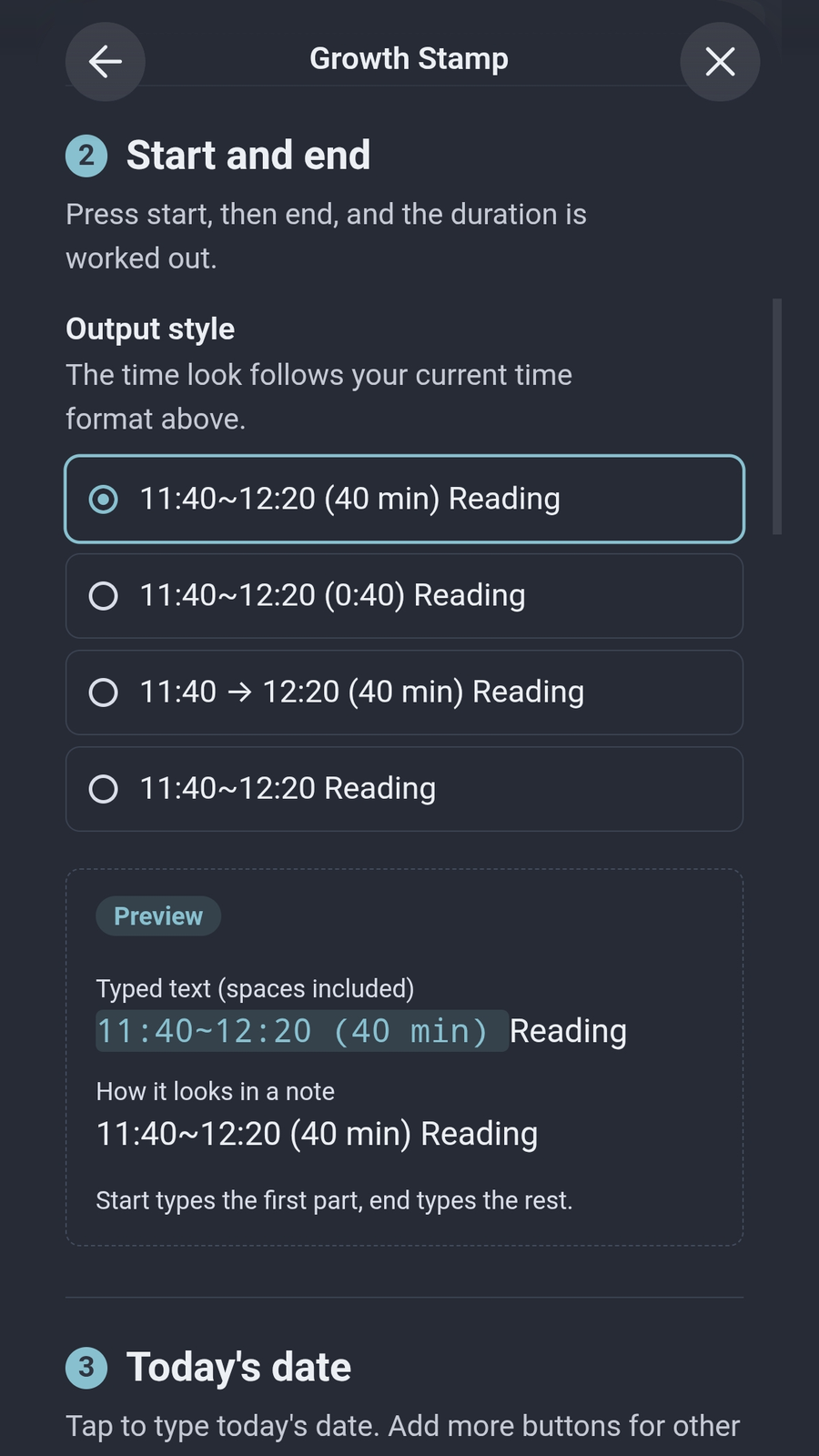
| Insert start time / end time | 11:40~ first, then 12:20 (40 min) with the duration worked out for you |
| Insert phrase | Any text you type often, like - [ ] or #review |
| Copy heading section | Copies the heading at your cursor and everything under it to the clipboard |
| Open affirmation note | Opens the note you read every day |
| Show / insert random affirmation | Picks one line from that note and shows it, or types it at the cursor |
Getting started
- Install and enable Growth Stamp.
- Go to Settings → Mobile → Toolbar options and add the Growth Stamp commands you want.
- Open the Growth Stamp settings and pick your styles. Each style shows a live preview of exactly what will be typed.
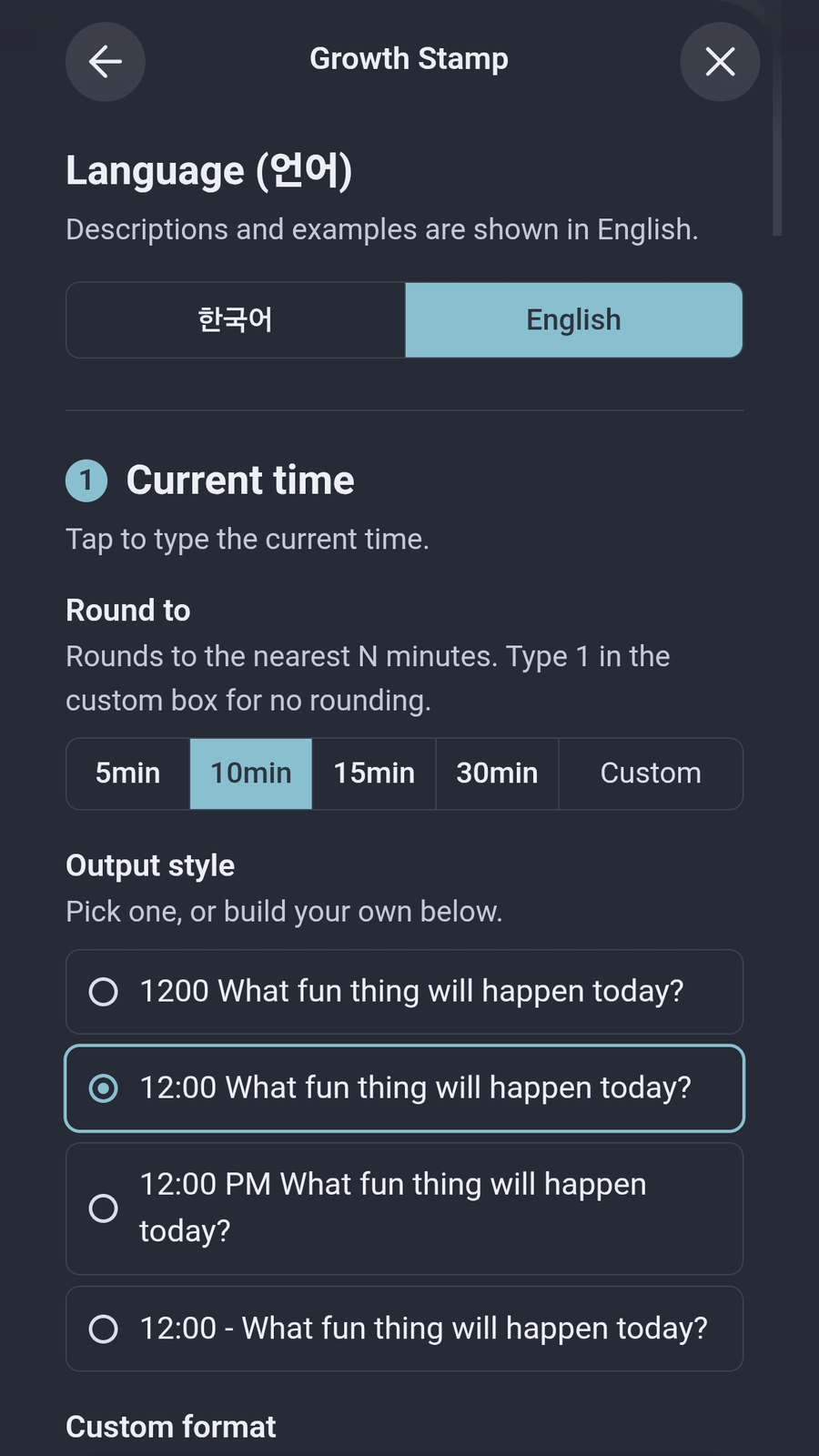
Make it yours
- Time style:
1410,14:10,2:10 PM,14:10 -or build your own. - Date style:
10/24 (Sat),Oct 24 (Sat),2026-10-24,*Oct 24*or build your own. - Trailing spaces are kept, so you can start typing right after the stamp.
Tokens you can use in your own format:
| Token | Meaning | Example |
|---|---|---|
HH / H |
Hour, 24h | 08 / 8 |
hh / h |
Hour, 12h | 08 / 8 |
mm |
Minute | 30 |
A |
AM / PM | AM |
YYYY / YY |
Year | 2026 / 26 |
MMM |
Month name | Oct |
MM / M |
Month | 10 |
DD / D |
Day | 24 |
ddd |
Weekday | Sat |
[text] |
Kept as is | [at] |
How a random affirmation is chosen
Every text line in your affirmation note can be picked. List marks (- , 1. ) and quote marks (> ) are removed. Headings, dividers, blank lines, the properties block at the top, and %% comments are skipped. The same line never comes up twice in a row.
Language
The settings and command names come in English and Korean. Growth Stamp follows your Obsidian language, and you can switch at the top of its settings.
Privacy
Growth Stamp works fully offline and makes no network requests. Your settings stay in the plugin's data file in your vault. The clipboard is written only when you tap Copy heading section.
한국어
쓰는 모든 기록에 "언제"를 도장처럼 찍어 주세요. 모바일 툴바의 버튼 한 번으로 시간, 날짜, 걸린 시간, 자주 쓰는 문구, 확언 한 줄이 입력돼요.
일상 기록, 일기, 습관 노트, 공부 노트처럼 기록하면서 성장하는 사람들을 위해 만들었어요. 시점이 남아 있는 메모는 나중에 돌아보기 쉽고, AI에게 맥락으로 건네주기도 좋아요.
버튼별 기능
| 버튼 | 입력되는 내용 |
|---|---|
| 현재 시간 입력 | 1410 5, 10, 15, 30분 또는 원하는 분 단위로 맞춰서 입력 |
| 오늘 날짜 입력 | 10/24(토) 형태가 다른 날짜 버튼을 여러 개 만들 수 있어요 |
| 시작 시각 / 끝 시각 입력 | 먼저 11:40~, 나중에 12:20 (40분) 걸린 시간까지 계산 |
| 문구 입력 | 자주 쓰는 글자. 예: - [ ] , #회고 |
| 헤딩 복사 | 커서가 있는 헤딩과 그 아래 내용을 통째로 클립보드에 복사 |
| 확언 메모 열기 | 매일 읽는 확언 메모를 바로 열기 |
| 랜덤 확언 보기 / 입력 | 확언 메모에서 한 줄을 뽑아 알림으로 보여 주거나 커서 위치에 입력 |
시작하기
- Growth Stamp를 설치하고 켜세요.
- 설정 → 모바일 → 툴바 옵션에서 원하는 Growth Stamp 명령을 추가하세요.
- Growth Stamp 설정에서 마음에 드는 형태를 고르세요. 형태를 고르는 곳마다 실제로 입력될 모습이 미리보기로 나와요.
랜덤 확언을 뽑는 기준
메모 안의 글줄을 하나씩 뽑아요. 목록 기호(- , 1. )와 인용 기호(> )는 떼고 내용만 써요. 제목, 구분선, 빈 줄, 맨 위 속성 영역, %% 주석은 빼요. 같은 줄이 연속으로 나오지 않아요.
언어
설정 화면과 명령 이름을 한국어와 영어로 볼 수 있어요. 처음에는 옵시디언 언어를 따르고, 설정 맨 위에서 바꿀 수 있어요.
개인정보
인터넷 연결 없이 동작하고, 외부로 아무것도 보내지 않아요. 설정은 볼트 안의 플러그인 데이터 파일에만 저장돼요. 클립보드는 헤딩 복사를 눌렀을 때만 사용해요.
Made by Kmgn (Growing Swan). MIT License.